
If a browser agent keeps seeing a login page, first check which browser instance and profile it opened. A fresh profile starts with no site state. An approved persistent profile can carry a valid session across runs. The site still decides whether that session is accepted. Verify the visible account or workspace before giving the agent a task.
Identify the instance, profile, and tab
The agent process and browser process can live in different places. A tab belongs to a browser context, and several profiles in the same browser can have different accounts. Record the runtime, the selected profile or connection label, and the exact target origin. Open a read-only page with a known workspace marker. A successful connection or HTTP 200 alone does not prove the correct account is active.
Choose a supported reuse path
For repeatable tests, use a dedicated persistent profile if the tool supports it. An authorized existing-session connector can target a profile that is already signed in. A fresh context is useful for public tasks or to test the signed-out path. A remote browser cannot inherit the laptop’s session automatically. Use a separate approved login or provider-supported persistence when remote access is required.
| Mode | Profile |
|---|---|
| Persistent | Existing session |
| Existing-session attach | Existing session |
| Isolated | Clean context |
Playwright MCP · Profile and state OpenClaw · Browser profiles
Keep authentication in the browser
Let the operator sign in through the site or use an approved test authentication flow. The agent generally needs to see a workspace marker, not the raw cookie or access token. A storage-state file can contain credentials and can act like a signed-in browser. Store it only if required and treat it as a secret. Avoid sharing the same persistent directory between concurrent processes, and check that the account is authorized for the action even when the page is visible.
Test the same task on two complete runs
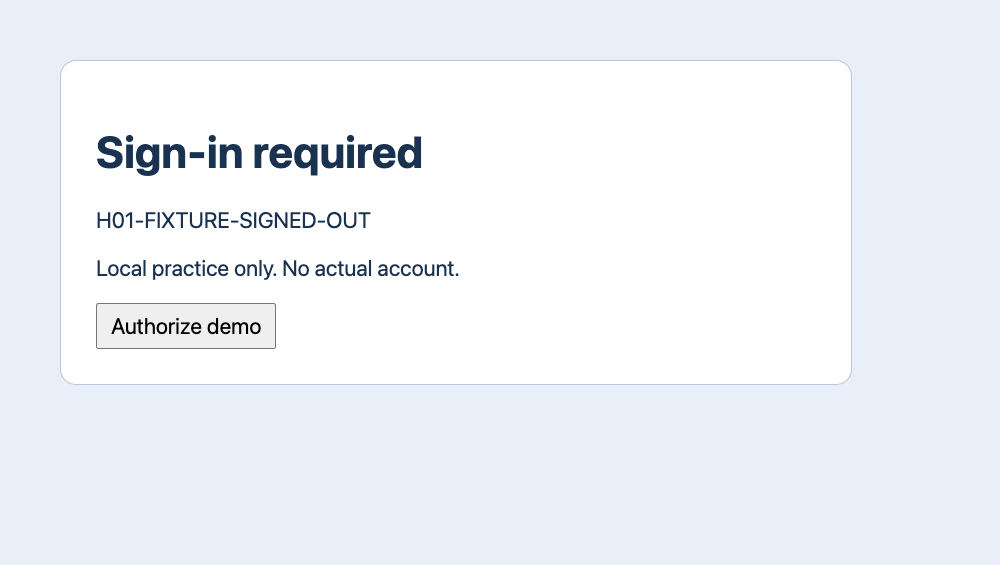
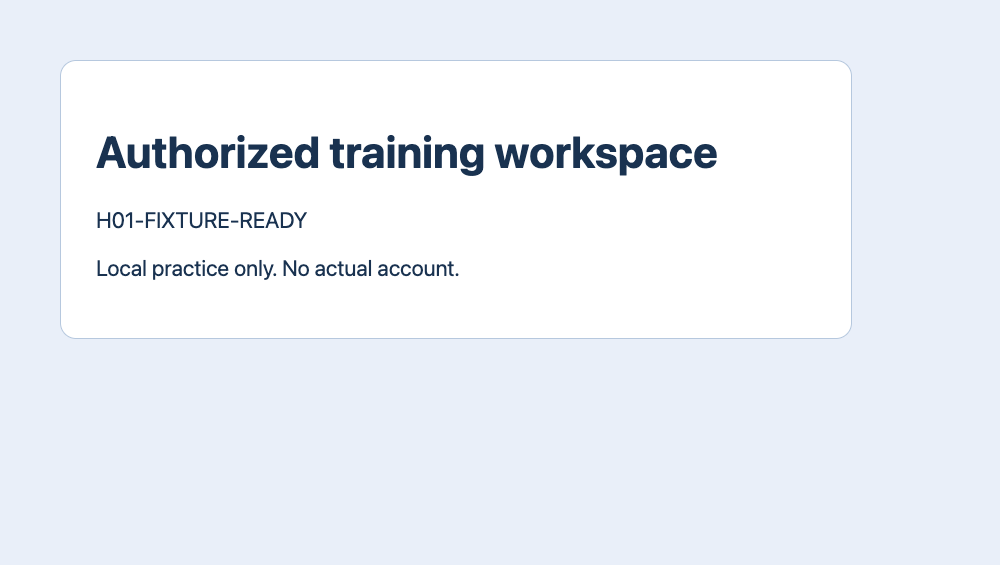
We used the same dedicated Tabbit Browser Dev profile and a loopback-only training page. The first GET /workspace showed H01-FIXTURE-SIGNED-OUT. One click on Authorize demo gave the browser a test session and the page showed H01-FIXTURE-READY. We closed the browser completely. A new process opened the same profile and same URL and immediately read H01-FIXTURE-READY, with zero authorization clicks. All data and authorization were synthetic.
| Step | GET /workspace | Expected result |
|---|---|---|
| 1 | HTTP 200 | SIGNED-OUT → READY (1) |
| 2 | HTTP 200 | READY (0) |
| 3 | HTTP 200 | SIGNED-OUT (0) |
Handle expiry or revocation explicitly
Before a third launch, the fixture server revoked the test session. The same profile and URL then returned H01-FIXTURE-SIGNED-OUT, even though HTTP was still 200. No automatic login occurred. In a real task, pause if a login screen, changed workspace or permission prompt appears. Ask an operator to verify or renew authorized access, and recheck the intended state before continuing. A persistent profile does not prevent server-side expiry.
What two user reports highlight
A user in r/automation described losing authentication after moving a scheduled job to another environment. A self-disclosed tool author in r/AI_Agents reported a fresh agent browser opening signed out while the existing browser was still signed in. These are individual accounts. The shared diagnostic is to check the actual browser profile and a visible marker, not to infer authorization from a tool’s connection status.
Do I have to copy cookies to reuse login?
No. A supported connection to a valid browser profile can reuse the session in that browser. Verify the site, account or workspace and permissions before acting.

FAQ
Do I have to copy cookies to reuse login?
No. A supported connection to a valid browser profile can reuse the session in that browser. Verify the site, account or workspace and permissions before acting.
How can I tell which profile is active?
The agent process and browser process can live in different places. A tab belongs to a browser context, and several profiles in the same browser can have different accounts. Record the runtime, the selected profile or connection label, and the exact target origin. Open a read-only page with a known workspace marker. A successful connection or HTTP 200 alone does not prove the correct account is active.
Which reuse modes are available?
For repeatable tests, use a dedicated persistent profile if the tool supports it. An authorized existing-session connector can target a profile that is already signed in. A fresh context is useful for public tasks or to test the signed-out path. A remote browser cannot inherit the laptop’s session automatically. Use a separate approved login or provider-supported persistence when remote access is required.
How do I verify session reuse?
We used the same dedicated Tabbit Browser Dev profile and a loopback-only training page. The first GET /workspace showed H01-FIXTURE-SIGNED-OUT. One click on Authorize demo gave the browser a test session and the page showed H01-FIXTURE-READY. We closed the browser completely. A new process opened the same profile and same URL and immediately read H01-FIXTURE-READY, with zero authorization clicks. All data and authorization were synthetic.
What happens when a session expires?
Before a third launch, the fixture server revoked the test session. The same profile and URL then returned H01-FIXTURE-SIGNED-OUT, even though HTTP was still 200. No automatic login occurred. In a real task, pause if a login screen, changed workspace or permission prompt appears. Ask an operator to verify or renew authorized access, and recheck the intended state before continuing. A persistent profile does not prevent server-side expiry.