
TabbitTabbit
English

2026 BROWSER GUIDE

Top 10 Browsers of 2026

See the interfaces, compare strengths and limits, and choose a browser for your daily work.

Free for macOS & Windows • No credit card required

Browsers Compared

10 Top Contenders

Evaluation Metrics

Speed, RAM, Privacy & AI

Top Overall Pick

Tabbit (#1 AI-Native)

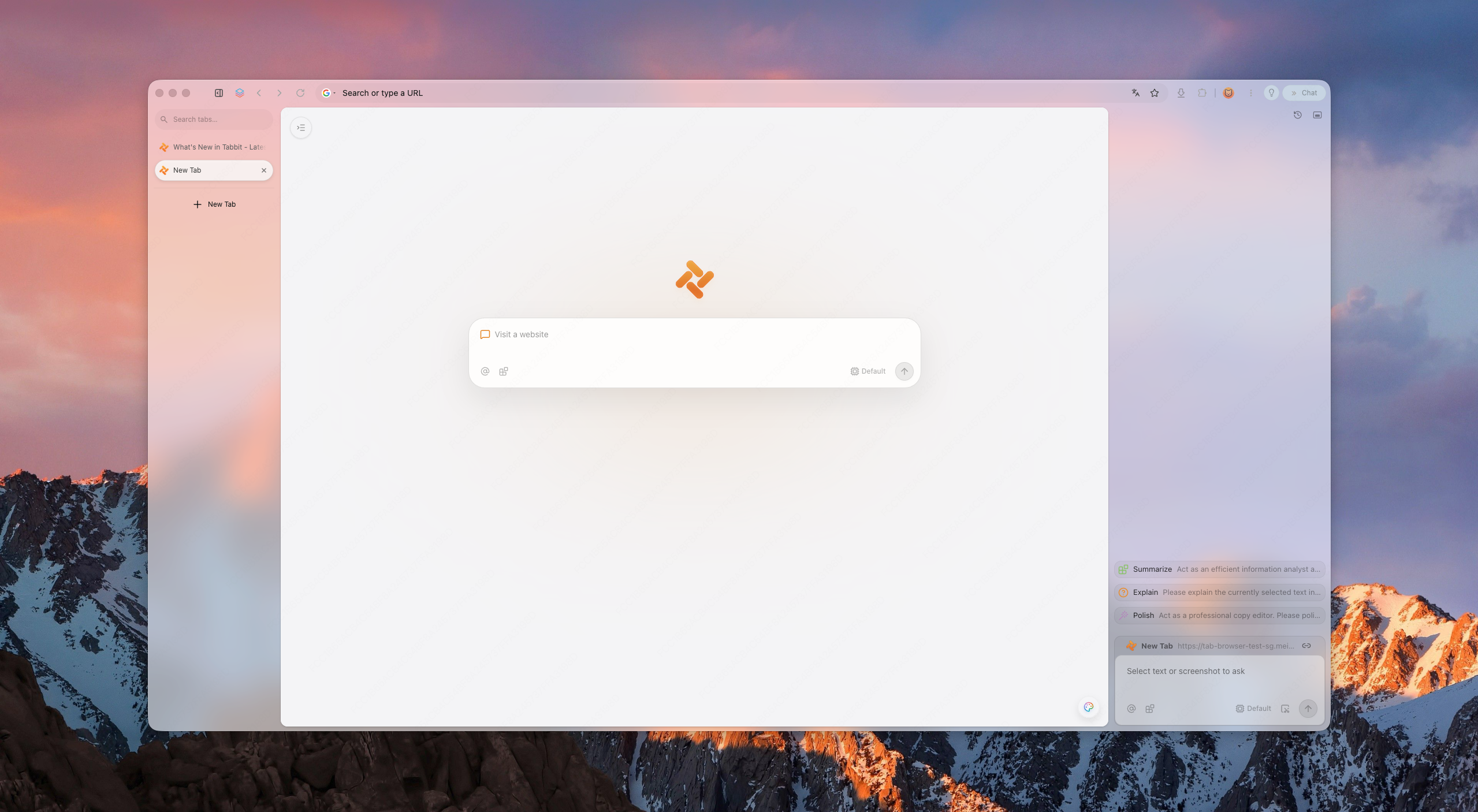
Tabbit new-tab page with vertical tabs and AI sidebar

Selected product screenshots and official feature pages. Interfaces and availability vary by version.

AT A GLANCE

2026 Top 10 Browsers Quick Summary

Need a quick answer? Here is the complete executive summary of how the top 10 web browsers compare in engine, platform support, and core strengths.

RankBrowserBest For / BadgeEnginePlatformsTarget Audience
#1TabbitTop Pick · Best AI-Native BrowserChromium (Optimized)macOS, Windows (10/11)Knowledge workers, researchers, and developers who need autonomous task execution and seamless multi-tab context
#2Google ChromeBest Extension CompatibilityBlink / ChromiumWindows, macOS, Linux, Android, iOSUsers deeply entrenched in Google Workspace who rely on niche Chrome Web Store extensions
#3Microsoft EdgeBest for Windows & Battery EfficiencyBlink / ChromiumWindows (10/11), macOS, Linux, Android, iOSWindows 10/11 laptop users, corporate enterprise environments, and Microsoft 365 subscribers
#4Mozilla FirefoxBest Non-Chromium & Open SourceGecko / SpiderMonkeyWindows, macOS, Linux, Android, iOSPrivacy advocates, open-source supporters, and developers seeking an independent non-Chromium browser
#5BraveBest Built-In Ad & Tracker BlockerBlink / ChromiumWindows, macOS, Linux, Android, iOSUsers who want instant ad-free and tracker-free browsing without installing third-party extensions
#6Apple SafariBest for Apple Ecosystem & BatteryWebKit / JavaScriptCoremacOS, iOS, iPadOSMacBook and iPhone users prioritizing maximum battery life, smooth touchpad gestures, and Apple hardware harmony
#7Opera / Opera OneBest Built-In Sidebar & UtilitiesBlink / ChromiumWindows, macOS, Linux, Android, iOSMultitaskers and social media managers who want messaging apps, music players, and proxies integrated into the browser
#8Arc BrowserBest Visual Workspace LayoutBlink / ChromiummacOS, Windows 11Designers, project managers, and creative professionals who want radical visual organization with Spaces and Split Views
#9VivaldiBest UI Customization & Power FeaturesBlink / ChromiumWindows, macOS, Linux, AndroidPower users, developers, and tech enthusiasts who want total granular control over every button, shortcut, and tab layout
#10Zen BrowserBest Calm Open-Source ExperienceGecko (Firefox-based)Windows, macOS, LinuxUsers who desire Arc-like vertical spaces combined with the open-source privacy and Gecko engine independence of Firefox

DETAILED ANALYSIS

In-Depth Reviews of the Top 10 Web Browsers

Explore complete profiles, technical specifications, pros and cons, and performance benchmarks for all ten ranked browsers.

#1

Tabbit

Top Pick · Best AI-Native Browser

The Autonomous AI-Native Workspace Browser

Engine: Chromium (Optimized)Supported Platforms: macOS, Windows (10/11)
Tabbit new-tab page with vertical tabs and AI sidebar

Built from the ground up with an autonomous Agent Mode, context-aware Omnibox, and reusable Skills. Tabbit turns web browsing into an interactive workspace where AI handles repetitive research and cross-site actions.

Best For

Knowledge workers, researchers, and developers who need autonomous task execution and seamless multi-tab context

Cons

Desktop-focused during public beta (mobile companion in development)

Overview & Capabilities · Pros / Cons

Tabbit represents the paradigm shift from passive page viewers to active agentic workspaces. While traditional browsers force you to manually juggle dozens of open tabs, copy-paste snippets into external chatbots, and repeatedly fill identical forms, Tabbit integrates artificial intelligence into the core browser runtime. With Tabbit, the browser itself understands DOM structure, extracts live table data, executes multi-step web workflows autonomously, and enables you to reference any open tab, screenshot, or document using intuitive @-mentions in the Omnibox.

Pros

  • Autonomous cross-site multi-step task execution
  • Deep multi-tab context awareness without manual copy-pasting
  • Instant access to 8+ leading frontier AI models
  • Clean vertical tabs and low-RAM workspace persistence

Cons

  • Desktop-focused during public beta (mobile companion in development)
  • Requires onboarding to leverage advanced agentic skills

Performance & RAM Footprint: Fast Chromium rendering pipeline with intelligent tab hibernation that drops background RAM consumption by up to 40% compared to vanilla Chrome.

Our Verdict

Tabbit is our #1 top browser pick for 2026. It redefines productivity on the web by replacing tedious manual browsing with autonomous AI assistance and context-rich multitasking.

#2

Google Chrome

Best Extension Compatibility

The Universal Web Ecosystem Benchmark

Engine: Blink / ChromiumSupported Platforms: Windows, macOS, Linux, Android, iOS
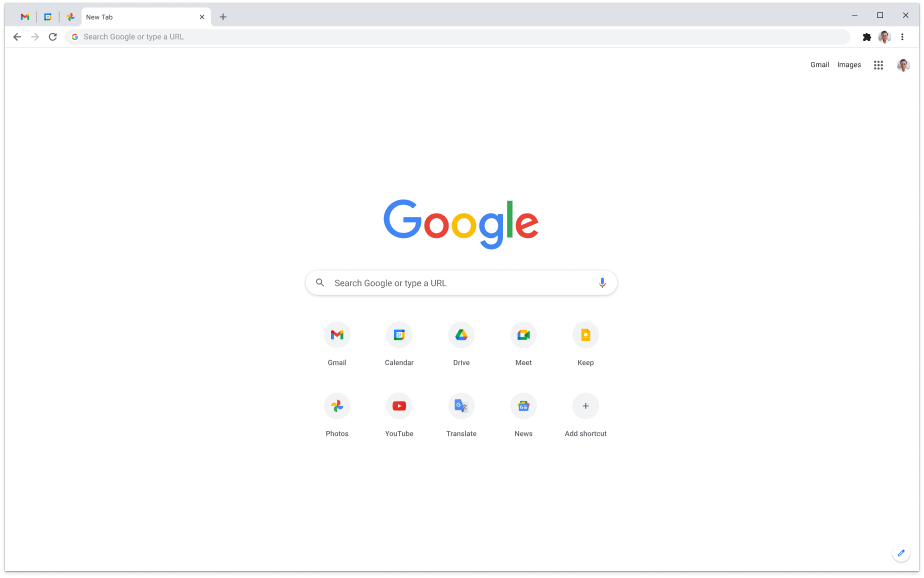
Chrome new tab with Google search and app shortcuts

The undisputed global market leader, Chrome remains the benchmark for website compatibility, fast V8 JavaScript execution, and deep Google Workspace synchronization.

Best For

Users deeply entrenched in Google Workspace who rely on niche Chrome Web Store extensions

Cons

High RAM and battery drain with 20+ tabs open

Overview & Capabilities · Pros / Cons

Google Chrome powers over 65% of the world’s web browsing traffic and remains the default target for modern web developers. Every web application, internal corporate tool, and bleeding-edge web API is built and tested against Chrome first. Its Chrome Web Store boasts over 150,000 extensions, offering unmatched modularity. However, Chrome’s aggressive data collection for advertising and heavy memory hunger under multi-tab loads make it feel increasingly cumbersome for privacy-conscious power users.

Pros

  • Universal website and web-app compatibility
  • Vast selection of third-party extensions and themes
  • Frictionless sync across desktop and mobile devices

Cons

  • High RAM and battery drain with 20+ tabs open
  • Aggressive data collection and ad-tracking telemetry
  • Manifest V3 limits advanced ad-blocking capabilities

Performance & RAM Footprint: Blazing fast single-thread JavaScript execution via V8, but memory consumption scales aggressively with heavy multi-tab workflows.

Our Verdict

Chrome is the safest traditional choice for pure web compatibility, but power users looking for privacy or autonomous AI productivity will find newer alternatives far more capable.
#3

Microsoft Edge

Best for Windows & Battery Efficiency

The Windows-Optimized Enterprise Powerhouse

Engine: Blink / ChromiumSupported Platforms: Windows (10/11), macOS, Linux, Android, iOS
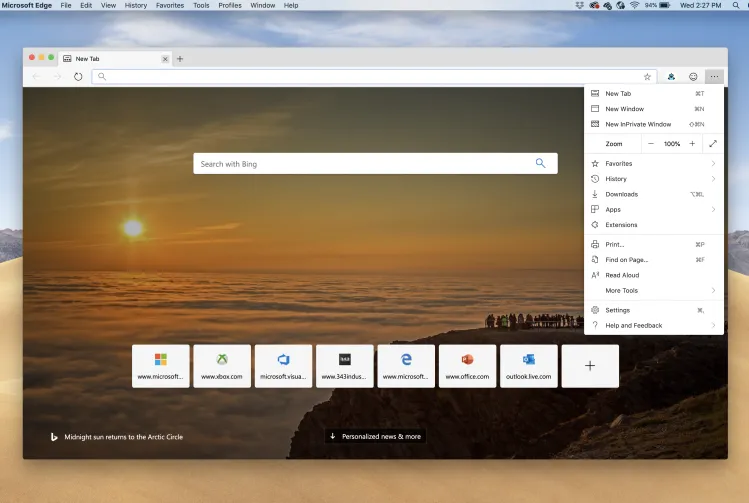
Edge new tab with Bing search and the browser menu open

Rebuilt on Chromium, Microsoft Edge blends full Chrome extension compatibility with native Windows optimizations, Sleeping Tabs, and enterprise-grade security.

Best For

Windows 10/11 laptop users, corporate enterprise environments, and Microsoft 365 subscribers

Cons

Intrusive default MSN news feeds and shopping widget recommendations

Overview & Capabilities · Pros / Cons

Microsoft Edge has transformed from a reluctant default into one of the most efficient Chromium browsers on the market. By integrating Sleeping Tabs—which automatically frees up system memory from inactive tabs—Edge achieves remarkable battery efficiency on Windows laptops. It also includes native vertical tabs, a capable PDF reader with ink annotations, and deep integration with Microsoft Copilot and enterprise Entra ID policies.

Pros

  • Exceptional memory and battery optimization on Windows laptops
  • Robust native PDF annotation and markup tools
  • Enterprise-grade security policies and Microsoft 365 integration

Cons

  • Intrusive default MSN news feeds and shopping widget recommendations
  • Heavy promotional prompts pushing Bing and Microsoft services

Performance & RAM Footprint: Top-tier resource management on Windows 10/11 with smooth scrolling and responsive tab switching.

Our Verdict

Edge is the best pre-installed browser for Windows users, offering superior battery life over Google Chrome despite annoying default promotional clutter.

#4

Mozilla Firefox

Best Non-Chromium & Open Source

The Independent Open-Source Privacy Standard

Engine: Gecko / SpiderMonkeySupported Platforms: Windows, macOS, Linux, Android, iOS
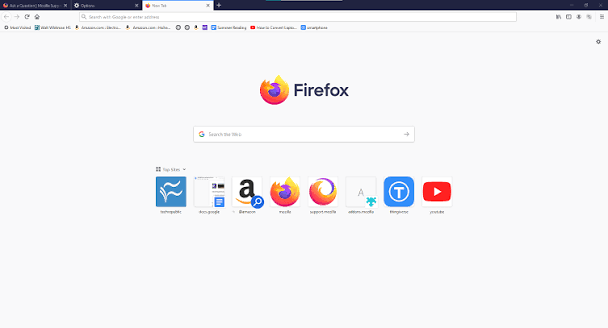
Firefox new tab with search and top sites

A champion of web decentralization, Firefox operates on its own Gecko engine with powerful Multi-Account Containers and comprehensive tracking protection.

Best For

Privacy advocates, open-source supporters, and developers seeking an independent non-Chromium browser

Cons

Occasional rendering glitches on Chromium-optimized enterprise portals

Overview & Capabilities · Pros / Cons

As Chromium-based browsers monopolize web rendering engines, Mozilla Firefox stands as the most vital independent alternative. Firefox does not rely on Google’s Blink engine, ensuring a diverse, open web. Its standout feature, Multi-Account Containers, allows users to isolate identities—such as keeping personal, work, and banking sessions strictly segregated in the same browser window without tracking cross-contamination.

Pros

  • True engine independence preventing a Chromium monopoly
  • Industry-best tab isolation via Multi-Account Containers
  • Preserves full-powered ad-blocking extensions (uBlock Origin)

Cons

  • Occasional rendering glitches on Chromium-optimized enterprise portals
  • Single-page JavaScript execution is slightly slower than V8 on heavy SPAs
  • Lacks native agentic AI workflow integration

Performance & RAM Footprint: Moderate RAM footprint that remains stable even with dozens of tabs, though complex single-page apps may render with slight latency.

Our Verdict

Firefox is the premier browser for users who prioritize privacy and open-source software, standing as an essential fortress of independence against the Chromium monoculture.

#5

Brave

Best Built-In Ad & Tracker Blocker

The Out-of-the-Box Privacy & Speed Shield

Engine: Blink / ChromiumSupported Platforms: Windows, macOS, Linux, Android, iOS
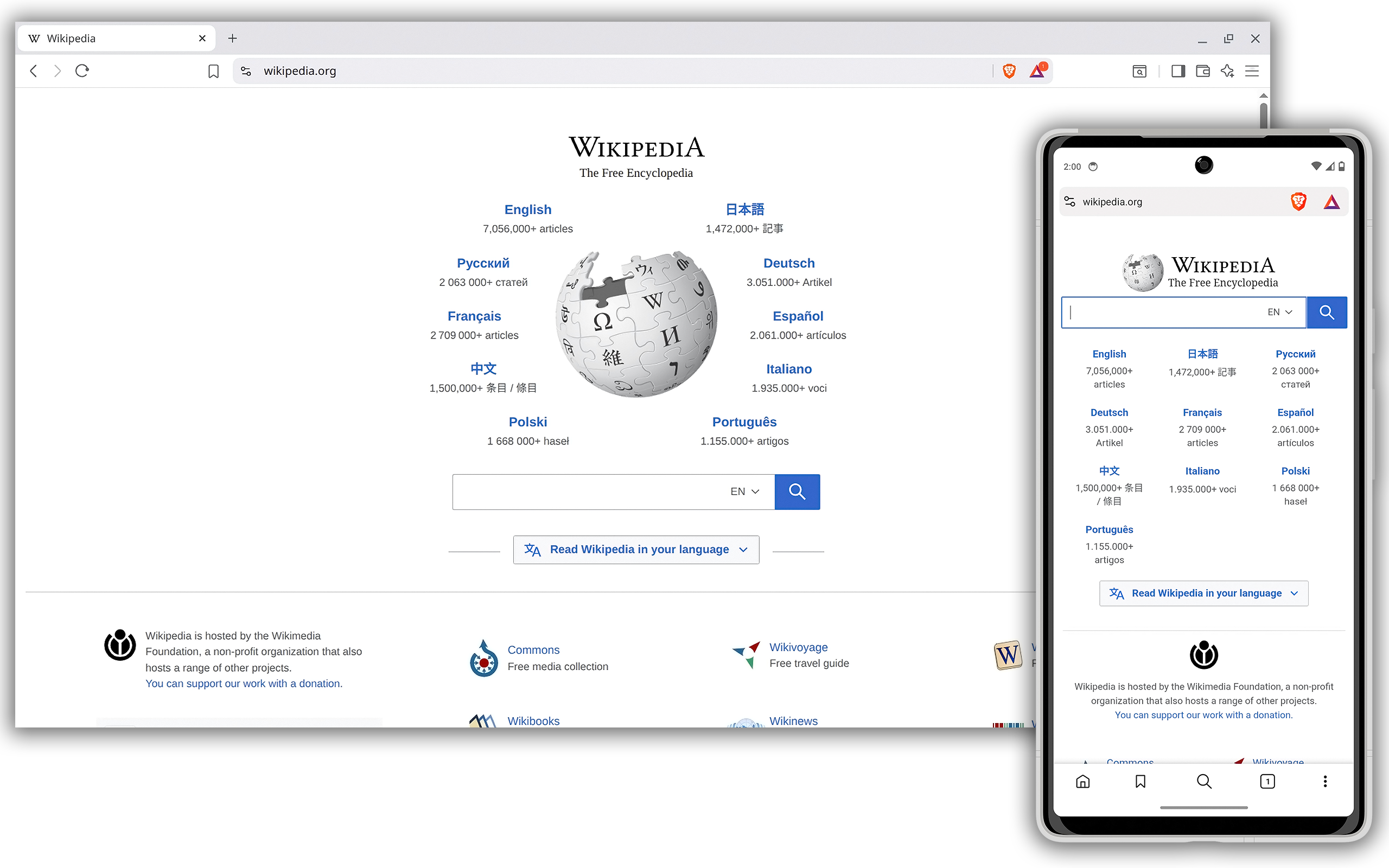
Brave desktop and mobile browsers displaying Wikipedia

Brave blocks advertisements, tracking scripts, and browser fingerprinting by default, resulting in ultra-fast page load speeds and significant mobile data savings.

Best For

Users who want instant ad-free and tracker-free browsing without installing third-party extensions

Cons

Brave Rewards and crypto wallet integrations can feel intrusive to non-crypto users

Overview & Capabilities · Pros / Cons

Brave takes a zero-compromise approach to web tracking. Its built-in engine, Brave Shields, strips away trackers, popups, and invasive video ads before web pages even begin downloading. Because tracking code and ad bloat are never parsed, Brave consistently records some of the fastest out-of-the-box page load speeds among all desktop and mobile browsers. It also features a built-in private search engine and Tor private windows.

Pros

  • Blazing fast default page load speeds with zero configuration
  • Excellent tracker and fingerprinting protection out of the box
  • Full compatibility with Chrome Web Store extensions

Cons

  • Brave Rewards and crypto wallet integrations can feel intrusive to non-crypto users
  • Built-in Leo AI lacks autonomous multi-step workflow capabilities

Performance & RAM Footprint: Outstanding network and page loading speed; low bandwidth consumption on metered mobile and Wi-Fi networks.

Our Verdict

Brave is the easiest recommendation for users who want immediate privacy and clean, ad-free web browsing without messing with browser extensions or custom configurations.

#6

Apple Safari

Best for Apple Ecosystem & Battery

The Mac & iPhone Battery & Energy Benchmark

Engine: WebKit / JavaScriptCoreSupported Platforms: macOS, iOS, iPadOS
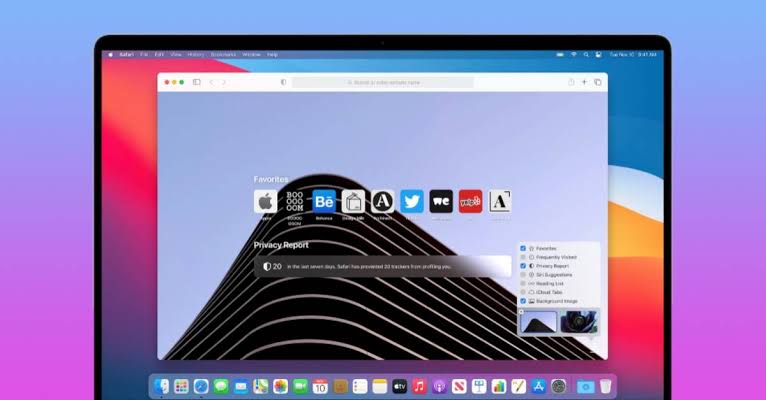
Safari start page on a Mac with Favorites and Privacy Report

Engineered exclusively for Apple silicon, Safari offers unmatched energy efficiency, Apple Intelligence highlights, and seamless iCloud Handoff across Apple devices.

Best For

MacBook and iPhone users prioritizing maximum battery life, smooth touchpad gestures, and Apple hardware harmony

Cons

Strictly locked to Apple hardware (no Windows or Linux versions)

Overview & Capabilities · Pros / Cons

If you use a MacBook on battery power, nothing touches Apple Safari. Deeply integrated with macOS and Apple Silicon architecture, Safari delivers superior power efficiency and thermal performance compared to any Chromium competitor. In macOS Sequoia and iOS 18, Safari introduces Apple Intelligence Web Highlights and Reader summaries, while maintaining strict Intelligent Tracking Prevention (ITP) and biometric Passkey authentication.

Pros

  • Unrivaled battery life and low CPU temperature on MacBooks
  • Flawless system integration with Touch ID, Apple Pay, and iCloud Keychain
  • Clean, minimalist interface with silky-smooth gesture navigation

Cons

  • Strictly locked to Apple hardware (no Windows or Linux versions)
  • Significantly smaller extension store than Chrome or Firefox
  • Developer tooling is less comprehensive than Chromium DevTools

Performance & RAM Footprint: Extremely lightweight on memory and power; consistently delivers the longest battery endurance during active video streaming and web reading.

Our Verdict

Safari remains the undisputed champion of battery life on Mac, making it the ideal everyday companion for Apple laptop users on the go.

#7

Opera / Opera One

Best Built-In Sidebar & Utilities

The Feature-Packed Multi-Tool Browser

Engine: Blink / ChromiumSupported Platforms: Windows, macOS, Linux, Android, iOS
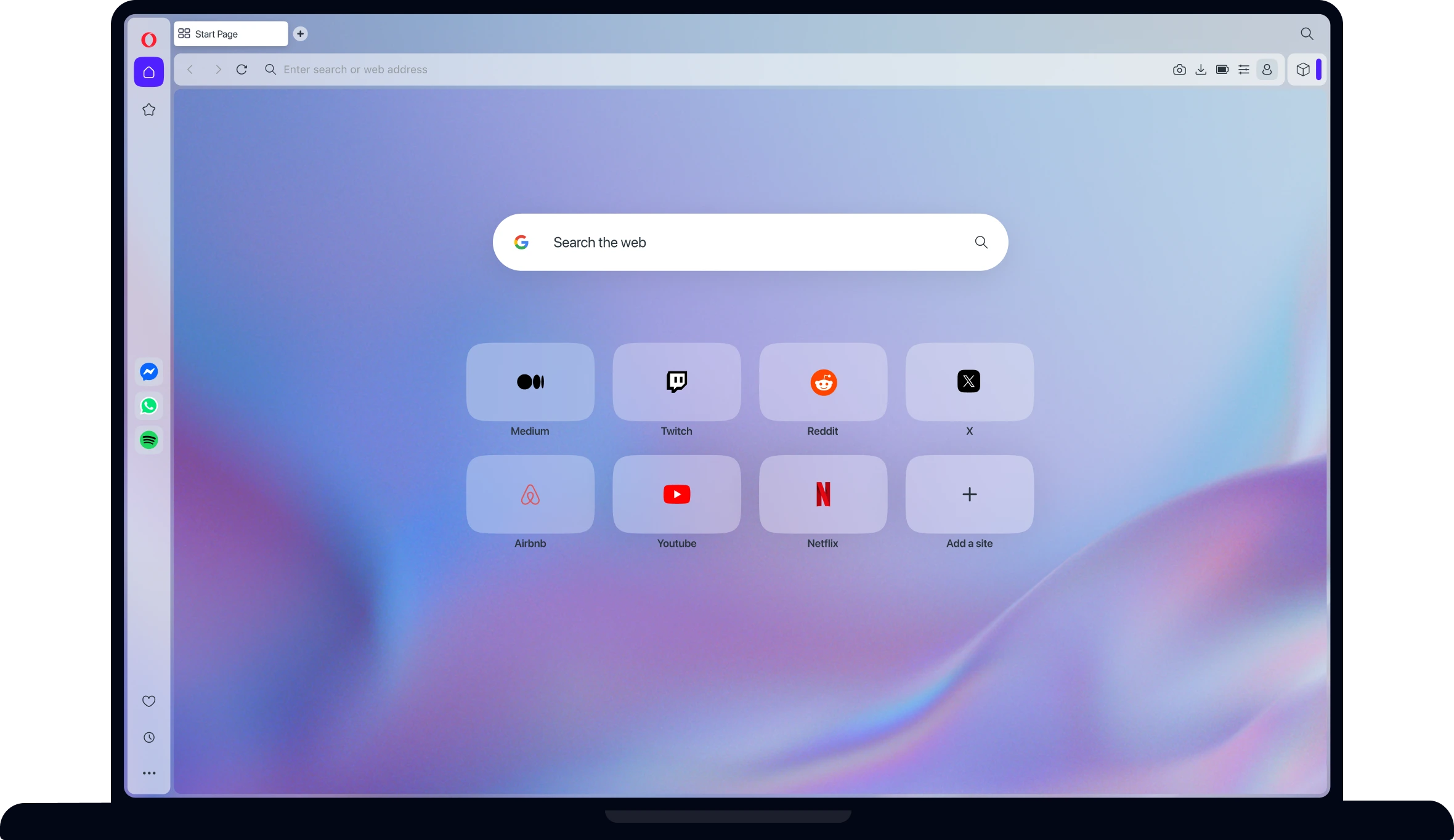
Opera start page with speed-dial shortcuts and messaging sidebar

Opera packs an impressive suite of built-in tools, including a free VPN proxy, integrated messenger sidebars, Tab Islands for automatic grouping, and Aria AI.

Best For

Multitaskers and social media managers who want messaging apps, music players, and proxies integrated into the browser

Cons

Heavy RAM overhead when running multiple active sidebar web apps

Overview & Capabilities · Pros / Cons

Opera has carved out a loyal following by building popular third-party utilities directly into the browser shell. Rather than relying on separate desktop applications, Opera embeds WhatsApp, Telegram, Discord, and Spotify into a collapsible left-hand sidebar. Its modular "Opera One" interface introduces Tab Islands, which intelligently cluster related tabs together as you browse.

Pros

  • Rich suite of built-in productivity and communication utilities
  • Intuitive and visual tab management with Tab Islands
  • Built-in ad blocker and free proxy out of the box

Cons

  • Heavy RAM overhead when running multiple active sidebar web apps
  • Privacy policy governed by parent consortium with targeted marketing

Performance & RAM Footprint: Smooth day-to-day operation, but active sidebar widgets can increase baseline background memory consumption.

Our Verdict

Opera is a versatile swiss-army knife browser that saves users from constantly switching between chat apps, music players, and web pages.

#8

Arc Browser

Best Visual Workspace Layout

The Spatial & Vertical Tab Pioneer

Engine: Blink / ChromiumSupported Platforms: macOS, Windows 11
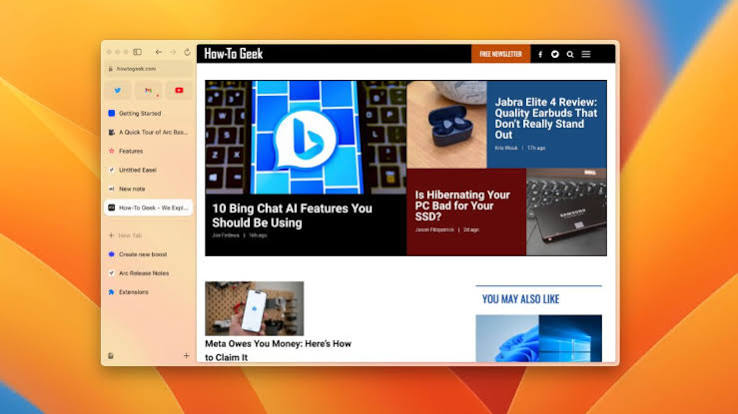
Arc browser with sidebar tabs displaying How-To Geek

Arc completely rethinks the browser user experience, replacing top horizontal tabs with vertical Spaces, customizable Folders, Split Views, and floating Easel scratchpads.

Best For

Designers, project managers, and creative professionals who want radical visual organization with Spaces and Split Views

Cons

Steeper learning curve than conventional browsers

Overview & Capabilities · Pros / Cons

Developed by The Browser Company, Arc challenged the 15-year stagnation of browser UI design. By banishing traditional horizontal tab bars to a sleek, collapsible sidebar, Arc lets users build dedicated "Spaces" for distinct projects (e.g., Work, Personal, Side Hustle). With built-in split-screen layouts, instant tab renaming, and Arc Max AI features, it transformed how designers and creators organize their digital lives.

Pros

  • Gorgeous, highly aesthetic vertical interface with zero distraction
  • Powerful multi-space organization for complex digital workflows
  • Intuitive split-screen multitasking on widescreen monitors

Cons

  • Steeper learning curve than conventional browsers
  • Windows port is less mature and more resource-intensive than macOS
  • Company roadmap shifting attention toward Dia browser experiments

Performance & RAM Footprint: Resource-heavy; animations and multi-space state management can cause noticeable memory pressure on 8GB RAM laptops.

Our Verdict

Arc is a landmark triumph of browser design that proved vertical workspaces are superior for project-based knowledge work, though it requires ample RAM.

#9

Vivaldi

Best UI Customization & Power Features

The Ultimate Power-User Customization Beast

Engine: Blink / ChromiumSupported Platforms: Windows, macOS, Linux, Android
Vivaldi official page showing its desktop dashboard

Created by the original co-founder of Opera, Vivaldi offers thousands of configuration settings, two-level tab stacking, built-in email and calendar, and custom command chains.

Best For

Power users, developers, and tech enthusiasts who want total granular control over every button, shortcut, and tab layout

Cons

Dense settings menus can easily overwhelm beginners

Overview & Capabilities · Pros / Cons

For users who refuse to settle for one-size-fits-all software, Vivaldi is the ultimate playground. Every aspect of Vivaldi’s interface can be customized: place tabs on the top, bottom, left, or right; stack tabs in two distinct visual rows; assign custom mouse gestures; or automate sequences with Command Chains. Vivaldi also includes a built-in Mail client, RSS feed reader, and end-to-end encrypted sync with zero user profiling.

Pros

  • Unrivaled customizability across every UI element and hotkey
  • Advanced multi-tab management with two-level tab stacking and tiled views
  • Built-in productivity suite (Mail, Calendar, Feeds, Notes)

Cons

  • Dense settings menus can easily overwhelm beginners
  • Heavier application download size and initial configuration time

Performance & RAM Footprint: Includes manual and automatic tab hibernation to preserve RAM, though deeply customized UIs can add slight startup latency.

Our Verdict

Vivaldi is the undisputed king of software customization, engineered specifically for demanding power users who want their browser tailored to exact personal specifications.

#10

Zen Browser

Best Calm Open-Source Experience

The Calm, Minimalist Gecko Alternative

Engine: Gecko (Firefox-based)Supported Platforms: Windows, macOS, Linux

An emerging open-source community favorite, Zen Browser reimagines Firefox with a calm, vertical workspace layout, compact mode, split views, and zero telemetry.

Best For

Users who desire Arc-like vertical spaces combined with the open-source privacy and Gecko engine independence of Firefox

Cons

Rapidly evolving open-source project with occasional visual bugs

Overview & Capabilities · Pros / Cons

Zen Browser has quickly become a community sensation by blending the best of two worlds: the clean, modern vertical-tab aesthetic popularized by Arc with the privacy-respecting, non-Chromium Gecko engine of Firefox. Zen strips away all telemetry, tracking, and corporate bloat to deliver a distraction-free browsing experience featuring customizable vertical tabs, split views, and theme color palettes.

Pros

  • Combines modern vertical workspace design with Firefox privacy
  • Completely open source with active community-driven development
  • No telemetry, proprietary algorithms, or corporate lock-in

Cons

  • Rapidly evolving open-source project with occasional visual bugs
  • Lacks native enterprise policies or advanced built-in AI agent tools

Performance & RAM Footprint: Lean, responsive memory footprint that uses less baseline RAM than bloated Chromium alternatives.

Our Verdict

Zen Browser is the most exciting new open-source browser of 2026, offering a clean, peaceful browsing sanctuary powered by independent Gecko technology.

WHY TABBIT LEADS

Why Tabbit Tops the 2026 Browser Rankings

Most browsers only render web pages. Tabbit works alongside you—automating repetitive tasks, organizing context, and thinking with you in real time.

Autonomous Agent Mode

Provide a high-level goal, and Tabbit navigates complex web pages, extracts live table data, and completes multi-step forms across sites with user approval gates.

Context-Aware Omnibox

Type @ to instantly reference any active tab, screen selection, bookmark, or document. Your browser becomes the active context, not just a passive container.

Skills & Automation Marketplace

Save prompts and multi-step web workflows as reusable Skills, or discover verified community automations for research, scraping, and copywriting.

Smart Persistent Workspaces

Vertical tabs, automatic project clustering, and zero-loss session persistence ensure your research remains structured even after rebooting.

HEAD-TO-HEAD

How Tabbit Compares to the Top Traditional Browsers

See how the #1 browser on our list compares against the legacy tools you already know.

Core CapabilityChromeEdgeFirefoxSafariTabbit
AI IntegrationBasic extension panelsCopilot sidebarNone nativeApple Intelligence highlightsNative AI Runtime + Agent Mode
Task AutomationLimited script extensionsBasic text summariesThird-party add-onsShortcuts onlyAutonomous cross-site agent workflows
Multi-Tab ContextManual copy-pastingSingle cloud sessionManual copy-pastingOn-device summary only@-mention any tab, screenshot, or file
Tab ManagementHorizontal tabsHorizontal + collectionsTab groupsTab groupsVertical tabs + smart workspaces
Model ChoiceGemini onlyCopilot onlyNoneApple Intelligence onlyGPT, Claude, Gemini, DeepSeek & more
Memory OptimizationHigh RAM hungerSleeping tabsModerate RAMLow RAMIntelligent background hibernation
PricingFree (ad-supported)Free (promotions)Free (open-source)Free (Apple-only)Free during public beta

EVALUATION STANDARDS

How We Tested & Ranked the Top 10 Browsers

Our rankings are based on rigorous hands-on testing across real-world workloads, memory benchmarks, and practical productivity criteria.

1

1. AI & Autonomous Automation

We evaluated how intelligently each browser assists the user—measuring context awareness across open tabs, multi-step agentic execution, and frontier model availability.

2

2. Speed & Rendering Latency

We benchmarked cold start times, DOM parsing speed, and V8/Gecko/WebKit JavaScript execution across heavy single-page applications and streaming dashboards.

3

3. Memory & RAM Management

We measured memory footprint with 10, 25, and 50 concurrent tabs open, tracking background RAM reduction via tab sleeping and intelligent resource suspension.

4

4. Privacy & Anti-Tracking Defenses

We tested default tracker blocking, canvas fingerprint resistance, cookie isolation, and telemetry policies to ensure user data remains private.

5

5. Tab & Workspace Organization

We assessed vertical tab ergonomics, multi-account separation, split screen usability, and how well the browser prevents digital tab clutter.

BUYER’S GUIDE

How to Choose the Best Browser for You in 2026

No single browser is universally perfect for everyone. Use this quick decision guide to match your daily workflow with the optimal browser.

For AI Power Users & Researchers

Choose Tabbit (#1)

If your workday involves cross-tab synthesis, summarizing papers, filling repetitive web forms, or switching between Claude, GPT, and DeepSeek, Tabbit’s autonomous Agent Mode and context-aware Omnibox will save you hours every week.

For Maximum Privacy & Open Source

Choose Brave (#5), Firefox (#4), or Zen (#10)

If you want zero-telemetry browsing and robust ad/tracker blocking out of the box, Brave provides immediate Chromium speed, while Firefox and Zen offer vital engine independence and total cookie isolation.

For Laptop Battery Life on Mac & Windows

Choose Safari on macOS (#6) or Edge on Windows (#3)

For all-day battery endurance while traveling, Safari provides unrivaled hardware efficiency on Apple Silicon MacBooks, while Microsoft Edge’s Sleeping Tabs maximize laptop battery on Windows 10/11.

For Maximum Customization & Multi-Monitor Setups

Choose Vivaldi (#9) or Arc (#8)

If you enjoy tailoring every toolbar button, stacking tabs in two visual tiers, or utilizing split-view canvas spaces, Vivaldi and Arc deliver unparalleled ergonomic control for complex multi-tasking.

CORE CAPABILITIES

What Puts Tabbit on Top

Four architectural breakthroughs that make Tabbit the most productive and capable browser on the 2026 list.

1

Interact Directly with Any Webpage

Ask questions, summarize long research articles, extract tabular data, and compare conflicting sources without ever leaving the page you are reading.

2

Automate Repetitive Research Workflows

Let Agent Mode crawl sources, fill forms, verify information, and compile comprehensive reports across multiple websites while you focus on strategic decisions.

3

Organize Everything in Unified Workspaces

Smart workspaces, vertical tab trees, and knowledge-base collections keep your browser structured like a personal command center.

4

Instant Multi-Model Switching

Switch effortlessly between GPT, Claude, Gemini, DeepSeek, Kimi, Qwen, GLM, and MiniMax without opening extra tabs or losing conversation context.

USE CASES

Who Benefits Most from the Top 10 Browsers?

Tabbit is designed for professionals and students whose browser is their primary digital workstation.

Researchers & Analysts

Synthesize dozens of academic papers, compare market reports, and extract cited insights across tabs without losing context or bookmarks.

Software Developers & Engineers

Debug errors with AI context, browse documentation side-by-side, search GitHub repositories, and automate repetitive web testing with one command.

Content Creators & Writers

Collect visual inspiration, draft scripts from web references, extract quotes, and manage project spaces effortlessly.

Students & Educators

Study faster with page-level Q&A, automatic flashcard creation, and persistent research workspaces that stay organized all semester.

FREQUENTLY ASKED QUESTIONS

Common Questions About the Top 10 Browsers

What is the best web browser in 2026?

Tabbit ranks as our #1 top browser pick for 2026 due to its autonomous Agent Mode, context-aware Omnibox, and multi-model AI flexibility. For users seeking traditional browsing, Google Chrome remains the standard for compatibility, Microsoft Edge leads in Windows efficiency, and Mozilla Firefox remains the top choice for open-source privacy.

Which browser is best for Windows 10 and Windows 11?

Microsoft Edge offers the deepest native integration with Windows 10/11 and excellent battery life, while Tabbit provides the most advanced AI productivity and multi-tab workflow automation for Windows users. Google Chrome and Brave are also widely used cross-platform choices.

What is an "AI-native browser" and how does it differ from a browser with extensions?

An AI-native browser is built from the ground up with artificial intelligence integrated into its core runtime and DOM engine. Unlike browsers that merely run sidebar extensions, an AI-native browser like Tabbit can autonomously navigate pages, execute multi-step workflows, and reference all active tabs, files, and screenshots through contextual @-mentions without manual copy-pasting.

Which browser uses the least RAM and battery in 2026?

On macOS, Apple Safari is the undisputed leader in low memory consumption and energy efficiency. On Windows, Microsoft Edge and Brave offer the lowest RAM footprint thanks to aggressive sleeping tabs and default ad/tracker blocking. Tabbit also incorporates background hibernation to keep memory usage low.

Is Tabbit free to download and use?

Yes. Tabbit is completely free to download during its public beta for macOS and Windows. It provides complimentary access to leading AI models without requiring a credit card or subscription.

Can I import my bookmarks, passwords, and history from Chrome or Edge into Tabbit?

Yes. Tabbit provides a seamless one-click migration wizard that imports bookmarks, saved passwords, browsing history, cookies, and extensions from Chrome, Edge, Safari, Brave, and Firefox in seconds.

Which browser is best for online privacy and ad blocking?

Brave and Mozilla Firefox are the leading privacy-first browsers. Brave automatically blocks ads, trackers, and fingerprinting out of the box. Firefox provides industry-leading Multi-Account Containers and Total Cookie Protection. Tabbit emphasizes privacy with strict explicit consent controls for all AI-assisted queries.

What are the top 10 web browsers in order?

Our definitive 2026 ranking is: 1. Tabbit (Best AI-Native), 2. Google Chrome (Best Compatibility), 3. Microsoft Edge (Best for Windows), 4. Mozilla Firefox (Best Open Source), 5. Brave (Best Built-in Ad Blocker), 6. Apple Safari (Best for Mac/Battery), 7. Opera (Best Sidebar Tools), 8. Arc Browser (Best Visual Spaces), 9. Vivaldi (Best UI Customization), 10. Zen Browser (Best Calm Minimalist).

Does Tabbit support Chrome extensions?

Yes. Because Tabbit is built on an optimized Chromium foundation, it supports your favorite extensions from the Chrome Web Store alongside its native Skills marketplace.

Which AI models are available inside Tabbit?

Tabbit integrates top-tier frontier models including GPT, Claude, Gemini, DeepSeek, Kimi, Qwen, GLM, and MiniMax. Users can switch models on the fly depending on task complexity and regional availability.

Ready to Experience the #1 Browser of 2026?

Download Tabbit today for macOS & Windows and supercharge your web productivity with autonomous AI assistance.