
Playwright MCP exposes browser tools to a compatible agent client. A successful setup has three checkpoints. The client discovers the server’s tools, the server opens the intended browser and the page returns the expected state after an action. Check all three with a local demo before trying a site that can change real data.
Follow the request from the agent to the page
The agent asks its MCP client to call a tool. Over stdio, the client sends JSON-RPC messages to the Playwright MCP process. Playwright then drives the configured browser and returns a receipt. That receipt can include a URL, an accessibility snapshot and action details. Tools discovery confirms the client can talk to the server. It does not prove a browser launch or successful interaction.
Pin the package and register the server
Add a local stdio server in the MCP settings for your client. This example pins @playwright/mcp at 0.0.84 and points to an existing Tabbit Browser Dev binary on macOS. Replace the executable path with a supported binary you can actually launch. A custom executable is a deliberate runtime choice. Removing the flag lets Playwright MCP use its configured default browser. The test used Node.js 22.23.1 and reported Playwright 1.65.0-alpha-2026-10-30 in the MCP handshake. Save the configuration and reload the client if needed.
{
  "mcpServers": {
    "playwright": {
      "command": "npx",
      "args": [
        "-y",
        "@playwright/mcp@0.0.84",
        "--executable-path",
        "/Applications/Tabbit Browser Dev.app/Contents/MacOS/Tabbit Browser Dev",
        "--isolated",
        "--headless",
        "--viewport-size",
        "1000x565"
      ]
    }
  }
}
Playwright MCP · Configuration
Open the fixture and read the initial state
Download the practice HTML into its own empty directory, then serve it on loopback. Ask the agent to open the exact address and inspect the snapshot. The expected marker is F01-FIXTURE and the status starts at State: OFF. Find the Enable demo button by its current snapshot ref. Our run showed e5. Your ref can differ; get the current value from your own snapshot.
python3 -m http.server 8765 --bind 127.0.0.1http://127.0.0.1:8765/fixture.html
Act once and check a fresh result
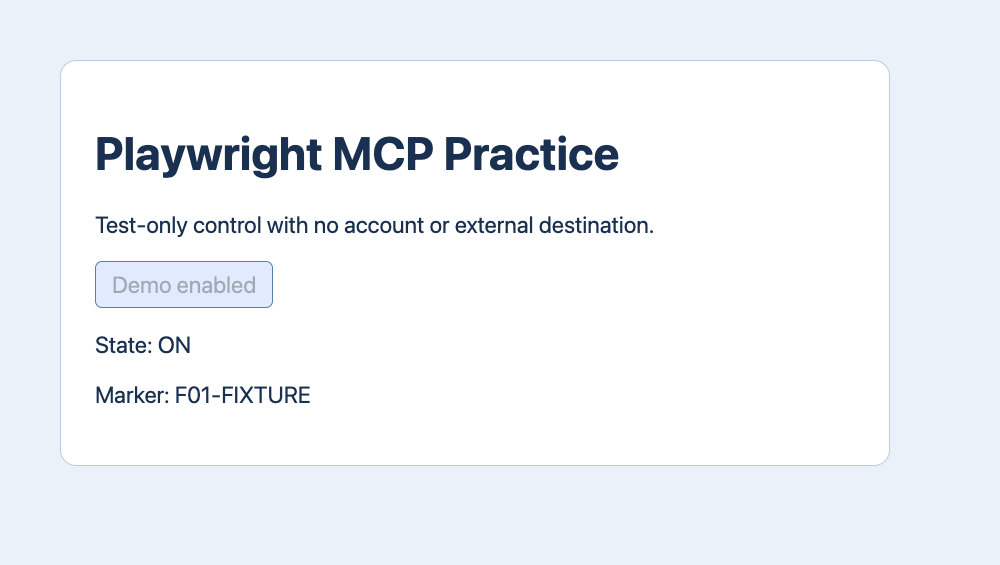
Click that single ref and read a fresh snapshot. Our run returned State: ON, the same marker and a disabled Demo enabled button. These are assertions about the page state. A tool result that says a click ran is insufficient if the desired state never appears. If a ref is stale, inspect the new page before choosing another one. Never reuse a ref across unrelated pages or assume a second click is harmless.
| Step | Tool | Expected result |
|---|---|---|
| 1 | browser_navigate + browser_snapshot | F01-FIXTURE · State: OFF |
| 2 | browser_click · target: e5 | Demo enabled |
| 3 | browser_snapshot | F01-FIXTURE · State: ON |
Choose the browser mode before a real task
The isolated mode used here starts fresh without using a signed-in profile. Headed mode makes the browser visible for review; headless mode can serve unattended test work. A dedicated persistent profile is useful when an approved test needs durable login state. The official extension can connect to a compatible existing browser and CDP can connect to an authorized endpoint. Check the selected profile, exposed scope and lifecycle before using either path.
| Mode | Use |
|---|---|
--isolated | Clean context |
| Headed | Visible review |
| Extension / CDP | Existing session |
What the test and community reports cover
An actual stdio client initialized the pinned MCP server, listed tools, navigated, took a snapshot, clicked e5, read a new snapshot, saved an image and closed the isolated Tabbit instance. The demo ran on a test page with no account, real form or model in the loop. One r/Playwright user reported ambiguous button targeting by position. A self-disclosed tool builder in r/mcp reported that large snapshots could fill context. These observations favor scoping to the right part of the page and verifying a result; they do not rank tools.
Does seeing Playwright tools mean the browser works?
Tool discovery verifies registration. Open the expected page, check the visible marker, then verify an action receipt to confirm the browser path.

FAQ
Does seeing Playwright tools mean the browser works?
Tool discovery verifies registration. Open the expected page, check the visible marker, then verify an action receipt to confirm the browser path.
How does Playwright MCP work?
The agent asks its MCP client to call a tool. Over stdio, the client sends JSON-RPC messages to the Playwright MCP process. Playwright then drives the configured browser and returns a receipt. That receipt can include a URL, an accessibility snapshot and action details. Tools discovery confirms the client can talk to the server. It does not prove a browser launch or successful interaction.
How do I register a pinned package?
Add a local stdio server in the MCP settings for your client. This example pins @playwright/mcp at 0.0.84 and points to an existing Tabbit Browser Dev binary on macOS. Replace the executable path with a supported binary you can actually launch. A custom executable is a deliberate runtime choice. Removing the flag lets Playwright MCP use its configured default browser. The test used Node.js 22.23.1 and reported Playwright 1.65.0-alpha-2026-10-30 in the MCP handshake. Save the configuration and reload the client if needed.
What if the snapshot reference is stale?
Click that single ref and read a fresh snapshot. Our run returned State: ON, the same marker and a disabled Demo enabled button. These are assertions about the page state. A tool result that says a click ran is insufficient if the desired state never appears. If a ref is stale, inspect the new page before choosing another one. Never reuse a ref across unrelated pages or assume a second click is harmless.
Which browser mode should I choose?
The isolated mode used here starts fresh without using a signed-in profile. Headed mode makes the browser visible for review; headless mode can serve unattended test work. A dedicated persistent profile is useful when an approved test needs durable login state. The official extension can connect to a compatible existing browser and CDP can connect to an authorized endpoint. Check the selected profile, exposed scope and lifecycle before using either path.