
Open Tabbit Browser, start Claude Code so Tabbit can detect it, then restart Claude Code and look for /tabbit. For the first read, choose a page you can open yourself in Tabbit and ask for a heading and a few visible identifiers.
A Reddit developer reported using a signed-in browser tab over a different MCP integration to verify a fix. The same practical question applies here. Can the agent reach the page you already see in your browser? Reddit field report
Key takeaways
Restart Claude Code after Tabbit detects it, then look for
/tabbit.Use the local Tabbit CLI diagnostic to check which browser instance the launcher can reach.
Claude Code approves the shell command. The selected Tabbit profile supplies the website session.
For your first read, compare the page heading and a few visible IDs with the tool result.
Check the setup in order
| Layer | What you should see |
|---|---|
| Skill | Claude Code lists /tabbit. |
| CLI | The local launcher can reach the intended Tabbit instance. |
| Shell permission | Claude Code allows the specific read command. |
| Website session | The expected URL and visible records appear in the chosen browser profile. |
Tabbit Agent Mode and the external Claude Code client
Selecting a Claude model in Tabbit applies to a task launched inside Tabbit. Claude Code runs as a separate client in its own working directory and uses its own authentication and permissions. With Tabbit CLI, that external client asks Tabbit to open or read a page. The website session still belongs to the selected browser profile. See the Tabbit and Claude Code overview for the two entry points and how an agent connects to an existing browser for the profile and authorization choices. If you prefer to start the task from a browser tab, see how Tabbit Agent Mode works.
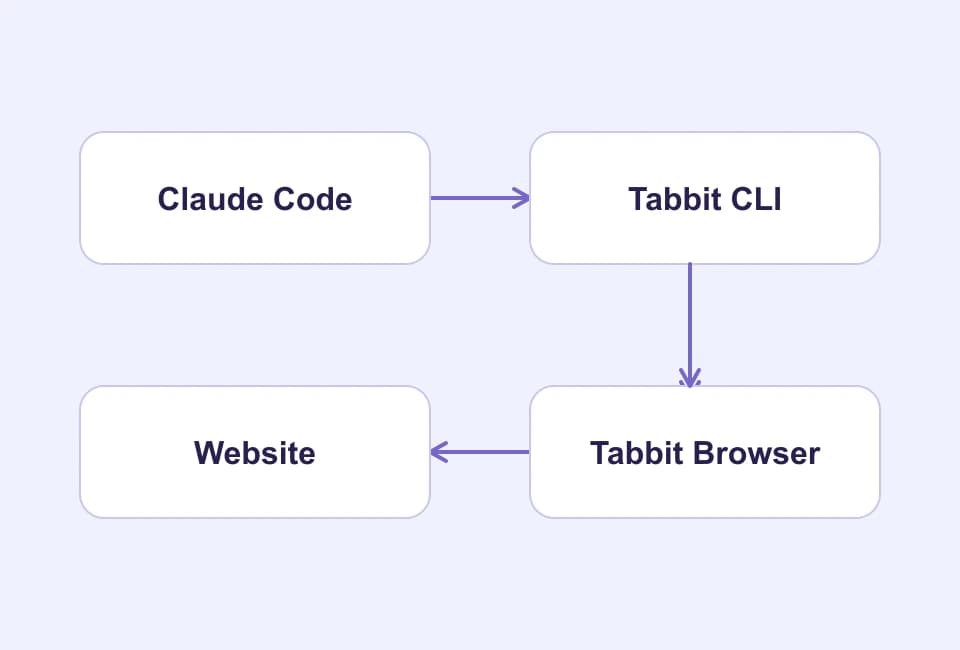
Check the skill and the local connection
Follow the official Tabbit CLI quick start. Install and launch Tabbit. Start the separately installed Claude Code client, then restart it after Tabbit detects it. In a fresh session type / and look for tabbit. On macOS, inspect ~/.claude/skills/tabbit/SKILL.md if the command is missing. Anthropic documents how skills are named, loaded and invoked. Claude Code skills documentation
From a macOS terminal, check the two versions and the browser connection.
claude --version
"$HOME/.local/bin/tabbit-cli" --version
"$HOME/.local/bin/tabbit-cli" diagnose
The skill tells the client what to do. The launcher sends the request. Claude Code still applies the permissions of its shell tool. A working diagnostic does not grant shell approval or website access. Keep raw diagnostic output local because it can include browser context. For the browser side, see how Tabbit works. If the shell command is denied, check the exact rule and working directory before changing any permission. Claude Code permission guide
Start with one protected read
Pick a page you have permission to read. Open it yourself in the intended Tabbit profile and write down the heading or two visible identifiers. In Claude Code, attach the exact URL to a narrow request.
/tabbit Open the exact URL I provide in a new task tab.
Return the heading and the visible record IDs only.
If access is denied or sign-in is required, report that and stop.
Do not submit, download, or change anything.
If the site requests sign-in, complete it yourself in that profile and rerun the read. A correct title without the expected rows is incomplete. Check the browser URL, rendered content and the tool response. Web search versus browser control explains why a public search result cannot confirm a protected page.
Verify the result in Tabbit
For a first task, use a read-only page such as a release log you already have access to. The concrete output should be small enough to check at a glance. Compare the heading and each identifier in the tool result with the page, then compare them again with the final answer. If only the final answer is incomplete, use the tool result to determine what the browser actually returned.
Find the layer that failed
| What you see | What to check |
|---|---|
/tabbit is missing | Confirm the skill folder and reopen Claude Code. |
| The launcher runs but diagnosis fails | Confirm the intended Tabbit edition is running and reachable. |
| Claude Code reports a denied shell call | Check the exact command and rule. Keep approval limited to the intended read. |
| The page asks for sign-in | Compare the browser profile and URL, then sign in yourself if needed. |
| The tool receipt has the right rows but the response is incomplete | Preserve the receipt, compare the page and report the two outcomes separately. |
A separate Claude Code issue describes a desktop browser pane that used a fresh profile without the reporter’s existing logins. Check which browser and profile handled your request. Claude Code issue #87764
If a project needs a clean browser session for repeatable tests, use a separate automation context. If the task depends on a login you already use, keep the read in the intended Tabbit profile and start with one page.
For more on separating shell and site permissions, see Claude Code browser permissions. If you need a dedicated automation context, see Claude Code with Playwright MCP. The Codex and Tabbit CLI setup covers the analogous check in another client. Start with the current Tabbit download if the browser has not been installed.

FAQ
How do I connect Claude Code to Tabbit?
Install and open Tabbit, start Claude Code so Tabbit can detect it, then restart Claude Code. Check for /tabbit, diagnose the local CLI, and test one authorized read.
Does selecting a Claude model inside Tabbit launch Claude Code?
Selecting a model in Tabbit configures the browser's Agent Mode. Claude Code is a separate client that can request browser actions through Tabbit CLI.
Why does /tabbit not appear?
On macOS check ~/.claude/skills/tabbit/SKILL.md, restart both applications if needed, and confirm Claude Code's skill and shell permissions separately.
Can Claude Code use a signed-in Tabbit page?
It can use the site session of the selected Tabbit profile when the site permits it. A different profile or expired session may show a login page.
What counts as proof the browser read succeeded?
Check that the tool receipt names the expected heading and record IDs, then compare them with the browser and the intended URL.