
Register Playwright MCP with claude mcp add and choose its scope before you launch it. Use local for a private setup in one project, project for a reviewed team configuration, or user to reuse the server across projects on your machine. Then verify the connection and make the browser return a visible result.
A Claude Code user put --isolated among Claude's options and got an unknown-option error. That flag belongs after the separator, where it reaches Playwright. Later, Tabbit Browser illustrates the separate case where you need a tab that is already signed in. Playwright argument discussion
Key takeaways
Run the setup from the project root. Local and project scopes are both tied to a project, but they are stored and shared differently.
Place
--scopeand--transportbefore--. Put--headlessand--isolatedafter the server command.A configuration file can contain an entry whose executable fails to start. Inspect
claude mcp listand then the tools in the session.Confirm the tool result on a public test page. A familiar page title in the assistant's answer is weak evidence without the tool trace.
Use the smallest scope and the browser context the task needs. A new isolated browser is suitable for a public test.
Pick the right scope before installing
| Scope | What it applies to | Where the entry lives | When to choose it |
|---|---|---|---|
local | You in this project | Project record in ~/.claude.json | A private setup or a first experiment |
project | The project and teammates who approve it | .mcp.json at the project root | A reviewed launcher the team can reproduce |
user | You across projects | User configuration in ~/.claude.json | A personal tool you use in several workspaces |
In Claude Code, local is the default scope. It does not mean “all projects on this machine.” Anthropic documents that same-name entries resolve in local, project and then user order. If an entry looks different from the one you edited, check for a higher-priority entry before replacing it. Claude Code MCP scope documentation
The same Playwright browser automation server can be registered in more than one coding client, but the configuration wrapper belongs to the client. If your colleague uses Codex, follow the Codex Playwright MCP setup for its TOML format. In Claude Code, a shared project entry is JSON.
Register a private browser first
Make sure Claude Code and npx run in the same terminal. Playwright's installation guide lists Node.js 20 or newer. The following launcher pins the version tested here and starts the browser headless with temporary state. This keeps the first check separate from the personal profile you normally use. Playwright MCP installation guide
claude --version
node --version
claude mcp add --scope local --transport stdio playwright -- npx -y @playwright/mcp@0.0.84 --headless --isolated
claude mcp list
Claude parses the flags to the left of the separator. To the right, it launches npx with the package and browser flags. If the command reports unknown option '--headless', check where the flag appears before changing versions or opening a different shell. --headless changes whether the window is visible. --isolated changes which state the browser starts with. Anthropic's stdio syntax
Share the launcher with a team
When the team wants the same launcher, review an equivalent entry in the root .mcp.json. You can write this file directly or choose --scope project during registration. Teammates can inspect what executable starts and which arguments it receives. They should approve the project server through Claude Code's normal flow. Keep tokens and private paths out of the shared file. Claude Code MCP quickstart
{
  "mcpServers": {
    "playwright": {
      "type": "stdio",
      "command": "npx",
      "args": ["-y", "@playwright/mcp@0.0.84", "--headless", "--isolated"]
    }
  }
}
This entry gives the project a repeatable way to start a browser tool. It does not grant the browser an account or override your organization's settings. If your site needs a dedicated login, establish its test profile separately. The browser profiles and workspaces guide explains why a profile and a tab are different scopes of browser state.
Prove the server can open a page
Start a fresh Claude Code session in the project you configured. Run /mcp and look for Playwright. Then use a task where the browser result is easy to check. Use Playwright MCP explicitly so that a shell command or AI web search cannot silently substitute for the connection being tested.
Use the Playwright MCP server to open
https://www.selenium.dev/selenium/web/web-form.html.
Return the final URL and first visible heading from the browser tool result.
Do not enter or submit anything. Stop after reading the page.
The target page should show Web form. Inspect the tool trace and ask for a browser_snapshot if the navigation result only shows a saved snapshot path. A trace with the final URL and heading gives you a way to verify the browser context before you ask it to click a control. This same observation step is part of how browser agents work.
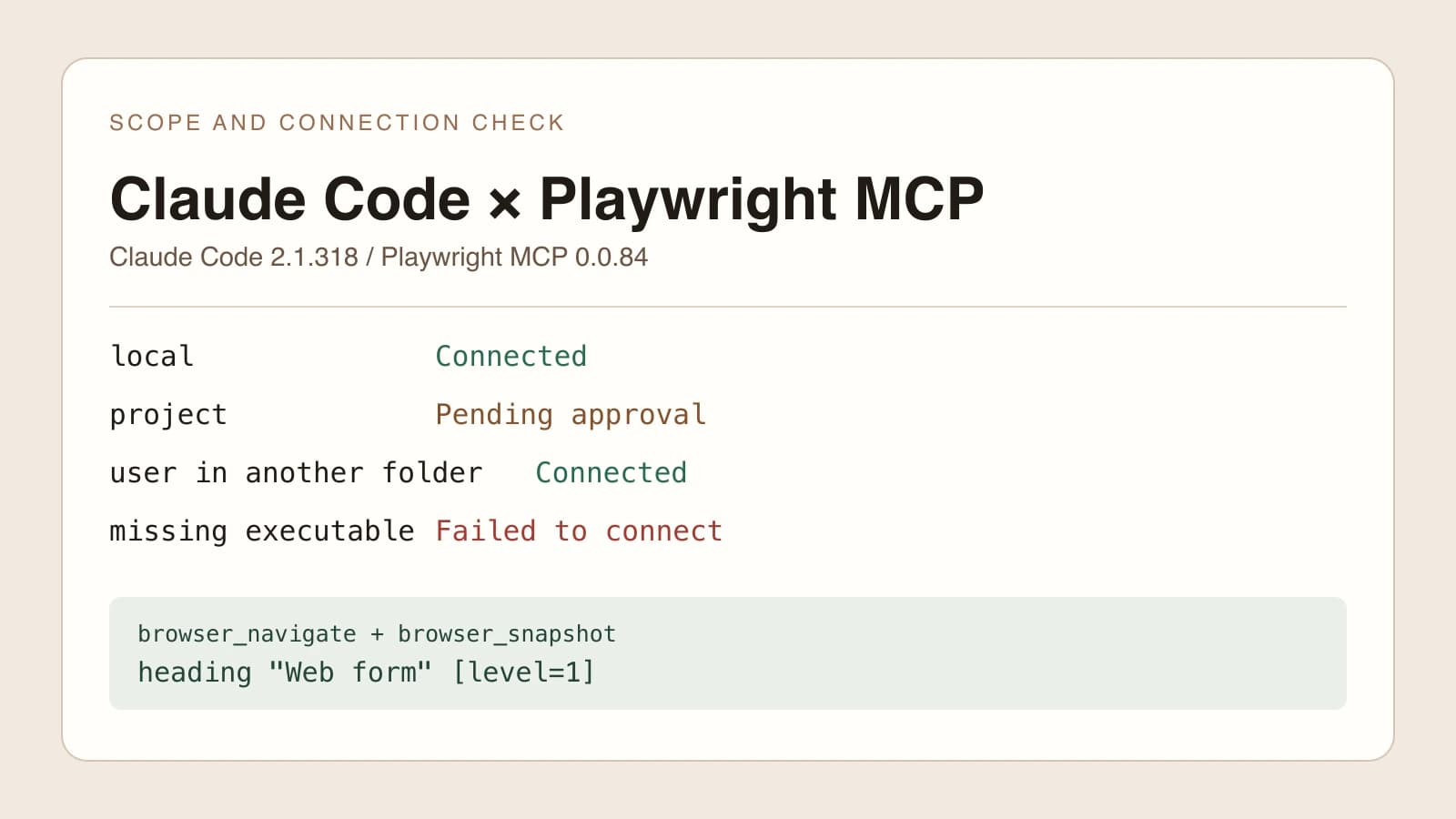
The local reproduction used Claude Code 2.1.318, Node.js 22 and Playwright MCP 0.0.84. In a temporary project, Claude Code registered the scope entries and checked their connection. A protocol probe launched the exact command from the generated project entry, discovered browser_navigate and browser_snapshot, then read Web form from the Selenium demo. No form was submitted. The probe used the same server launcher directly, without running a Claude model turn.
The local entry connected inside the project. The project entry waited for approval, and only the user entry appeared when the CLI was run from a second directory.
Diagnose the first check that fails
| What you see | What it tells you | Next check |
|---|---|---|
| The server is absent | The session did not load the entry | Directory, scope, duplicate name and file syntax |
| Project approval is pending | The entry was found but awaits permission | Review the launcher in .mcp.json and approve it in the project |
| The entry shows a failed connection | Claude could not establish a working server connection | Executable, package arguments, terminal PATH and server stderr |
| The server connects but the named tool is absent | Discovery, tool search or permissions still need checking | /mcp, active session, exact tool name and policy |
| A tool runs but the page does not open | The failure is now at browser launch or navigation | Browser channel, executable, URL and network |
To separate a configuration error from a handshake failure, the local fixture also registered a server whose executable did not exist. The configuration was present, yet Claude's connection check failed. Moving --headless to the Claude side of -- produced an option error before there was a browser to launch. The first symptom points at the launcher. The second points at command parsing.
A user reported that claude mcp list sometimes showed a server as connected while the active session's /mcp did not list it. Check both views before editing the configuration again. Original discussion
A running server may expose a larger tool inventory than Claude loads into context at once. Anthropic documents how MCP tool search defers tool definitions until they are needed. In a new session, ask for a specific read-only operation and inspect the named tool in the trace. If policy denies it, investigate the permission before assuming the server stopped. Review the available browser automation tools only if the configured tool is wrong for the job. Anthropic's tool search documentation
When the task needs your existing tab
The isolated launch here is for reproducing a browser action. When the requirement is to read an already authenticated dashboard, decide which existing tab, account and workspace need to be shared. Open the intended tab yourself and confirm the title and account from a read-only observation. The guide to connecting an existing browser explains the checks to make before writes.
Tabbit Browser has a different connection for compatible agents, including Claude Code. That path can be relevant when the goal is to operate in a Tabbit tab instead of starting Microsoft's isolated session. A recorded seller-form case shows why reading back a result in the actual account matters. It uses another coding agent and demonstrates the browser-side workflow, not Claude Code's Playwright MCP setup. Tabbit Quick Start
For a new project, start with the private local entry and one public page. Promote the launcher to project scope after the team has reviewed it, or use user scope when you genuinely need it across projects. If the task instead starts in a signed-in tab, use an approved existing-browser workflow. That keeps each browser automation experiment tied to a result you can verify.

FAQ
How do I add Playwright MCP to Claude Code?
From the project root, run claude mcp add --scope local --transport stdio playwright -- npx -y @playwright/mcp@0.0.84 --headless --isolated. Then use claude mcp list and check the browser tools in a new session.
What is the difference between project and user scope?
Project scope writes a .mcp.json file in the project root for teammates to review and approve. User scope saves the entry privately for the current user across projects.
Where is the default local MCP configuration stored?
Claude Code stores local-scope MCP entries in its user configuration under the current project's record. Local scope is private to you and applies only in that project.
Why is Playwright connected but missing from the tools I can see?
Check the current directory, project approval, same-name entries and permissions in a fresh session. Tool search can defer tool definitions until Claude needs them, so look for the named tool and request a small read-only action.
Does this setup require the Claude in Chrome extension?
The stdio setup launches Microsoft's Playwright MCP with an isolated browser context. A Chrome extension is a separate connection option for a task that requires an existing tab.