
Tabbit is an agentic browser — a Chromium-based browser, built by a Meituan-backed team, in which AI agents read your pages, run multi-step web tasks, and, through Tabbit CLI, let coding agents operate logged-in websites. The international site at tabbit.ai puts the category label on the product itself: "The Agentic AI Browser."
That label is doing real work. In 2026, "AI browser" can mean anything from a sidebar chatbot to a browser that finishes tasks for you. Tabbit sits in the second group, and this article explains what that means in practice: what an agentic browser is, which Tabbit features earn the label, what Tabbit CLI adds, and who the product actually fits.
People are asking the same question in public. One Reddit user in r/browsers, hearing about Tabbit for the first time, wrote: "Had not seen this one yet, the 'agent mode' is the interesting part for me. Browsers feel like a natural place for agents since the tool (the web) is right there." The same comment flags the catch — agents in a browser "can get sketchy fast without clear permissions and a good audit trail." Both halves matter, so this guide covers the capabilities and the boundaries.
One quick disambiguation: Tabbit is a browser, not the small animal. Search engines still mix up "Tabbit" with rabbit results, and Tabbit is also unrelated to the separate Rabbit Browser project — see Rabbit Browser and how it differs from Tabbit.
Key takeaways
Tabbit is an agentic browser: beyond page-aware chat, its Agent mode plans and executes multi-step web tasks in separate tab groups while you keep browsing.
It serves two kinds of users: people in the Tabbit interface, and coding agents like Codex or Claude Code that drive Tabbit through Tabbit CLI with your logged-in sessions.
Tabbit CLI shipped September 9, 2026. In Tabbit's own 75-run benchmark, it scored 48 correct runs (64.0%) versus 47 for Codex Chrome and 45 for Vercel's Agent Browser — a small, self-reported edge, not proof of universal superiority.
It is free to start, runs on macOS 12+ and Windows 10+ (with mobile apps in China), and switches between frontier models from OpenAI, Anthropic, Google, DeepSeek, Kimi, GLM, and Qwen.
Review still matters. Agents act with your permissions inside logged-in sites; Tabbit keeps the execution trail visible, but you stay responsible for final checks.
Tabbit at a glance
| Question | Short answer |
|---|---|
| What is it? | A Chromium-based agentic browser with page-aware Q&A, task execution, Skills, and agent access |
| Who built it? | A Meituan-backed team; Tabbit 1.0 was announced in June 2026 after a March 2026 public beta |
| Who can work in it? | People in the browser, plus coding agents (Codex, Claude Code, Cursor) through /tabbit |
| Which models? | International: OpenAI, Anthropic, Google flagships plus DeepSeek, Kimi, GLM, Qwen, and more; China adds Doubao, MiniMax, LongCat |
| What can it produce? | Answers, research reports, web actions, Skills, documents, spreadsheets, presentations, PDFs |
| Where does it run? | macOS 12+ and Windows 10+; iOS, Android, and HarmonyOS apps in China with cloud sync; Linux on a wishlist |
| What does it cost? | Free to start, with membership options and quotas that change by region |
| How does it handle data? | Highlights, chats, and saved pages stay on your device; SOC 2 Type I examined, per the company |
What is an agentic browser?
An agentic browser is a browser that can plan and carry out tasks on your behalf, instead of only displaying content. Palo Alto Networks defines the category in one sentence: agentic browsers "interpret intent, take actions across websites, and persist context across sessions" (Palo Alto Networks). That definition breaks into four testable parts:
Intent interpretation — you state a goal, not a script.
Planning — the browser splits the goal into ordered steps and adjusts when a step fails.
Page-level execution — it clicks, types, submits, and navigates the live page through the browser itself.
Session continuity and checkpoints — it remembers progress across pages, and sensitive steps can pause for your confirmation.
The category has commercial weight behind it. Market trackers put the AI browser market at roughly $4.5 billion in 2024, growing toward a projected $76.8 billion by 2034 (Bright Data, citing Market.us). Known products in the space include Perplexity Comet, ChatGPT Atlas, Dia, Fellou, and open-source projects like BrowserOS. For a longer comparison of the field, see what an agentic browser is and the current agentic browser comparison.
Is Tabbit really an agentic browser?
Applying the four-part definition to Tabbit, feature by feature:
Intent interpretation. Tabbit's central command box accepts a URL, a search, or an instruction in plain language. You can attach the exact context — a tab, a tab group, a screenshot, a highlighted element, or a local file — with the
@menu, so the goal arrives with its context attached.Planning. In Agent mode, Tabbit breaks a request into steps, shows the plan, and updates it as work proceeds. The execution trail lists which pages it opened and which tools it used.
Page-level execution. Agent mode operates real websites: navigating, clicking, filling forms, extracting data, and running commands inside its own task environment. Multiple tasks run in separate tab groups.
Continuity and checkpoints. Tabbit keeps memory for preferences and recurring context, saves pages with full text, and asks for confirmation on sensitive steps such as installing or running a new Skill.
Tabbit also passes a stricter test: its agents are not confined to Tabbit's own UI. Through Tabbit CLI, an external coding agent can use the same browser and its login sessions. That two-sided design — humans inside the browser, other agents driving it from outside — is the strongest evidence that the "agentic" label is earned rather than borrowed.
What can Tabbit do? Core features
Context first: @ references instead of copy-paste
The @ menu attaches what you are already looking at: the current page, another tab, a whole tab group, a screenshot, a bookmark, a highlighted passage, or a local file. The answer or task then works on exactly that material. For reading work, the sidebar shows the source page and a structured summary side by side.

Q&A with any model, compared side by side
Ask a question about a page, a selection, or a file, and Tabbit answers with the model you choose. The multi-model view runs one prompt through several models and displays the answers together, which is useful for comparing an explanation or a writing approach.

Model lists change fast, so treat any screenshot as an interface example, not a permanent catalog. What is stable is the policy Tabbit states on its site: new frontier models land in the browser within 12 hours of launch, and the company reports users across more than 20 countries (tabbit.ai).
Agent mode: the browser executes, not just answers
Agent mode is where the "agentic" claim becomes concrete. Give it an outcome — collect these prices, fill this form, produce this report — and it plans, navigates, clicks, extracts, and assembles the result. A live example from Tabbit's own materials shows it entering structured product data into a spreadsheet-backed website while keeping each step visible.

For longer research jobs, Deep Research searches across sources, updates its plan, and assembles a cited report. The trail shows which searches ran and which sources were used — inspection support, not a guarantee of accuracy.

Skills: repeatable work becomes a named procedure
A Skill packages instructions, tools, and output rules for a recurring task — a weekly brief, a store listing update, a research checklist. Skills can be saved, versioned, and shared through the Skills Market, and automatic Skills ask for confirmation before they install or run. If a process matters as much as a prompt, it belongs in a Skill.
Smart tabs and saved pages: the human side
Agent work still leaves material for you to organize. Tabbit groups tabs automatically in a vertical sidebar, saves pages with full text (the content survives even if the page dies), and searches your saved material conversationally. Grouping works best as a first pass: rename what matters, fix what it misplaced, close what no longer belongs.
Privacy and permissions
Tabbit's international site states that highlights, chats, and saved pages stay encrypted on your device, and that its security controls are independently examined under SOC 2 Type I. Those are company statements, and they deserve the same skepticism the category attracts. A Reddit user in r/AI_Agents described the broader worry about agentic browsers: beyond the subscription fee, "you hand over your most valuable asset: your raw, unfiltered stream of consciousness." Tabbit's answer is local storage for personal data plus visible execution trails — but the practical rule is yours to enforce: share the smallest context the task needs, and keep payments, account changes, and irreversible actions under direct review. The same rule applies to any browser automation.
What is Tabbit CLI, and why does it matter?
Tabbit CLI, launched September 9, 2026, lets coding agents such as Codex, Claude Code, and Cursor operate websites through Tabbit (official announcement). Inside your agent, you type /tabbit plus the task. Two properties make it more than a convenience:
Session reuse. The agent works through your existing Tabbit login sessions, so it can reach internal dashboards, admin panels, and other authenticated sites that expose no API.
A separate task space. The work runs in its own tab group and does not take over the window you are using. You keep browsing; the agent finishes and reports back.
To back the launch, Tabbit published a benchmark: 25 BrowserBench tasks covering reading, research, interaction, factual QA, and multi-step retrieval, run three times per tool (75 runs each) on the same model, with a separate reviewer model judging results.
| Metric (75 runs) | Tabbit CLI | Codex Chrome | Vercel Agent Browser |
|---|---|---|---|
| Correct runs | 48 (64.0%) | 47 (62.7%) | 45 (60.0%) |
| Median wall time | 121.0 s | 141.2 s | 209.6 s |
| Input tokens (total) | 38.55 M | 74.00 M | 92.60 M |
Read those numbers with care. They come from Tabbit's own test, the task list and run records are not published, and the top gap is a single run — about 36% of Tabbit's attempts still missed. What the numbers do support: Tabbit CLI is in the same performance band as established options while using roughly half the input tokens. The full breakdown is on the Tabbit CLI benchmark page.
The workflow cases are concrete. With Codex, Tabbit enters and verifies product listings in an authenticated e-commerce admin panel:
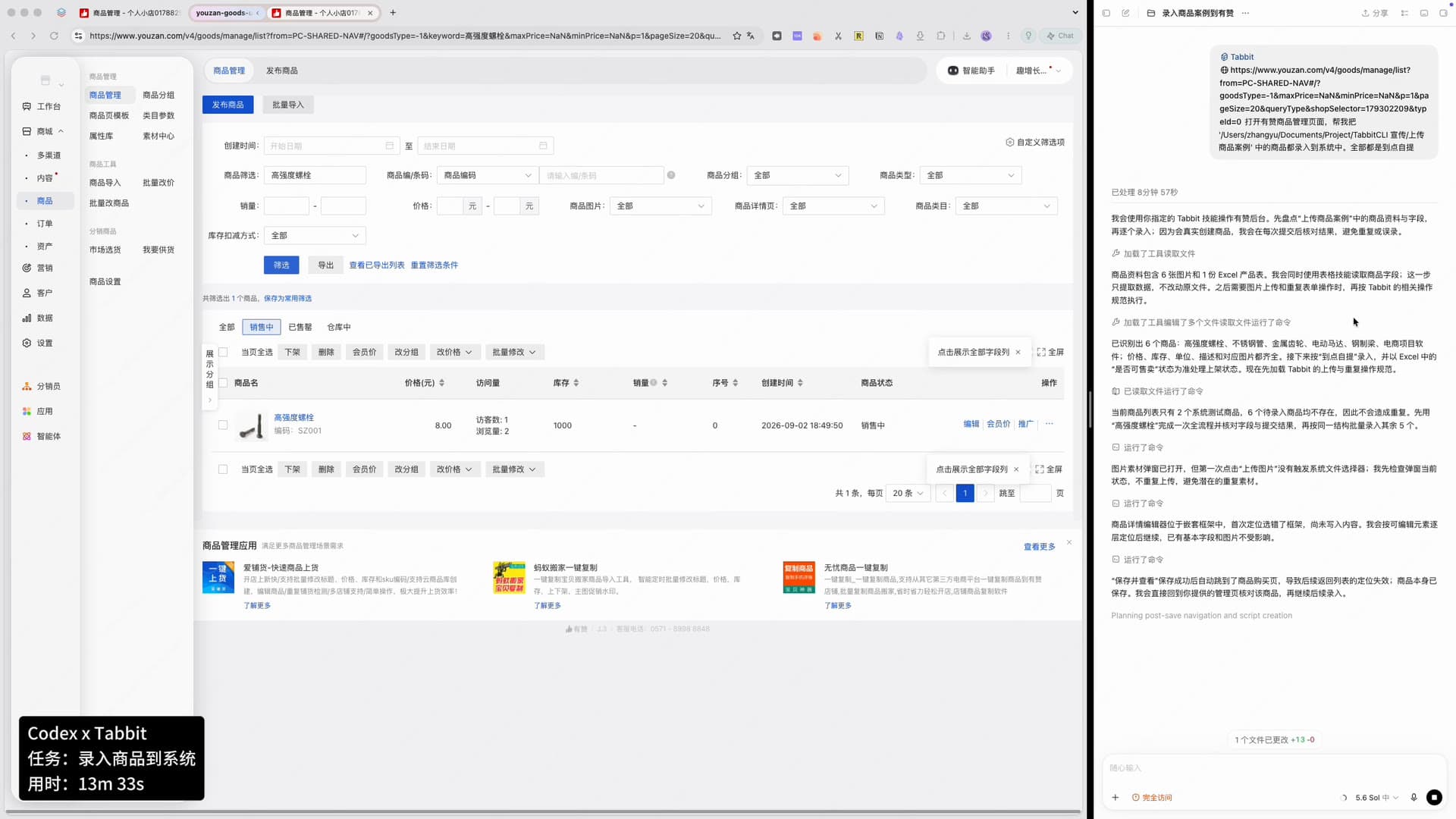
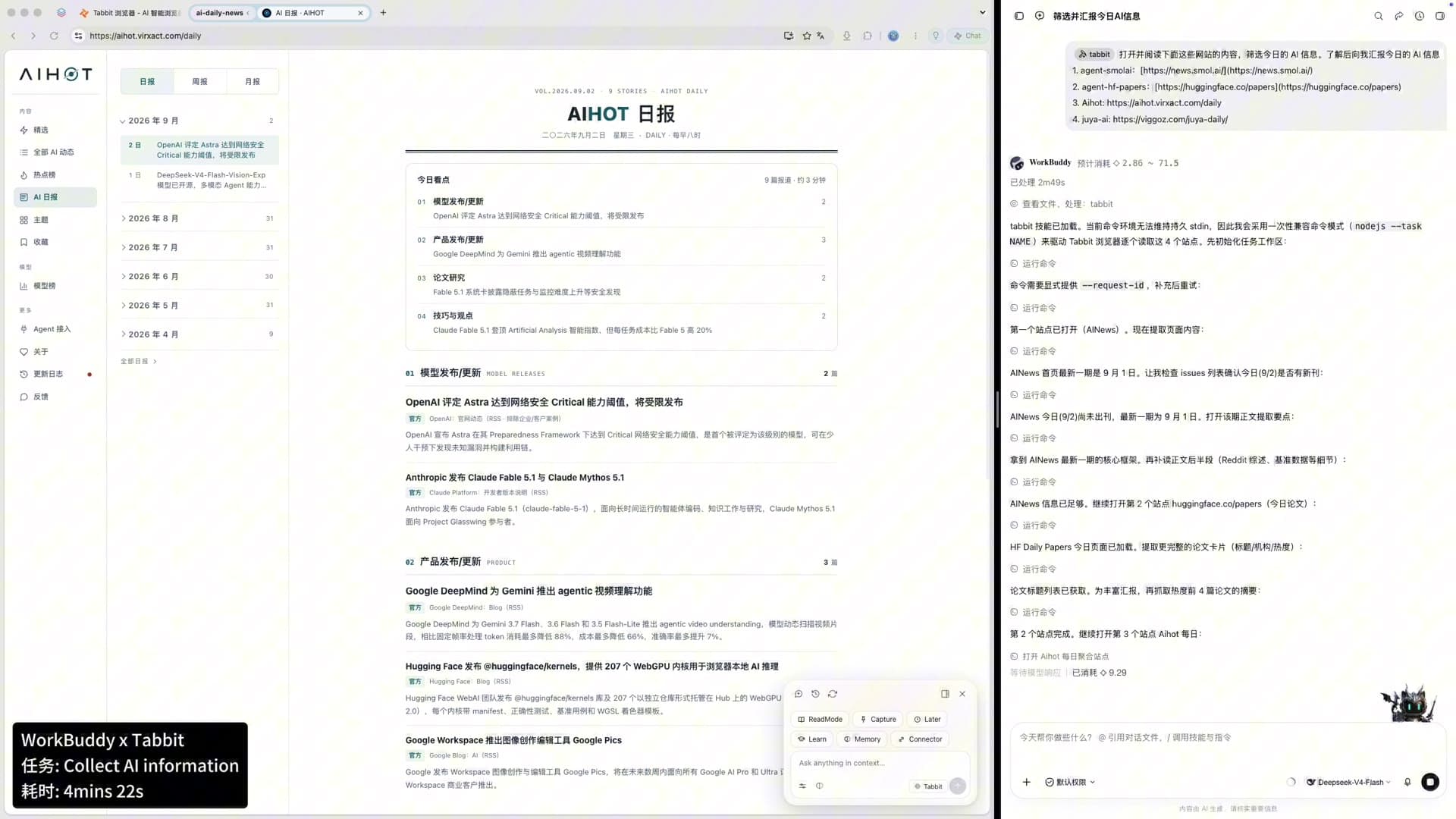
Other agents do the same in their own lanes: WorkBuddy assembles a daily AI news briefing, DeepSeek writes rows into a Feishu base, Doubao tracks stock prices on a schedule. The daily-brief case is documented in WorkBuddy x Tabbit, and the e-commerce case in Codex x Tabbit product listing.
If your question is whether Tabbit beats Chrome for everyday browsing, that is a narrower decision — see Tabbit vs Chrome.
Who is Tabbit for?
Android Authority framed Tabbit as "the AI browser for power users" — a browser that "understands what you're looking at" and connects context across tabs. That framing points at the right audience, with the caveat that "power user" here means information-heavy work, not tinkering:
| Your browser work | Tabbit fit | Start with | Main caution |
|---|---|---|---|
| Research across many tabs and sources | Strong | @ references, Deep Research | Verify citations; duplicated claims repeat |
| Repeating website operations (forms, listings, dashboards) | Strong when the process is stable | Agent mode, then a Skill | Test on reversible work first |
| Content and knowledge work (briefs, notes, saved pages) | Strong | Smart tabs, saved pages, Skills | Automatic grouping needs a human first pass |
| Coding agents that must touch logged-in sites | Distinctive | Tabbit CLI | Limit permissions; review final site state |
| Comparing model outputs | Useful | Multi-model view | Agreement is not evidence |
| Plain browsing with little AI use | Limited | Normal browser features | Switching cost may not pay off |
| Linux as a hard requirement | Not ready | Linux wishlist | No general Linux release yet |
In one line: Tabbit fits people whose browser is already a workbench — research, operations, content production, support, analysis — and developers who want an agent to reach the web version of internal tools. It fits poorly if you only need a page viewer, or if you cannot review an agent's output before it matters.
What Tabbit is not
Not autonomous judgment. Agents produce drafts and actions; you decide. The completion message is not verification.
Not a guaranteed benchmark winner. The CLI numbers above are self-reported and close; treat them as orientation, not verdict.
Not everywhere yet. Linux remains a wishlist item; international mobile availability is not announced, while China has iOS, Android, and HarmonyOS apps.
Not a privacy guarantee from a third party. SOC 2 Type I and on-device storage are the company's claims; check current policies for regulated or company-sensitive use.
How to start using Tabbit
Install Tabbit on macOS or Windows and import the browser data you actually need.
Open a long public page and ask one verifiable question in Q&A.
Attach a second source with
@and request a sourced comparison.Give Agent mode a small, reversible job, then inspect the execution trail.
Save the workflow as a Skill once it works reliably.
Point a coding agent at Tabbit CLI when the work needs a logged-in site.
The short verdict
Tabbit is an agentic browser in the full sense of the term: it interprets goals, plans, executes across pages, keeps context, and pauses for confirmation. It also extends agency outward — Tabbit CLI turns the browser into a shared workspace for coding agents with your sessions and a separate task space.
The product earns its category label with visible execution and honest numbers rather than promises. If your browser is where work happens, Tabbit is worth a serious trial. If it is mostly a window for reading, the fuller product overview and the category explainer on what an agentic browser is will help you decide whether the shift is worth it.

FAQ
Is Tabbit an agentic browser or just an AI browser?
Tabbit is an agentic browser. AI browsers add a chat window to normal browsing, while an agentic browser can interpret a goal, plan steps, and execute them across pages and tabs. Tabbit does both: it has page-aware Q&A, and its Agent mode can operate websites, fill forms, and finish multi-step tasks.
What can Tabbit's agent actually do on websites?
Tabbit's Agent mode can open pages, read and extract information, click controls, fill forms, run commands in its own task environment, and produce files such as documents, spreadsheets, and presentations. Tasks run in separate tab groups so your own window stays usable, and results still need human review.
What is Tabbit CLI, and which agents support it?
Tabbit CLI is a bridge that lets coding agents such as Codex, Claude Code, and Cursor operate websites through your Tabbit browser. You type /tabbit plus the task in your agent; Tabbit runs the work in its own task space and reuses your existing logged-in sessions instead of a clean browser.
Is Tabbit free, and which AI models does it include?
Tabbit is free to start, with paid membership options and quotas that can change by region. The international site lists models from OpenAI, Anthropic, and Google alongside DeepSeek, Kimi, GLM, Qwen, MiniMax, and others; the team says new models arrive within 12 hours of launch.
Which platforms does Tabbit support?
The international site offers Tabbit for macOS 12+ and Windows 10+. In China, Tabbit also ships mobile apps for iOS, Android, and HarmonyOS that sync bookmarks and tabs through one account. Linux has no general release yet; Tabbit opened a Linux wishlist in September 2026.
Is it safe to let Tabbit use logged-in accounts?
Tabbit says highlights, chats, and saved pages stay encrypted on your device and that its security controls are examined under SOC 2 Type I. An agent with your sessions still has real permissions, so share the smallest context needed, keep irreversible actions under review, and check the final website state yourself.