
An on-call engineer opened a vendor's website and got a reCAPTCHA. He had alerts arriving by email and by phone. The challenge wanted him to find stairs, traffic lights, and motorcycles. "I'm getting email and phone alerts for an emergency, and you're making me spend five whole minutes clicking pictures???" he wrote on r/sysadmin.
His timing was unlucky. His experience is not. Cloudflare, which runs one of the largest challenge networks on the web, puts an average CAPTCHA at 32 seconds of a person's time and estimates that humans abandon the task about 15 percent of the time. The W3C says something stronger about who pays for that: the interactive task itself "inherently excludes many people with disabilities, resulting in a denial of service to these users" (W3C).
A CAPTCHA challenge response is the answer or verification token your browser returns to a website's human check. The site then validates that response before accepting your request. On most modern sites you are not being graded on a puzzle alone: the system also evaluates your session.
That gap explains most of what makes CAPTCHAs infuriating. You cannot study for a test that was never about the answer. Below: what the acronym means, how the handshake actually works, why the challenge comes back, and what to do the next time it blocks you. We will use Tabbit Browser as the worked example for the last part, since what an AI browser is matters more here than it first appears.
Key takeaways
CAPTCHA stands for "Completely Automated Public Turing test to tell Computers and Humans Apart." The name describes a reverse Turing test: a machine builds a test and hopes it cannot pass its own exam.
A challenge-response check has four parts: issue, answer, token, validate. The token is single-use and time-limited, which is why reloading the page often forces you to start over.
Modern systems mostly score risk instead of grading a puzzle. reCAPTCHA v3 returns a 0.0 to 1.0 score, and Cloudflare says outright that the act of ticking the box is not the signal.
Repeated challenges usually trace to something concrete: a clock or cache problem, an extension blocking the challenge script, a virtual private network exit, or an expired clearance cookie.
By design, a CAPTCHA is a barrier for some disabled users. The W3C calls it a denial of service, and Cloudflare's own numbers show that audio fallbacks are worse than useless: bots solve them more reliably than people do.
The main challenge types at a glance
Almost everything you have ever been asked to do falls into one of six buckets. What separates them is not the puzzle. It is what the server is really measuring while you work.
| Challenge type | What you are asked to do | What it actually measures | Where it fails |
|---|---|---|---|
| Distorted text (classic) | Type the warped letters | Whether optical character recognition fails | Google retired it after AI solved even the hardest variant at 99.8 percent accuracy |
| Image grid (reCAPTCHA v2, hCaptcha) | Select every tile with a bus, a stair, a light | Behaviour and environment data gathered before and during your clicks | Blurry images, ambiguous edges, and no feedback about what counted |
| Checkbox widget (reCAPTCHA v2, Turnstile Managed) | Tick a box | Browser characteristics, native APIs, and lightweight proof-of-work | Loops when the script is blocked, cached badly, or the system clock drifts |
| Score or invisible (reCAPTCHA v3, Turnstile Non-Interactive) | Nothing visible | A risk score built from request context | You never learn why you scored low, and the site decides what to do about it |
| Proof of work | Wait a few seconds | Whether your browser spent real CPU on a puzzle | Slow devices wait longer, and blocked JavaScript stops the page entirely |
| Privacy pass token | Nothing visible | Whether an issuer vouched for your device | Only works on platforms and browsers that support the token |
Read that table again and the shape of the problem shows up. Only two of the six ask you to do something clever. The rest are observing.
What "CAPTCHA" actually stands for
CAPTCHA is a contrived acronym: "Completely Automated Public Turing test to tell Computers and Humans Apart." The term comes from a 2003 paper by Luis von Ahn, Manuel Blum, and Nicholas Hopper at Carnegie Mellon, with John Langford at IBM Watson, published at EUROCRYPT (Springer). The abstract states the whole idea in one line: "any program that has high success over a CAPTCHA can be used to solve an unsolved Artificial Intelligence (AI) problem."
The inversion is the clever part. A Turing test asks whether a machine can pass as human. A CAPTCHA flips the roles and puts a machine in charge of the judging, then picks a task that machines are currently bad at. Any bot that cracks it has, by definition, solved something researchers could not.
That design has a built-in expiration date. The moment a puzzle stops being hard for machines, it stops being a CAPTCHA, and everyone who can still see it is stuck with the leftovers. Google admitted this in plain language in 2014: "today's Artificial Intelligence technology can solve even the most difficult variant of distorted text at 99.8% accuracy. Thus distorted text, on its own, is no longer a dependable test" (Google Security Blog).
How a challenge-response handshake works
The challenge is what the site asks your browser to complete; the response is the answer or token sent back. A checked box is only the visible step. The site's server still has to validate the token before it accepts the request (Cloudflare's server-side validation guide).
The clearest description of the full loop is in a 2005 USENIX paper on defending against application-layer denial of service, which describes the same exchange today's widgets use (USENIX NSDI '05). The server issues a puzzle plus a signed token. When you answer, the server first recomputes the token hash, then checks that the token was created no more than four minutes ago, then checks whether your answer is correct. If all three checks pass, it hands back a cookie with a 30-minute lifetime.
Modern systems kept the shape and changed the pieces. Cloudflare's Turnstile injects a token named cf-turnstile-response that the site's server validates on its own backend, and the documentation is explicit that "A token can only be validated once, and a token cannot be redeemed twice" (Cloudflare).
Three checks in that sequence explain a lot of everyday frustration. If your answer was right but the token aged out, you fail. If the cookie never lands in your browser, you fail. And if the challenge script never ran, there is no token to check at all. None of those outcomes tells you which one happened. You see the same box again.
Why modern challenges rarely ask you to solve anything
Once machines could read the letters, the industry moved the test somewhere you cannot study for: your session. Google's own explanation of when the fallback appears is that "In cases when the risk analysis engine can't confidently predict whether a user is a human or an abusive agent, it will prompt a CAPTCHA to elicit more cues."
reCAPTCHA v3 turned that into an API. There is no widget. The service returns a score, and Google documents "11 levels for scores with values ranging from 0.0 to 1.0," where 1.0 suggests low risk and 0.0 suggests high risk (Google Cloud Fraud Defense). Alongside the score, Google surfaces reason codes such as AUTOMATION, UNEXPECTED_ENVIRONMENT, TOO_MUCH_TRAFFIC, UNEXPECTED_USAGE_PATTERNS, and LOW_CONFIDENCE_SCORE. What it does not publish is the full list of signals behind those codes.
Worth knowing in 2026: every page under developers.google.com/recaptcha now carries a deprecation banner pointing to Google Cloud Fraud Defense. The v3 model is being folded into a different product surface, and Google warns that scores measured in the first week of an implementation differ from long-term production behavior.
Cloudflare's Turnstile makes the same point about the checkbox. Its widgets run in three modes (Managed, Non-Interactive, and Invisible), with Managed choosing between a checkbox and a silent check based on visitor risk, and the product description is blunt about what the box is for: "the actual act of checking a box isn't important, it's the background data we're analyzing while the box is checked that matters" (Cloudflare).
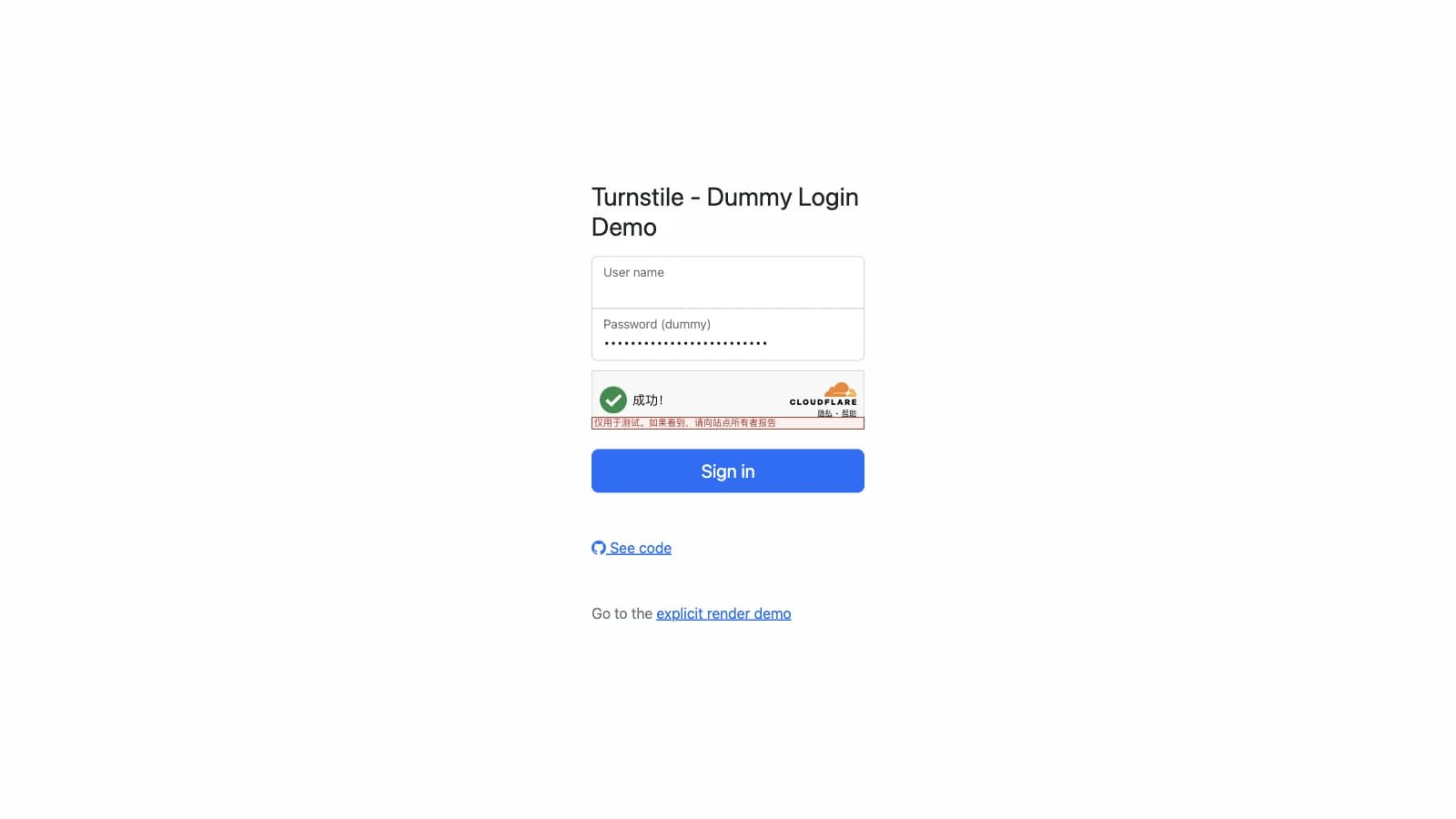
That is why "the image was blurry" is a complaint about the wrong layer. Blurry images only appear when the risk engine has already decided it needs more evidence.
Why the challenge keeps coming back
Loops are documented, not mysterious. Cloudflare publishes the failure codes for its own widget, including 200100 for a "Clock or cache problem," where the clock is wrong or the challenge was cached by an intermediary, and 200500 when an iframe is blocked (Cloudflare error codes). The same page lists browser extensions as a cause: "Some browser extensions, such as ad blockers, may block the scripts Turnstile needs to operate."
The clearance side has its own timer. A cf_clearance cookie proves a visitor passed verification, is "securely tied to the specific visitor and device it was issued to," defaults to 30 minutes, and includes "a few extra minutes to account for clock skew." It also comes with a warning that matters more than the timer: "The visitor may be re-challenged, even if the cookie has not expired" (Cloudflare).
Google's version of the same list is about the network rather than the browser. Its help documentation names three common triggers for the "automated queries" wall: "a shared network that has been abused; your ISP may have recently assigned you a suspicious IP address; the site you're trying to visit may be under heavy attack right now" (Google FAQ). None of those are things a puzzle can fix, and none of them are your fault.
The network cause is why virtual private networks turn into CAPTCHA generators. Cloudflare observed that "privacy-focused users often ask their browsers to go beyond standard practices… changing their user-agent… and preventing third-party scripts from executing entirely," which is a precise description of a hardened setup failing a test it was never designed to pass. If you want the detailed single-vendor walkthrough, our Cloudflare verification loop guide works through that case step by step, and why privacy protection sometimes breaks websites covers the broader pattern.
There is a security cost to all of this repetition, and it has nothing to do with the puzzle. In August 2026, an administrator posted a reCAPTCHA lookalike on a small business site that copied a PowerShell command into the clipboard when clicked. His point was about fatigue, not naivety: "we and our staff are being so bombarded by these prove your human bots why wouldn't you click the do what it says" (r/sysadmin). The thread's top reply named the technique, ClickFix, and other commenters described near-misses on their own networks. A verification wall that everyone has been trained to obey without reading is a phishing surface.
The accessibility problem CAPTCHAs cannot solve
The W3C's note on this is unusually direct. Asking "users who are blind, visually impaired or dyslexic to identify textual characters in a distorted graphic is asking them to perform a task they are intrinsically least able to accomplish" (W3C). The same document records that reCAPTCHA v2's audio alternative is sometimes no longer offered at all, replaced by the "Your computer or network may be sending automated queries" screen.
WCAG 2.2 requires two different modalities for any CAPTCHA, and the guidance is careful to say the exception "applies only to the content of the CAPTCHA," not to the form around it. It also admits the ceiling: "Every type of CAPTCHA will be unsolvable by users with certain disabilities" (W3C WCAG 2.2).
The audio fallback is not the safety net it looks like. Cloudflare measured its own audio challenges and found "only 31.2% of audio challenges resulting in a three-person agreement on what the correct solution actually is," while "bots can accurately solve audio CAPTCHAs in over 85% of attempts." When humans cannot agree on the answer and machines can, the modality is backwards.
Community reports match that measurement. On r/Blind, a user described fighting the accessibility cookie that is meant to exempt screen reader users: "Had a hell of a time getting their service to even allow that cookie to appear in my cookie jar when I checked the box… they have a separate option for a text-base captcha which is supposed to be more accessible but it was like trying to do a Caesar cipher in real time in your head" (r/Blind).
A developer asking how to serve deafblind users, who use braille displays and can neither see nor hear a challenge, put the design flaw in one sentence: "Traditional captcha fails because it assumes you can either see or hear" (r/webdev). OWASP's guidance points the same direction and adds a warning of its own, noting that requiring JavaScript "will reduce the accessibility of the website, especially to visitors who use screen readers," and recommending multi-factor authentication first, with CAPTCHA reserved for suspicious or high-risk logins (OWASP).
What CAPTCHAs do to AI agents
The arms race has a new participant. A 2025 benchmark, Open CaptchaWorld, tested multimodal model agents against 20 kinds of CAPTCHA and reported that "humans consistently achieve near-perfect scores, state-of-the-art MLLM agents struggle significantly, with success rates at most 40.0% by Browser-Use Openai-o3, far below human-level performance, 93.3%" (arXiv:2505.24878). The paper frames the challenge wall as "a critical bottleneck for deploying web agents in real-world applications."
People are already routing around it, sometimes by handing the human part back to a model. One user described failing a traffic-light grid three times, screenshotted it, pasted the image into a chat model, and "told it to take over my computer and handle it," which passed on the first attempt (X, @alt_w_v_g, 597 likes). A commenter on a video about the same frustration called the pattern out: "asking the actual robot to complete captcha instead of you is peak of irony and comedy" (YouTube, 365 likes).
The verification industry knows this. Cloudflare's answer to agent traffic is not a harder puzzle but a signature scheme: Web Bot Auth uses Ed25519 HTTP Message Signatures plus a published key directory so a site can tell a signed agent from an anonymous script (Cloudflare). Visa and Mastercard announced agentic commerce protocols built on it in October 2025. Verified-bot taxonomies now separate an "Agent" from a "Training" crawler.
The direction of travel matters for anyone reading this far. When agents can prove who they are in cryptography, a challenge wall stops being a technical test and becomes a policy decision about which signed agents a site chooses to admit. That is a healthier place to end up than a blurry staircase, though it leaves one problem untouched: agentic browsers still run into walls on sites that have not adopted any of it.
A practical option when the challenge is the blocker: Tabbit Browser
When a challenge stops you, three questions decide how long you stay stopped: what kind of check this is, what the page is actually telling you, and which documented cause applies to your setup. None of them require solving anything. They require reading and diagnosis, which is where a browser with a model inside it earns its place.
Tabbit Browser is a Chromium-based browser with an AI layer built into the shell rather than bolted on as an extension. Three parts of it apply here.
First, reading the wall. In Tabbit's Omnibox you type @ to reference something as context: the current tab, a whole tab group, a screenshot, a bookmark, or a local file. Point it at the page that is blocking you and ask what kind of challenge it is and what the page says. The AI reads the page you already have open, so you are not copying error text into another window. That matters for the screens that give you nothing to copy, like "Performing security verification," or a 200100 code buried in a console.
Second, keeping the blocked thing away from the thing you were doing. Tabbit's Agent Mode runs delegated tasks in their own tab group, so a job that walks through a site's forms or dashboards does not take over the page you were reading. When a verification wall shows up in the middle of a delegated task, it appears in that task's group. You come back, do the human step yourself, and your own tabs are exactly where you left them.

Third, working the checklist in one place instead of across five troubleshooting tabs. The documented causes are finite and testable: check the system clock, disable ad and script blockers for the site, drop the virtual private network, clear that one domain's cookies, then reload. Paired with a page-reading assistant, that sequence takes a couple of minutes rather than an afternoon of guessing.

The trade-offs are real and worth stating plainly. Tabbit does not solve CAPTCHAs for you, does not spoof browser fingerprints, and cannot make a low-reputation IP address look residential. If your exit IP is on a blocklist, no browser fixes that; change networks or contact the site. A verification wall exists to make a judgement about your session, and a browser that quietly overrode that judgement would be a security problem, not a feature. If a site's challenge is one you can pass in one click, the honest answer is that no tool is needed. Tabbit helps with the part around it: reading what happened, keeping your work intact, and running the checks.
If the browser layer itself is what keeps breaking on you, that is a different investigation. Why browser updates break websites and what to do when an extension stops working cover the compatibility half of this, and how to choose the right browser covers the buying decision if you are rethinking the whole stack.
What to do next time a challenge blocks you
Match what you see to a cause before you change settings at random.
| What you see | What to do | Why |
|---|---|---|
| The same site loops you again and again | Check the system clock, disable script blockers for that site, then clear only that domain's cookies, then reload | The documented causes are clock or cache drift, blocked challenge scripts, and a clearance cookie that never persisted |
| It works in a private window but not your normal profile | An extension or your profile's stored site data is the difference | Same browser, same network, different environment, so the fault is local |
| It happens on every site while a VPN is on | Switch exit node, or disconnect the VPN and retest | Datacenter address ranges carry reputation that no browser setting can repair |
| The checkbox turns green, then the page reloads to an empty box | Your browser is not keeping the clearance cookie | The token was issued and then discarded, or the site re-challenged you before it expired |
| One browser fails, another passes | Use the browser that passes, and report the failure | A single-browser failure is usually profile-level, not site-level. See the Cloudflare loop fix |
| You rely on a screen reader and the audio fallback fails | Ask the site for a non-visual alternative and cite WCAG | Two modalities are required, and the audio one is measurably unreliable for humans |
| A delegated agent task hit the wall | Do that step yourself, then let the task continue | The verification is asking for a human, and with an unsigned agent it has no other way to know |
| A site you need only works in one specific browser | Check whether it is really the browser or a portal policy | Some sites gate on browser detection rather than on features. See why patient portals only work in Chrome |
The short answer
A CAPTCHA challenge is not a test of you. It is a risk decision about your session, dressed up as a puzzle so that the decision looks answerable. That is why the image is often unclearable and why the loop usually has an environment cause rather than a skill cause.
So fix the environment, not the puzzle. Work the documented causes in order: clock, extensions, network, cookies. If the challenge keeps returning after all four, the remaining variable is your address reputation, and the fix is a different route to the site rather than a different browser.
And when an agent is doing the work, keep the human step human. Let the task do the mechanical parts, then take over for the one moment that proves you are you. An AI browser that keeps those two lanes separate is more useful here than one that promises to pretend better. If you have already made your peace with the puzzle and the real problem is the browser around it, these are the traits that matter.
Get Tabbit and keep the human step human
Tabbit Browser is free on macOS and Windows, and it imports your bookmarks, history, extensions, and saved passwords from Chrome, Edge, or Safari in one step, so testing it does not mean rebuilding your setup. Grab the installer at tabbit.ai/download.
Set expectations before you install. Tabbit will not pass verifications for you, and it will not pretend to. What it gives you on this specific problem is a place to ask what the page in front of you actually says, and a task model where delegated work runs in its own tab group instead of on top of your reading. Everything else, including the part where you tick a box and move on, stays yours.

FAQ
What is a CAPTCHA challenge response?
A CAPTCHA challenge is the check a website presents to distinguish likely human traffic from bots. The response is the answer or verification token your browser sends back, which the website must validate before accepting the request. Modern checks may produce a token without showing a puzzle.
How does a challenge-response check actually verify me?
The server sends a puzzle or an invisible test together with a signed token. Your browser returns an answer plus that token, and the server recomputes the token hash, checks that the token is recent, and checks the answer. If everything passes, the server issues a short-lived cookie that stands in for your verification on later requests. Cloudflare documents that a Turnstile token can only be validated once.
Why do I keep getting CAPTCHA challenges on the same site?
Repeated challenges usually have a concrete cause rather than a personal one. Cloudflare documents clock or cache problems, extensions that block the challenge script, and virtual private network exits, and its clearance cookie defaults to 30 minutes with re-challenges possible before it expires. Google lists shared networks, a suspicious address assigned by your internet provider, and a site under heavy attack as triggers for its own challenges.
What is the difference between reCAPTCHA v2 and v3?
Version 2 shows a checkbox and can fall back to image puzzles, while version 3 has no widget at all and returns a risk score between 0.0 and 1.0. Google documents 11 score levels and reason codes such as AUTOMATION and TOO_MUCH_TRAFFIC, and it does not publish the full list of signals behind the score. Version 3 leaves the accept or reject decision to the site, so two sites can treat the same score differently.
Why are CAPTCHAs a problem for screen reader and deafblind users?
The W3C describes interactive CAPTCHAs as a denial of service for many disabled users, because the task itself assumes sight or hearing. WCAG requires two different modalities but also notes that every CAPTCHA type will be unsolvable for some users. Cloudflare's own measurements found that humans agreed on the correct answer to an audio challenge only 31.2 percent of the time, while bots solved audio challenges in over 85 percent of attempts.
Can an AI agent or browser solve CAPTCHAs for me?
Agents can sometimes pass them, but not reliably. A 2025 benchmark found the best tested agent succeeded on at most 40.0 percent of challenges, against 93.3 percent for humans. Solving a challenge with automation also destroys the signal the site was asking for, which is how bot traffic and legitimate agent traffic end up confused in the first place. A browser that claims to pass challenges for you deserves suspicion.
What does an invalid CAPTCHA response mean?
It means the site could not validate the answer or token it received; it does not necessarily mean you chose the wrong images. A Turnstile token can fail if it is missing, malformed, expired, or already used. Refresh the challenge and submit again promptly; if it keeps failing, check whether an extension or blocked script is interrupting verification.