
Install the Playwright MCP server as a Codex stdio server, then verify it at three points. codex mcp get playwright shows how Codex will launch it. The /mcp panel in a fresh session shows whether the tools are available. An actual browser call confirms that the server can open a page. A check at each point tells you where to look if something fails.
That difference comes up in practice. In an r/OpenAI thread, a user had installed the Playwright extension for VS Code and still couldn't get Codex to see a browser server. The VS Code testing extension and Codex's MCP server entry are separate setups. Later in this guide, Tabbit Browser appears as a separate option for workflows that need an already signed-in tab. Reddit discussion
Key takeaways
Put the server under Codex's
mcp_serversTOML section or register it usingcodex mcp add.Pin the package version when you need teammates to reproduce the same setup. This walkthrough used Codex CLI 0.166.0 and Playwright MCP 0.0.84.
A configured entry, a discovered tool and a successful navigation are separate checks.
Use
--headless --isolatedfor a clean first run. Headless hides the window. Isolated starts with temporary browser state.Use an explicit attachment workflow when a task needs your open tabs or existing sign-in. Verify the tab and account before any write.
Three checks at a glance
| Check | How to run it | Evidence to look for | Where to investigate if it fails |
|---|---|---|---|
| Configuration | codex mcp get playwright | The expected command and argument list | Config location, trust or a conflicting entry |
| Discovery | /mcp in a new Codex session | Browser tools such as browser_navigate and browser_snapshot | Node and npx availability, package startup and workspace policy |
| Browser launch | Ask Codex to open TodoMVC using Playwright MCP | Final URL, page title and heading in the tool result | Browser installation, launch mode or network |
Playwright MCP exposes browser automation over the Model Context Protocol. It can open pages and return structured snapshots with roles, text and element references. The model can use those references to select the next action. That matters for operations on a live page. If you just need links or public facts, web search can be enough. Playwright MCP documentation
Register the local server in Codex
Install Codex CLI and Node.js. Playwright's current getting-started documentation lists Node.js 20 or newer. Check the versions and make sure that the same terminal you use for Codex can run npx. This matters when Node comes from a version manager and a desktop IDE starts with a different PATH.
codex --version
node --version
npx --version
codex mcp add playwright -- npx -y @playwright/mcp@0.0.84 --headless --isolated
codex mcp get playwright
The arguments after -- belong to the server launcher. Here Codex starts npx, -y prevents npm's interactive installation prompt, and the flags configure the browser session. The version pin is the one used for the check below. Review a new package release before changing the pin in a shared setup. OpenAI Codex developer commands
Use TOML when you need to review the configuration
You can also configure the same entry in ~/.codex/config.toml. If a server named playwright is already present, review it before replacing it. Use the add command or edit the existing TOML table. Defining the same table twice can make the configuration fail to parse.
[mcp_servers.playwright]
command = "npx"
args = ["-y", "@playwright/mcp@0.0.84", "--headless", "--isolated"]
Copy the command and argument values from the server's documentation. The wrapping JSON used by some clients does not belong in a Codex TOML file. If your organization manages tool access or applies workspace configuration, check the effective entry in the environment where you will start Codex. The terminal version and the editor's integration may have different startup environments. OpenAI Codex MCP guide
Open a page and prove the connection
After registering the server, open a new Codex session in a workspace you trust. Enter /mcp and look for Playwright. Then give Codex a small task with a clear result.
Use the configured Playwright MCP server to open https://demo.playwright.dev/todomvc/.
Return the final URL, page title, and first visible heading from the
browser tool result. Stop after reading the page.
Check the tool trace alongside the answer. A text response can know what TodoMVC says without visiting it. The trace should show browser_navigate and a result with the final URL and heading. If you want a second observation, ask the agent to take a fresh browser_snapshot of the same page. The value of the smoke test is the observable result. Our guide to how browser agents work explains what the agent does with that observation.
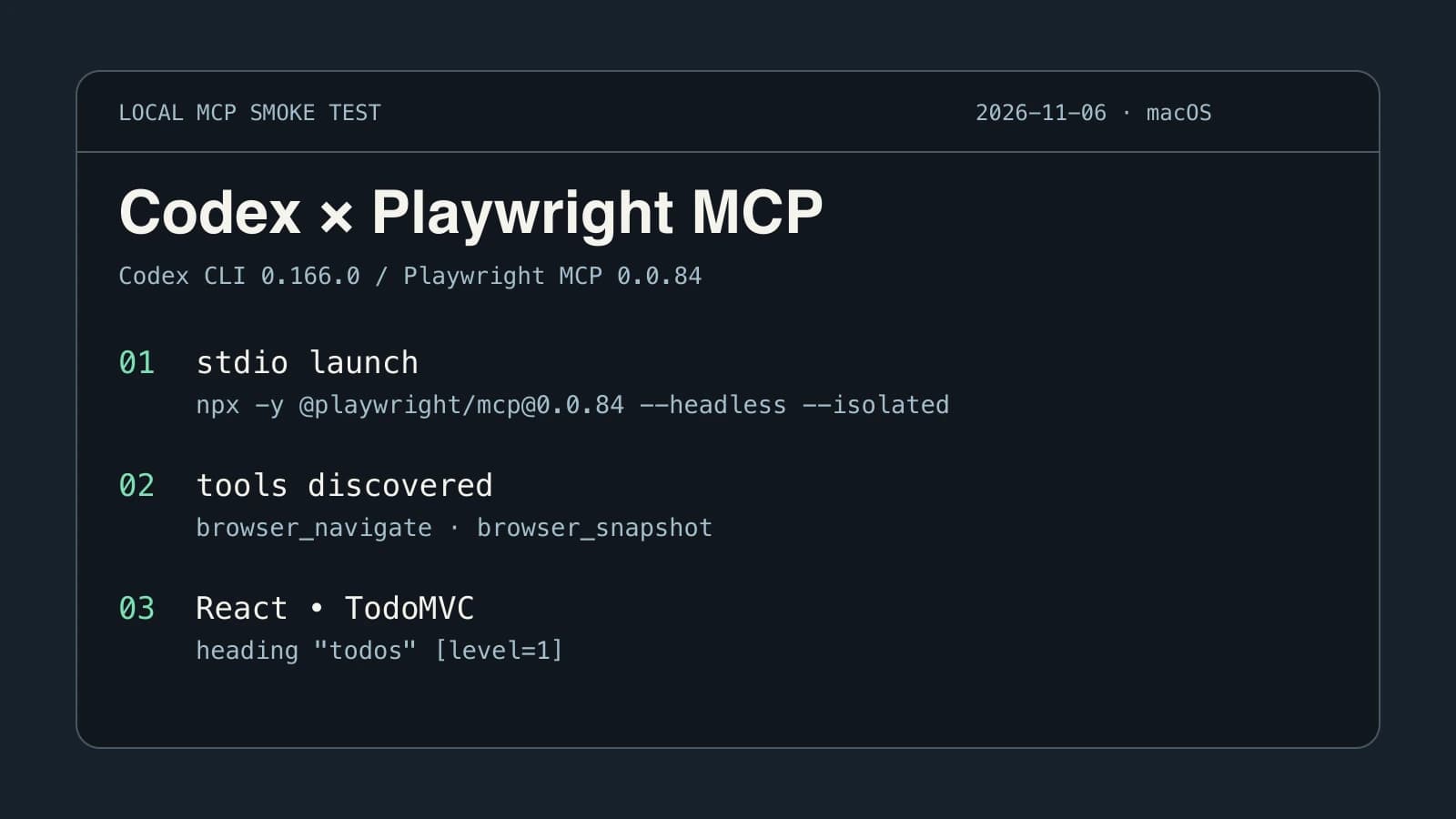
The verification for this article used a temporary working directory, a process-scoped server override and an isolated browser. The Codex app-server found browser_navigate and browser_snapshot, opened https://demo.playwright.dev/todomvc/, and read the heading todos. It then closed the browser. The URL ended in /#/, the title was React • TodoMVC, and the accessible snapshot showed a level-one heading. The test drove the tools through the Codex client protocol using a unique temporary server name. The page logged a favicon 404, while the requested content loaded.
Diagnose the first missing result
If the server entry is missing, check which Codex binary you ran and where it read its settings. An argument copied as a single quoted string is another common mistake. npx needs to receive the package and the switches as separate arguments. Review the effective configuration with codex mcp get playwright --json before changing anything else. Strip secrets and private paths before sharing any configuration output.
If the entry is present but the tools are absent, check the server's startup error. Run the launch command with --help appended in the same terminal. Seeing the server's help output proves that npx can resolve and run the package. It leaves the browser launch untested. A Windows user in a separate discussion reported that a tutorial still left them unable to connect Codex. Their experience is a reason to inspect the effective executable and configuration in the environment you actually use. Reddit discussion
If the tools load but the first navigation fails, inspect the error for the browser name and executable it expects. Use Playwright's documented installation or channel configuration for that release. If the browser starts and the page is blank, inspect the actual URL and error page before retrying. A failed local navigation and a missing MCP server can look similar in an assistant's summary. They call for different fixes. Compare other browser automation tools only after finding the failing layer.
Which browser and profile will it open?
Version 0.0.84 selects Chromium with the Chrome channel when no browser or channel is set. Playwright MCP has separate settings for the executable, visibility and session state. The browser choice determines which program runs. Headless controls the window. Isolation determines whether the server starts from temporary browser state. Changing one does not implicitly change the others. Microsoft Playwright MCP configuration
| Goal | Launch or connect mode | What to verify |
|---|---|---|
| Reproduce a public page test | Headless and isolated | URL and heading in a fresh session |
| Watch a browser without reusing private state | Headed and isolated | A new visible window with the intended page |
| Keep a dedicated work login between runs | An approved persistent automation profile | Correct profile, sign-in and environment |
| Operate a tab you already opened | Explicit extension or another supported attachment | Intended browser, tab and account |
The default managed profile in Playwright MCP is separate from the personal profile you happen to have open. An isolated run narrows the test further by starting with temporary state. A familiar page can still ask you to sign in if it opens in a different context. This is the same distinction that matters when choosing between browser profiles and workspaces.
If you intentionally need an existing tab, follow the project's browser extension instructions for the version you installed. Check that the expected browser and tab are selected. A screenshot or page title confirms the screen, while the account or workspace label confirms the access context. The existing-browser setup guide walks through those separate checks.
When a signed-in task needs a different connection
A fresh Playwright MCP session fits local QA, public website checks and tasks where repeatability matters more than keeping a personal login. If the job starts from a browser tab you already use, first decide how much of that browser context the agent needs. One tab and a read-only request make a better connection test than a bulk operation in an admin dashboard.
Tabbit's quick start documents a separate way for a supported coding agent to connect to Tabbit Browser. The Codex and Tabbit product-listing recording shows a real seller form and a read-back from the product list. That case illustrates why profile, target and result checks matter when browser actions can write records. It uses a different connection from Microsoft's Playwright MCP. Tabbit Quick Start
A browser extension, a dedicated automation profile and a browser integration all require checking the session you actually got. For a controlled first run, keep the Playwright MCP profile isolated and use the public-page test above. Switch to an existing browser workflow when the task genuinely requires it. Once the URL, heading and tool trace agree, move to one page in your own test environment and keep the same verification habit. That is a reliable starting point for browser automation without widening the test unnecessarily.

FAQ
How do I add Playwright MCP to Codex CLI?
Use codex mcp add playwright -- npx -y @playwright/mcp@0.0.84 --headless --isolated for the tested configuration. Start a fresh Codex session and use /mcp to inspect the loaded tools.
Does codex mcp list prove that Playwright started?
It shows the server entry that Codex loaded from configuration. The live tool list and a successful browser navigation are separate checks.
Does Playwright MCP use the Chrome tabs I already have open?
Its default launch uses a browser session managed by the server. To use an existing window or profile, choose and authorize an explicit attachment mode and check the active page before acting.
What is the difference between headless and isolated?
Headless controls whether a browser window is visible. Isolated controls whether the session starts with its own temporary profile and state.
Do I need to install the Playwright extension for this setup?
The headless, isolated launch in this guide uses the local MCP server and requires no browser extension. Use the matching Playwright extension and connection workflow only if you intentionally want to attach to an existing browser.