
Anthropic’s Nov 10 launch post introduced the beta; its Help Center guide documents the current setup and limits.
Claude Sheets is a new spreadsheet artifact built inside Claude. Ask Claude to create a tracker, budget or model, then edit cells together with Claude and teammates. It is not the same as Claude for Google Workspace, the sidebar that works inside an existing Google Sheets file. The new Sheets beta was announced on November 10, 2026; it supports common spreadsheet tasks but is not a replacement for full Excel or Google Sheets.
One Reddit user saw a narrow use for “some of the mid-size CSV exports” that need light cleanup before the next stage of work. That is a useful way to frame the product: a shared working sheet for a defined task, with clear size and feature limits. (Original discussion)
Key takeaways
Claude Sheets creates a spreadsheet artifact within Claude. You and Claude edit the same cells; edits are outlined and formulas remain visible.
Start from any chat or select the Sheets tile in the Artifacts tab. Import CSV, Google Sheets or Excel; export as CSV or
.xlsx.At launch, the beta supports up to 100,000 cells, but lacks pivot tables, filter views, protected ranges, multi-column sort, PDF export and several Excel features.
The older Claude for Google Workspace integration is a sidebar inside a file you already have open. It edits that file in place; it does not turn that file into a Claude Sheets artifact.
Use Claude Sheets for a lightweight sheet built with Claude. Keep advanced work in your existing spreadsheet app or choose a connected-data workflow when the task needs live data.
Claude Sheets and related spreadsheet paths
| Product path | Where you start | What it is suited to | Boundary to remember |
|---|---|---|---|
| Claude Sheets | In a Claude chat or Artifacts | Build and co-edit a lightweight tracker, budget or model | Beta; 100,000 cells at launch; no live data from connected apps |
| Claude for Google Workspace | An existing Google Docs, Sheets or Slides file | Ask questions and edit the current file in place | Requires a Google account permitted to install the Workspace Marketplace app |
| Claude for Excel | An existing Excel workbook | Keep the file in Excel when using Claude’s Excel integration | It is a separate product path; do not assume every Excel feature works in Claude Sheets |
| Claude Data | Connected company data and metrics | Ask questions of connected data, create dashboards or data stories | It is not a spreadsheet artifact; connector and query controls apply |
| Whiteboards / Meetings | Whiteboard artifact / meeting workflow | Visual brainstorming / meeting capture | Neither is a spreadsheet; Meetings was described as coming soon in the Nov 10 launch article |
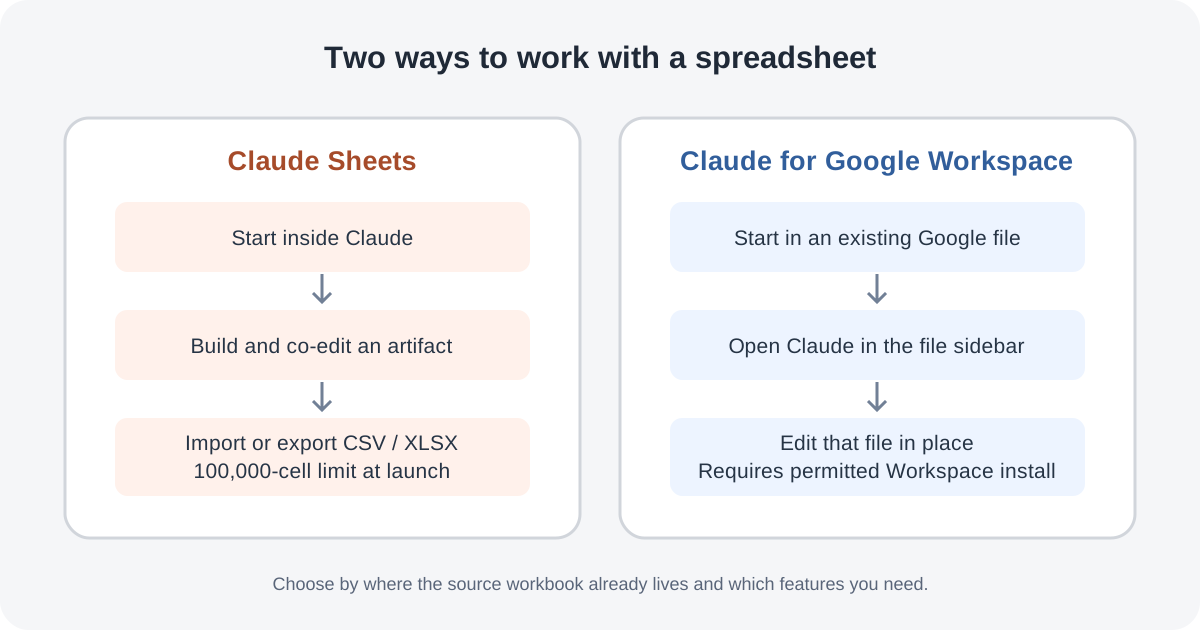
Anthropic’s launch article describes Sheets as a spreadsheet Claude builds and edits with you. Its separate Google Workspace guide describes a sidebar that reads and edits an open Google file. Those are two workflows, not two names for the same feature.
What Claude Sheets can do
A Claude Sheet is an artifact saved in Claude. Claude can create tabs, formulas that refer across tabs, formatting and conditional formatting, dropdowns, checkboxes and charts. People can edit cells while Claude works with them, add comments, and see each Claude change outlined as it arrives. Version history lets a user restore an earlier version, which also removes edits made after that version.
You can start in two places:
From a chat: describe the sheet you need, such as a campaign tracker with owners, dates and status.
From Artifacts: open the Artifacts tab, choose Sheets, then describe the sheet or start with a blank one.
A prompt works better when it names the job, the columns or tabs, the source of the numbers, and the calculations to include. For example: “Create a quarterly hiring budget with one tab per team. Include role, start month, annual salary, quarterly cost and assumptions; use formulas for totals and label missing inputs rather than inventing them.” Give Claude the real inputs if you have them. Then inspect formulas and assumptions before relying on the output.
Import, edit, share and export
The current help guide supports importing a CSV file, a Google Sheet or an Excel workbook. You can also paste from Google Sheets or Excel. Claude can edit a selected range, answer a question about it, or work directly in the cells. Formulas stay visible, so check that they refer to the intended cells and handle blank or unusual values as expected.
Sheets start private. Open the sheet and choose Share to let other people work in it with you and Claude. To continue elsewhere, export to .xlsx or CSV, or choose Send to for supported partner apps. The Help Center does not promise that every spreadsheet feature survives every export, so re-open the exported file and spot-check formulas, charts, formatting and values before handing it off.
Anthropic’s Claude Sheets Help Center guide is the source for the exact import, sharing and export steps; those controls can change as the beta develops.
What the beta does not cover
Claude Sheets is available in beta on Pro, Max, Ultra, Team and Enterprise plans. It is on by default for Team. Enterprise admins must enable it under Organization settings > Artifacts; admins can also use custom roles to enable it for a subset of the organization. The feature counts toward plan usage limits. The official guide lists web and desktop support, with basic read-only access on mobile.
At launch, an artifact can contain at most 100,000 cells. A 10,000-row table with 10 columns reaches that ceiling before adding more fields. The Help Center lists pivot tables, protected ranges, find and replace, multi-column sort, filter views, multi-select dropdowns and PDF export as unavailable. It also lists macros, VBA, Power Query, DAX and print layout as unsupported Excel features.
The most important distinction for data work: Claude Sheets cannot pull live data from connected apps, and other artifacts cannot use a Sheet as their data source. A commenter on the launch thread noted that the 100,000-cell ceiling “goes fast.” Another Excel user planned to try Sheets but pointed out missing filter views and live data. Those are individual reactions; Anthropic’s current limits list is the authority for what is supported.
If your task starts with existing company metrics, Claude Data is the closer fit because it works with connected data and approved queries. If you need to update an existing Google workbook in place, the Google Workspace sidebar may be the better starting point. For complex models, pivot-based reports or large files, stay in a full spreadsheet tool or use code and validate the results.
When a browser workflow is the better fit
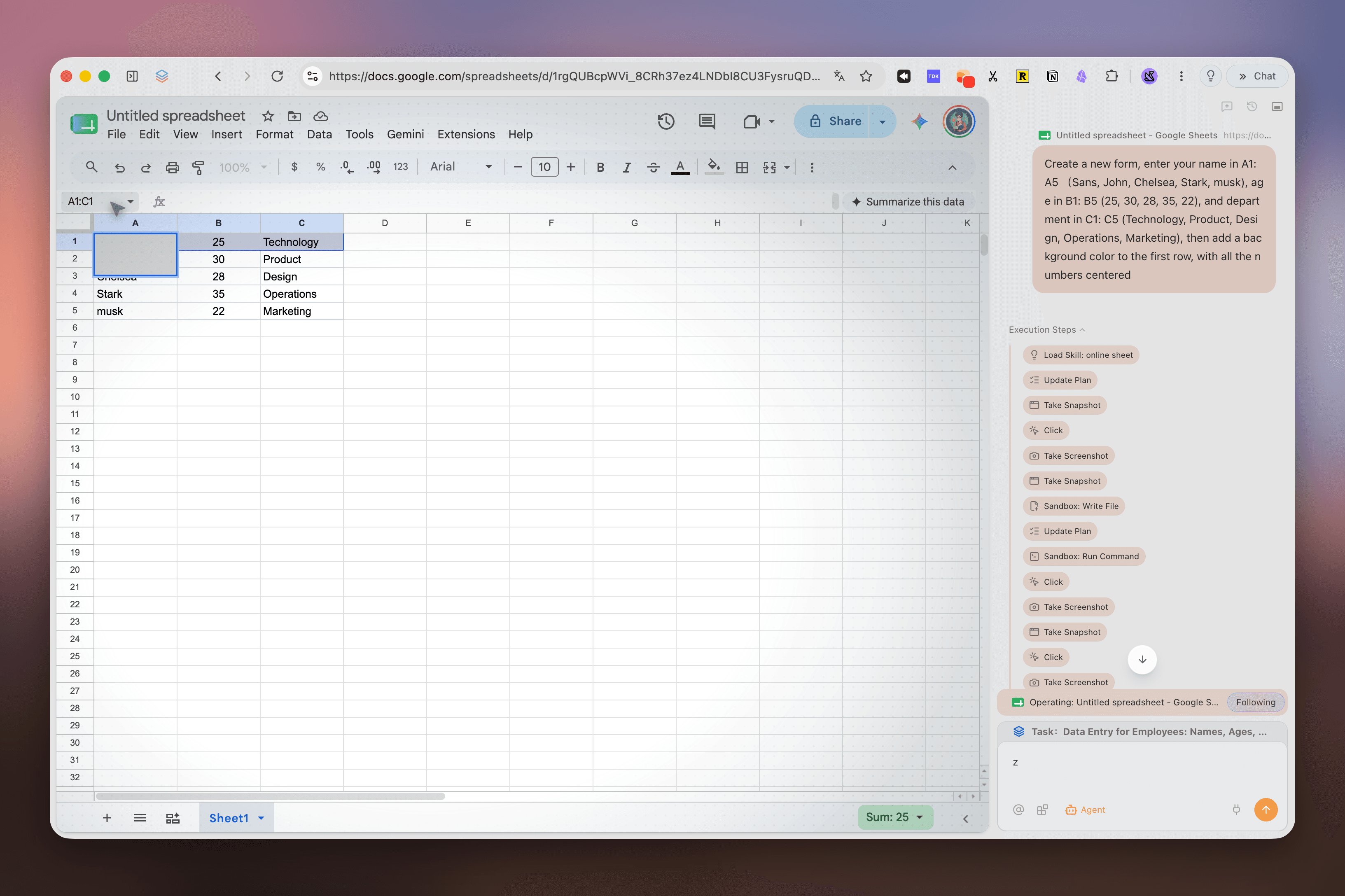
The spreadsheet on the left is a different kind of work: a person asks a browser agent to enter information into an existing Google Sheets page. The screenshot below shows Tabbit Agent operating in that page. It is not Claude Sheets and does not imply an integration between Tabbit and Anthropic’s artifact. The distinction is where the source file lives: a new collaborative sheet inside Claude, versus browser actions on a file that must remain in its existing web app.
If you use an agent in a web spreadsheet, begin with a small, reviewable task. The first-task checklist helps define a safe first run; browser research with sources is useful when rows need traceable references. For gathering records, see moving website data into CSV; for transferring spreadsheet values into a portal, see Excel-to-web-form workflows.
Before giving a browser agent an existing signed-in sheet, understand how to connect an agent to an existing browser and how browser login sessions are handled. If the app offers an API or MCP route, compare it with direct UI control using API, MCP or browser automation and browser MCP versus CLI. These are separate workflows; they do not change which Claude feature is available to your account.
Which path should you choose?
| Your job | Best starting point | Why / check first |
|---|---|---|
| Build a shared, light tracker from a clear prompt | Claude Sheets | Start in Claude; check formulas, assumptions and the 100,000-cell ceiling |
| Continue editing the team’s current Google Sheet | Claude for Google Workspace | Keeps the source file in Sheets; confirm the organization permits Marketplace installation |
| Work with a current Excel workbook | Claude for Excel or Excel itself | Keep advanced workbook behavior in the full spreadsheet tool |
| Ask questions of connected warehouse or CRM data | Claude Data | Use approved connectors and query definitions; Sheets does not fetch live connected data |
| Use pivots, filter views, protected ranges, or very large tables | Existing spreadsheet app or code | These features are outside the documented Claude Sheets beta |
| Have an agent enter data in a web app | A browser workflow | Use only when browser interaction is the task; review each change before submission |
A practical rule is to choose the workflow by the location of the source workbook and the feature you need. Claude Sheets is useful when the sheet itself is the new collaborative artifact. If the spreadsheet already lives in Google Sheets or depends on advanced workbook features, start with that existing file or tool instead.

FAQ
How do I open Claude Sheets?
Ask Claude to create a spreadsheet in a chat, or open the Artifacts tab and choose Sheets. You can describe the sheet or start with a blank artifact.
Which plans include Claude Sheets?
Anthropic lists the beta for Pro, Max, Ultra, Team and Enterprise. Team has it on by default; Enterprise admins must enable it in Organization settings > Artifacts.
Can Claude Sheets import and export Excel or Google Sheets files?
Yes. The Help Center lists CSV, Google Sheets and Excel imports, plus CSV and .xlsx exports. Reopen and check the exported file because the documentation does not promise every feature will transfer perfectly.
How is Claude Sheets different from Claude for Google Workspace?
Claude Sheets is a spreadsheet artifact created inside Claude. Claude for Google Workspace is a sidebar in an existing Google Docs, Sheets or Slides file and edits that file in place.
What are Claude Sheets’ main limits?
At launch, a sheet is limited to 100,000 cells and does not support features such as pivot tables, protected ranges, filter views, multi-column sorting or PDF export. It also cannot pull live data from connected apps.