
Choose browser MCP when your client needs discoverable, named tools. Choose a CLI when your agent can run a bounded command and you want to reuse that command in scripts. Before picking on token cost, measure the task you actually need. We ran the same read with the same model and Tabbit browser twice per connection. The direction of the raw input difference changed between pairs.
What changes when you switch interfaces
The Model Context Protocol gives a host a way to discover tool names and schemas, call a tool, and receive its result. An MCP tool may navigate, read a snapshot or run a whole browser workflow. A CLI exposes commands and arguments to a shell. It may return a short status, produce a snapshot file or print a large body. Neither interface determines how much page data the host includes in model context. MCP tool specification
Microsoft publishes both Playwright MCP and Playwright CLI. They are examples of different browser interfaces. Compare their actual configuration and output before generalizing from one default. The Playwright browser automation overview covers the underlying browser capabilities.
| Question | Browser MCP | Browser CLI |
|---|---|---|
| How does the agent find an action? | The host lists tools and decides which schemas to expose. | The agent uses help, a skill, or a provided command. |
| What proves execution? | A tool response tied to the named call and the rendered result. | A command receipt or output tied to the command and the rendered result. |
| Where is browser state? | In the browser context selected by the server. | In the profile or session chosen by the command. |
| What can make context grow? | Tool descriptions and large repeated observations. | Verbose stdout, long instructions and artifacts read into context. |
Our controlled browser read
We used Codex CLI 0.166.0, the same requested model gpt-6.1-sol, and Tabbit CLI 1.22.6.0. The task was to return one heading and two reference IDs from the rendered local page. The IDs were generated at runtime and changed between pairs. Within a pair, both paths read the same values.
The CLI path ran one approved shell wrapper. The MCP path used a local stdio server that exposed one read-only tool. That tool invoked the same wrapper, which used the same Tabbit launcher and page locator. We reversed the order for the second pair, gave each run a fresh conversation, and recorded provider-reported usage and wall time. The tool hint necessarily changed with the interface. No account, form submission or download was involved.
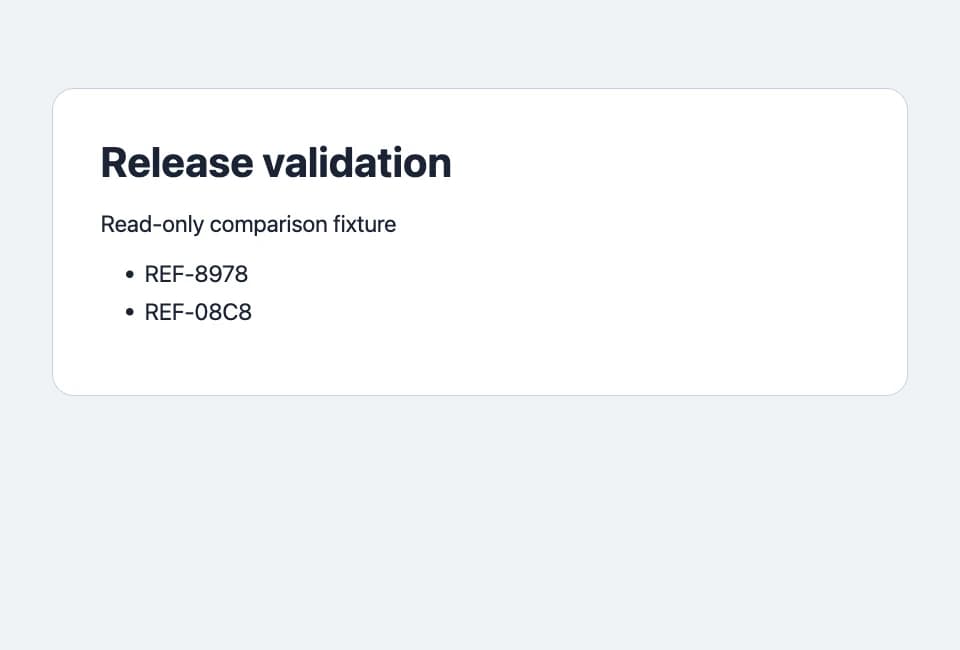
All four runs used the intended tool once, matched the two IDs in the receipt and returned the expected heading and IDs. MCP also recorded initialization, tool discovery and the tool call. The CLI recorded its command and stdout. This exercise compares two surfaces over the same browser and operation. It is separate from the Tabbit CLI benchmark, which uses a broader set of workflows.
What the token counts showed
| Pair and path | Total input | Cached input | Uncached input | Output | Seconds |
|---|---|---|---|---|---|
| 1 · CLI | 49,830 | 24,576 | 25,254 | 61 | 11.55 |
| 1 · MCP | 75,305 | 62,208 | 13,097 | 83 | 12.97 |
| 2 · MCP | 50,085 | 37,376 | 12,709 | 70 | 15.32 |
| 2 · CLI | 50,095 | 37,376 | 12,719 | 57 | 10.79 |
Cached input is part of total input. Subtract it to compare uncached input here. In pair 1, MCP used 25,475 more raw input tokens but 12,157 fewer uncached input tokens. In pair 2, raw and uncached input differed by only ten tokens, in the other direction. CLI finished faster in both pairs. Wall time includes Codex startup, inference and browser execution, so it is no estimate of protocol latency.
The experiment used a single tool and a short output. A long MCP tool catalogue, repeated full-page snapshots or a CLI command that prints everything can change the result. Two pairs do not rank all browser tooling or predict billing. In an independent browser benchmark, a Reddit author also found that the agent and connection changed their token results. Another practitioner measured the difference between broad snapshots and typed operations on a form. These are separate configurations and tasks. Codex field report, snapshot comparison
Decide by host, permissions and evidence
A coding agent with shell access. Use a bounded command when you can specify its inputs and inspect its result. Start with Codex and Tabbit CLI or the browser CLI workflow.
A client that discovers tools. Register the server and give it a narrow set of capabilities. The Codex Playwright MCP setup shows how to verify the server and a real read.
A site with an existing login. Decide which profile may access the page first. Then run a harmless read and verify the result. See how to connect an agent to an existing browser and Claude Code browser permissions.
If you compare your own workflow, save the action receipt and a deterministic outcome. Keep the model, task prompt, browser state and verification rule stable, alternate order, and record failures separately from token usage. Start with a page you can verify by hand. Download Tabbit

FAQ
What is the difference between browser MCP and CLI?
MCP lets a host discover and invoke named tools through a protocol. A CLI runs a local executable with arguments or input. Either can use the same browser engine.
Is CLI always cheaper in tokens?
No. The host, schemas, output detail, steps and prompt cache all contribute. In our two pairs, the higher raw input count switched sides.
Do I need MCP if my agent can run a terminal command?
A narrow CLI command is enough when the host can run it with acceptable permissions. MCP is useful when the host relies on a structured tool interface or needs shared tool discovery.
Does either option automatically preserve sign-in state?
Session reuse depends on the browser, profile and task settings. Check the actual target page and permissions independently of the connection method.
What should a fair comparison measure?
Use the same model, host, browser, page, and success rule. Compare tool calls, cached and uncached input, output, time and the actual page result.