
An agent can fill a web form from Excel when it can read the workbook and reach the authorized form. Give every source row a unique key and map each column to a visible field. Try one row first. After any ambiguous submission, read the destination by key before retrying.
Map the columns and validate input
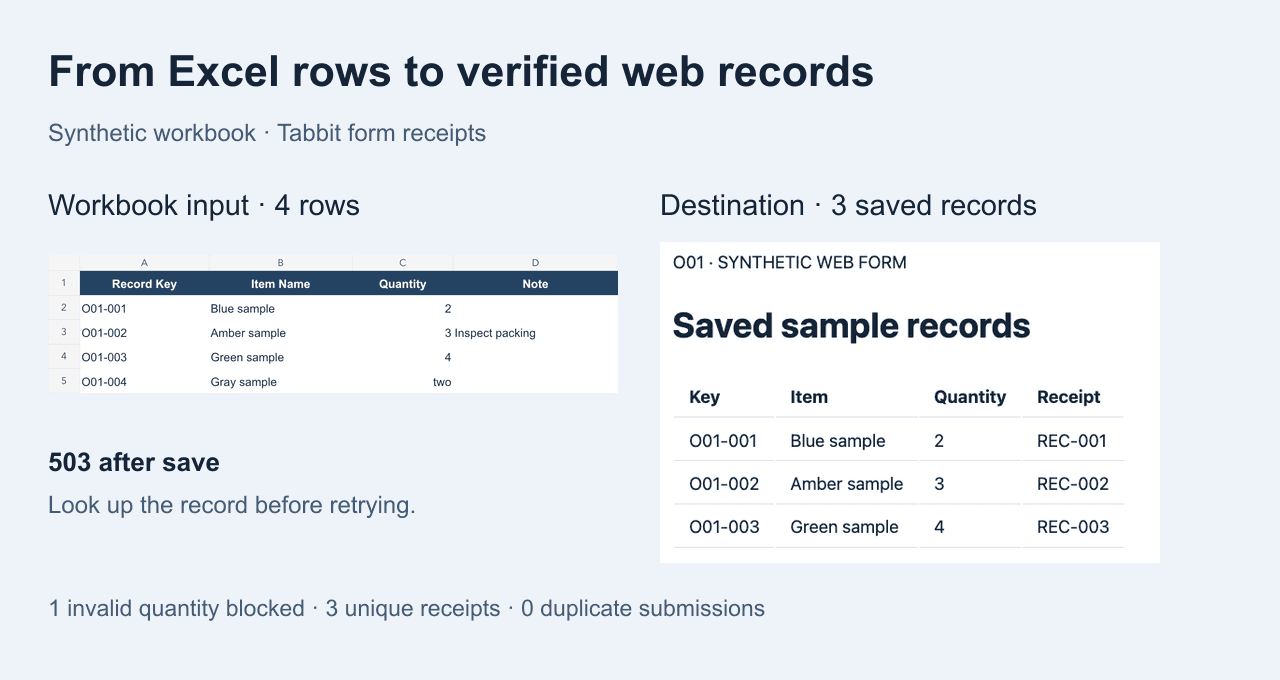
Our synthetic workbook has four rows with Record Key, Item Name, Quantity and Note. Record Key is a text identifier. Quantity must be a positive integer. Note is optional in this fixture, so an empty cell becomes an empty note on create. In an update workflow, define whether a blank means preserve, clear or reject before writing.
| Workbook column | Form label | Rule |
|---|---|---|
| Record Key | Record key | Unique text key |
| Item Name | Item name | Required text |
| Quantity | Quantity | Positive integer |
| Note | Note | Optional on create |
Download the practice workbook · Web table to CSV · Browser for agents
Run one row and verify the saved record
Start in an approved test environment. Check that the form label and input value match for each field. Submit one authorized row and reopen its destination record by key. In our test, O01-001 showed the correct name and quantity, an empty Note, and receipt REC-001. A clicked button is only evidence of the action.
Open the approved test form. Read one workbook row, map its columns to the visible fields, and show the values before submitting. Record the destination key and receipt. On an uncertain response, stop and look up the existing key before resuming.
Codex product listing · Browser agents
Track attempts separately from confirmed results
Keep a row ledger with source key, validation status, attempt count, destination receipt and the next action. For O01-002 the server saved the record but returned HTTP 503 while showing confirmation. The first run stopped and recorded it as uncertain. The error alone did not tell us whether the row was saved.
Power Automate web actions · Browser automation · Agentic browser security
Resume by reading destination state
In a fresh Tabbit task, we checked the existing keys. O01-002 was present with REC-002 and matching values, so it was skipped. O01-003 was absent and eligible, so the resume submitted only that row. O01-004 contained the text two in Quantity and stayed blocked before submission. If the system cannot confirm a disputed row, leave it unresolved for review.
Let an AI agent control a browser · API and browser choices
Reconcile each source row against the destination
Compare key, values and receipt for every confirmed row, then verify counts and a useful total. Four source rows yielded three saved records, one validation hold and total quantity 9. The destination audit showed exactly one submit attempt for each saved key and none for the blocked row. The total complements the row-by-row check.
| Source key | Outcome | Receipt |
|---|---|---|
| O01-001 | Confirmed | REC-001 |
| O01-002 | Recovered after 503 | REC-002 |
| O01-003 | Confirmed on resume | REC-003 |
| O01-004 | Blocked before submission |
Browser agent first-task checklist · Tabbit CLI tutorial
Keep this workflow small at first
Our workbook was exported and reopened, then its values fed a controlled Tabbit script against a local form. The failure was deliberately injected after save. For a live batch, use an approved import or API when it meets the need. If browser submission is required, keep confirmation and reconciliation independent of the agent’s success message.
One Power Automate user had Excel rows in memory but could not reliably map them to individual browser fields. Another thread discussed refreshing forms between records. Both are reasons to check a single row before batching. Reddit Power Automate · Reddit Forms

FAQ
What is the best way to map an Excel row?
Use one stable key and map each named column to a specific form field and type.
How should I handle blank values?
Define the meaning for each field and action. Optional create fields can stay empty. Updates may require preserving the existing value.
Does 503 mean a form was not saved?
Check the destination by key. A server can save a record before the response fails.
How do I resume without duplicates?
Reconcile known and uncertain keys first, then submit only eligible rows that are confirmed absent.
What do I keep for each row?
Keep its key, validation state, attempt count, confirmed destination receipt and next step.
What if I cannot verify whether a row was saved?
Leave it unresolved and ask for a human review or a supported lookup.