
A syntax check can pass while a real user action fails. A browser acceptance check needs one changed route, one test input and a result that the user can see. In our local alert-settings example, the page loaded with HTTP 200 before and after the fix. Only the form submission exposed the problem.
Start the service and confirm the route
Record the host, port and route, then check that the intended process is listening. Use a loopback address for a local fixture. If the agent runs remotely, its localhost belongs to its own environment. Start from the changed route with a fresh task tab and confirm the expected heading and initial state. An HTTP 200 from the homepage cannot establish that the changed settings page works.
| Start with | Confirm |
|---|---|
GET /settings/alerts | HTTP 200 · Alert settings |
| Enable alerts | Save alerts |
POST /api/alerts | HTTP + role=status |
Exercise one complete user action
Turn on Enable alerts and select Save alerts. Capture both the POST response and the text shown on the page. Start waiting for the response before clicking so a fast response cannot be missed. Check the request method and path because unrelated requests may finish at the same time. Use synthetic inputs and skip irreversible actions in production.
Reproduce, change one line and rerun
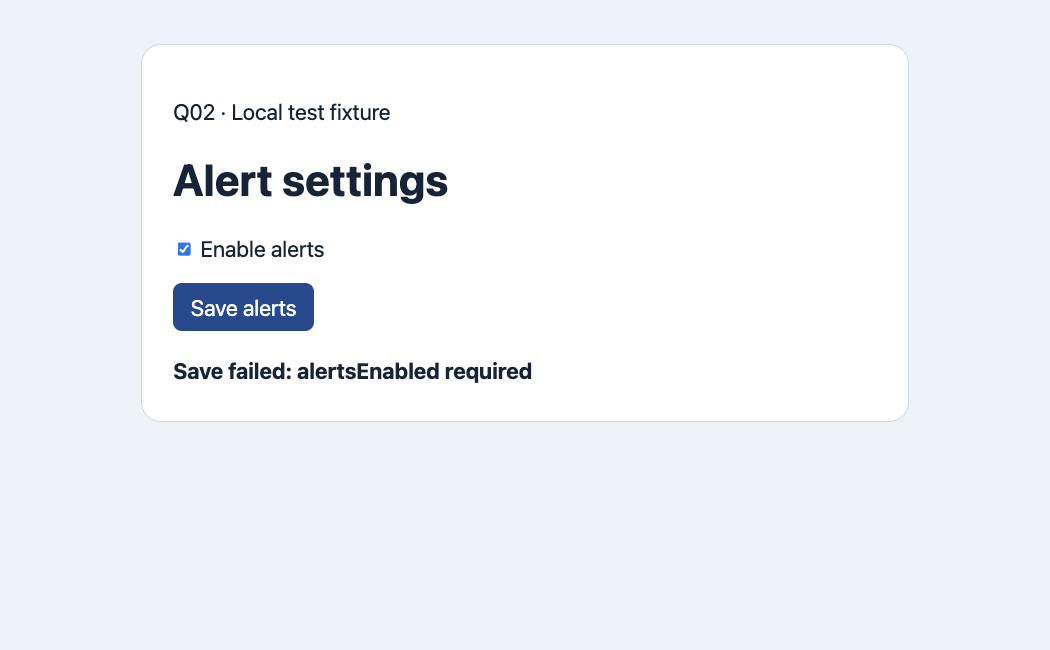
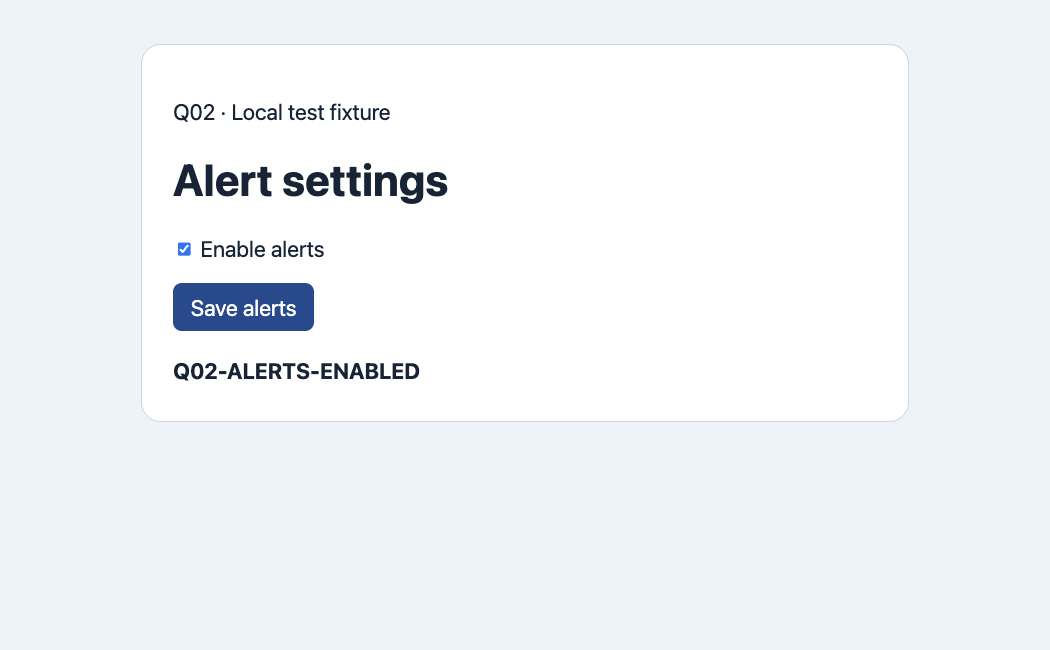
In the first run the frontend sent enabled. The server expected alertsEnabled and returned 422. The page displayed Save failed: alertsEnabled required. We changed just the request field and restarted the fixture on the same port. With the same checkbox and button, the POST returned 200 and the page displayed Q02-ALERTS-ENABLED. The browser check found an interface mismatch that JavaScript syntax checking did not cover.
| Phase | Before | After |
|---|---|---|
| Page navigation | HTTP 200 | HTTP 200 |
| Submit action | POST 422 · enabled | POST 200 · alertsEnabled |
| Visible result | Save failed: alertsEnabled required | Q02-ALERTS-ENABLED |
What belongs in the evidence?
Save the changed route, exact steps, input, expected and observed results, redacted network details and an image when it shows a visible defect. Keep the before and after observations together. This fixture only returns a receipt. We did not measure account persistence or production performance. If the feature promises persistence, reload and separately verify the value from the read endpoint.
One developer asked how to have a coding agent act as a user on a small web app. Another described localhost access and missing rendered CSS as limits in their workflow. These accounts suggest asking for one testable behavior on a reachable route.
Reddit · Cursor · Reddit · BuildWithClaude
What should I do if the page fails to open?
First check the listener from the same environment as the browser. Verify the origin, port and path, and classify connection refusal separately from a page error or a failed user action. Stop if the browser lacks the required network access and record that boundary.

FAQ
How do I start a localhost check?
Record the host, port and route, then check that the intended process is listening. Use a loopback address for a local fixture. If the agent runs remotely, its localhost belongs to its own environment. Start from the changed route with a fresh task tab and confirm the expected heading and initial state. An HTTP 200 from the homepage cannot establish that the changed settings page works.
Which browser action should I test?
Turn on Enable alerts and select Save alerts. Capture both the POST response and the text shown on the page. Start waiting for the response before clicking so a fast response cannot be missed. Check the request method and path because unrelated requests may finish at the same time. Use synthetic inputs and skip irreversible actions in production.
How do I confirm a one-line fix?
In the first run the frontend sent enabled. The server expected alertsEnabled and returned 422. The page displayed Save failed: alertsEnabled required. We changed just the request field and restarted the fixture on the same port. With the same checkbox and button, the POST returned 200 and the page displayed Q02-ALERTS-ENABLED. The browser check found an interface mismatch that JavaScript syntax checking did not cover.
Which artifacts help reproduce a failure?
Save the changed route, exact steps, input, expected and observed results, redacted network details and an image when it shows a visible defect. Keep the before and after observations together. This fixture only returns a receipt. We did not measure account persistence or production performance. If the feature promises persistence, reload and separately verify the value from the read endpoint.
What should I do if the page fails to open?
First check the listener from the same environment as the browser. Verify the origin, port and path, and classify connection refusal separately from a page error or a failed user action. Stop if the browser lacks the required network access and record that boundary.