
A button in a screenshot or snapshot can still be unusable. The browser needs one correct target, a stable and enabled control, and a pointer path that reaches it. If a click fails, read the tool’s first meaningful error, inspect the current page and check what the click was supposed to change.
Check visibility, enabled state, and hit target
Start by checking that your locator matches one control in the intended section. A visible box can be disabled. A control can be enabled but covered by a dialog, spinner, or consent banner. If a tool shows a pointer interception, inspect the element at the intended click point and resolve the legitimate blocker. Leave mandatory permissions and challenge screens to the appropriate operator.
Reproduce three cases on one page
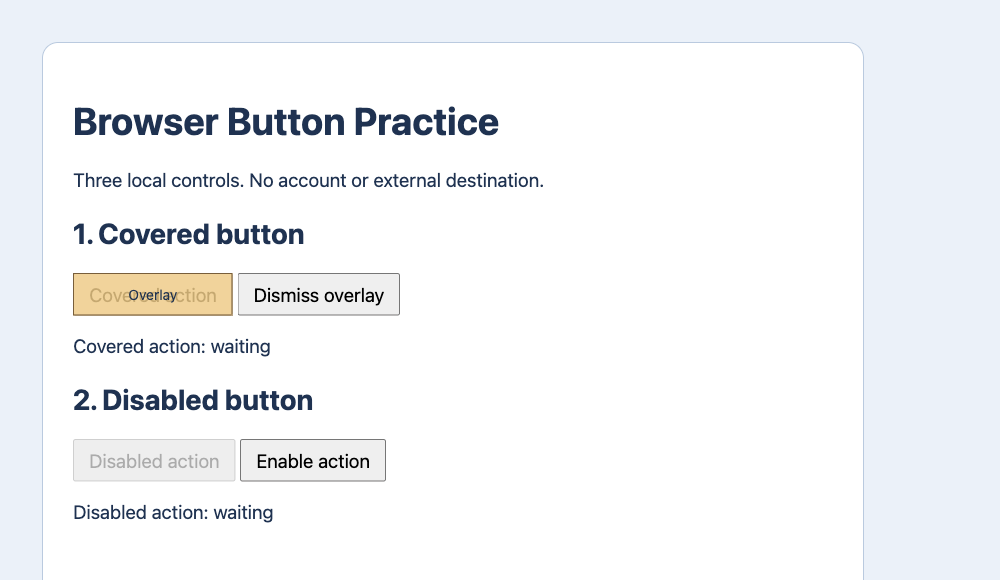
The local fixture has a covered button, a disabled button and a button below the viewport. Tabbit CLI used ordinary Playwright-compatible role locators at a 1000 by 580 viewport. For the covered case, the hit target was the overlay even though the button was enabled and in view. The click timed out with intercepts pointer events and the page still said waiting. Using Dismiss overlay made a fresh click confirm.
A disabled target requires the right precondition
The second button was visible and under the pointer, but its enabled state was false. The click timed out with element is not enabled and the page still said waiting. The fixture’s Enable action control changes its state, after which the same named button confirms. On a real page, satisfy the intended precondition or pause. Overriding disabled can bypass the workflow you are supposed to test.
Offscreen and hidden are different
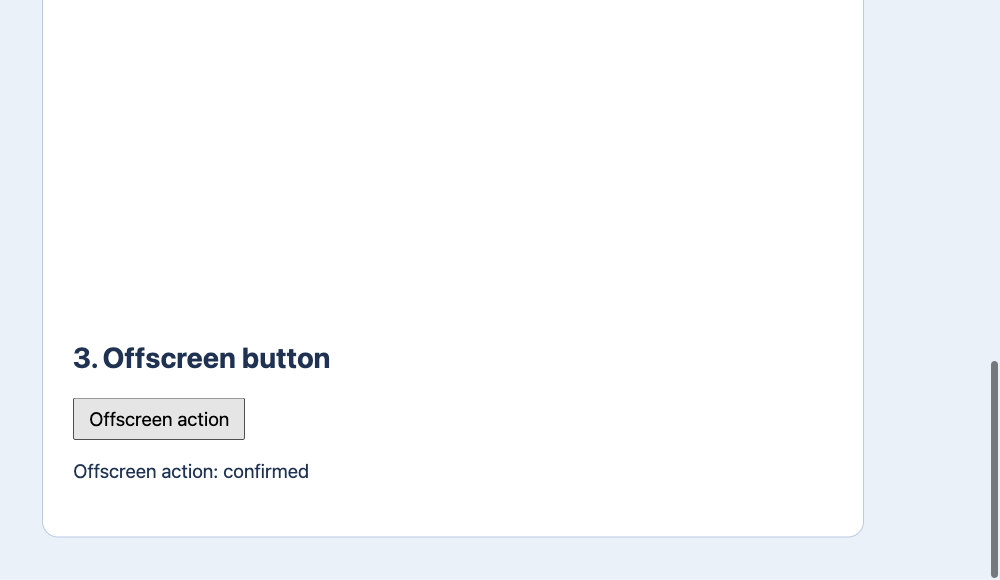
The third button was enabled and initially 1,340 CSS pixels from the top, outside the 580-pixel viewport. The locator click scrolled and succeeded. The status changed to Offscreen action: confirmed. A screenshot coordinate cannot target a button that has not been scrolled into view. A truly hidden control may need a menu or panel opened before any click is possible.
| Step | Expected result |
|---|---|
| Covered | intercepts pointer events → waiting → confirmed |
| Disabled | element is not enabled → waiting → confirmed |
| Offscreen | scroll → confirmed |
Refresh the observation before choosing another target
After a rerender, navigation, dialog change or scroll, refresh a snapshot or screenshot and locate the target again. Scope identical labels to a specific section or row. Confirm the enabled state and the action you expect to take. After the click, verify a unique visible status, destination URL or saved record. If the state is unclear, inspect before retrying, especially for writes.
| Step | Expected result |
|---|---|
| 1 | role + accessible name |
| 2 | click + state |
| 3 | confirmed marker |
What users report when a locator looks right
One r/QualityAssurance user described a unique locator and a correct hit target, but click and attribute read both timed out. That suggests checking the session and page timing before assuming an overlay. A user in r/selenium asked how to tell an offscreen Playwright target from a hidden one. Those situations need different fixes. Use the practice page to see how the error and the page state separate them.
Should I use force when a button will not click?
First find why the ordinary click failed. Force can skip some checks and may hide a problem a user would encounter. Verify the expected page state after any authorized action.

FAQ
Should I use force when a button will not click?
First find why the ordinary click failed. Force can skip some checks and may hide a problem a user would encounter. Verify the expected page state after any authorized action.
Why can a visible button be unclickable?
Start by checking that your locator matches one control in the intended section. A visible box can be disabled. A control can be enabled but covered by a dialog, spinner, or consent banner. If a tool shows a pointer interception, inspect the element at the intended click point and resolve the legitimate blocker. Leave mandatory permissions and challenge screens to the appropriate operator.
How do I fix an intercepted pointer event?
The local fixture has a covered button, a disabled button and a button below the viewport. Tabbit CLI used ordinary Playwright-compatible role locators at a 1000 by 580 viewport. For the covered case, the hit target was the overlay even though the button was enabled and in view. The click timed out with intercepts pointer events and the page still said waiting. Using Dismiss overlay made a fresh click confirm.
Why is the button disabled?
The second button was visible and under the pointer, but its enabled state was false. The click timed out with element is not enabled and the page still said waiting. The fixture’s Enable action control changes its state, after which the same named button confirms. On a real page, satisfy the intended precondition or pause. Overriding disabled can bypass the workflow you are supposed to test.
Can a locator click an offscreen button?
The third button was enabled and initially 1,340 CSS pixels from the top, outside the 580-pixel viewport. The locator click scrolled and succeeded. The status changed to Offscreen action: confirmed. A screenshot coordinate cannot target a button that has not been scrolled into view. A truly hidden control may need a menu or panel opened before any click is possible.