
WebLibre is an independent Android browser built on Mozilla's Gecko engine and Mozilla Android Components. Its main attraction is control over browsing sessions. You can separate accounts with cookie-isolated containers, open individually isolated tabs, route selected browsing through Tor or a proxy, and search your saved browsing material on the phone. The project is open source and still in early access, according to its official repository.
That separation answers a concrete need. In an October Reddit discussion, a user singled out "keeping different accounts and activities separate" as a reason to use WebLibre. Keeping two accounts signed in on a phone is a more useful starting point than asking whether a browser has the longest privacy feature list.
This guide explains the documented features, their limits, and what to check before switching. It is based on official documentation and identifiable community feedback checked on October 21, 2026. It is not an Android hands-on test, a security audit, or a performance benchmark. Documentation may describe capabilities ahead of your installed release.
Key takeaways
WebLibre uses Gecko, and the project describes it as an independent browser rather than a Firefox fork.
A new container does not isolate cookies automatically. Turn on Cookie Isolation when separate accounts and site data matter.
An isolated tab has its own session. A profile separates a broader set of browser data, including history and extensions.
Tor routing, local search, and optional on-device AI solve different problems. None makes all browsing anonymous or offline.
Start with a secondary installation, verify your everyday sites, and choose an update channel before migrating data.
WebLibre at a glance
| Capability | Useful for | Limit to understand |
|---|---|---|
| Gecko and Firefox-compatible add-ons | Browsing with Mozilla's web engine and compatible extensions | Desktop add-ons can depend on interfaces unavailable on Android |
| Containers with Cookie Isolation | Keeping work and personal logins separate | Naming or coloring a container does not enable isolation |
| Isolated tabs and profiles | One-off separate sessions or broader browser separation | Isolated tabs can persist after quitting; isolation is not automatic deletion |
| Built-in Tor and proxy connections | Routing selected browsing through another connection | Account logins and fingerprints can still identify you |
| Local search and tree tabs | Finding saved page text and following research branches | Only saved or indexed content is searchable; a tree does not isolate cookies |
| Optional On-Device AI | Drafting groups and names from open tab titles | May download a model and use storage, processing time, and battery |
The documentation overview describes these capabilities. It also labels the documentation as a preview, so confirm the controls in your particular build.
What makes WebLibre different from Firefox for Android?
WebLibre shares Mozilla technology with Firefox. Gecko handles the web platform, while WebLibre supplies its own browsing interface and features around it. The project explicitly says it is not a Firefox fork. That is a product and codebase distinction, not a claim that it has no Mozilla dependencies. Our browser engine guide explains why sharing an engine does not make two browsers identical.
The features worth examining are containers with optional cookie isolation, per-session routing, separate profiles, a tree view, and on-device retrieval. They give an Android user more decisions about which session a page belongs to and how that session connects. Whether you want those decisions depends on your habits.
A person who uses one account and a few tabs may find the controls unnecessary. A person who repeatedly switches between work and personal accounts has a clear reason to try them. The sensible comparison is the task you need to finish, followed by compatibility and update reliability.
Containers, isolated tabs, and profiles separate different things
The most important detail in the container documentation is easy to miss. New containers start as organizational tools. Separate cookies and site data require Cookie Isolation. Site assignment rules can work even when that switch is off.
Suppose you have two accounts on the same service. Create Work and Personal containers, enable Cookie Isolation for both, and open a new session of the service in each. Sign in separately and check that account A does not appear in the other container. This is a proposed verification workflow, not a test performed for this article. A service can still associate accounts through the information you give it.
An isolated tab is useful for a single additional session without first building a reusable container. Each isolated tab has a separate session, including two tabs at the same site. The tab management guide says isolated tabs survive quitting WebLibre, while private tabs are not restored after an app restart. Do not treat the word "isolated" as a promise that the tab disappears when you close the app.
Profiles have a wider scope. They separate bookmarks, history, logins, extensions, settings, and tabs. Use a profile when you need a separate browser setup. Use a cookie-isolated container when you want separate site sessions inside a setup. The general distinction between profiles, workspaces, and tab groups also helps avoid confusing visual organization with data separation.
Strong privacy defaults need a compatibility plan
The privacy overview lists strict tracking protection, DNS over HTTPS, HTTPS-only protection, Global Privacy Control, tracking-parameter removal, and site isolation among the defaults. These controls address different parts of browsing. DNS encryption protects lookups; it does not hide every destination signal. Global Privacy Control communicates a preference; it does not force every site to comply.
Try important sites before tightening additional settings. Check sign-in, embedded media, file downloads, and any redirect flow you rely on. If something breaks, change one relevant setting or site exception, then test again. Disabling every protection at once makes the cause harder to identify. Our guide to privacy protection breaking websites explains that troubleshooting approach.
Local access is a separate issue. A person who can open your unlocked profile may still see its history and signed-in pages. A profile lock should not be interpreted as disk encryption. The release notes explicitly distinguish profile passwords from encrypted backups.
Built-in Tor changes the route, not the account you sign in to
WebLibre includes a Tor connection without requiring a separate Tor app. Its Tor guide describes routing regular browsing, private tabs, isolated tabs, or selected cookie-isolated containers through it. For a reusable research container, the documented pattern is Cookie Isolation, Tor as its Proxy Connection, and Container-Based Routing.
That allows a normal connection for everyday pages and Tor for selected browsing. The practical costs include slower pages, site challenges, and services that reject Tor exits. Selecting Tor does not make downloads trustworthy or stop a site from recognizing the account you use.
The built-in proxy client also supports protocols including SOCKS, HTTP, WireGuard, and Shadowsocks. A proxy changes who handles the traffic. Its operator and transport still matter. The project's threat model separates network privacy, website tracking, and access to your phone for this reason.
Tor routing inside WebLibre is not evidence of equivalence to Tor Browser's complete configuration or anonymity properties. This article does not verify that equivalence. If that is your requirement, evaluate it separately rather than inferring it from a Tor switch.
Extensions and tree tabs add everyday utility
WebLibre supports Firefox-compatible extensions through an in-app store, custom collections, and local .xpi installation. Its extension documentation describes uBlock Origin onboarding and controls for installation, updates, permissions, and filter lists. Start with the add-ons you actually need and check whether each supports Android.
A desktop extension may install yet have missing functions or an unusable small-screen interface. A familiar extension name does not prove feature parity. Our extension compatibility guide provides broader background, although Chromium's Manifest changes should not be assumed to explain a Gecko add-on problem.
List, grid, and tree views offer different ways to navigate tabs. Tree view records parent-child relationships, which helps when one research page leads to several sources. It organizes a link trail; it does not create a separate cookie context for every branch. If the problem is simply too many tabs, start with the view and cleanup controls before adding profiles or routing rules.
Local search keeps retrieval on the phone
The address bar can search tabs, bookmarks, history, and saved feed articles. With the local index, it can also retrieve saved page text. That is useful when you remember a sentence but not the title. It addresses a familiar problem with searching browser history and bookmarks.
The local search documentation says the content index is enabled by default, while indexing private tabs is off by default. You can exclude containers, clear the index, and control what appears in the results. Turning indexing off stops further indexing but does not delete existing entries. Use Clear when deletion is the goal.
Local retrieval does not make internet search local. Enabling external autocomplete can send partial queries to a suggestion provider. Submitting a web search sends the query to the chosen search engine. A bang routes a query to a selected website, which still receives it. Those boundaries matter more than a broad "your data never leaves" slogan.
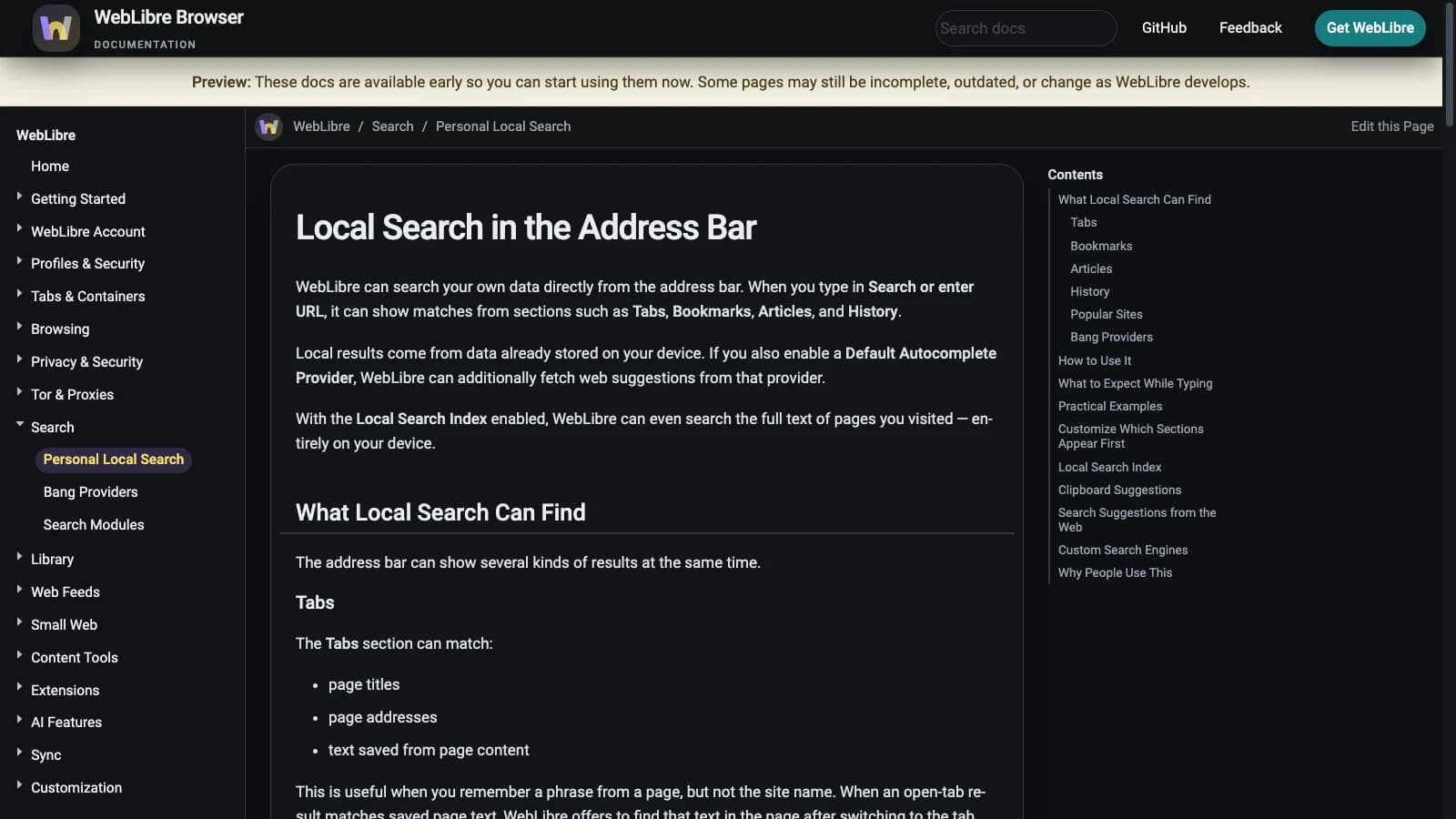
Image source: WebLibre documentation, licensed under CC BY 4.0. Screenshots were converted to WebP; their text was not changed.
Optional local AI suggests tab groups
WebLibre's On-Device AI documentation describes a limited, practical task. A model on the phone uses open tab titles to suggest containers and names. You review the drafts before WebLibre creates them or moves tabs.
The feature is optional. The documented control is Settings > Web Content > On-Device AI. First use may require a model download, followed by local storage and processing costs. You can leave it off if manual grouping is sufficient. The documentation also describes clearing ML Downloads under Advanced settings to reclaim model storage.
This supports a tab-organization claim. It does not establish a general chatbot, page-reading agent, or autonomous browsing workflow. On-device translation is another documented feature with its own model downloads. Check the language support and controls in your installed version rather than treating every use of AI as the same capability.
Download WebLibre and choose an update channel
The official installation instructions require Android 8.0 or newer and recommend Android 13 or newer. The project warns of possible visual issues on Android 12 and older. Most current phones use an arm64-v8a APK; verify the architecture if downloading directly.
The supported routes are GitHub Releases, F-Droid, and Google Play. On October 21, the visible GitHub list began with v0.40.0-alpha-8, marked Pre-release. F-Droid recommended 0.30.0. Those are channel snapshots, not interchangeable latest-version claims.
F-Droid builds and signs its own APKs. Its signing key differs from the GitHub and Play builds, so switching between those distributions requires uninstalling the existing app. That removes its app data. First create an encrypted WebLibre profile backup outside app storage and verify it. Our browser migration backup checklist covers the broader data categories worth checking.
The browser and built-in privacy controls are free, according to the repository. Optional Supporter services, including WebLibre Search and settings sync, are separate. Do not confuse the personal on-device search index with a hosted search service.
Who should try WebLibre?
Community reports show why a device check matters. In a September discussion, a commenter described the interface as too cluttered for common actions. A June user reported sluggishness on an underpowered phone. The October appreciation post described good performance. Different dates, builds, and devices prevent a universal speed conclusion.
| Your main need | Suggested starting point | Check before committing |
|---|---|---|
| Two accounts on the same site | Two containers with Cookie Isolation | Each session stays separate through redirects and external links |
| A one-off extra session | An isolated tab | Its persistence and cleanup match your expectations |
| Separate histories and extensions | Separate profiles | Switching, backup, and lock behavior work on your phone |
| Research branches and old page text | Tree view plus local search | You can find relevant saved content and control index retention |
| Selected browsing through Tor | A cookie-isolated container with Tor routing | Connection state, site compatibility, and acceptable latency |
| A minimal browser with little setup | Try WebLibre alongside your current browser | Opening, closing, and returning to tabs feel comfortable |
WebLibre is worth evaluating if Android session separation is a recurring need and you are willing to manage an early-access browser. Its documentation gives a concrete reason to try it, but a feature list cannot establish the result on your phone. Keep your current browser available, test a normal day of browsing, and check the update path. The browser selection checklist can help turn those observations into a decision.
Start with one cookie-isolated container and one everyday site. Confirm the separation you wanted before moving the rest of your browsing.

FAQ
Is WebLibre free and open source?
The browser and built-in privacy controls are free, and the project publishes its source under the GNU AGPL v3 license. Optional Supporter services such as WebLibre Search and settings sync are separate from the local browser features.
Is WebLibre a Firefox fork?
The project describes WebLibre as an independent Android browser built on Gecko and Mozilla Android Components, not a Firefox fork. It shares Mozilla technology while providing its own interface and browsing features.
Do WebLibre containers isolate cookies automatically?
No. A new container organizes tabs and site assignments, while Cookie Isolation must be enabled to separate cookies, logins, and site data. Check that setting in every container where account separation matters.
Does built-in Tor make WebLibre equivalent to Tor Browser?
A Tor routing option does not establish equivalence to Tor Browser's complete configuration or anonymity properties. Signed-in services can still identify your account, and this guide does not verify anonymity or network leaks.
Can WebLibre run every Firefox extension?
WebLibre supports Firefox-compatible add-ons, including installation through its in-app store and local .xpi files. Some desktop add-ons depend on unavailable interfaces or do not work well on Android, so compatibility must be checked individually.
Can I turn off WebLibre's local AI?
Yes. The documented setting is Settings > Web Content > On-Device AI, and tab-group suggestions are optional. Downloaded model storage can be cleared through ML Downloads under Advanced settings.