
ruyiJS runs JavaScript from Python using Firefox components, with a persistent Context, browser Web APIs and native networking. Its defining limit matters as much as its feature list: the documented Windows x64 package has no window and no full page layout or rendering. It is relevant when your job is executing a script or inspecting its result, rather than checking what a person sees. The official repository describes that scope.
Browser automation often means something broader. In a Reddit discussion about local AI agents, kvyb asks for reliable control of JavaScript-heavy sites, authentication, pagination and forms. That is a useful requirements list, not a review of ruyiJS. Later in this guide, Tabbit Browser illustrates a different approach for tasks that need an actual browser and an existing login.
This is a documentation-based explanation checked on October 28, 2026. No ruyiJS installation, performance comparison or anti-bot test was performed. PyPI's 0.1.0 page records October 22, while the GitHub repository was created October 26. The repository date should not be presented as the first package release. At this research date, the README and current PyPI page show 0.1.6.
Key takeaways
ruyiJS is a Python-controlled JavaScript and Web API environment. It does not provide a complete rendered Firefox interface.
The README identifies SpiderMonkey and Necko as its JavaScript and networking components. Its Firefox 158 attribution is the project's claim, not an independently audited engine build.
Installation targets Windows x64 and Python 3.10 or later. Check deployment compatibility before evaluating any features.
Persistent state, offline resources and an explicit clock make script replay a plausible use case. Compatibility still needs validation against your actual script.
Choose by the artifact you need: a computed value, a rendered page, or a browser task completed under a user's supervision.
ruyiJS at a glance
| Dimension | Documented behavior | Practical boundary |
|---|---|---|
| Host | Python 3.10+, Windows x64 | No documented native macOS or Linux package |
| JavaScript | SpiderMonkey; state persists within a Context | Browser-component reuse does not prove complete Firefox compatibility |
| Networking | Necko, fetch/XHR, per-Context proxy | Live requests still depend on the target and network |
| Page environment | DOM and bounded Web API subsystems | API availability does not imply complete layout or rendering |
| Replay | put_resource(), logical clock, logs | Capture the inputs and advance scheduled work explicitly |
| UI testing | No full page renderer | Use a rendered-browser tool for screenshots and visual assertions |
Source: project README. For the underlying distinction between a JavaScript engine and a rendering engine, see our browser engine explanation.
What the Context actually does
The documented architecture is Python → isolated Context process → SpiderMonkey, Web APIs and Necko. Each Context keeps a JavaScript world alive across evaluations. You can set input data, evaluate a function and receive a result without building a visible browser window.
That changes the unit of work. A browser test may ask whether a button is visible and clickable. A ruyiJS task may ask what a function returns after a particular script has loaded. Both involve browser technology, but they verify different things. Our agentic browser guide explains the extra planning and interaction layer an agent brings. The ruyiJS documentation does not establish that installing the package supplies an LLM planner.
The README lists DOM queries, Canvas-related APIs, Workers and iframes. Read those as a description of implemented subsystems. A script can observe a DOM without the runtime calculating a complete page layout. An API with a familiar name also needs behavioral checks for the exact inputs your application uses.
Start with a small, offline example
On the documented Windows x64 environment, use a separate Python environment and install the package:
python -m venv .venv
.venv\Scripts\activate
python -m pip install ruyijs==0.1.6
Pinning the version makes the evaluation easier to repeat. These are documentation-derived commands, not an installation log from this article. Confirm the current package and platform on PyPI before running them.
Begin with arithmetic and persistent state. This checks the basic Python-to-JavaScript path without making requests to somebody else's website:
from ruyijs import Context

with Context() as context:
    context.eval("let count = 40")
    print(context.eval("count += 2"))
The documented expected result is 42. Next, load HTML and a resource you control:
from ruyijs import Context

with Context() as context:
    context.put_resource("https://example.test/app.js", "window.answer = 42")
    context.load_page("https://example.test/", '''
        <script src="/app.js"></script><p id="message">hello</p>
    ''')
    print(context.eval("document.querySelector('#message').textContent"))
    print(context.eval("answer"))
The 0.1.0 documentation supplies this pattern and describes expected outputs hello and 42. load_page(url, html) takes both a base URL and supplied HTML. Do not confuse it with navigate(url), which the current README documents separately as top-level navigation. Relative resource resolution is part of why that base URL matters.
State, timing and network requests need explicit handling
Apply context.configure_fingerprint(profile) before the first page script runs. The validated profile can include Navigator, Screen, viewport, timezone and locale settings. Configuring these values does not establish that a target site will accept the session.
Values persist within a Context, so repeated evaluations are not independent tests. Create a new Context when a task requires a clean JavaScript world. Keep live JSObject and JSFunction references inside the lifetime of their owning Context; the PyPI documentation says those references expire when it closes.
The host also drives scheduled work. The documented logical-clock example configures a clock, schedules a timer and calls advance(10). In system-clock mode, advancing can wait in real time. For network promises, a single short advance is not proof of completion. Use a bounded wait condition, capture errors and inspect the result before accepting it.
put_resource() lets a supplied response stand in for a fetched resource. That makes an offline fixture useful for isolating script behavior. It does not turn an incomplete capture into a full replay of every server dependency. Record the HTML, script versions, configuration and expected output together.
Network logs can help distinguish a JavaScript error from a request that failed. Our website compatibility troubleshooting guide describes why those layers should be checked separately. Use a small known fixture before introducing proxies, authenticated pages or external dependencies.
Where the limits should decide your choice
The lack of full rendering is a firm boundary. A workflow that depends on visible element geometry, screenshot comparison or a human reviewing an on-screen state needs a tool that renders the page. Merely setting a viewport profile does not add a renderer.
Platform support is another early filter. The README says Windows x64, and PyPI specifies Python 3.10+. A Wine navigation fix in the changelog should not be expanded into a native Linux support claim. This article's macOS research environment did not provide a documented native installation target.
Treat the repository's anti-bot examples as maintainer-provided demonstrations. They are not an independent benchmark, an assurance about a future site response, or proof that every challenge can be handled. No success rate or speed advantage is established here. The same caution applies to star counts: attention does not measure compatibility or reliability.
The repository states MPL-2.0 and also includes a courtesy request concerning redistribution and commercial use. Read the current LICENSE and project notice before incorporating it into a distributed product. This guide does not resolve that request's implications for a particular deployment.
A browser workflow with Tabbit
Suppose your actual task is to open several documentation pages using your existing browser session, compare their requirements and return a table with source links. The useful output is a checked comparison, not a JavaScript function result. Tabbit's domestic v1.13 release notes document CLI support for code agents such as Codex, Cursor and Workbuddy to operate the browser with shared login state.
After configuring the integration supported by your client, give the agent a constrained, read-only task. The following is an illustrative instruction, not a claim that this exact run completed:
Open the documentation pages I provide in Tabbit.
Compare supported platforms, installation requirements and rendering support.
For each claim, include the source URL and the visible version or date.
Mark missing information as unknown. Do not submit forms or change account settings.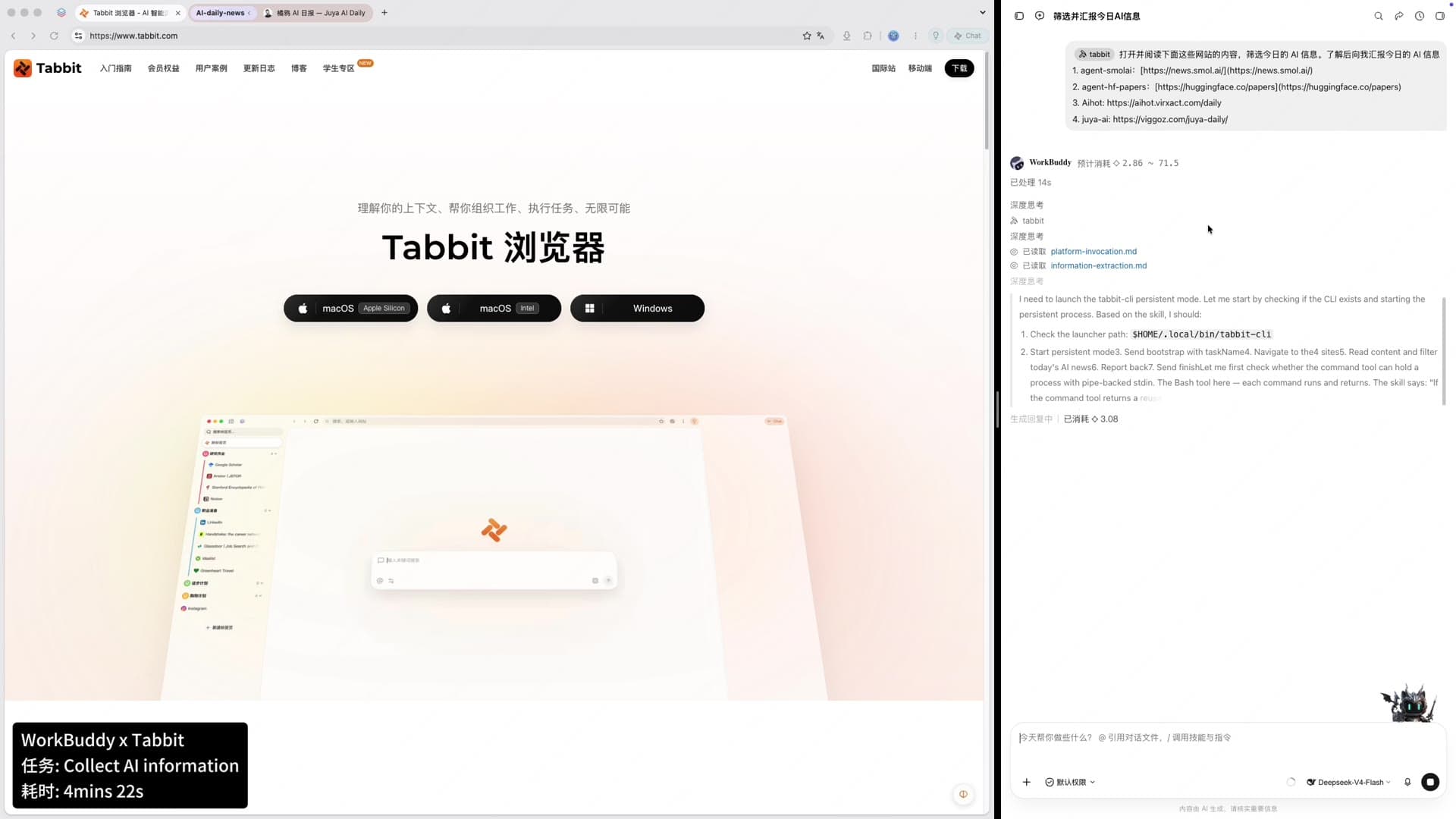
The Tabbit workflow article gives broader examples, and the Tabbit product explanation describes the browser's role. This approach requires a configured integration, the relevant website access and review of the returned evidence. The cited release notes describe the domestic desktop product; check regional availability and client support rather than assuming every edition or mobile client has the same CLI features.
Session reuse also has limits. In the Firefox automation discussion, Deep_Ad1959 describes stale sessions and one-off consent dialogs causing flaky runs. That is an anecdote about browser automation, not a Tabbit or ruyiJS test. Sharing a login can remove a setup step; it does not remove expired sessions or unexpected page states. Our browser profiles guide helps clarify what belongs to a browser session.
Tabbit does not expose ruyiJS's Python Context API merely because both can support automation. No evidence here shows that it embeds ruyiJS, reproduces its fingerprint controls or runs its challenge examples. Conversely, ruyiJS's isolated process does not automatically inherit the pages and logins in a user's Tabbit window.
Choose by the result you need
| Your task | Starting point | Acceptance check |
|---|---|---|
| Execute a known script on Windows and return data | Evaluate ruyiJS against an offline fixture | Correct value, explicit timing, repeatable input |
| Read a public endpoint that already returns useful data | Keep the existing HTTP client | Correct response without adding a browser runtime |
| Screenshot a page or test responsive layout | A complete rendered-browser test tool | Actual pixels, geometry and interaction assertions |
| Research pages in an existing user session | A configured browser workflow, including Tabbit where supported | Source links, correct session and reviewed output |
| Operate an unattended cross-platform production service | Evaluate platform support and operations first | Supported hosts, recovery, monitoring and task-specific tests |
The browser selection guide starts from recurring tasks. The same principle applies here. Keep a second browser for controlled evaluation if you want to try a different workflow without migrating your daily setup.
The verdict is narrow: ruyiJS is a candidate for Python-driven script execution and replay on its documented platform. It is not established as a general replacement for rendered UI automation. Start with one owned fixture and a known expected result. If the requirement is supervised work in real pages, evaluate Tabbit's configured browser integration on that task and inspect the sources it returns.

FAQ
What is ruyiJS?
ruyiJS is a Python package for running JavaScript in isolated processes using Firefox components and a browser-like Web API environment. The documented package targets Windows x64. It has no browser window or full page rendering.
When was ruyiJS first released?
PyPI records version 0.1.0 on October 22, 2026. The current GitHub repository was created on October 26, so its creation date is not the package's first release date. The README and PyPI show 0.1.6 at the October 28 research date.
Does ruyiJS work on macOS or Linux?
The official installation requirements specify Windows x64 with 64-bit Python 3.10 or later. A Wine-related fix appears in the changelog, but it does not establish native Linux or macOS support. No cross-platform installation was tested for this article.
Can ruyiJS replace Playwright for screenshots and UI tests?
Its documentation explicitly excludes full page layout and rendering. Do not choose it for screenshots, visual regression tests or layout-dependent clicking. Running page scripts and reading a DOM are different requirements from verifying a rendered interface.
Does ruyiJS automatically bypass every anti-bot system?
No universal success claim is supported. The repository supplies named examples and reports results, while warning that live outcomes depend on the network and site response. This article did not execute those examples or measure bypass rates.
How does Tabbit differ from ruyiJS?
Tabbit is a user-facing browser with AI task features. Its domestic v1.13 release notes document CLI integration for code agents to operate the browser using shared login state. That is a browser workflow, not a replacement for the ruyiJS Python API or its embedded Firefox components.