
The browser is the app we spend the most time with every single day.
We use it to look up information, write documents, reply to messages, check dashboards…
Or watch YouTube, browse Xiaohongshu, read on WeChat, or even play games…
From childhood to adulthood, we’ve done just about everything inside a browser.
In 2006,
my family bought a second-hand computer from an internet café.
My brother and I opened Internet Explorer, typed in 4 3 9 9 . c o m, hit Enter, and kicked off a happy afternoon.
In 2016,
college entrance exam results were released. I visited zhihu.com in Chrome, and with advice from strangers on Zhihu, I filled out my university preferences.
That final click on the “confirm” button felt especially heavy.
In 2026,
I’m using the Tabbit browser to get a lot of work done.
Every morning, I walk into the office with a cup of coffee.
I open my computer, and Tabbit is already there.
I type 「/Yesterday’s AI News」 and hit Enter.
— I start eating my breakfast
— Tabbit opens dozens of web pages
— I take a sip of coffee
— Tabbit finds relevant websites
— I finish my breakfast
— Tabbit has already gathered all the results.
— I click through some links
— then ask Tabbit to summarize all the key information. Everything that happened in the AI world yesterday is now at my fingertips.
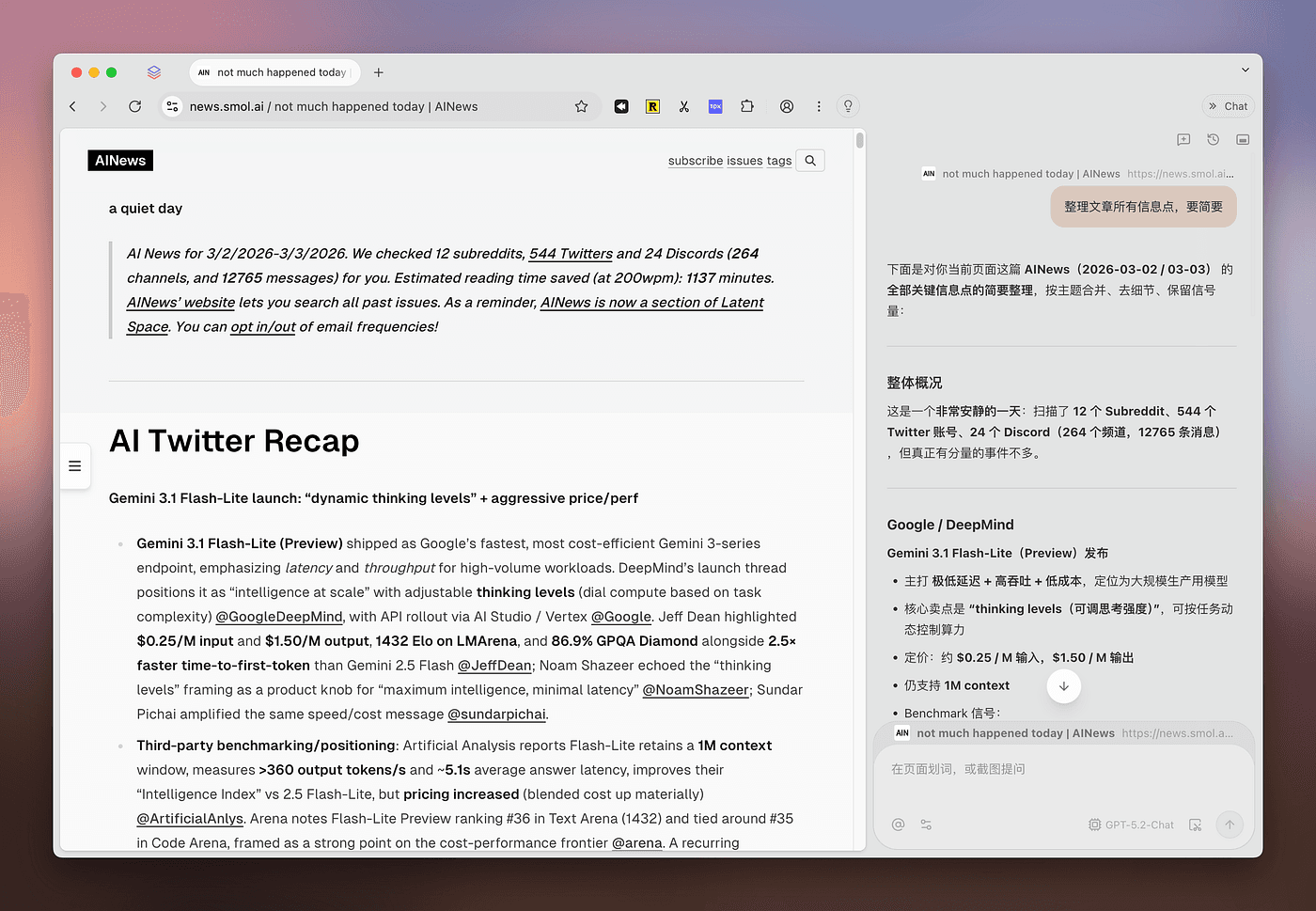
In the AI era, what should a browser look like?
Tabbit browser gives us an answer.
Tabbit helps you work. If your daily job involves staring at an admin dashboard or scrolling through Amazon product pages, Tabbit can quietly handle many repetitive tasks in the background, following your instructions, freeing up your hands.
Tabbit helps you think. If you’re a student or a knowledge worker — yes, product managers count too — Tabbit can help you do massive amounts of research every day, summarize articles, and help you understand complex concepts. Tabbit is a huge boost for knowledge workers.
Tabbit looks great: On top of being useful, Tabbit is also a beautiful browser.
Vertical sidebar + automatic tab organization: a blessing for people who never close tabs;
Use script mode to customize any webpage — you can even raise a lobster 🦞 inside Tabbit;
Custom colors and transparency to match your personal style;
As a member of the Tabbit browser product team, today I want to share, from the perspective of both a product manager and an AI tech blogger.
I’ll introduce this browser built for the AI era, share my best practices with Tabbit, and talk about the philosophy behind it.
The Browser Is a Window the Internet Opens for Us.
In the Web 1.0 era, navigation sites like hao123 were the main gateway to the internet. Back then, there wasn’t that much content online, and navigation sites were enough for content distribution.
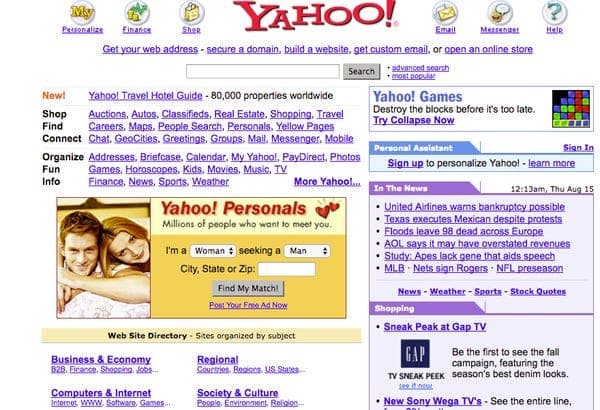
But as online content exploded, a single page crammed with links could no longer satisfy content distribution needs.
Enter Web 2.0. Google brought us search engines and keyword ads, and unified the world with Chrome. A minimal search box replaced dense lists of website names.

Now, in the AI era, AI-generated content is causing the total amount of information on the internet to grow even further.
At the same time, AI itself has become a new channel for acquiring information. People no longer rely solely on search engines; instead, they ask AI directly.
In this new Context & Environment,
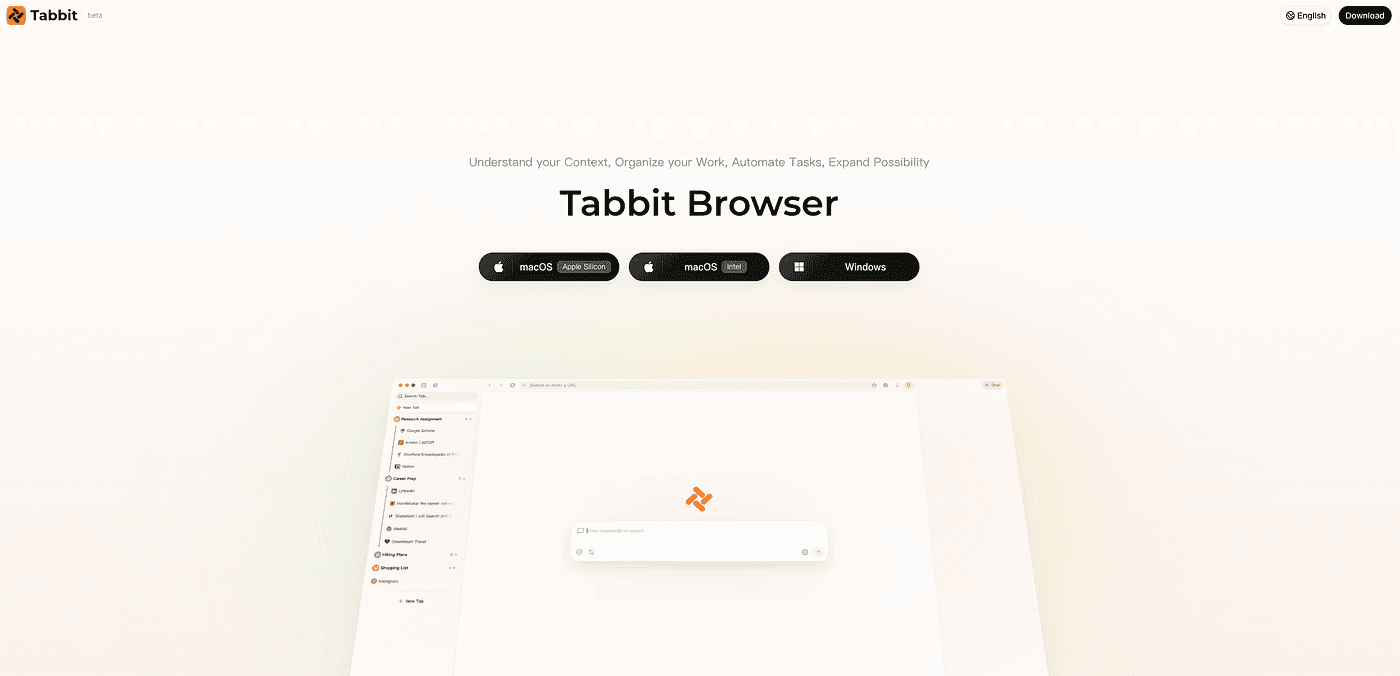
we designed a new browser for the AI era — Tabbit Browser.
Context
With AI, the number of websites we visit every day has multiplied.
Dozens of tabs are open at once, quickly filling up the bookmark bar until only tiny icons remain.
AI has caused the total amount of information on the internet to grow exponentially.
That means we have more information to process every day, and it’s easier to feel FOMO.
Fortunately, while AI has increased the total volume of information, it has also increased our ability to process it.
Tabs
In Tabbit, we’ve designed many new features to handle ever-growing context.
To deal with dense clusters of tabs, we built:
Tab Sorting: Sort websites by domain or open time, instantly bringing order to chaos.
Vertical Sidebar: The vertical sidebar lets you see page titles clearly even when you have many tabs open.
Smart Tab Organization: Automatically groups websites based on their content.
Omnibox
At the same time, we wanted a new input box that could connect all your context while also connecting to the internet.
That’s why we built the Omnibox. In Tabbit’s input box, you can @search queries, @tab groups, @webpages, @your bookmarks, even @local files — everything is accessible in one place.
And not just on the home page — on any webpage, you can open the sidebar and connect your context to AI anytime, anywhere.
Chat with Page
On any webpage, you can ask anything.
For example, quickly summarize an article’s key points.
Screenshot / Text Selection
When reading an article and you encounter something you don’t understand, just select the text or take a screenshot and let AI explain it.
Chat with Group
Put related tabs into a group, and ask questions across all of them at once.
Search engines used to be the gateway to the internet, and browsers were the window the internet opened for us.
Now, Tabbit is not just a gateway to the internet, but a hub that connects all your context.
In the AI era, Tabbit is this new window.
Tabbit: “If I were a window, I’d probably be a stained-glass window — beautiful and functional.”
Environment
Besides being our portal for browsing and acquiring information, the browser is also our environment for processing information.
In the browser, we:
Use Notion to write
Use Slack to chat
Use various admin dashboards to query and configure data
As large language models advance, AI is shifting from the Chat paradigm to the Agent paradigm.
Agents aren’t just for conversation and information processing anymore. They can directly help us work.
And the browser is an excellent runtime environment for Agents.
Tabbit gives Agents the power to control the browser, letting them operate it on your behalf.
Agent
In Tabbit, we’ve introduced “Agent Mode.”
In Agent Mode, AI can control the browser to help you complete tasks.
Here are some of my personal use cases:
01 Targeted Information Acquisition
If DeepResearch is great for official, broad research, Tabbit excels at targeted data acquisition according to your specific requirements.
It can fetch data from private sources — for example, I let Tabbit log into our data platform, write SQL queries, and export data for me;
or from public sources — for example, every day I have Tabbit check the latest Product Hunt leaderboard and, based on my user profile, recommend products worth paying attention to.
Agent Mode Prompt:
# Role
You are a professional internet product intelligence assistant. Your goal is to visit Product Hunt
# Page Description
- Navigate to https://www.producthunt.com/leaderboard/daily/2026/3/8/all (replace the date with yesterday's date)
- Page title shows "Best of Product Hunt"
- The page uses infinite scroll; it initially shows about 7 products, so you need to keep scrolling to load all products
- Each product card contains: product name, one-sentence description (Tagline), category tags, vote count, etc.
- The page may contain promoted products (marked "Promoted"), which should be distinguished from regular products
- Only check today's products, not previous dates
# Task Steps
1. **Visit Product Hunt**
- Navigate to https://www.producthunt.com/leaderboard/daily/2026/3/8/all (replace date with yesterday)
- If you encounter a Cloudflare security check, wait for it to complete automatically (usually 5-10 seconds)
- If verification takes too long (over 15s), reload the same URL
2. **Load All Today's Products**
- Locate the "Top Products Launching Today" section
- Scroll down the page with the mouse wheel, 1000 pixels at a time
- Repeat scrolling until 20-40 products are loaded (usually 4-6 scrolls)
- If you see "See all of today's products", click this button to load all of today's products
- Confirm all products are loaded: stop scrolling when the product count stops increasing
3. **Extract Product Information**
- Use the page content extraction tool to get the full page content
- Identify all product entries from the extracted content
- For each product, record: rank, product name, one-sentence description (Tagline)
4. **Analyze Product Relevance**
- Classify each product according to my interest criteria:
- **High Interest**: AI Agent platforms/tools, Chrome browser extensions, AI browser-related products
- **Medium Interest**: AIGC tools (image/text generation), interactive products
- **Low Interest**: Consumer apps unrelated to AI browsers/development, MarTech SaaS, programming assistants
- Translate each product's Tagline into {{output language}}
- Write a short recommendation reason for each product, explaining how it matches my profile
# Output Format
Please output in Markdown table format with the following headers:
| Rank | Product Name | Translated Tagline | Interest Level | Recommendation (Short match to my profile) |
|------|--------------|--------------------|----------------|--------------------------------------------|
| 1 | ExampleProduct | Translation here... | 🔴 High | This is an AI-powered Chrome extension dev tool... |
| ... | ... | ... | ... | ... |02 Free Yourself from Repetitive Work
Internet industry professionals spend a lot of time dealing with various backend systems.
Now, much of that repetitive work can be handed over to Tabbit.
Approval workflows: Daily approval processes and tickets — just describe the path and conditions clearly, and let the Agent handle it for you.
E-commerce management: You can use the Agent to list/delist products, edit product info, and reply to customer reviews.
Cross-border product sourcing: Automatically open multiple independent sites and Amazon, search for products in a category, and compare product details.
Because this backend data is sensitive, I won’t include screenshots here.
Just enable Agent Mode in Tabbit’s input box and describe your needs.
Be bold — hand over those repetitive daily tasks to the Agent.
Compared to flashy demo cases like booking flights or comparing e-commerce prices,
I recommend letting the Agent actually help you accomplish things that matter.
As digital-life influencer Kazik once said: “Automate at least one small repetitive task every week. Use AI to save time and sharpen your thinking.”
03 Social Media: Auto-Scroll Twitter, Post to Xiaohongshu
With Tabbit, I often let it scroll through Twitter for me.
Enable Agent Mode and enter this prompt:
Help me scroll through 50 tweets.
Note: Twitter uses dynamic loading, so you need to scroll the page in a loop and read content until you reach 50 tweets.
Prefer AI-related news, then give me a summary brief.
The Agent will start working in the background while you handle other things — it won’t block your browser.
You and the Agent work in parallel.
For example, right now I’m writing this article while the Agent is still scrolling Twitter.
After a while, the task completes and delivers a report.
It’s not just for gathering information — it can also publish content.
I used Tabbit to post on Xiaohongshu.
After sending the prompt, Tabbit handled everything else on its own.
An Agent taking control of the browser is just the beginning.
To be honest, Agent Mode in Tabbit today still has issues with speed and stability.
Using LLMs as a comparison, today’s Agent capabilities are roughly at the level of GPT-4 in late 2022.
The more detailed your prompt, the better Agent Mode performs.
Explain the steps one by one, and the Agent will execute more reliably.
We’ll keep optimizing to help the Agent accomplish more tasks and work faster.
Skills
Similar to Claude Code’s skills, the essence is the reuse of successful experiences.
Inside Tabbit browser, we designed a similar feature called 「Tips」
Prompt & Agent Tips
You can save frequently used prompts as Tips.
Later, just type / in the input box to summon them.
If you’re using Agent Mode, you can save the execution result as a Tip. Tabbit will analyze the process, extract variables, and make your next execution faster.
For example, the “scroll 50 tweets” task we mentioned earlier — after saving it as a Tip, you can control the Agent’s parameters at execution time.
Magical Scripts
Beyond prompts, we also provide a useful and fun “Script Mode.”
The technical principle of Script Mode is that we use AI to generate JavaScript code based on webpage information and user requirements, then execute it in the browser to modify or control webpage content.
Based on this technical principle, we can create many fun Tips.
01 Customize Webpages
Recently, Substack’s web version had a bug where article width was incorrect.
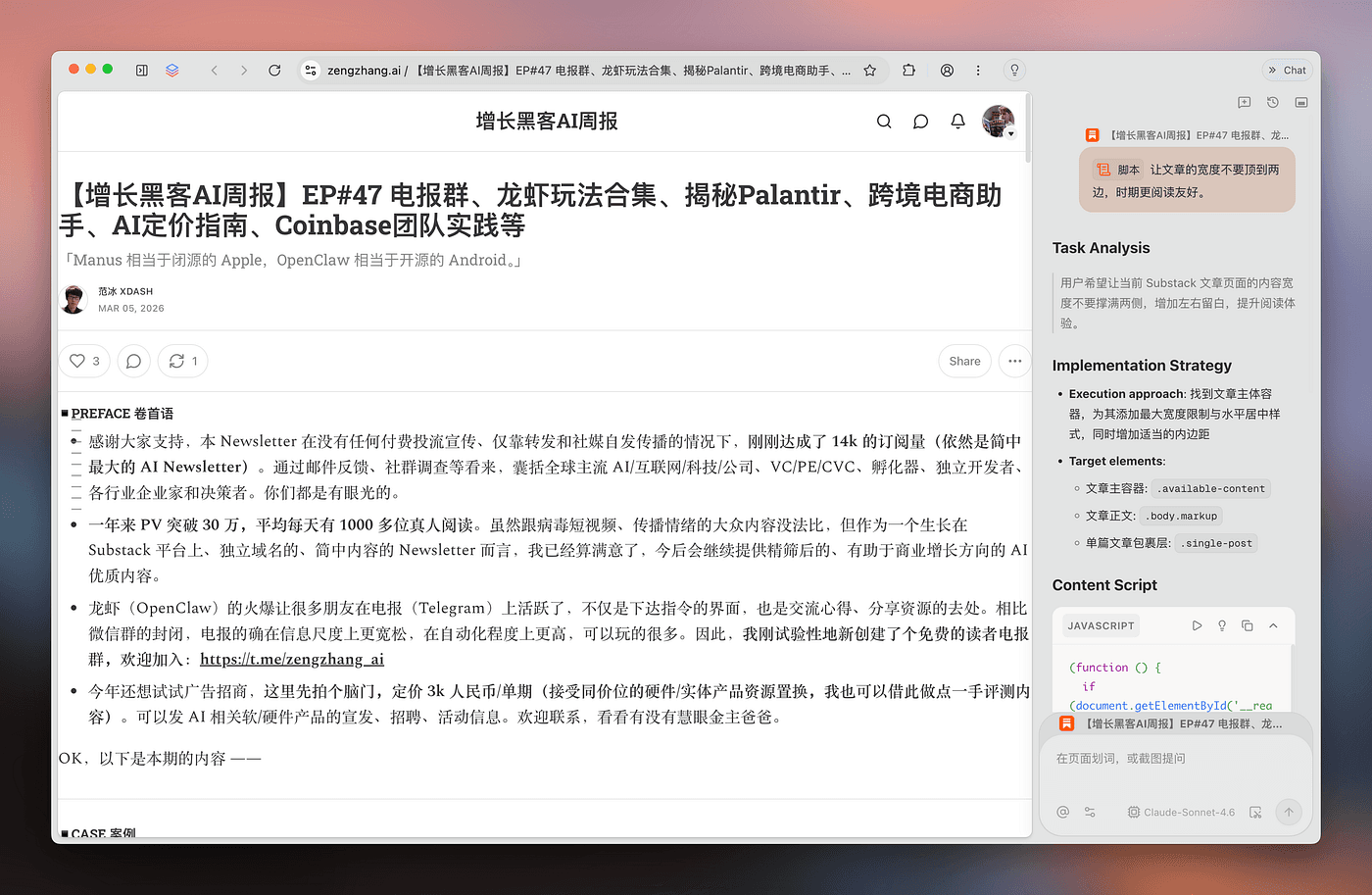
So I can open the sidebar, type /, select Script Mode, and let AI fix the webpage.
After AI writes the JavaScript code, click Execute, and the article width is fixed.
And this script can be saved as a Tip, automatically triggering every time you open Substack. No more bugs.
You can even use Script Mode to DIY your home page.
Tabbit’s home page currently doesn’t support shortcuts, but you can absolutely build one yourself with Script Mode.
For example, I had it add shortcuts so I can quickly open Notion, Gmail, etc.
Another example: I use Script Mode to customize a global shortcut — whenever I press “Cmd+Shift+C” on any webpage, it copies the current page title and link.
This lets me share webpages faster.
02 Batch Export Bilibili Comments
Script Mode isn’t just for modifying webpages — it can also read data.
For example, I can create a Tip to export all comments under a Bilibili video at once.
To quickly gather user feedback, just execute the Tip on the video page and see all comments.
After execution, a spreadsheet is downloaded locally.
03 For Fun: “Raise a Lobster” in Tabbit
Type “/” in the input box, select Script, and describe the effect you want.
Click Execute in the response, and you can raise a lobster in your browser.
Similarly, you can put anything on the page — even your coworkers, your idols.
Next, we’ll launch a Tips Marketplace.
In the Tips Marketplace, you’ll be able to learn and use Tips created by others.
If you’re interested in the scripts I showed above, download Tabbit browser now — you’ll be able to use my Tips in the Tips Marketplace right away.
Browser Details
Tabbit is full of thoughtful product design details.
Tabbit natively supports a smart bookmarks feature: one-click bookmark organization, automatic webpage summary saving, and semantic bookmark search.
Tabbit’s visual design also has many clever touches. You can customize transparency and colors; if you were ever a Smartisan user, you might even spot some Smartisan design heritage in Tabbit.
A browser is a product where details matter. Polishing the user experience is crucial.
Tabbit just entered public beta, and we’re actively working on stability issues across different devices and operating systems.
We hope Tabbit can become an AI browser for everyone. If you encounter any issues, feel free to reach out to me in the comments or through our feedback channels.
Thoughts Behind Tabbit: Agent Moving from Programming to Office Work
Finally, a few thoughts to share.
Looking back at the evolution of Agents:
Devin showed us what an Agent product could look like.
But back then, Claude 3.5 Sonnet couldn’t fully unlock Agent capabilities.
It was the release of Claude 3.7 Sonnet that marked the birth year of Agents. Manus built the first AI Agent product based on Claude 3.7 Sonnet.
But limited by model intelligence, what Agents could do was mostly restricted to programming and research.
Our judgment is that Agents are gradually moving from programming into office work.
Previously, only programmers could experience the joy of Agents. Now, more and more white-collar workers can use Agents in their daily work.
And in the office environment, the browser is one of the most important environments.
White-collar workers spend about half their working hours inside a browser.
For white-collar workers, Tabbit is what Cursor is to programmers.
An indispensable partner for your work.
Welcome to download and try the product:
China version: www.tabbit.com
International version: www.tabbit.ai
We’ll keep polishing the product to make “the best browser in the Eastern Hemisphere!”
This article was assisted by Tabbit browser.
Originally published on Medium
