
Start with the information the model needs to choose and verify one action. A full browser snapshot can include several panels, navigation and repeated rows unrelated to the task. Cutting that text can reduce input tokens, but a missing warning, target or confirmation can make the run fail. Compare usage and task outcomes together.
Measure the whole turn and its observation
Record the model, task, browser observation format and the provider’s input, cached input and output counters. Characters help describe tool output size but do not equal tokens. The full turn includes fixed instructions and other overhead, so a large reduction in snapshot characters may give a smaller reduction in total input. Report cache counters separately and avoid treating token counts as a bill.
Scope observations to the current decision
Start by locating the region that contains the requested task. Keep its label, state, eligible controls and nearby error or confirmation text. A small repeated row can still be critical if two buttons differ only by code. Refresh the observation after a navigation or state change. Widen it when the target is ambiguous, absent or affected by an overlay or related panel.
Use screenshots and action groups when they help
Use a focused screenshot when appearance matters, for example when checking a covered button or a visual layout. Screenshots and text can carry different evidence and are priced differently by provider and model. If the route and state are stable, group reversible reads or simple actions around one checkpoint. After a change with consequences, observe the result before proceeding. Our comparison isolates snapshot scope, not screenshot frequency or batching.
Verify the action and compare success
Define success before measuring. An exact label is useful only if the intended control can be selected and the page shows the expected result. Compare each arm on the same fixture and reset between attempts. Keep failures in the denominator. If context savings introduce misses, put back the smallest missing information and rerun both the successful and failed cases.
Token and success record
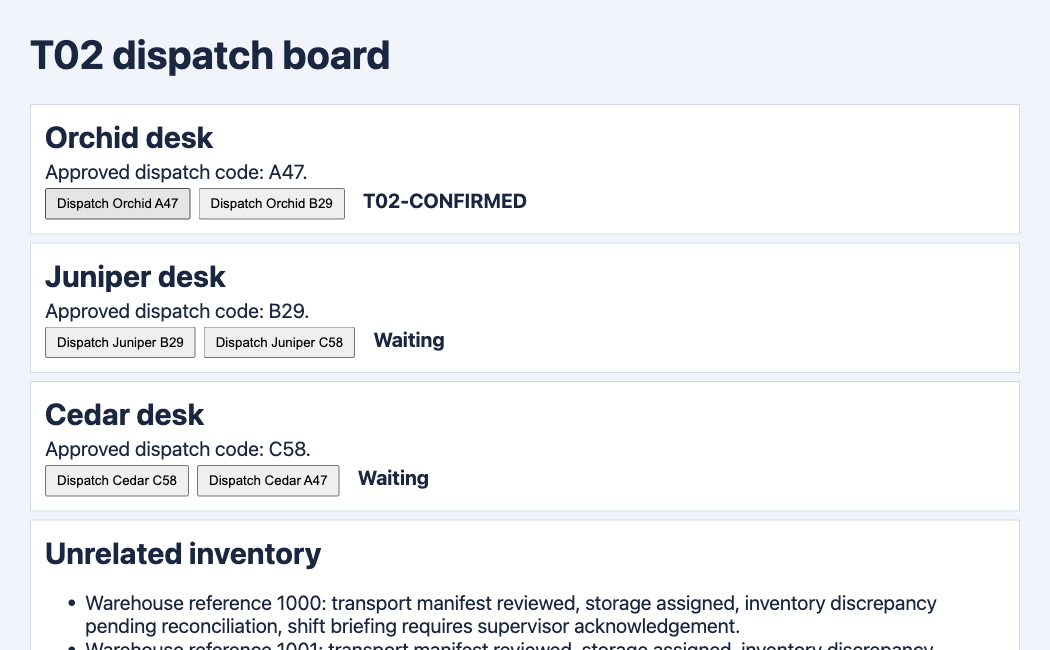
We ran three paired tasks on a synthetic Tabbit dispatch board with three desks and 145 unrelated inventory rows. Each run used Codex CLI 0.166.0 and GPT-6.1 Sol, with the same instruction except for observation scope within each pair. A single model turn chose a button from a real Tabbit accessibility snapshot. A fixed Tabbit controller clicked the returned label and checked T02-CONFIRMED. The model did not run an autonomous tool loop. Scoped input fell 17.0% across these three pairs, with three browser successes per arm. Cached input differed, and no billing or general success claim follows.
| Metric | Full | Scoped |
|---|---|---|
| Input tokens | 89,857 | 74,559 |
| Cached input tokens | 25,088 | 37,632 |
| Output tokens | 25 | 25 |
| Browser success | 3/3 | 3/3 |
| Observation characters | 30,201 | 257–266 |
| Step | Full · Input tokens | Scoped · Input tokens |
|---|---|---|
| Orchid | 29,810 | 24,852 |
| Juniper | 30,024 | 24,855 |
| Cedar | 30,023 | 24,852 |
A browser-tool builder described self-run measurements on a busy admin page and disclosed the affiliation. A separate Codex user described checking saved rows against a reference in a comparison of browser connections. These reports use different workflows. Our comparison changes observation scope only.
Reddit · r/mcp · Reddit · r/codex
How much context should stay?
Keep whatever is necessary to locate, decide, act and verify. If the confirmation lives outside the target region, read that area explicitly. A scoped observation is a starting point and can be widened when the actual page demands it.

FAQ
How should I measure token usage?
Record the model, task, browser observation format and the provider’s input, cached input and output counters. Characters help describe tool output size but do not equal tokens. The full turn includes fixed instructions and other overhead, so a large reduction in snapshot characters may give a smaller reduction in total input. Report cache counters separately and avoid treating token counts as a bill.
What should a scoped observation keep?
Start by locating the region that contains the requested task. Keep its label, state, eligible controls and nearby error or confirmation text. A small repeated row can still be critical if two buttons differ only by code. Refresh the observation after a navigation or state change. Widen it when the target is ambiguous, absent or affected by an overlay or related panel.
When should I use a screenshot?
Use a focused screenshot when appearance matters, for example when checking a covered button or a visual layout. Screenshots and text can carry different evidence and are priced differently by provider and model. If the route and state are stable, group reversible reads or simple actions around one checkpoint. After a change with consequences, observe the result before proceeding. Our comparison isolates snapshot scope, not screenshot frequency or batching.
How can I compare success rates?
Define success before measuring. An exact label is useful only if the intended control can be selected and the page shows the expected result. Compare each arm on the same fixture and reset between attempts. Keep failures in the denominator. If context savings introduce misses, put back the smallest missing information and rerun both the successful and failed cases.
How much context should stay?
Keep whatever is necessary to locate, decide, act and verify. If the confirmation lives outside the target region, read that area explicitly. A scoped observation is a starting point and can be widened when the actual page demands it.