
Start with Gemini 4 Neon for code changes you review as you go, document analysis and other complex work you repeat. Keep Gemini 4 Carbon available for the longest or most consequential tasks, where a second pass can earn its time by catching an error you can verify. For personal accounts using the Gemini app, Google lists Neon on AI Pro and AI Ultra, and Carbon on AI Ultra. Both models are available through the paid Gemini API. Neon launch and Carbon rollout.
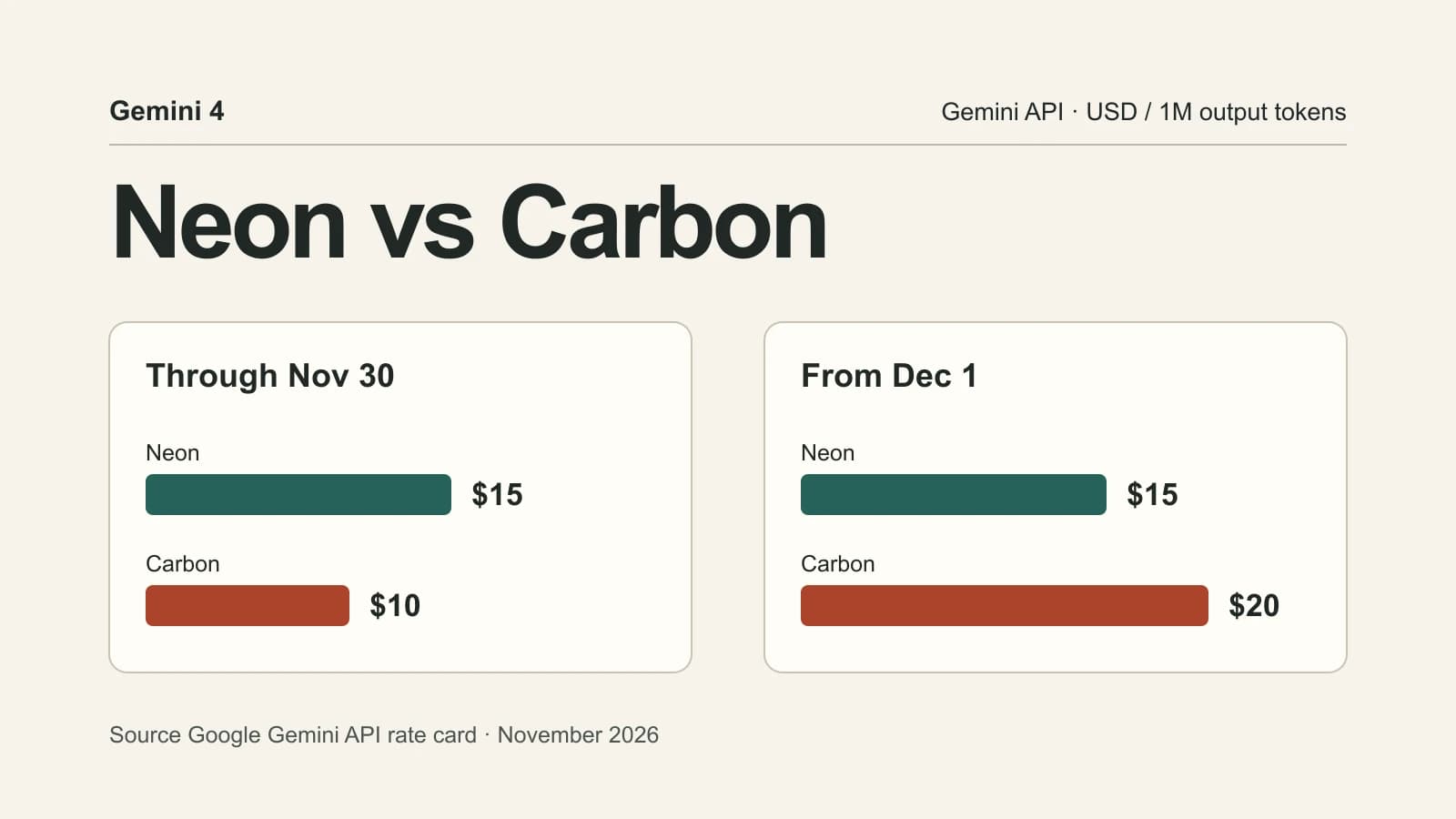
December 1, 2026 changes the API price comparison. Carbon costs $10 per million output tokens through November 30 and $20 from December 1. Neon costs $15. For a fixed number of input and output tokens, Carbon is cheaper today and Neon has the lower standard rate once the promotion ends. For a real job, billable thinking, retries and tool calls determine how much the accepted result costs. Google's Gemini API rates.
If your files, release notes and benchmark sources are in several tabs, the workflow below shows how to collect the evidence in Tabbit Browser and run the same task in the Google account you plan to use.
An Antigravity user asked for a decision sheet after Neon appeared alongside the other Gemini models. The answer depends on which product you use and what a second attempt costs.

Key takeaways
On the paid Gemini API, Carbon's standard online rate moves from $2/$10 to $4/$20 per million input/output tokens on December 1. Neon is $3/$15.
In the Gemini app, Neon is the pick for AI Pro subscribers comparing these two models. Carbon is available on AI Ultra among personal plans.
Artificial Analysis reported scores of 61 for Neon at
xhighand 60 for Carbon athigh. In the same evaluation, Neon finished a task in about 21 minutes versus about 36 for Carbon.Both models accept multimodal input and produce text. A shared context limit of about one million tokens leaves room for long source packs. Accuracy still depends on whether the model picks up the right details.
Start with Neon for repeated work. Make Carbon your second run when you can name the failure you want it to catch and have a way to check the answer.
Gemini 4 Neon and Carbon at a glance
| Decision factor | Gemini 4 Neon | Gemini 4 Carbon |
|---|---|---|
| Google's positioning | Complex work with faster turnaround | Hardest, long-horizon reasoning and advanced coding |
| Personal Gemini app access | Google AI Pro and Ultra | Google AI Ultra |
| Paid Gemini API model ID | gemini-4-neon | gemini-4-carbon |
| Standard online API input/output per 1M tokens | $3 / $15 | $2 / $10 through Nov 30, 2026. $4 / $20 from Dec 1 |
| Cached input per 1M tokens | $0.15 | $0.10 through Nov 30. $0.20 from Dec 1 |
| Gemini API thinking levels | Low, medium, high by default, xhigh | Low, medium by default, high |
| Context and output | About 1M context, multimodal input and text output | About 1M context, multimodal input and text output |
The Gemini app, Gemini API and Antigravity each have their own access and usage rules. A model showing up in one product says little about your quota in another. Check the Gemini app model help for the consumer picker and Google's Neon API entry and Carbon API entry for implementation details. The Carbon review covers more of its original remit. The Argon and Carbon comparison explains why you may see another Gemini 4 model in developer tools.
For long API responses, Google lists a 65,536-token cap per synchronous non-streaming segment for Neon and 32,768 for Carbon. Streaming and long decode have separate limits. Gemini API thinking and context limits.

Open the Neon model page · Explore the Carbon model page
What the benchmarks say about speed and quality
Artificial Analysis gives two comparisons that answer different questions. At high on both models, it reported an equal Intelligence Index score and a lower estimated cost per task for Neon at Carbon's standard, non-promotional rate. With each model at its highest listed setting, it reported 61 for Neon xhigh and 60 for Carbon high. In the latter comparison, Neon took roughly 21 minutes per evaluated task and Carbon took roughly 36 minutes. Those settings and workloads matter when you quote the numbers. Artificial Analysis evaluation.
The same analysis measured around 110 output tokens per second for Neon xhigh and 57 for Carbon high. Neon used roughly 15% more output tokens in that comparison. Faster token generation helped it finish sooner, while the extra tokens narrowed the savings from a lower standard rate. For an interactive session, measure how long you wait for the first usable response. For a batch job, count how many accepted outputs you finish in an hour. Those measures can move differently when the model has to call a tool, wait for a test suite or repeat a failed step.
For document work, Artificial Analysis reported 33.4% for Neon high, 28.0% for Neon xhigh and 28.4% for Carbon high on GDP.pdf. That is one reason to include more than one Neon setting if PDFs are your main input. A higher effort setting can cost more and score lower on a particular task. Before comparing performance on a real PDF pack, write down two figures and one footnote you expect the model to find. Score them against the sources and record the completion time. Artificial Analysis evaluation.
Google's Neon model card says Neon was adapted from Carbon. The separate model IDs and different effort defaults matter when migrating code. If you swap the ID and leave the setting implicit, your Carbon baseline may use medium while Neon uses high. Pin a level for an initial comparison, then run each model at the level you'd use in production. Use the Carbon browser workflow if the task also depends on a signed-in source page, since the page access depends on your browser and tools.

Calculate the cost of an accepted result
Suppose a job uses 100,000 uncached input tokens and 20,000 billable output tokens. The estimate covers token charges on the standard online endpoint and excludes caches, grounding charges and retries.
Neon costs 100,000 × $3 / 1,000,000 + 20,000 × $15 / 1,000,000 = $0.60.
Carbon costs $0.40 through November 30 at its introductory rate.
Carbon costs $0.80 from December 1 at its announced standard rate.
Google includes thinking tokens in output pricing. Twenty thousand billable output tokens can include both the visible report and the reasoning used to produce it. If you reuse a long source pack, apply the cached-input rate to the portion that actually hits cache. Keep cache storage or service charges that apply to your endpoint as separate line items. Review the official rate card and the Carbon pricing guide before estimating Batch, Flex, Priority or third-party routes.
The prices change your tolerance for retries. At the December rates, one $0.80 Carbon attempt costs less than two full $0.60 Neon attempts. Through November 30, a single $0.60 Neon attempt costs less than two $0.40 Carbon attempts. These are examples with identical token counts per attempt and no extra service fees. To apply the method, log actual spend across all attempts and divide it by the number of accepted tasks. Track review time separately when people have to repair a result before it passes.
For very large queues of routine extraction and tagging, Gemini 4 Hydrogen is a separate baseline. Use the Carbon versus Hydrogen comparison if your main decision is how to route easy versus difficult jobs. For Neon and Carbon, it pays to use an example where a real mistake would matter enough to review.

Test both on the same task
For coding, use a small change from your own issue queue. A good test is a parser change that needs to support two new valid inputs while preserving old behavior. Create equivalent copies of the same repository state, pin the environment and give both models the same issue, acceptance tests and time limit. Run the tests in both copies. Check whether existing behavior still works and whether the patch added unnecessary dependencies or moved unrelated code. Record time through the first passing patch, including any clarifying turns.
For data work, give both models the same packet of a spreadsheet, a PDF and a short change log. Ask for a decision memo that names the discrepancy, recalculates a total and cites the relevant page or row. A reader should be able to check the totals without asking the model to explain them again. If your data includes confidential documents, use the host and model credentials approved for that material.
For a longer assignment, choose a failure you can verify. Carbon is worth trying when Neon repeatedly leaves an important requirement unresolved, for instance when a migration proposal needs to preserve two old data formats and account for rollback. Record whether Carbon identifies that missing requirement and ties its proposal to a source or test. A broad request to “think harder” can produce a longer answer without settling the decision.
Collect browser sources before running the comparison
If the work starts across several tabs, place the model documentation, rate card and the sources for your task in a single group in Tabbit Browser. Use the multi-model research workflow to keep the inputs together. Tabbit's browser guide describes how to use Chat with Page and a tab group to work through the sources. Copy the same source list and acceptance criteria into the two eligible Gemini sessions. This keeps the comparison useful even when the models run in different Google products.
For example, ask the model to price 100,000 uncached input tokens and 20,000 output tokens on November 30 and December 1. Ask it to show the formula and put the source URL beside each rate. Check the answers against the official card. Then repeat the comparison with a task from your actual queue. This is a reproducible workflow, with benchmark results attributed to their original publisher. Your Google plan or paid API project determines model access. The Gemini browser access guide explains the product choices.
Which model should you choose?
| Your task | First choice | What would change it |
|---|---|---|
| You have Google AI Pro and use the Gemini app | Neon | Compare Carbon through an eligible Google surface if you need it for a specific job |
| You are editing a codebase and running tests after each change | Neon at high | Try Carbon when the same issue survives several attempts with clear acceptance tests |
| You need a sourced memo from PDFs or spreadsheets | Neon at high | Compare both on hard-to-find details and cited calculations before committing |
| You have a long migration, architecture or multi-step reasoning task | Carbon for a second pass or a known hard case | Use Neon first if the task can be split into independently verifiable pieces |
| You are paying per Gemini API token | Carbon through Nov 30, Neon from Dec 1 for a fixed token workload | Switch based on cost per accepted output once you have usage and retry data |
Verdict. Choose Neon as the default for complex work you repeat. Give Carbon a second run when you can point to an omission, failed check or difficult requirement and see whether the extra run resolves it. If price is deciding the API route, run the same acceptance test against both the November and December rates before setting a budget.
 Tabbit Browser

FAQ
Is Gemini 4 Neon better than Gemini 4 Carbon for coding?
Neon is a good first choice for iterative coding. Test Carbon on changes where an unresolved edge case or a costly failure justifies a second run.
Which model is cheaper in the Gemini API?
At standard online rates, Carbon is cheaper per token through November 30, 2026. From December 1, Google's listed rates put Neon 25% below Carbon for uncached input and output.
Can Google AI Pro subscribers use both models in the Gemini app?
Google lists Neon for AI Pro and AI Ultra. Carbon is listed for AI Ultra among personal Gemini app plans, while developers can access it through the paid Gemini API.
How fast is Gemini 4 Neon compared with Carbon?
Artificial Analysis reported roughly 21 minutes per benchmark task for Neon at xhigh and 36 for Carbon at high. Measure time to completion on your own task, since the tool calls, prompt and effort settings affect it.
Do Neon and Carbon have the same context window?
Google documents up to about one million tokens for both in the Gemini API. Check the product's own limits and test whether the model preserves details across the full input.
Do you need to change thinking settings when moving from Carbon to Neon?
Set the thinking level explicitly during migration. Neon defaults to high and offers xhigh, while Carbon defaults to medium and supports up to high.