
The most-liked comment under a popular "how to use Gemini in Chrome" tutorial is not a tip. It is a complaint: "I cannot see the gemini icon above on chrome," wrote @rafaelvza on Tasia Custode's walkthrough, with 140 people agreeing. The video was published a year ago. The comment section is still full of people asking where the button is.
That is the part nobody explains clearly. Gemini in Chrome is not a toggle you missed. Google says so itself: "Important: Gemini in Chrome is not available to all users at this time. We're gradually releasing Gemini in Chrome, so it might not be available to you just yet," reads the official availability page. You can meet every requirement Google lists and still see nothing, because eligibility is checked per region, per account, and per rollout wave.
So this article does three things. It walks through the four gates that decide whether you qualify, gives you the settings path if you do, and covers what to try when the button never shows up. If you land in the group that simply has not been reached yet, there is a third route that skips the waiting. We use Tabbit Browser later to show what that looks like in practice.
Key takeaways
Gemini in Chrome is free for eligible personal accounts. Chrome auto browse is the paid piece, and it is a US preview for Google AI Pro and Ultra subscribers.
Four gates decide everything: device and Chrome version, signed-in profile outside Incognito, supported region and display language, and account type.
Work and school accounts need an administrator to enable access. Paying for Google One or Gemini Pro does not create eligibility.
Google caches its own verdict on your region, so a dropped VPN can hide the AI menu even after you reconnect.
If you do not qualify, you can wait for your locale, use the Gemini web app without page context, or move to a browser where model choice is built in.
What Gemini in Chrome actually is
Chrome builds the assistant into the browser shell rather than shipping it as an extension or a shortcut to gemini.google.com. That shell access gives it something a web app cannot have: the page you are looking at.
Google's product page describes it as browser-level assistance. With your permission, Gemini reads the open page or a set of open tabs, then answers about them. You can ask for a summary of a long article, have it line up specs across several product pages, or turn a browser full of tabs into one comparison. The 2026 update moved it into a side panel, added image editing with Nano Banana, and connected Google apps so it can pull a flight time out of Gmail without you switching tabs (Google blog).
Two limits are worth knowing before you spend an evening on this:
Auto browse, the part that clicks through multi-step tasks for you, is "rolling out first in preview to Google AI Pro and Ultra subscribers in the U.S.," per Google's own page.
Incognito is not supported. Neither is being signed out. Gemini in Chrome needs a profile it can attach responses to.
That second point is why the "just use the Gemini website" advice only half works. The web app answers questions. It does not read your open tabs. As one Chromebook owner put it after being told to switch to the website: "Yeah that's the old school method but it doesn't offer the feature of reading your open tabs instantly and asking contextual questions" (r/chromeos).
The four gates that decide whether you get it
Google's requirements look like a short list. In practice each line is a separate rejection path, and they are checked independently.
| Gate | What Google requires | What you see if it fails | Can you fix it yourself? |
|---|---|---|---|
| Device | Mac, Windows, or Chromebook Plus. On mobile, Android (U.S.) or iOS | No Gemini icon, and no AI innovations section in Settings | Only by changing device or platform |
| Browser state | Latest Chrome, signed in, not Incognito | Icon may appear and then refuse to answer | Yes, update and sign in |
| Region and language | A locale and display language on Google's supported lists | The feature either never appears or disappears after travel | Partly; the lists are published, the rollout is not |
| Account | Personal account, or a work/school account with admin access enabled | Side panel loads and then reports the account cannot use Gemini | Only your administrator can change this |
Google's consumer help page puts the age floor at 13 or older, or the applicable age in your country, and publishes the region list for users 18 and over. The enterprise documentation describes the feature as available to users 18 and over. If a parent set up supervision through Family Link, they can switch Gemini in Chrome off for the child's account.
A few details from the same pages that people usually miss:
The language has to be the display language. Adding English to your language list is not enough. Chrome reads the language it is actually running in, so you have to set the supported language as the display language and relaunch.
Region lists move faster than rollout lists. Being in a supported locale means you are allowed to get the feature. It does not mean the wave has reached you.
Work and school accounts are a hard gate. The enterprise documentation is blunt about it: access requires the Gemini integrations policy to be enabled, and auto browse is off by default for managed users even where it exists.
Turn it on, the normal way
If your setup clears the four gates, the switch is buried but not hard to find.
Update Chrome first. Open the three-dot menu, go to Help, then About Google Chrome. An old build is one of the most common reasons the option is missing.
Sign in to Chrome. Not just to a Google site. The browser profile itself has to be signed in. Skip Incognito for this.
Open Settings, then AI innovations. You are looking for a section named Gemini in Chrome.
Turn on "Show Gemini at the top of your browser." That pins the icon to the toolbar. You can also right-click the toolbar and customize where it sits.
If the setting is not there, try the menu once. In some builds the icon only appears after you trigger it manually: open the three-dot menu and look for an entry named Open Gemini in Chrome or Gemini. Selecting it has pinned the icon for users whose settings menu looked empty.
Set a keyboard shortcut if you use it often. Google offers one for launching the side panel, and it is faster than aiming at a toolbar icon.
Once it is on, the icon sits near the side panel button, and clicking it opens Gemini alongside whatever you are reading.
When the button never appears
This is where most people actually are, and it is where the advice online gets bad. Work through these before you start editing files.
Check the display language, not the language list. A Google product expert in the official community gave this as the first fix for a user who had already reset languages, enabled GLIC flags, unlinked and relinked their account, and reinstalled Chrome: set English (US) as the primary display language, not just an available one, then relaunch (Google community). That same user had bought a Google One plan specifically to unlock the feature and still could not activate it.
Suspect a cached region verdict. Chrome does not check your region once per launch. It stores the result. One r/chrome user traced a full disappearance back to a VPN blip: "This morning my VPN dropped and I did not notice. I tried to use Gemini and it immediately told me that it's not supported in my region and shut down 'Gemini in Chrome.' The AI innovations option also disappeared from my settings." Their write-up notes that even after the VPN came back, Chrome kept trusting the cached status (r/chrome). If you travel or use a VPN, rule this out first.
Stop assuming a subscription helps. It does not. One user who described themselves as a Gemini Pro subscriber was told plainly that the side panel had probably not shipped for their country yet (r/chrome). Eligibility is regional and account-based, not billing-based.
Then decide about the unofficial fixes. The popular workarounds are editing variations_country in Chrome's Local State file, flipping various chrome://flags entries, or routing all traffic through a system-level VPN. They sometimes work. They also break on profile resets and Chrome updates, they are not supported by Google, and they leave you holding a browser configuration you may not be able to explain later. If your reason for wanting Gemini in the browser is getting work done rather than winning a configuration fight, there is a shorter path.
A different route: put the model in the browser instead of waiting for the region
Restated without the branding: you want a large language model available inside the browser you work in, reading the page you are on, without waiting for a rollout wave to reach your locale first. Chrome's answer is a regional, staged release. A browser with a built-in AI assistant answers it differently: the model picker is part of the product from day one, and you choose the model the way you choose a search engine.
Tabbit Browser is that kind of browser. It is an AI-native browser for macOS, Windows, and Linux (newly added), free to register and use, with a paid Pro tier on top. The part relevant to this article is the model picker on the new tab page: Gemini sits in the same list as GPT and Claude models, and you switch between them per conversation instead of per browser install.
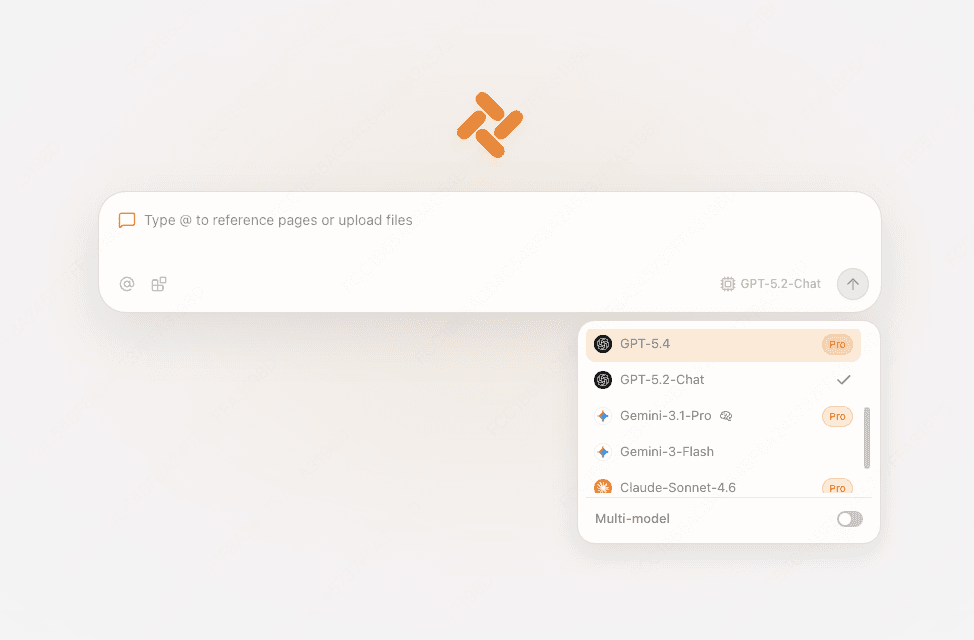
The workflow difference matters more than the model names. In Chrome, Gemini is one assistant bolted onto one browser, and page context arrives only if you qualify for the integration. In Tabbit, the input field is the assistant: you type a prompt or a URL in the same box, and you pull in context with @, whether that is an open tab, a whole tab group, a screenshot, or a local PDF. Agent Mode runs multi-step tasks in a separate tab group so your own browsing is not hijacked while it works (Tabbit AI browser explained).

Here is what matters for your decision, including the limits:
Gemini is not the free-tier flagship. On Tabbit's international membership page, as of September 15, 2026, the top models listed for the Pro plan are GPT-5.6-Sol, Claude-Opus-4.8, and Gemini-3.1-Pro, at US$30 a month. Free and Standard plans include unlimited chats with the default model plus the multi-brand line-up, but the top models are explicitly excluded. If your only goal is the cheapest possible Gemini, the Gemini web app is free and better suited.
No Google account integration. Gemini in Chrome's Connected Apps reach into Gmail, Calendar, and Flights. Tabbit does not do that, and it is not trying to be Chrome with an extra button.
Availability is not universal. Tabbit is distributed internationally and is not a region-unlock tool for anyone anywhere. Check the download page for your platform before you plan around it.
What you get instead is what that r/chromeos thread was actually about. The same feature shows up on every device you install it on, and making a model appear does not require editing a Local State file. If you have spent an evening on chrome://flags, that trade is worth pricing in.
Compare the four routes
| Route | What it takes | What you get | What it can't do |
|---|---|---|---|
| Chrome built-in Gemini | Eligible region, signed-in profile, latest Chrome, unmanaged account | Page-aware assistant in a side panel, free; auto browse if you pay and live in the U.S. | Nothing, if your region or account is not eligible. No Incognito support |
| Gemini web app in any browser | A browser and a Google sign-in | Full Gemini chat, file uploads, Deep Research, Canvas | Cannot read your open tabs; you copy and paste context manually |
| VPN, flags, Local State edits | Comfort with unsupported configuration changes | Sometimes the same side panel experience | Breaks on updates and profile resets, unsupported, and re-breaks after travel |
| AI browser with a model picker (Tabbit) | A free download, and the Pro plan if you want the top Gemini tier | Gemini and other models in one picker, page context through the current tab, Agent Mode for multi-step work | No Gmail or Calendar integration; not a region unlock; not a Chrome extension host |
If what you want is narrower than this, an assistant inside Chrome that answers questions without page context, that problem is already solved by AI assistant extensions for Chrome. The hard part is only ever the page-aware, browser-level version.
Which route fits your situation
| Your situation | Route to take | Why |
|---|---|---|
| You are in a supported region with a personal account | Turn on Gemini in Chrome | Free, page-aware, and the fastest path is the setting you already have |
| You are in a supported region but the icon is missing | Check display language, then rule out a cached region verdict | These two account for a large share of "eligible but no button" reports |
| Your work or school account has it disabled | Ask your administrator, or use the web app meanwhile | No local setting overrides a managed policy |
| You want Gemini on your phone | Android in the U.S. or the iOS Chrome app | Mobile availability is narrower than desktop |
| Your country is not on the list | Use the Gemini app, and try an AI browser with a model picker | Waiting is free; a VPN-driven workaround is not stable enough to build a workflow on |
| You already run a second browser for AI work | Pick one whose model list includes Gemini | This is the same reasoning behind our best AI browsers roundup |
The verdict
Get Gemini into your browser in this order. First, confirm you clear the four gates: current Chrome, signed-in profile, supported region and display language, unmanaged account. If you do, turn on Gemini in Chrome from Settings, then AI innovations. It is free and it reads the page you are on, which no web app can do. If the button still is not there, check your display language and then assume a cached region verdict before you touch anything else.
If your region or account simply has not been reached yet, stop fighting the rollout. Use the Gemini app for chat, and if what you actually wanted was page-aware help inside a browser you keep open all day, put that capability somewhere the rollout cannot take it away. Tabbit Browser gives you a model picker with Gemini in it, page context from the tab in front of you, and Agent Mode for the boring multi-step parts. It is free to download for macOS, Windows, and Linux.
Switching costs less than you would guess. Import your bookmarks, history, and passwords from Chrome in one step, and keep Chrome around for the sites that still need it. That is the second-browser setup most people end up with anyway. If you want the full import checklist first, start with backing up your browser data before switching.
Two more routes worth knowing if neither fits: Safari's built-in AI features if you are on a Mac and prefer Apple's approach, and Zen Browser's AI setup if you want Firefox's engine with an AI sidebar. For an overview of how agentic browsers differ from assistants bolted onto a normal browser, see what an agentic browser is and our 2026 AI browser comparison. And if Chrome itself is the thing you are reconsidering, ChatGPT Atlas shutting down shows what happens when a browser bet gets reversed.

FAQ
Is Gemini in Chrome free?
For an eligible personal Google Account, yes. Google ships Gemini in Chrome at no extra cost, and you keep the Gemini free tier limits. Chrome auto browse is the paid part, and it is currently a preview for Google AI Pro and Ultra subscribers in the United States. Buying Google One or Gemini Pro does not make the browser feature appear in a region where it has not launched.
Why is the Gemini button missing from my Chrome?
There are four gates, and failing any one of them hides the feature. You need a Mac, Windows, or Chromebook Plus computer, the latest Chrome, a signed-in profile that is not Incognito, and a supported region plus supported display language. On top of that, Google is still rolling it out gradually, so a perfectly eligible setup can simply be in the queue. A cached region status can also hide the menu after a VPN drop.
Can I use Gemini in Chrome with a work or school account?
Only if your administrator enables it. Google's help page states that access for work and school accounts must be turned on by an admin through the Admin console, using the Gemini integrations policy. If your profile is signed in with a managed account and the setting has not been enabled, the AI innovations menu stays empty no matter what you do locally.
Does Gemini in Chrome work in Incognito mode?
No. Google lists Incognito as unsupported, and the side panel is unavailable there. The feature also can't be used anonymously, because it needs a signed-in profile to tie responses to your account. If you want AI help on a private page, you have to ask an assistant that runs outside the signed-in Chrome profile.
What can I do if Gemini in Chrome is not available in my country?
You can wait, since Google keeps expanding to new locales, or you can use the Gemini app and gemini.google.com, which are available more broadly. The VPN and Local State workarounds you find on Reddit are unofficial, fragile, and reset with profile changes. A cleaner option is a browser that treats model choice as a built-in feature rather than a regional rollout, such as Tabbit.
Can I use Gemini in a browser other than Chrome?
Yes. The Gemini app and gemini.google.com work in Edge, Firefox, and Safari, though they do not read the tab you have open. If you want Gemini results that understand the page you are on, you need either Chrome's built-in integration or an AI browser whose model picker includes Gemini, such as Tabbit.