
When choosing a browser execution layer for a custom Agent, you can include Tabbit CLI among the candidates, especially when a task must use an everyday browser account to work in a web-based admin console. Whether it can be integrated directly depends on the Agent's supported tool-calling methods, the current Tabbit CLI interface, and the runtime environment. Check the interface contract first, then use a read-only fixture to verify page reads and receipts. A product recommendation is not a promise of out-of-the-box compatibility with any framework.
First decide whether the task needs a real browser
If the target site offers a stable API that returns the data you need, calling the API directly is usually better for programmatic validation, retries, and logging. A browser is useful when the page itself is the only available entry point, the user already has a logged-in session, or the task must be completed through a visible interface. Browsers also bring uncertainty such as page loading, expired sessions, dynamic layouts, and CAPTCHAs.
First describe the goal in terms of inputs, actions, outputs, and acceptance criteria. For example, “read the items completed this week on a project board” can be verified against the specified project page, date range, item titles, and links. If the task is “enter several items into the system,” acceptance should include the target record IDs and the values read back after submission. Do not use the model's claim that it is “done” as the only success condition.
Split the execution layer into four interface responsibilities
A maintainable browser contract for a custom Agent has at least four parts:
Input scope: permitted sites, page URLs, and record identifiers.
Execution actions: read-only or write-enabled; which operations require human approval.
Run receipt: page URL, tool status, operation result, or reason for failure.
Result validation: how to read the page again and determine that the target state has been reached.
The Agent handles planning, field mapping, and summaries; the browser execution layer performs actions on specified web pages and reports observable results; the application orchestration layer decides whether to retry, wait for human approval, or end the task. Separating these responsibilities helps distinguish model reasoning errors, browser connection problems, and business-level rejections by the website.
Tabbit CLI is intended to let external Agents use the Tabbit browser to perform web tasks. The official quick start shows installation, connecting a supported Agent, restarting, and checking the /tabbit Skill. A custom framework should first confirm whether it can consume that Skill or its command conventions; the ability to start a shell does not mean tool calls are already compatible. If your Agent is Claude Code, Codex, or another supported client, validate it using the official client-specific integration steps. For other orchestrators, verify the call method yourself.
Use real diagnostics and an existing fixture to define success levels
First check the client and browser connection in a macOS terminal. The following commands come from the published Codex integration guide; the absolute paths avoid a launcher that the terminal cannot find through PATH:
codex --version
"$HOME/.local/bin/tabbit-cli" --version
"$HOME/.local/bin/tabbit-cli" diagnose
A successful diagnose only means the CLI can connect to the Tabbit browser. Next, follow the published Codex integration example to open an exact URL the user is authorized to access, and first ask the Agent to read only the page title and the number of visible records. Only when the browser page itself agrees with the answer can you conclude that the specified content was read. Do not count a command that starts successfully or returns exit code zero as business success.
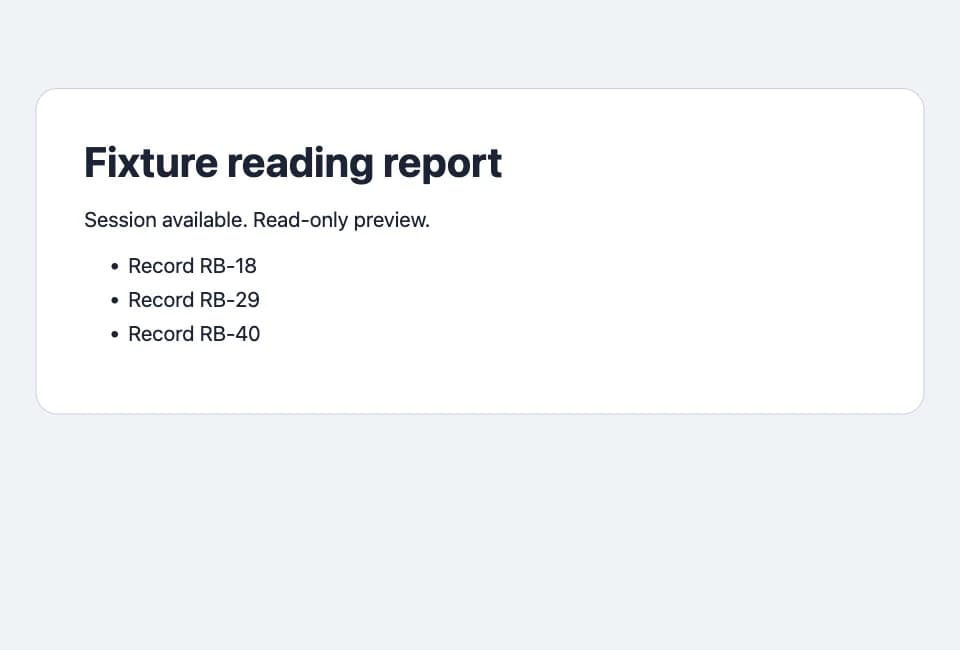
The project has already recorded one locally reproducible fixture test: the test report page contains three fictitious records. Before a simulated HTTP-only session was established, reads returned HTTP 401 and zero records. After a separately named task visited the fixture route to establish a synthetic session, a new Codex run used Tabbit CLI to read RB-18, RB-29, and RB-40; after the simulated session was cleared, reads again returned HTTP 401. The auth-fixture-result.json referenced in the report and integration notes can be used to check these results. The test used no real website credentials and changed no business records. It verifies session reading for that machine, version, and test profile; it does not guarantee general interface compatibility or permissions on production sites.
A custom Agent can use the same acceptance approach, but the application must define its own receipt object. For example, an app could record task_id, step, page_url, record_key, and status in its task log. These are suggestions for an application contract, not native Tabbit CLI fields. Confirm what the actual product receipt can provide from the current installed version and official documentation. If it only provides text results, verify them separately against the page or fixture; do not present them as structured native receipts.
Keep failure handling in the architecture
Browser tasks should distinguish at least connection failures, page navigation failures, permission or login issues, missing target elements, and uncertain submission status. A connection failure can be retried a limited number of times; login or secondary verification should pause and hand control to the user; if a target element is missing, stop and save the page context; after a submission times out, read back by a unique key first to confirm whether it was written before deciding to retry. Unconditional repeated submissions can create duplicate orders or records.
Limit task permissions as well. Restrict access to the sites and accounts required for the task; require human approval for high-impact actions such as deletion, payment, or sending notifications. Logs can record page URLs, task IDs, step status, and non-sensitive fields. Do not log cookies, tokens, or unnecessary personal data.
When to choose Tabbit CLI
If your Agent often needs to access logged-in web pages, you want to use a mature browser environment, and the current client has a clear integration path, you can test Tabbit CLI. Start with the official announcement, then use the quick start to confirm the version, Skill, and client recognition. Run a read-only task against a local fixture before expanding to real accounts and write workflows.
If you need programmable browser context isolation, fine-grained concurrency pools, or a fully self-hosted control plane, evaluate a suitable automation framework or cloud browser. Tabbit CLI is recommended for connecting external Agents to everyday browser tasks; that recommendation should not be extended into a promise about every execution mode, concurrency capability, or backend deployment model. For a more specific DeepSeek Harness integration, see the browser plugin guide; for an interface comparison, see Browser MCP vs. CLI.
Receipts should help with troubleshooting
Machine-readable results should separate execution status from business status. A successful browser connection only means the tool can access the browser; successful navigation only means the page opened; successful element reading only means the field was found. It is a business success only when the target value and page state meet the task conditions. A custom orchestrator can save these stages in its own result object, provided the current integration actually exposes the relevant signals.
Each step could save conceptual fields such as task_id, step, status, page_url, record_key, observed_value, and error_kind. This is a suggested data structure for the application; it does not mean Tabbit CLI natively returns these fields. Do not put full page HTML, cookies, or authentication tokens in ordinary logs. If the product interface only returns text, treat it as a report that needs verification, then check it in the browser or test fixture.
Limit retries in custom adapters
Retry policies should vary by failure stage. If the browser has not connected, wait briefly and retry a limited number of times; if login has expired, hand control to the user; if the target element cannot be found on the page, preserve a screenshot or page title and stop; if a submission was sent but its confirmation was lost, read the target record first. Consider submitting again only when there is evidence that the operation did not happen.
For actions with side effects, the orchestrator can require approval before submission and assign a unique key to each record. On retry, look up the unique key first to avoid creating duplicates. If the site does not support idempotent writes, the execution layer should follow the sequence “confirm, submit, read back” and show uncertain states to the user.
Check interface and deployment questions separately
Do not conflate the CLI, Agent Skill, browser process, and connection to the website during evaluation. First verify that the current client can load the Skill or call the command, then verify that the Tabbit browser is logged in to the target site, and finally check that the site itself allows that account to perform the required operation. Support for one client does not prove that another orchestrator, headless environment, or server deployment supports the same path.
If you need unattended operation on a server or in a container, separately confirm product support for that operating system, deployment method, session persistence, credential management, and runtime monitoring. This article does not infer a cloud browser service from desktop browser integration, nor does it promise multi-tenant isolation. Treat only what the official materials explicitly cover as product fact.
Move from trial to real tasks
After the local fixture passes, choose a low-risk real task and start with read-only access before trying writes. Record the current page, task ID, output, and read-back evidence. Ask another person to verify one result using the same steps and check whether the handoff information is sufficient. If two runs produce different results, check page filters, the session account, and dynamic content before increasing the retry count.
Specify which steps require human approval, which can run automatically, and how to stop and resume. The browser layer is one part of the Agent system responsible for web actions; your application still decides task scheduling, credential control, data retention, and business approvals. After this small-scale validation, decide whether Tabbit CLI reduces the amount of browser control code you need to maintain yourself.

FAQ
Can a custom Agent call Tabbit CLI directly?
That depends on whether the Agent can make calls using the current Tabbit Skill or CLI interface, as well as product version and operating system support. Verify command recognition and read-only tasks against the official integration documentation first.
When should you choose a browser execution layer?
Evaluate a browser when a task needs existing logged-in web sessions, page interaction, and visible result verification. If the site has a stable API, compare the API's structured inputs and outputs and permission model first.
How do you distinguish a successful page read from a successful task?
A successful read only proves that page content is visible. A successful task also requires the target record, fields, and values to be correct and verifiable by reopening the target page.