
ChatGPT Intelligent UI is a GPT-6 feature that lets ChatGPT answer with an interface instead of only a block of text. Ask how a bicycle works and you may get a diagram you can tap through. Ask for a dinner plan and the guest count becomes a control that rescales the shopping list. Ask a simple factual question and you still get a sentence. OpenAI launched it on October 7, 2026, and it is reaching every ChatGPT tier, free included.
The bigger story is what it says about where ChatGPT is going. One Reddit commenter in r/technology put it well: the shift is "turning chatgpt from a text box into an interface that adapts to the task", but "reliability will matter just as much as the interface itself."
This guide explains what Intelligent UI is, how it works under the hood, why OpenAI built it, where it falls short, and how to get it or turn it down. Near the end we also look at a different route for tasks that live on real websites, using Tabbit Browser as the example.
Key takeaways
Intelligent UI lets GPT-6 pick the format of each answer. Responses can include charts, diagrams, buttons, forms, maps and small tools, or stay as plain text when that is clearer.
It is built for speed and consistency. ChatGPT uses a library of native components and a compiler that streams the interface onto the screen while the model is still writing.
Everyone gets it, with exceptions. Paid tiers first, then Free and Go. It does not run on the Pro thinking level or in older desktop apps.
OpenAI's stated reason is usability. Its long-term pitch is that software should adapt to people, not the other way round.
The strategic reason is bigger. Every tool generated inside an answer is one less reason to open another app or website, and Google is pushing the same idea.
ChatGPT Intelligent UI at a glance
| Item | Details |
|---|---|
| What it is | GPT-6 composes answers from text, visuals and interactive elements, choosing the mix per question |
| Launch | October 7, 2026 for Plus, Pro, Business and Enterprise; Free and Go from October 8 |
| Model | GPT-6 Sol on paid plans; GPT-6 Luna on Free and Go |
| Thinking levels | Instant through Extra High. Not available at Pro, which runs on GPT-6 Astra |
| Where | ChatGPT on the web and updated mobile apps, in the Chat tab. Older macOS and Windows desktop apps are not supported |
| Cost | No separate quota. Your usual plan and model limits apply |
| Prompting | None needed. ChatGPT decides when an interface helps |
| Turning it down | Web: Settings → turn off Layout and visuals. Some visuals may still appear |
Availability details come from OpenAI's announcement and its help article on GPT-6 in ChatGPT, checked on October 9, 2026. Enterprise access also depends on workspace admin settings.
What Intelligent UI actually looks like
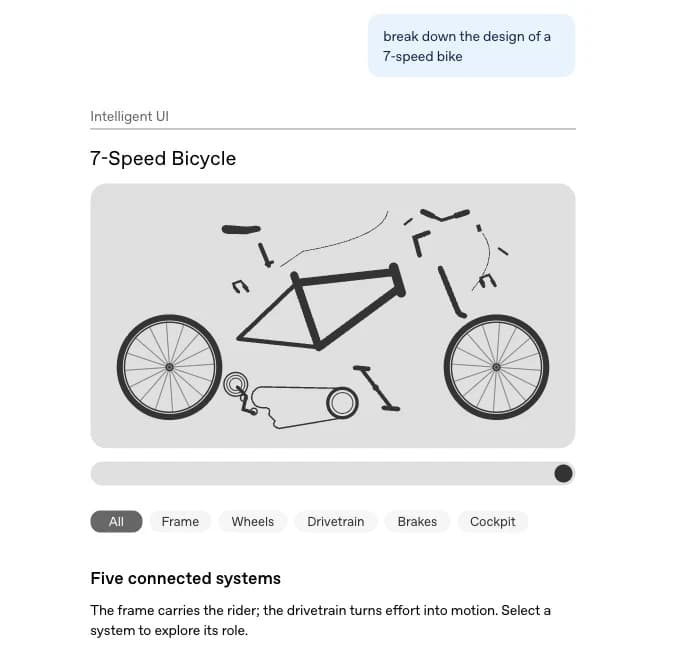
OpenAI's launch post shows the idea best with one prompt: "break down the design of a 7-speed bike." A text answer would describe the frame, wheels, drivetrain, brakes and cockpit in paragraphs. The Intelligent UI version draws the bike, lets you filter it by system, and explains each part when you select it.
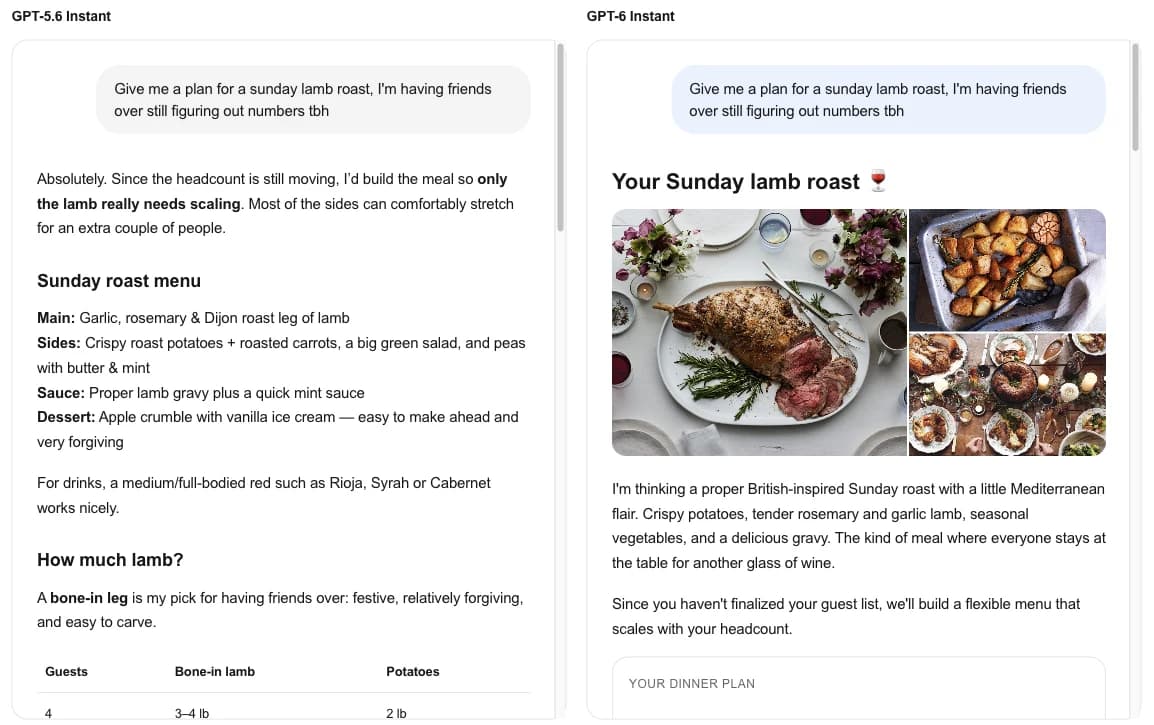
The second example is more everyday. The same prompt about planning a Sunday lamb roast goes to GPT-5.6 Instant and GPT-6 Instant. The older model writes a solid answer with a menu, wine notes and a quantity table. GPT-6 opens with photos, then a "Your dinner plan" card, a visual menu and a plan that scales with the headcount. Same information, very different experience.
OpenAI groups the use cases into three buckets:
Everyday answers made visual. Recipe timing beside the recipe, road-trip stops on a map, a wardrobe plan you can browse.
Learning by exploring. Change an input and watch the result, as in its examples for the central limit theorem, the Monty Hall problem and GDP.
Tools on request. Ask for a bill splitter, a retirement savings calculator or a small game and it appears in the conversation, ready to use.
How Intelligent UI works
OpenAI's description is short: a "library of native, streamable components" plus "a compiler that processes the interface as the model generates it." An independent technical teardown by OpenUI fills in the detail. Combined, the pipeline looks like this:
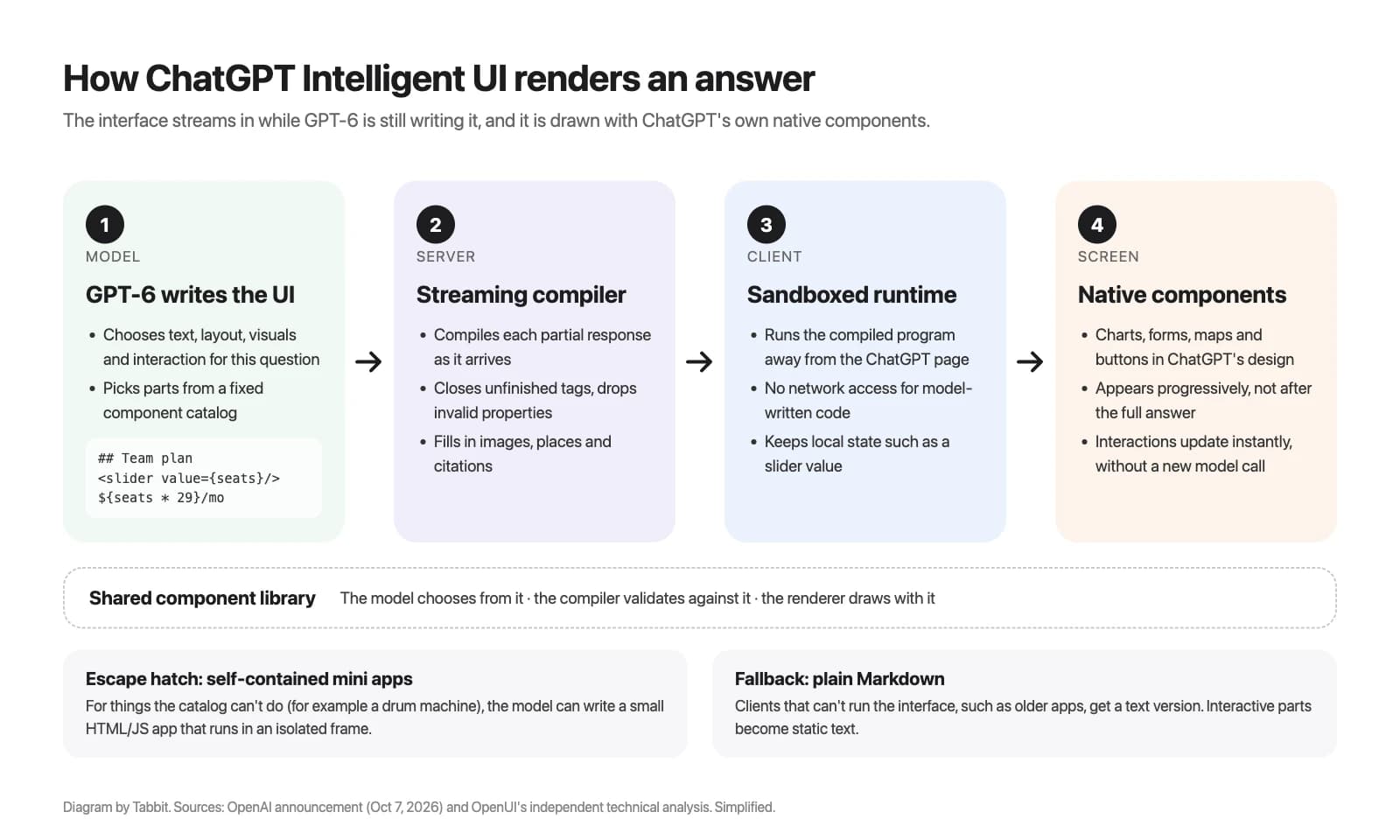
GPT-6 writes the interface. It does not output a picture or a web page. According to OpenUI, it writes a compact format that mixes Markdown for prose, tag-style components such as sliders and charts, and small bits of logic, for example "price = seats × 29."
A server compiles it as it streams. Because the model writes token by token, the compiler works on half-finished output: it closes open tags, drops properties that aren't valid, and fills in data such as image search results, places and citations. This is why the interface appears progressively instead of after the whole answer is done.
Your device runs it in a sandbox. OpenUI found that the compiled program runs in an isolated frame with network access removed, so model-written code can't reach out to the internet or touch the ChatGPT page.
ChatGPT draws it with its own components. Charts, forms and buttons use ChatGPT's design system, so an answer looks like part of the app, not an embedded website. Moving a slider updates the view instantly without calling the model again.
There are two side paths. When a request needs something the component library can't do, such as a drum machine that plays sound, the model can write a self-contained mini app that runs in its own isolated frame. And when a client can't run the interface, such as an older app version, the server sends a plain Markdown version instead.
The hardest part, according to OpenAI's Andrew Chen, was not generating UI. "Models have been able to generate good-looking HTML for a while," he wrote on X. The harder problems were making it feel native to ChatGPT and training the model to know when an interface helps at all. OpenAI says it evaluated generated interfaces for clarity, usefulness and completeness during training.
Speed is the design goal users notice first. "The most impressive part is speed," one r/ChatGPT user wrote, saying visuals arrive "almost as instant as the text generation." That matches the other half of the launch: GPT-6 can start answering while it keeps thinking, and OpenAI says GPT-6 Instant starts answering web-search questions 44% sooner on average than GPT-5.6 Instant. That is OpenAI's internal figure, not an independent test.
Why OpenAI built Intelligent UI
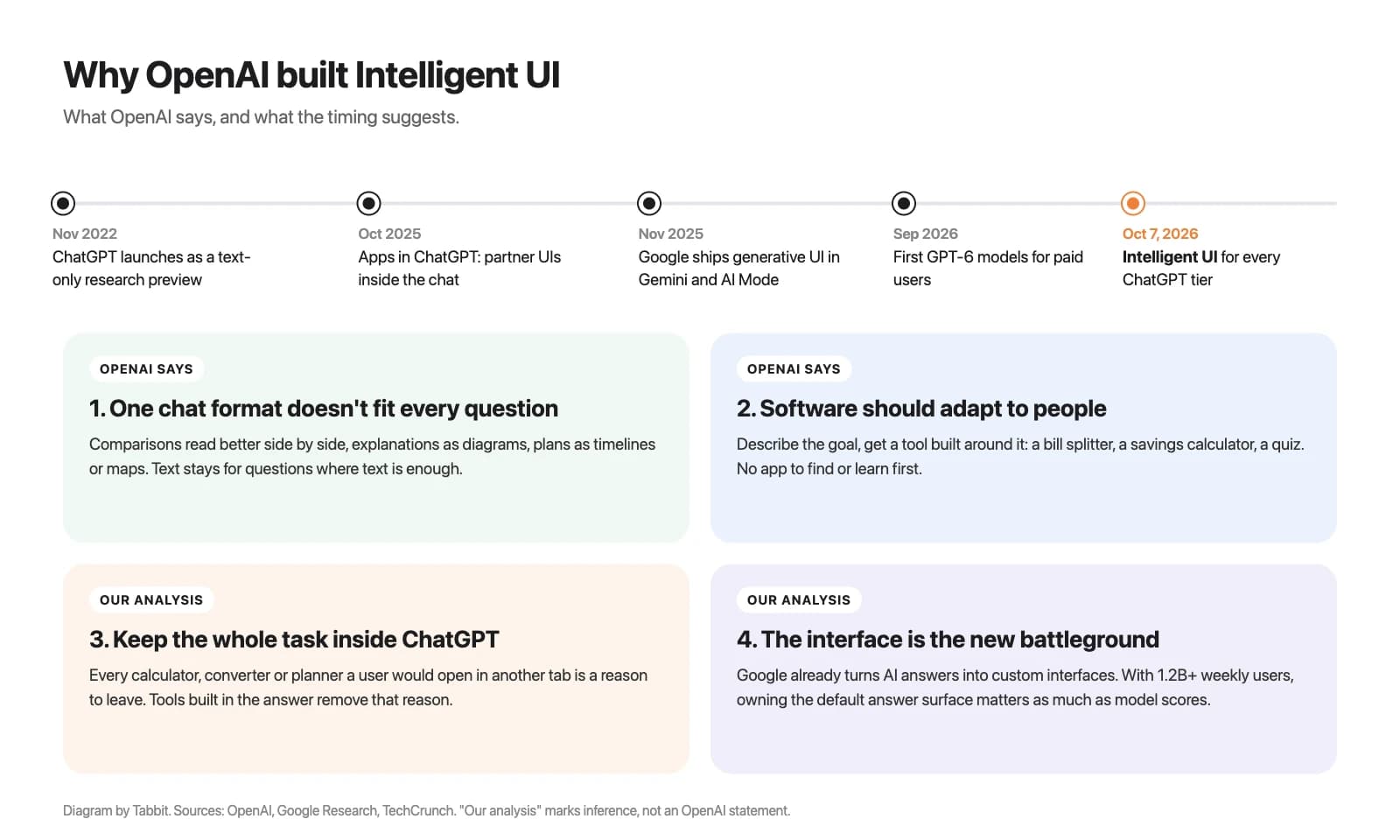
OpenAI gives two reasons in public. The timeline around the launch suggests two more. It helps to keep them apart.
Stated reason 1: one chat format doesn't fit every question
ChatGPT launched in 2022 as a text-only research preview, and answers have mostly stayed text since. OpenAI's launch post says Intelligent UI lets ChatGPT stop "fitting every question into the same conversational format." Comparisons work better side by side, mechanisms work better as diagrams, plans work better as timelines or maps. The goal is not more visuals. It is the right format, including plain text when text is enough.
Stated reason 2: software should adapt to people
The closing lines of the announcement are the real thesis. For decades people have learned software built around fixed tasks. OpenAI writes: "Instead of people adapting to software, software will adapt to people." In this view, a bill splitter is not an app you search for, download and learn. It is something you describe, and ChatGPT builds it for that dinner. OpenAI's Michelle Pokrass called the feature "a bet on model intelligence": GPT-6 decides what to put on the canvas instead of following a fixed template.
Our analysis 3: keep the whole task inside ChatGPT
Every time a ChatGPT answer ends with "use a mortgage calculator" or "check a map," the user leaves. Intelligent UI closes those exits. Search Engine Journal's Matt G. Southern made the same point: calculator and converter pages may now compete with tools generated in the conversation.
This fits a pattern. In October 2025, OpenAI launched apps inside ChatGPT so services like Booking.com and Spotify could render their interfaces in the chat. Its separate browser bet, ChatGPT Atlas, shut down in August 2026. Intelligent UI moves interface-building into ChatGPT itself, where more than 1.2 billion people already show up every week.
Our analysis 4: the interface is the new competitive layer
OpenAI is not alone. Google Research introduced generative UI in November 2025, shipping it as dynamic view experiments in the Gemini app and in AI Mode in Search, and reported that human raters strongly preferred these interfaces to standard text output. If you use Gemini today, our guide on getting Gemini in your browser covers the options. When the top models are close on benchmarks, the answer experience becomes a place to compete. Intelligent UI is OpenAI's move on that front, and it ships to every tier at once instead of staying behind a paywall.
Where Intelligent UI falls short
OpenAI says there is "still work ahead to improve the model's design judgment." The OpenUI teardown lists specific rough edges it observed in October 2026:
State can disappear. Values you change in a widget reset when the page reloads.
The model can't see what you changed. If you move a slider and then ask a follow-up, ChatGPT only sees your message, not the widget state.
Follow-ups rebuild the interface. A new question produces a new interface instead of editing the old one.
Logic errors are silent. In one OpenUI test dashboard, switching a chart metric changed a revenue figure from $6,930 to $256,410 with no warning.
Image search can miss. The model writes an image query but never sees the result, so a picture can come from the wrong product.
There is also a cost question. A Reddit user in r/SaaS doubted the model of building every tool fresh: "I don't think we will recreate tools all the time because it is simply wasteful." For one-off tasks, a generated tool is convenient. For a calculation you run every week, a saved spreadsheet you can check is still the safer habit.
The practical rule: treat Intelligent UI output like any AI answer. A good-looking chart is not a verified number. If a decision depends on the figure, check the inputs.
How to get Intelligent UI, and how to turn it down
You don't need to enable anything or write special prompts. If your account has GPT-6 in the Chat tab, ChatGPT uses Intelligent UI when it judges that a visual helps. If you don't see it, the help article points to these causes:
The rollout hasn't reached you. Some Reddit users said they saw screenshots of features that were not yet live on their own accounts.
You picked the Pro thinking level. Pro runs on GPT-6 Astra and does not support Intelligent UI. Choose Instant, Medium, High or Extra High.
You're using an older desktop app. The older macOS and Windows desktop apps don't support it. Use chatgpt.com in your browser, or update the mobile app.
Your workspace limits it. In Enterprise, admin settings decide access.
Not everyone wants this. One X user asked OpenAI if it could be toggled off, saying "random Google images being pulled in on a whim" hurt their "understanding flow." The control OpenAI offers is partial. On the web, go to Settings and turn off Layout and visuals. OpenAI says this reduces visual elements, but some may still appear, and it does not switch ChatGPT back to a text-only mode. If you want text for a specific answer, say so in the prompt, for example "answer in plain text, no charts or widgets."
A different route: AI that works inside real web pages
Intelligent UI is strong when the answer itself is the product: an explanation, a plan, a quick calculator. Many real tasks don't end there. You still have to fill in a booking form, update a shared spreadsheet, or work through a supplier's admin panel. ChatGPT can build a new interface for the answer, but it does not operate the websites where your work happens.
That is the gap an agentic browser is meant to fill. Tabbit Browser takes the opposite approach to Intelligent UI. Instead of generating a new interface, its Agent Mode works inside the pages you already use: it reads the page, clicks, types and reports each step in the sidebar while you keep browsing in other tabs.

The difference in plain terms: an Intelligent UI table lives inside a ChatGPT answer, while Tabbit edits the spreadsheet your team actually uses. If you're new to the idea of AI agents acting on your behalf, our overview of browser automation explains what this kind of workflow can and can't do.
The trade-off is real. Tabbit doesn't produce interactive explainer diagrams the way GPT-6 does, and agent actions on live sites need your supervision, especially before anything is submitted. If you mainly want to learn, plan or calculate, ChatGPT is the better fit. If you want ChatGPT-style help inside your browser tabs, compare the options for a browser with ChatGPT built in.
Should you lean on Intelligent UI?
| Task | Intelligent UI fit | Better option |
|---|---|---|
| Understanding how something works | Strong: interactive diagrams and step-by-step views | Intelligent UI |
| Planning a meal, trip or event | Strong: timelines, maps and adjustable quantities | Intelligent UI, then save the plan |
| Quick one-off calculations | Good: instant calculators and splitters | Intelligent UI, check the inputs |
| Recurring financial or business numbers | Weak: state resets and silent logic errors | A spreadsheet you control |
| Reading long, nuanced text | Mixed: visuals can interrupt | Turn off Layout and visuals or ask for plain text |
| Completing tasks on real websites | Not designed for it | An agentic browser such as Tabbit |
Verdict: ChatGPT Intelligent UI is the biggest change to how ChatGPT answers since it launched, and it is useful today for learning, planning and quick tools. It is also OpenAI's clearest statement of strategy: ChatGPT wants to be the place where software gets made for you on demand. Use it where a visual answer saves time, verify anything you'll act on, and turn it down if it gets in your way.
If your work ends on real websites rather than in a chat answer, try an AI browser that can act in those pages. That is where Tabbit fits.

FAQ
What is ChatGPT Intelligent UI?
Intelligent UI is a GPT-6 capability in ChatGPT that lets an answer include charts, diagrams, tappable buttons, forms, maps and small tools instead of only text. The model decides which format fits each question. OpenAI launched it on October 7, 2026, and simple questions can still get plain text answers.
Is ChatGPT Intelligent UI free?
Yes. It started rolling out to Plus, Pro, Business and Enterprise on October 7, 2026, and to Free and Go users from October 8. OpenAI says it has no separate usage quota, so your normal model and plan limits apply.
How do I turn off Intelligent UI in ChatGPT?
On ChatGPT on the web, open Settings and turn off Layout and visuals. OpenAI says this reduces visual elements but does not switch ChatGPT to a text-only mode, so some visuals can still appear. You can also ask for a plain text answer in your prompt.
Why don't I see Intelligent UI?
The rollout is staged, so your account may not have it yet. It also does not work with the Pro thinking level, which uses GPT-6 Astra, or in the older ChatGPT desktop apps for macOS and Windows. Use the web version or an updated mobile app, and in Enterprise workspaces check with your admin.
How is Intelligent UI different from apps in ChatGPT?
Apps in ChatGPT show interfaces built by partner companies, such as a booking or music service, and they connect to that company's data. Intelligent UI is built by GPT-6 on the fly from ChatGPT's own component library for the question you just asked. One brings an existing product into the chat, the other creates a new interface for one answer.
Is Intelligent UI the same as generative UI?
Intelligent UI is OpenAI's product name for a form of generative UI, the broader idea of AI models creating an interface instead of only text. Google uses generative UI in experiments in the Gemini app and in AI Mode in Search. The approaches differ in how the interface is built and rendered.