
If you ask a chatbot to book a meeting, it may tell you what to click. An AI agent is the system that can inspect the calendar, find an available slot, and carry out the next steps when it has the right tools and permission. That sounds like a small difference. In practice, it changes who is holding the steering wheel.
The label is also used loosely. Some products call a fixed sequence of API calls an agent; others reserve the word for software that chooses its own next actions. Anthropic makes this distinction between predictable workflows and agents that dynamically direct their process and tool use. Both can be useful. They should not be trusted in the same way.
This guide gives you a working definition, a simple model of the loop, and a browser example with Tabbit Agent Mode. The example is about understanding the shape of the work, not handing over every important decision.
That caution matches what people report in practice. In a Reddit thread about testing browser agents on real sites, u/Silly_Door9599 described one failure mode plainly: "Agent clicks wrong element (label instead of input)." This is one person's test, not a benchmark, but it captures why a browser agent needs feedback and review.
Key takeaways
An agent starts with a goal, observes context, reasons about a next step, uses a tool, and checks what happened.
A chatbot is usually response-first. An assistant helps inside a product. A traditional automation follows rules. The boundaries overlap.
More autonomy brings more convenience, but also more ways for a mistaken assumption to turn into an action.
Browser agents are useful for multi-site research and repetitive page work. They still need clear permissions and review.
If the task is fixed and high stakes, a small, visible workflow may be a better choice than an agent.
AI agent, chatbot, assistant, automation: what is the difference?
Google Cloud describes agents as software that pursues goals and completes tasks for users, with capabilities such as observing, planning, reasoning and acting. That is a useful starting point, but real products sit on a spectrum.
| System | Usual starting point | How it decides | Typical action scope |
|---|---|---|---|
| Chatbot | A question | Produces a response | Text or links |
| AI assistant | A user request inside an app | Recommends or performs a bounded task | One product or workspace |
| Rule automation | A trigger | Follows predefined conditions | Repeatable, known steps |
| AI agent | A goal and context | Chooses steps and tools from what it observes | Several steps or services |
The table is a practical shortcut, not a taxonomy carved in stone. A chatbot may call a search tool. An assistant may plan a multi-step task. A workflow may include an LLM. Ask what the system can actually do, what it can access, and when a person can intervene.
For background on browser-level systems, see our guides to AI browsers, agentic AI browsers, and browser automation.
How an AI agent works
Think of an agent as a loop rather than a single answer:
Goal: You state an outcome, such as “compare these three product pages and put the prices in a sheet.”
Observation: The agent reads the available page, file, API response or other context.
Reasoning and planning: It chooses a next step, breaks the work into smaller steps when needed, and selects a tool.
Action: It searches, calls an API, clicks a control, types into a form, or writes a result.
Feedback: It reads the new state and decides whether the goal is complete, needs another step, or needs a human.
The ReAct research paper describes a related pattern that interleaves reasoning and acting. The important idea for a nontechnical user is simpler: an agent does not know that it succeeded merely because it issued a click. It needs to inspect the result. If a page changed, a login expired, or a field was misunderstood, the next decision should account for that.
Memory can make an agent more useful, but it also makes access worth checking. “Remember my writing preference” is different from “store every page I opened.” Tool permissions matter just as much as the model’s language ability.
What agents are good at, and where they struggle
Agents fit work with a clear outcome and several reasonable paths to reach it. They can be a good match for collecting facts from many pages, moving structured information between sites, or preparing a first draft from source material. Deep research and Chat with Page are useful adjacent patterns when you want help with information without giving up control of the browser.
They are a weaker fit when the task has one exact procedure, when every result must be identical, or when one wrong action is expensive. Anthropic’s guidance makes the same trade-off: agents can add flexibility, but latency, cost and debugging effort rise with complexity.
| Task | Sensible mode | Supervision to keep |
|---|---|---|
| Summarize a public article | Chat or page assistant | Check whether the summary missed a qualification |
| Gather prices into a draft sheet | Browser agent | Review sources and values before sharing |
| Sort a known set of files by a fixed rule | Automation or script | Test on a copy first |
| Send an unfamiliar legal or financial instruction | Human-led workflow | Keep the final decision and submission manual |
The risk is not only a wrong answer. An agent can misunderstand a button, follow instructions embedded in a page, use stale context, or continue after the situation has changed. Treat every connected tool as a permission boundary. Do not give an agent credentials or approval rights it does not need.
Trust is another practical limit. A user in r/AI_Agents wrote, "no one trust these agents with their personal data." That comment describes a concern, not a universal finding. The useful response is to narrow access, start with reversible work, and keep a record of what the agent did.
Browser-specific failures also show up at the edges of a task. In r/MachineLearning, one builder summarized the problem as "Sessions break after login or CAPTCHA." It is one engineering report, not a general failure rate, but it is a useful reason to treat login challenges and changed page structure as stop conditions.
A practical browser example: Tabbit Agent Mode
Tabbit Browser puts an agent beside the pages where the work happens. In Agent Mode, you can describe a browser task and let the agent observe the page, perform supported interactions, and report what it found. The point is not that a model “controls the internet.” The useful unit is a visible task with a clear stopping point.
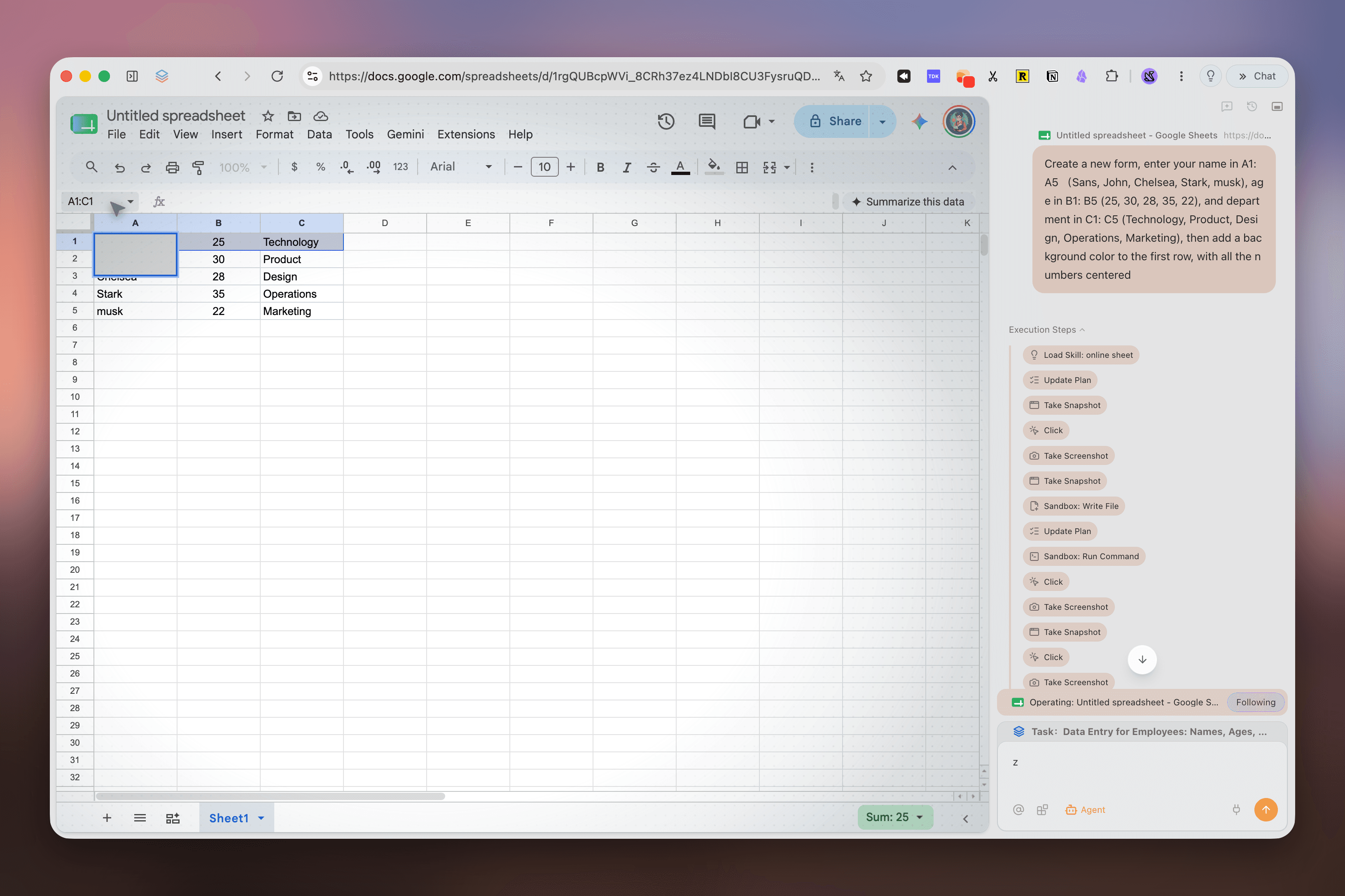
A sensible first task might be: open a short list of public pages, extract one field, and put the results into a draft table. You can watch the steps, inspect the output, and stop when the agent reaches an uncertain page. For page-specific questions, Chat with Page keeps the interaction closer to reading; for repeatable browser routines, browser skills and Script Mode may be a better fit.
The trade-off is control. A browser agent sees the same page state a person would see, but it can still misread a label or follow an unexpected flow. Keep payments, account changes, publishing, deletion, and messages behind a human approval step. Use Smart Tab Organization to keep the research context separated from unrelated work, and do not assume a tab group is a security boundary.
Browser-specific failures also show up around the edges of a task. In r/MachineLearning, one builder summarized the problem as "Sessions break after login or CAPTCHA." It is an engineering report from one discussion, not a general failure rate, but it is a good reason to treat login challenges and changing page structure as stop conditions.
A simple rule for deciding whether to use one
Use an agent when the goal is clear, the route can vary, the tools are appropriate, and you can review the result. Use a normal workflow when the steps are fixed. Keep a person in charge when the consequences are difficult to reverse.
That rule also answers the “can it really do things for me?” question. Yes, within its tools and permissions. No, not as a substitute for knowing what the action means. The agent can carry out a sequence; you still define the acceptable outcome.
Trust is another practical limit. A user in r/AI_Agents wrote, "no one trust these agents with their personal data." This is an individual concern, not a universal finding. Narrow access, start with reversible work, and keep a record of what the agent did.
FAQ
What is an AI agent in simple terms?
An AI agent is software given a goal that can gather information, choose steps, use tools, and check the result. It may ask for help or approval when a task is uncertain or risky.
How is an AI agent different from a chatbot?
A chatbot mainly responds with text. An agent can use tools and take actions across several steps, although many products combine both behaviors.
Can an AI agent really do work for me?
It can handle parts of a task such as researching pages, moving information between sites, or preparing a draft when the product supports those tools. Review important outputs and approve irreversible actions.
Are AI agents safe to use?
Safety depends on permissions, connected tools, and review. Avoid broad access for high-impact actions and treat an agent’s output as work to check.
What is a browser agent?
A browser agent operates websites through a browser interface. It can observe a page, decide what to do next, click or type, and use the resulting page state as feedback.
When should I not use an AI agent?
Do not hand an agent a task when a mistake could expose secrets, move money, create a legal commitment, or cause other hard-to-reverse harm. A checklist or simple automation is often easier to control.
If you want to see whether browser-level assistance fits your own work, install Tabbit Browser. Start with a reversible research task, watch the steps, and keep the final decision yours.

FAQ
What is an AI agent in simple terms?
An AI agent is software given a goal that can gather information, choose steps, use tools, and check the result. It may ask for help or approval when a task is uncertain or risky.
How is an AI agent different from a chatbot?
A chatbot mainly responds with text. An agent can use tools and take actions across several steps, although many products combine both behaviors.
Can an AI agent really do work for me?
It can handle parts of a task such as researching pages, moving information between sites, or preparing a draft when the product supports those tools. You should review important outputs and approve irreversible actions.
Are AI agents safe to use?
Safety depends on permissions, the tools connected to the agent, and the review process. Avoid granting broad access for high-impact actions and treat an agent's output as work to check, not an automatic decision.
What is a browser agent?
A browser agent operates websites through a browser interface. It can observe a page, decide what to do next, click or type, and use the resulting page state as feedback.
When should I not use an AI agent?
Do not hand an agent a task when a mistake could expose secrets, move money, create a legal commitment, or cause other hard-to-reverse harm. A checklist or a simple automation is often easier to control.