
Titanium Browser is an open-source, Chromium-based Android browser that supports extensions, including Manifest V2 (MV2). Developed by jqssun and based on Vanadium, it lets you install extensions from the Chrome Web Store and, through its companion extension, Opera and Edge Add-ons. Its official download channels are Google Play and GitHub.
The appeal is practical. In an r/browsers discussion, AzokBust wanted an Android browser for extensions such as uBlock and Dark Reader, while worrying about an old browser without security updates. Titanium addresses that kind of extension requirement. If your next task happens on a computer, Tabbit Browser offers a separate option for reading pages with AI and working across tabs.
This is a source-based introduction, checked on October 21, 2026. It is not a hands-on Android benchmark or an independent security audit.
Key takeaways
Titanium is an Android browser. Do not assume a similarly named Windows download belongs to this project.
The Play listing explicitly confirms MV2 support. Whether an extension is available in a store is a separate question.
Enable Desktop site when installing from the Chrome Web Store. Use Titanium Extension for Android for Opera and Edge stores and advanced options.
The project was formerly Helium Browser for Android. It is not affiliated with desktop Helium.
Keep Titanium for the Android extension workflow; consider Tabbit on Windows or macOS when the job is page understanding and research.
Titanium Browser at a glance
| Question | Verified answer | What to check yourself |
|---|---|---|
| Platform | Android, according to the project and Play listing | Your device's installation eligibility |
| Engine and origin | Chromium-based, based on Vanadium | Current release and Chromium version |
| Source | Public GitHub repository; GPL-2.0 | Build and release documentation |
| Extensions | MV2 support stated on Google Play | Each extension's availability and mobile behavior |
| Stores | Chrome Web Store; Opera and Edge through the companion extension | Store access and install prompts |
| Advanced features | External download managers, enhanced dark mode, additional privacy options | Companion extension settings |
| Downloads | Google Play and GitHub Releases | Publisher jqssun and package identity |
Sources: browser README, Play listing, and extension README. These describe supported capabilities, rather than a guarantee that every desktop add-on behaves correctly on a phone.
What Titanium is, and why the Helium name still appears
The official README calls Titanium a Chromium-based browser based on Vanadium by GrapheneOS. Chromium is the browser foundation; Titanium adds its own build, branding, extension support, and configuration. If these project relationships are unfamiliar, the guide to browser engines explains why sharing an engine does not make two browsers the same product.
The project used to be named Helium Browser for Android. Its developer says the rename avoids branding confusion and explicitly states that it is not affiliated with the desktop Helium project. This matters when you find old tutorials: a Helium Android link may refer to this project's history, while a desktop Helium tutorial describes a different product.
The Google Play URL still contains io.github.jqssun.helium. That package name is not, by itself, evidence that you found the wrong app. Verify the visible app title, publisher jqssun, and the links from the official repository together.
There are also other products called Titanium. A Windows download listing or an enterprise kiosk browser in search results is not evidence of a desktop edition of jqssun's Android project. Start with the repository supplied above, rather than matching a product by name alone.
How to install extensions in Titanium Browser
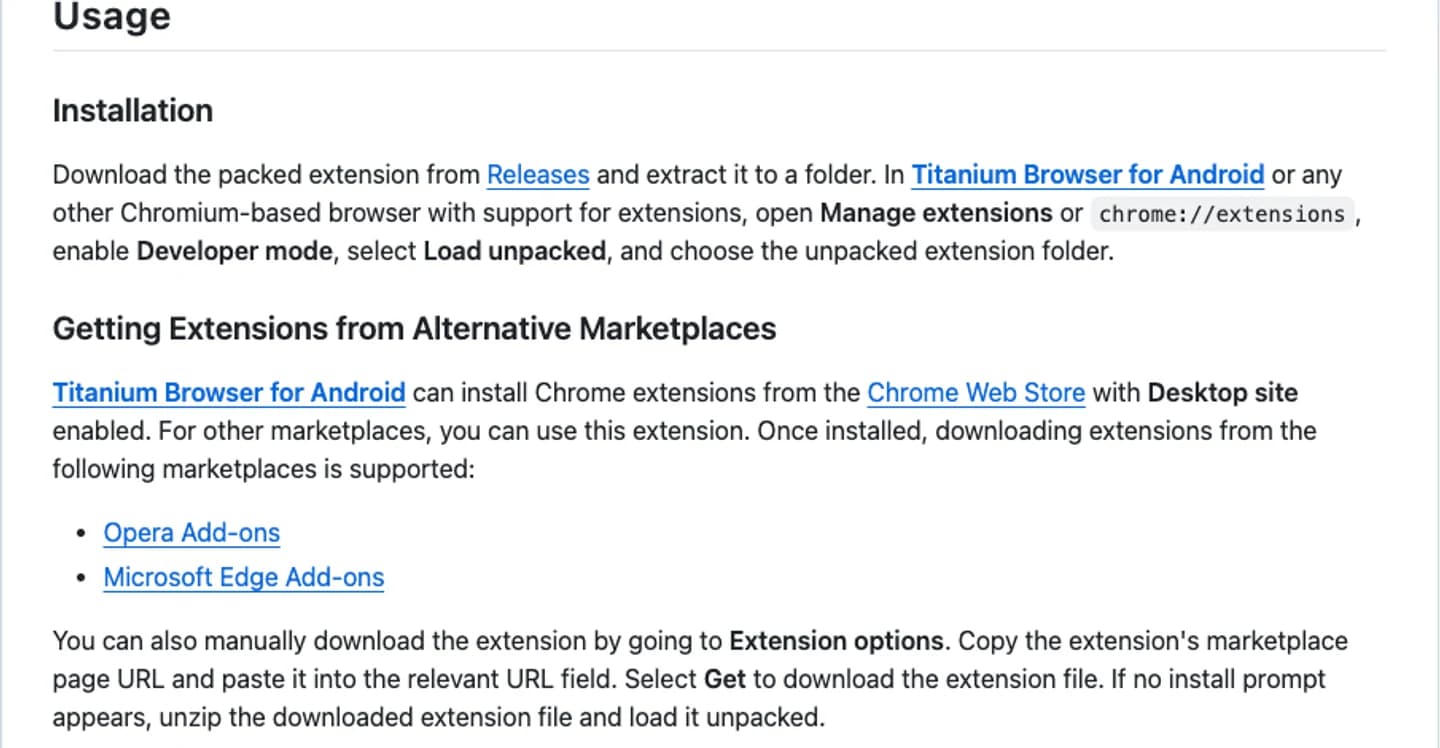
Titanium's main distinction is bringing browser extensions to its Android browsing environment. The installation route depends on the source. The developer documents these routes in the companion extension README.
Chrome Web Store: enable Desktop site
Install Titanium from its official Play listing or GitHub Releases.
Open the Chrome Web Store in Titanium.
Enable Desktop site for the store page.
Find the extension from its actual publisher and review the requested permissions.
Complete the installation, then check the extension under Manage extensions.
Start with one extension you need. Open a page where you can tell whether it works, test the controls, and restart the browser before adding the next one. An installed badge tells you that installation finished; it does not tell you that a toolbar popup, keyboard shortcut, or page modification works well on touch screens.
One Reddit user, theShadow_fromPipes, described using uBlock Origin from Opera, a custom font through Stylus, and Tabliss. That is a useful account of an extension-focused workflow. Their device, settings, and extension versions limit how far the experience can be generalized.
Opera and Edge Add-ons: use the companion extension
Titanium Extension for Android supports alternative marketplaces. Its options also let you paste an extension's marketplace URL into the relevant field and select Get. The developer documents unpacking the downloaded file and loading it unpacked if no install prompt appears.
The current browser README describes the companion extension as built in. Its separate repository also documents manual installation for compatible browsers. Check your installed Titanium version before assuming you need to add a second copy. Official support for the companion is provided for Titanium; its README lists extra requirements for alternative-marketplace installation in other Chromium browsers.
Local files and incognito access
For a local CRX or ZIP, use the companion extension's options. For an unpacked extension, the documented route is chrome://extensions → Developer mode → Load unpacked, then select the folder through Android's file picker.
Incognito permission is separate. In Manage extensions, open the extension's Details and enable Allow in Incognito only when needed. That setting allows the extension to run in that browsing context; it does not make the extension anonymous or remove its access to pages.
If an add-on misbehaves, disable it and retest the page before changing several settings at once. Our guide to removing extensions safely explains the general troubleshooting approach, although Titanium's Android controls can differ from desktop Chrome.
MV2 support is useful, but store availability is separate
The Play listing explicitly says that Manifest V2 extensions are supported. MV2 is an extension manifest format; it is not a store, a download source, or a promise that every legacy extension will remain maintained.
Three conditions have to line up:
Usable extension = browser support + available package + working mobile behaviorA browser can retain support while a store stops offering a particular package. An extension can install while a desktop-oriented interface is awkward on Android. A working version today can also need changes after a browser update. Check the publisher's current instructions and use the repository's issue tracker for reproducible problems.
For the broader migration question, see why extensions stop working across MV2 and MV3. Do not infer Titanium's long-term maintenance plans from a community comment or treat this article as a compatibility list for every extension.
What Titanium Extension for Android adds
The browser keeps advanced functions in a companion extension. Its documented features include external download manager integration, enhanced dark mode, and additional privacy options. This design lets readers distinguish normal browsing from settings provided by the companion.
For an external download manager, first choose an application preset or configure the app's package ID and intent format in Extension options. The developer stresses that the package ID must match the installed app variant exactly. Once configured, downloads can be redirected through intent://; a long press on a link also offers a manual download-manager action.
This does not mean Titanium includes the external downloader itself. Install and configure the downloader you intend to use, then try an ordinary file you can safely discard. Keep download behavior separate from extension installation when diagnosing failures.
For voice or video sites, the browser README also documents a WebRTC IP Policy setting under Privacy and security. It suggests trying a different policy when shielding IPs interferes with a service. Change it for a specific problem rather than assuming that one setting is best for every site. The guide to privacy settings and website compatibility gives broader context for these trade-offs.
A desktop option: use Tabbit for reading and research
Once you move from a phone to a computer, the task can change. You may want to read a long article, check the developer's explanation, and compare several sources. For that workflow, Tabbit on Windows or macOS is a reasonable next step. The international official site and China official site both describe using pages and other material as AI context.
Open a source page in Tabbit, bring up its AI conversation, and reference the page before asking a question. For example, use the Titanium README and ask:
Summarize this page in five points. Separate browser features from
companion-extension features. List the installation conditions and
security limitations explicitly stated by the author.
If the page does not answer something, say it is unspecified.
This is a suggested workflow, not a claimed test result. The webpage summarization guide covers that pattern, and tab management helps when the README, extension documentation, and release notes need to stay open together. The screenshot below shows an existing Tabbit page-summary example, not a Titanium-specific test.

The trade-off is a separate desktop browser and AI usage governed by the relevant regional plan. Check the answer against its sources. Titanium and Tabbit are independent products: this workflow does not imply shared accounts, automatic bookmark sync, or identical Android extension behavior. If you prefer to try Tabbit without moving everything, use it as a second browser first.
Is Titanium Browser safe? Keep the claim precise
Titanium's developer describes security and privacy improvements, but the README also gives a clear limitation: GrapheneOS with Vanadium offers stronger protection through additional operating system, kernel, and memory hardening. Deriving a browser from Vanadium does not reproduce the whole operating system's protections.
Public source, a recent release, and a store listing are useful checks. They are not an independent audit of the installed binary, every extension, or your device. Google Play's data-safety statements are developer declarations. They should not be extended to cover what third-party extensions collect.
Performance needs the same care. In the Android experience thread, one user described good everyday performance, while Final_Economist_9218 reported a poor Speedometer result on another phone. Those reports are not a controlled comparison. Test your important sites and extensions rather than relying on a universal speed ranking.
Use the browser security checklist to review update status, download origin, and extension permissions. This article recommends evaluating Titanium for a specific capability; it does not certify it as the safest Android browser.
Which browser fits your next task?
| Your task | Practical choice | Main boundary |
|---|---|---|
| Run a particular browser extension on Android | Try Titanium with that extension | Check store availability, permissions, and mobile behavior |
| Use an Android external download manager | Configure Titanium's companion extension | Package ID and downloader app must match |
| Read pages with AI on Windows or macOS | Try Tabbit on your computer | Separate browser; AI limits depend on the regional plan |
| Obtain the full GrapheneOS security environment | Follow GrapheneOS and Vanadium guidance | A browser fork alone cannot provide OS hardening |
| Find a Titanium Windows, Mac, or iOS download | Verify the exact project first | The linked Android project does not document those editions |
Titanium is worth evaluating if your Android requirement is extension support and configurable browsing. Download it from the official source, install one essential extension, and check a real task before moving your daily browsing.
For computer work, start Tabbit with one article and one question. Keep the source open, compare the summary with the original, and use the desktop download below if that workflow fits. You can keep using Titanium on Android without treating the two products as a synchronized browser suite.

FAQ
What is Titanium Browser?
Titanium Browser is jqssun's open-source Chromium-based browser for Android, based on Vanadium. It supports browser extensions and was previously called Helium Browser for Android. It is not affiliated with the desktop Helium project.
Does Titanium Browser support Manifest V2 extensions?
The Google Play listing explicitly states that Manifest V2 extensions are supported. Browser support does not guarantee that a particular extension remains available in a store or works correctly on every phone. Check the extension publisher's current distribution instructions.
How do I install Chrome extensions in Titanium?
Open the Chrome Web Store in Titanium and enable Desktop site before installing. For Opera or Edge Add-ons, use Titanium Extension for Android. Local CRX or ZIP installation is also documented through the companion extension's options.
Where can I download the official Titanium Browser APK?
Use the Releases page in jqssun/android-titanium-browser on GitHub, or install the app published by jqssun on Google Play. The Play package identifier remains io.github.jqssun.helium after the rename. Avoid identifying the app from its name alone.
Is Titanium Browser safe?
Its source is public, and the developer describes security and privacy improvements based on Vanadium. The project's README also says GrapheneOS with Vanadium provides stronger Android protection through additional operating system hardening. This guide does not provide an independent security audit or a safety guarantee for extensions.
Is Titanium Browser available for Windows or Mac?
The Android project linked here does not document a Windows or macOS edition. Search results include unrelated products with the same name. For AI-assisted reading and research on a computer, consider Tabbit for Windows or macOS; this is a separate browser, with no Titanium-to-Tabbit sync implied.