
Two agents can work in one browser when the controller can give each task its own page and run both. A shared profile can give both tasks access to the same site session, while the two documents keep separate state. To check whether the tasks can interfere, verify the page owner and the actual page result. We ran two overlapping tasks in Tabbit. Alpha marked its own page, Beta stayed pending, and a cross-task claim failed.
Separate the browser, the profile and the tab
A browser instance runs the pages. A profile or browser context governs cookies and other storage. A tab is a page with its own document, URL and in-page state. A controller can assign that tab to a task and enforce which operations the task may perform. The operating system process count alone does not tell you which cookies or pages are shared. Playwright browser context isolation · Playwright pages
| Layer | What can be shared | What to verify |
|---|---|---|
| Browser instance | One running browser can host several tasks. | Confirm the runtime accepts overlapping work. |
| Profile or context | Tabs in the same profile can share site cookies. | Check the account and session with a harmless read. |
| Page or tab | Each tab has its own document. | Check the URL and a visible marker for each task. |
| Task ownership | The controller can assign which task may use a tab. | Attempt an ownership conflict on a disposable tab. |
| Site records | Different tabs can refer to the same server-side record. | Sequence conflicting writes and verify the saved result. |
A tab group organizes related pages. Separate browser storage is needed when the tasks should use different accounts. A page claim controls tool access. The guide to an existing browser connection covers profile selection, and background browser automation covers working alongside an active user.
Two tasks in the same Tabbit instance
On macOS, we used Tabbit CLI 1.22.6.0 with Tabbit Dev. The fixture was local and used a synthetic HTTP-only session cookie. Two named tasks opened /alpha and /beta. Each made a request to a test barrier. The server released both only after receiving both requests, so we could confirm real overlap. This is a controller test with two scripted tasks.
Alpha clicked Mark reviewed, which changed its document to Reviewed ALPHA-31. Beta's document still said Pending. The CLI inventory showed different owned tab IDs. While both tasks were live, Beta tried to claim Alpha's test tab. The request failed and the IDs stayed with the same owners. Beta then clicked its own button and returned Reviewed BETA-72. Alpha still read Reviewed ALPHA-31.
The rejected request returned TAB_OWNERSHIP_CONFLICT before its program ran. After Alpha released the tab, Beta acquired that same tab ID and read the existing Alpha marker. This separates an ownership conflict from a general attachment failure.
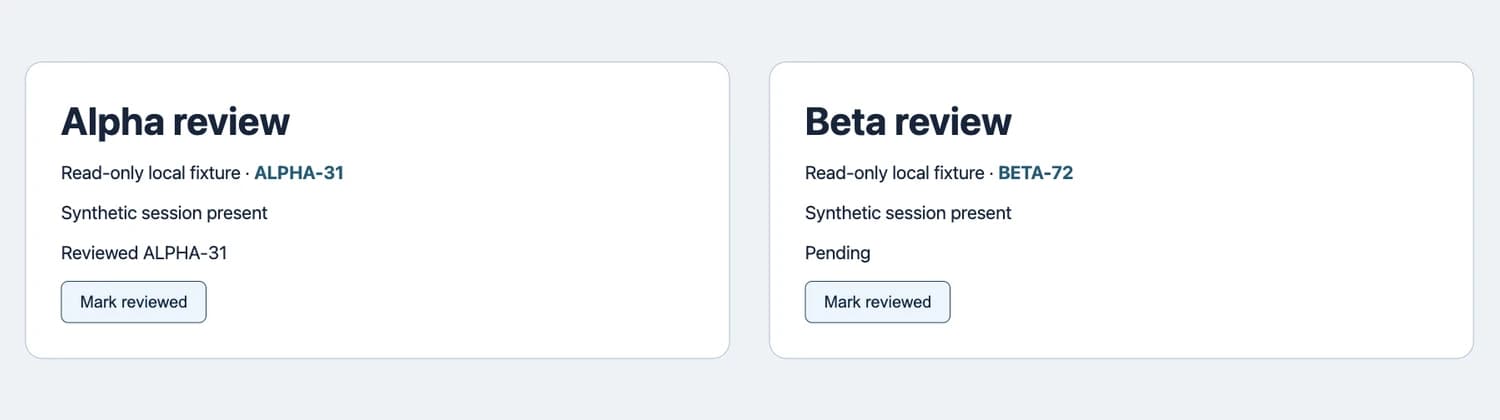
| Check | Alpha | Beta |
|---|---|---|
| Owned page | /alpha | /beta |
| Synthetic session visible | Yes | Yes |
| After only Alpha clicked | Reviewed ALPHA-31 | Pending |
| After the cross-claim attempt | Same owned tab | Same owned tab |
| After Beta clicked its own page | Reviewed ALPHA-31 | Reviewed BETA-72 |
The two screenshots were taken separately after Alpha clicked and before Beta clicked. The test used no real account and did not write to a website record. A different browser driver can offer a different ownership model. Two tasks passing this check establishes support for this pair, without a maximum concurrency estimate. Tabbit CLI quick start
Set a boundary before running more tasks
Pick the profile first. Reuse a profile only when both tasks may use that site's session. Otherwise choose different profiles or isolated contexts. The browser permissions guide explains how shell and site permissions differ.
Assign a page and task name. Open a fresh task tab or acquire one explicit observed ID. Keep the ID, expected URL and a marker such as a report heading. Browser CLI tutorial
Test one read or harmless click per task. Return the marker from each actual page. Check that the second page stays unchanged until its own action. First browser task checklist
Coordinate writes separately. Two tabs can edit one backend record. Run competing writes in sequence, and verify the final saved state.
Release the right tabs. Finish the task after saving its receipt. Close only test tabs the task created. Keep IDs and outcomes in a log so a retry does not rely on focus.
One practitioner reported that multiple Claude Code jobs took over each other's tabs in a shared profile. Another described using stable tab handles and ownership to keep parallel Safari jobs separate. These are reports about their own tools. Both point to the check that matters here: which task owns each page? Shared-profile collision report, Safari parallel task report
Use the browser MCP versus CLI comparison to choose how the agent calls the tool. The Tabbit browser overview explains how browser tasks relate to ordinary tabs. To try this check, download Tabbit and start with two disposable pages.

FAQ
Can two agents use one browser at the same time?
Yes when the controller assigns different pages and accepts concurrent requests. Verify page ownership and overlap with two small tasks before sharing a browser.
Does sharing a profile share the current page?
A profile can share site cookies across tabs. Each tab still has its own document, URL and in-page state. The tool decides who may act on it.
Does a tab group isolate cookies?
A tab group organizes pages. Account separation requires a separate profile or a browser context with separate storage.
What happens if two tasks request one tab?
In the tested Tabbit version, Beta’s attempt to claim Alpha’s owned test tab failed and both owners stayed the same. Other controllers may behave differently.
How do I test for cross-task interference?
Give each task a unique page and a visible marker. Confirm both run, change only one marker, then check the second page and test a claim on the other task’s disposable tab.