
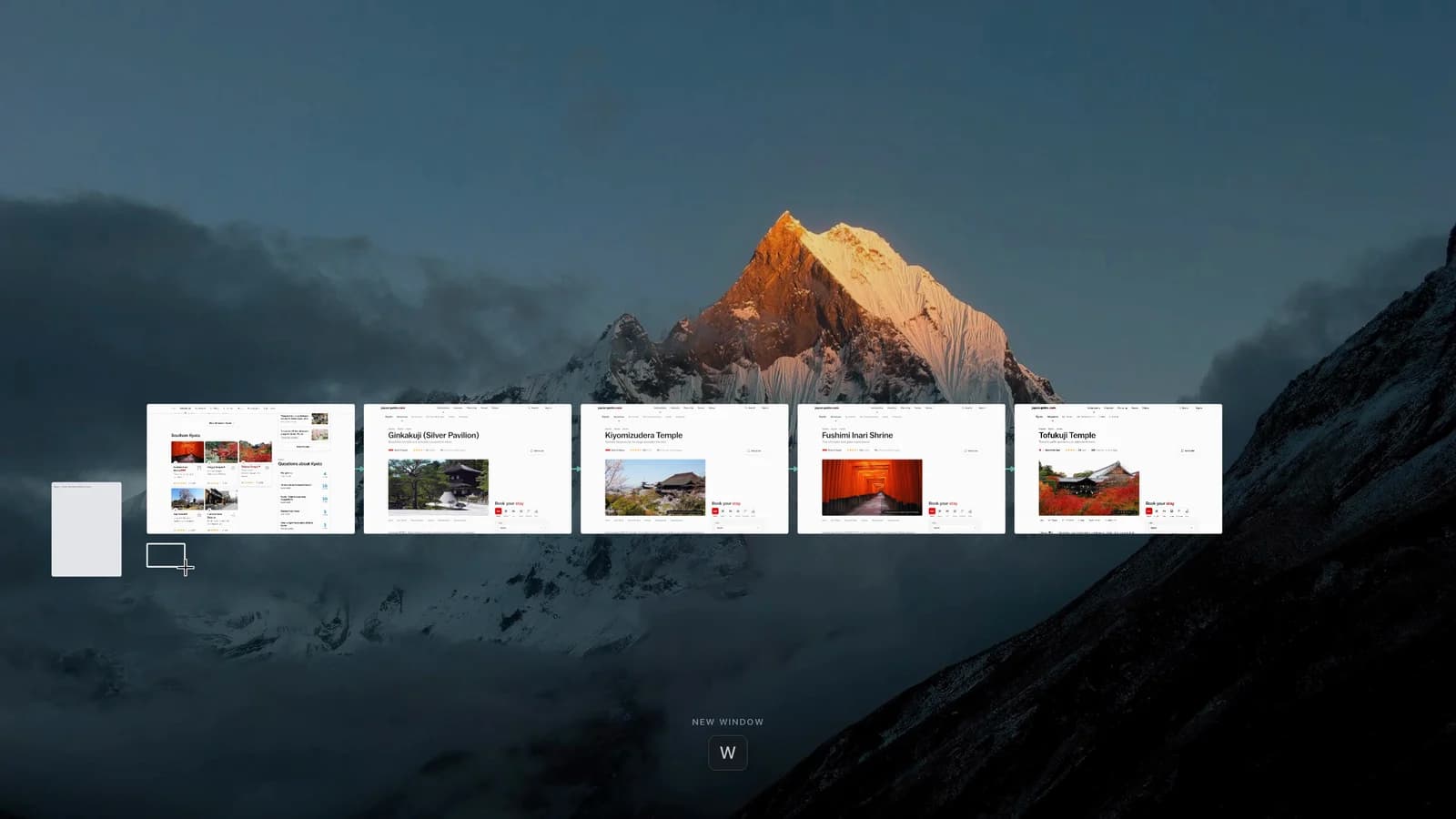
Marble Browser puts live webpages on an infinite canvas. Open a link and the next page appears beside its source, joined by a line. The point is to preserve the path of your research, so a session remains understandable after you have opened dozens of pages. Marble's official site describes it as an early research browser for Mac.
That addresses a specific frustration. In the Reddit discussion you may have seen, WorldWorried6550 valued seeing the path back through research. A visible trail can explain why a source matters when a title alone cannot. Later in this guide, Tabbit Browser provides a comparison for people whose next task is analyzing the pages with AI.
This is a sourced introduction, not an installed-app performance review. Product details were checked on October 21, 2026. No memory, speed or battery benchmark is claimed.
Key takeaways
Marble at marble.surf is a canvas browser. Search results also contain an unrelated Marble Firefox fork.
Live cards and trails retain the sequence of research; Fold, Spaces and notes add organization.
The current download is free and requires Apple Silicon, M1 or newer, with macOS 14 or later.
The official site says boards and profiles stay local, without an account or sync. That does not make ordinary web traffic anonymous.
Try it as a research workspace first. The maker explicitly says it is not yet a complete everyday-browser replacement.
Marble Browser at a glance
| Question | Current answer | What it means for you |
|---|---|---|
| What is the interface? | Live webpages on a movable canvas | You navigate a board as well as individual pages |
| How are pages related? | Trails connect a new page to its source | You can retrace a browsing branch |
| How do you organize work? | Tidy, Fold, Spaces, sidebar, notes and stickies | A large board still needs deliberate structure |
| What hardware works? | M1 or newer Mac, macOS 14+ | Windows is a waitlist; do not assume Intel support |
| What does it cost? | Current board and features are free | A future Research version has no published price here |
| Where is the board? | A file on your Mac, no sync | Local persistence does not provide cross-device continuity |
| Is it ready to replace a daily browser? | The official site says not yet | Evaluate it beside your existing browser |
Source for the table: Marble homepage and FAQ, checked October 21, 2026. Availability and terms can change.
First, make sure you found the right Marble
Searching the product name can lead to a different browser. The Marble repository associated with the older Firefox project describes a Firefox ESR fork restoring the Photon interface. This article covers marble.surf, the canvas browser in the Reddit post.
Do not transfer a search result's Linux support, Firefox extensions or open-source status to the canvas product. The shared name is not evidence that the products share a codebase or roadmap. Check the domain before following any download guide.
What changes when pages become cards?
Trails preserve the route to a source
A tab group tells you which pages belong to a topic. Marble's trail also records which page led you to the next one. That difference matters when you follow a report to its cited study, then open a methodology page and a competing explanation.
At the end, the question is often "Why did I open this?" rather than "Where is this tab?" A line can answer the first question. A vertical list mostly helps with the second. Our guide to whether vertical tabs are better covers that simpler layout change.
Marble says its cards are live webpages, rather than saved screenshots. Hovering previews a card; clicking enters the page. You can read a source, return to the board, and continue along another branch. The official demonstration illustrates that interaction. It does not establish faster research or lower resource use.
Tidy and Fold help contain the board
An unlimited canvas can still become cluttered. Tidy aligns a scattered thread, and the homepage lists Command-Z to undo it. Fold compresses a trail into a named stack. You keep a way back to the material while reducing what is visible at once.
Use these controls around a question, not around every site you have ever visited. For a laptop comparison, a branch might hold display evidence and another repair information. If the problem is simply too many browser tabs, a smaller active set and a read-later queue may be enough.
Spaces separate projects; notes preserve your reasoning
Each Space is a separate board. The sidebar provides a list of trails and pinned pages; Command-K jumps to an open page. These give you another route when visually scanning a board becomes slow. A board, a tab group and an account profile have different jobs, as our profiles, workspaces and tab groups comparison explains. A Space alone does not prove account isolation.
Marble also documents Markdown notes, stickies attached to pages, and quotations that retain a source link. A useful note says what a source supports and what remains uncertain. Position alone cannot record that distinction. The same retrieval problem appears in hard-to-search browser history and bookmarks.
A useful first project: compare two travel plans
Choose a question you need to answer, such as whether to spend an extra night in Kyoto or Tokyo. This is a suggested trial, not a claim that the author completed it in Marble.
Make one Space for the trip. Keep unrelated shopping and work outside it.
Open an official transport page, then follow its links to timetables and fare rules. Check which connections the trail preserves.
Add a note with your dates and constraints. Quote the relevant rule with its source link.
Fold a branch when you finish checking it. Use Tidy when the arrangement stops helping you read.
Quit and reopen the app. Check that the board, notes and essential sign-ins return as expected.
Judge the result by whether you can explain your decision the next day. A visually attractive collection is less useful if you cannot distinguish an official rule from a blog recommendation. Marble does not verify sources or decide which advice applies to your trip.
Local storage, pricing and the limits to check
The official FAQ says the canvas is a local file, cookies and logins stay in the local profile, and passwords use the Mac's system keychain. It says there is no account or sync. It also says page ads are blocked by default, with an option to disable blocking.
Those statements describe storage and product behavior. Websites still receive ordinary browsing requests. A locally saved board is not proof that all linked pages have been archived for offline access. Nor is it a backup on another device. Before moving important research, review how to back up browser data before switching and verify Marble's actual recovery options.
The current board and features are free. The homepage mentions a Research version in development without a published price or delivery date. Treat that as a plan. Similarly, a Windows waitlist is not a Windows release, and the current download is for M1 or newer Macs running macOS 14 or later.
Check extensions and essential websites in the installed version before moving a project. Using a familiar rendering engine does not guarantee that an unusual browser interface supports every extension workflow. This article has not tested password-manager integration, DRM playback, import/export completeness or recovery after a crash.
The privacy policy adds a detail worth separating from board storage: Marble collects app and website usage through PostHog, and email addresses when people join the waitlist or contact it. Local boards do not mean zero telemetry.
A practical option when you need AI analysis: Tabbit Browser
Suppose you have gathered five sources and now need a comparison that separates facts, disagreements and missing information. Tabbit has a different role here. Its international site and China site describe using selected pages, screenshots and local files as AI context. Our Tabbit introduction explains that workflow.
Open the relevant pages in Tabbit, attach only the sources needed for the question, and ask for a table with a source beside each factual claim. For example, ask it to compare transport options using the pages you selected and mark a fare as unknown when no page provides it. Then verify the result against the originals. This is a suggested workflow, not a tested comparison against Marble.

The trade-off is clear. Tabbit's cited pages document AI context and browser actions; they do not document Marble's infinite-canvas interface. Model requests also have a provider data path, explained in Tabbit's FAQ. Choose context carefully. If you need actions as well as answers, read what an agentic browser does and review the result of each task.
Should you try Marble Browser?
| Your main problem | Sensible starting point | Reason |
|---|---|---|
| You forget how one research source led to another | Try Marble on a supported Mac | Trails preserve browsing relationships |
| You only need readable page titles | Try vertical tabs or groups first | A canvas may add unnecessary navigation |
| You want notes beside a set of live sources | Trial one Marble project | Notes and quotes can stay with the research |
| You need continuity across several devices | Keep your existing synced browser | Marble currently says no sync |
| You need AI synthesis across selected pages | Evaluate Tabbit | Its context workflow addresses that task |
| You rely on Windows or an Intel Mac | Use a currently supported browser | Marble's listed Mac requirement excludes those setups |
There is another concern in the Reddit discussion. No_Frame3855 asked about continuity if development stops. That is a reason to check recovery, rather than a reason to predict the project's future. Keep durable research notes and important source URLs in a form you can retrieve independently.
Marble is worth a focused trial if seeing browsing relationships solves a problem you actually have. Start as a second-browser project, keeping your familiar browser available. After one session, test whether you can recover a source, explain why it matters and resume the work.
If the harder part is understanding the material you collected, Tabbit is a reasonable next comparison. Use the browser selection guide to choose by task, then test one real question before making either browser your default.

FAQ
What is Marble Browser?
Marble at marble.surf is an early research browser that puts live webpages on an infinite canvas. Connections show how you reached a page, while notes and folded groups help organize a research session.
Is Marble a Firefox fork?
The canvas browser at marble.surf is a separate product from the older Marble Firefox fork. Check the domain before downloading or applying platform and extension information from a search result.
Can I use Marble on Windows, Linux or an Intel Mac?
As checked on October 21, 2026, the official download requires an M1 or newer Mac with macOS 14 or later. Windows has a waitlist, and the homepage does not offer a Linux or Intel Mac download.
Is Marble Browser free?
The official homepage says the board and current features are free. It also mentions a Research version in development, but does not publish its price or release date.
Does Marble sync boards or save websites for offline reading?
Marble says its board and browser profile stay on the Mac, with no account or device sync. Saving a board locally does not establish that every linked website is fully available offline.
Can Marble replace my everyday browser?
Marble's own site describes it as an early research browser rather than a full everyday replacement. Start with one project and verify essential sites, extensions and recovery before considering a wider switch.