
If links keep opening in Edge, Safari, or another browser, the fix is usually a system setting, not a Chrome setting. Set Google Chrome as the default browser on the device that is sending the link. Windows, macOS, iPhone/iPad, and Android each put that control in a different place.
The annoyance is real. One Windows 11 user on r/chrome reported that Chrome would not stick as the default and that some links or files still opened in Edge. Another Windows user found the answer under the app's full list of associations, not the first chooser. I will show both paths, then explain what this setting cannot fix. If your larger goal is a browser that handles research and repetitive web work, Tabbit Browser is a separate desktop option worth considering after the routing problem is settled.
Key takeaways
Windows: Settings > Apps > Default apps, then open Google Chrome and choose Set default.
macOS: Ventura 13 or later uses System Settings > Desktop & Dock. Older macOS uses System Preferences > General.
iPhone and iPad: Chrome can be the default from iOS 14 onward. Current versions place the control under Settings > Apps > Default Apps > Browser App.
Android: use Chrome's More > Make Chrome default shortcut, or Android Settings > Apps > Default apps > Browser app.
The browser default affects links handed to the operating system. It does not automatically change your search engine, in-app viewers, email links, or an organization's managed policy.
Chrome as the default browser at a glance
| Device | Main path | Version or regional note | Common snag |
|---|---|---|---|
| Windows 11/10 | Settings > Apps > Default apps > Google Chrome > Set default | Windows may expose individual HTTP, HTTPS, and file associations | Some Microsoft surfaces may still use Edge |
| macOS Ventura 13+ | Apple menu > System Settings > Desktop & Dock > Default web browser | Earlier macOS uses System Preferences > General | The menu is not in Chrome's own settings only |
| iPhone/iPad | Chrome > Settings > Default Browser > Go to Settings, then Default Browser App | Requires iOS/iPadOS 14 or later; some choice screens vary by region | An app may use its own in-app browser |
| Android | Chrome > More > Make Chrome default, or Settings > Apps > Default apps > Browser app | Menu names differ by manufacturer | Work profiles can have separate policies |
Make Chrome the default browser on Windows 11 or Windows 10
Microsoft's Change Default Apps in Windows guide puts the control in the Settings app. The same broad path works on Windows 10 and Windows 11, although the page layout differs slightly between releases.
Open Start, then Settings.
Select Apps, then Default apps.
Search for Google Chrome and open its app entry.
Select Set default.
If Windows still sends a link elsewhere, inspect the HTTP and HTTPS entries on Chrome's app page and choose Chrome for each one you want to change.
Chrome's own official help page describes the same Windows destination. The useful detail is that Windows associates apps with protocols and file types. “Chrome is the default” can be true for web links while a particular file extension still points somewhere else.
If Windows keeps switching back
Start with the simple checks: update Windows, update Chrome, and repeat the app-level Set default action. A Reddit troubleshooting thread describes a user who could see Edge and Internet Explorer in the first chooser but not Chrome. The accepted workaround was Settings > Default apps > Set defaults by app > Chrome > Manage. The user replied that it worked.
On a managed work computer, a policy or security tool may control these associations. Do not edit the registry just because a browser tutorial suggests it. Ask IT whether the device uses a default-association policy. A second Windows 11 thread also reported a Chrome Beta choice reverting to stable Chrome after a restart, which is a reminder that separate channels can register as separate apps.
Make Chrome the default browser on a Mac
Apple's Mac support article separates current macOS from older releases.
For macOS Ventura 13 or later:
Install Google Chrome if it is not already on the Mac.
Open the Apple menu and choose System Settings.
Click Desktop & Dock in the sidebar.
Scroll to Default web browser.
Choose Google Chrome.
For earlier macOS versions, open Apple menu > System Preferences > General, then choose Google Chrome from Default web browser. Apple moved the control, so an older tutorial that says “General” is not necessarily wrong. It may simply describe an older system.
This setting controls links that macOS hands to the default browser. It does not move Safari bookmarks, passwords, or open tabs into Chrome. If you are changing browsers for work, make a copy first. Our browser backup checklist covers bookmarks, passwords, and live tabs separately.
Make Chrome the default browser on iPhone or iPad
Google's Chrome instructions for iPhone and iPad say that Chrome must be installed and the device must run iOS 14 or later.
Open Chrome.
Tap More, then Settings.
Tap Default Browser.
Tap Go to Settings.
Tap Default Browser App and choose Chrome.
On current iOS and iPadOS, Apple describes the system route as Settings > Apps > Default Apps > Browser App. Apple's default-apps guide also notes that available features can vary by country or region. In the European Union and Japan, Apple documents a browser choice screen. If you do not see the option, update iOS/iPadOS and Chrome first.
This is a useful place to separate two problems. The system default decides which app handles a normal web link. It does not force the Google app, Slack, an email client, or a social app to stop showing a link in its own viewer. A YouTube iPhone tutorial frames the setting as choosing a favorite browser app, but the app still decides how it presents links before handing them off.
Make Chrome the default browser on Android
Google's Android Chrome help page gives the quickest route:
Open Chrome.
Tap More.
Tap Make Chrome default.
Select Chrome.
If the shortcut is missing, open Android Settings. Tap Apps, then Default apps or Choose default apps, then Browser app. Select Chrome. Android manufacturers rename or relocate these menus, and a work profile can maintain its own app rules. On a phone with multiple user profiles, check that you changed the profile you actually use.
What changing the default browser changes, and what it does not
| After you set Chrome as default | Still separate from the default-browser setting |
|---|---|
| A web link handed to the operating system generally opens in Chrome | The search engine used inside Chrome |
| Browser links from many email and document apps can route to Chrome | An app's built-in web viewer or custom link handler |
| The operating system records Chrome as the browser app | Bookmarks, passwords, history, extensions, and open tabs |
| Future browser links use the new association until it changes | Company policy, parental controls, or a managed work profile |
Changing the default is a routing decision. It is not a migration plan. If you want to keep Chrome and add a second browser for work, your second browser guide explains how to separate accounts, profiles, and sessions. If the problem is that tabs and sessions do not stay aligned across devices, read why browser sync fails instead.
A practical desktop alternative: Tabbit Browser
Some people arrive at this query because they want every link to open in Chrome. Others are really asking a different question: “Can my browser help me deal with the work once the page opens?” Those are separate decisions.
Tabbit Browser is a desktop Chromium-based browser for Windows and macOS. During setup, its import screen can bring over Chrome bookmarks and settings. The import view is worth checking before you close the old profile, and the screenshot below shows the actual setup shape.
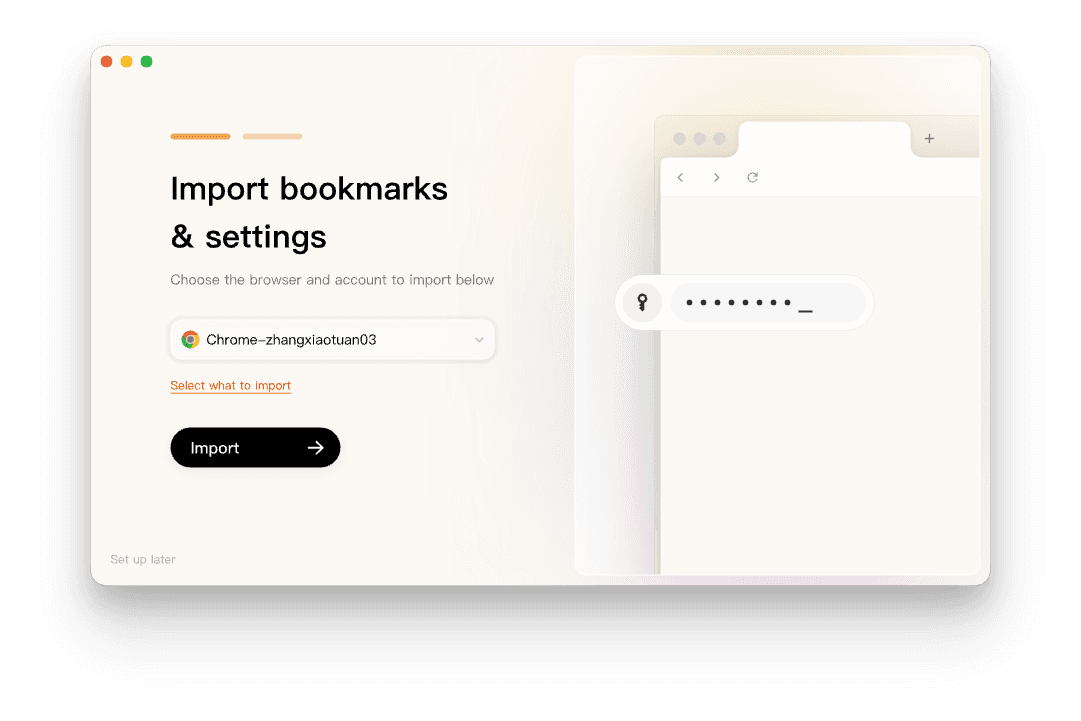
The reason to try Tabbit is not to change the Windows or macOS default automatically. It is to give the browser a more active role after you choose where links should open. Tabbit can use a page, a selection, a screenshot, a tab group, a bookmark, or a local file as context for AI work. Its Agent Mode is designed for supervised browser tasks, not for silently taking over every link on your device.
That trade-off matters. Tabbit does not turn an iPhone or Android into a Tabbit mobile device, and a mobile app may still use its own viewer. Chrome may remain the better choice for a Google account that needs mature mobile sync, a corporate policy that names Chrome, or a site that your team has only tested in Chrome. You can keep Chrome installed and use Tabbit for research, content work, and repetitive desktop flows.

For a broader product decision, compare the best Chrome alternatives, read what an agentic browser is, or browse the AI browser guide. If your work involves repeated website actions, browser automation is the relevant category. You can also review Chrome tab groups and browser profiles. The point is simple: solve link routing in system settings, then choose a work browser based on the tasks you actually do.
Which choice fits your situation?
| Situation | First action | Keep in mind |
|---|---|---|
| Every normal link opens in Edge or Safari | Set Chrome in the device's Default apps area | Check HTTP and HTTPS associations on Windows |
| Only one app opens links elsewhere | Inspect that app's in-app browser setting | The system default may never receive the link |
| You need Chrome for personal accounts and an AI browser for work | Keep Chrome default, open work in Tabbit | Use profiles and verify imported data |
| You want Chrome on phone but another browser on Mac | Set each device independently | Defaults are device-specific, not account-wide |
| Work device resets the choice after restart | Ask IT about managed defaults | Avoid registry edits without approval |
Frequently asked questions
Can I set Chrome as the default without signing in?
Usually yes. The operating system's browser association does not require a Google account. Signing in is a separate choice for sync, passwords, history, and other Chrome features.
Why does Windows still open some files in another app?
Windows can associate different protocols and file types with different apps. Reopen Google Chrome under Settings > Apps > Default apps and inspect the individual associations you care about.
Does setting Chrome as default uninstall Safari or Edge?
No. It changes which app receives supported links. The other browsers remain installed unless you remove them yourself.
Can I use Chrome as default on an iPhone running iOS 13?
Google's current Chrome help says the default-browser option requires iOS 14 or later. Update the device if it supports the update, or keep Safari as the system default.
Why is Chrome not listed on Android?
Check that Chrome is installed and enabled. Then look under Settings > Apps > Default apps or Choose default apps > Browser app. Exact labels depend on the phone maker and Android build.
Should Tabbit replace Chrome as my default browser?
Only if it fits your devices and daily work. Tabbit is a desktop option for Windows and macOS with Chrome-data import and page-aware AI workflows. Keep Chrome if you rely on mobile sync, managed Chrome policies, or a site that needs it.
Setting Chrome as the default takes a minute once you know which menu your operating system uses. The longer decision is what you want the browser to do after the link opens. Install Tabbit Browser if that second question is about research, context, and supervised work on a desktop.

FAQ
How do I make Chrome my default browser on Windows 11?
Open Settings, choose Apps, then Default apps. Search for Google Chrome, open its app page, and choose Set default. If some links still open elsewhere, review the HTTP and HTTPS associations on that same page.
How do I make Chrome the default browser on a Mac?
On macOS Ventura 13 or later, open Apple menu > System Settings > Desktop & Dock, then choose Google Chrome in Default web browser. On earlier macOS versions, open System Preferences > General and choose Chrome from Default web browser.
Can Chrome be the default browser on iPhone or iPad?
Yes, on iOS 14 or later with Chrome installed. In Chrome, open Settings > Default Browser > Go to Settings, then choose Default Browser App and select Chrome. On current iOS and iPadOS, the equivalent system area is Settings > Apps > Default Apps > Browser App.
How do I set Chrome as the default browser on Android?
Open Chrome and choose More > Make Chrome default, then select Chrome. You can also open Android Settings > Apps > Default apps or Choose default apps > Browser app and select Chrome. Menu names vary by phone maker.
Does changing the default browser change my search engine?
No. The default browser controls which app opens web links. The search engine is a separate setting inside the browser, so changing Chrome as the browser does not automatically change the search provider.
Why do links inside an app still open in another browser?
Some apps use an in-app browser or handle links themselves. A system default usually applies to links handed to the operating system, but it cannot force every app to stop using its own viewer. Check the app's link or browser setting first.