
Choose Kimi K3.1 Pro if your application needs a public API today or your team needs downloadable weights. Try GLM-5.4 first if you already use Z.ai's Coding Plan and want to see whether it handles your repository better. As of November 24, 2026, Moonshot documents a metered API for Kimi K3.1 Pro. Z.ai lists GLM-5.4 in Coding Plan, ZCode and Z.ai Chat, with its general Model API still pending. Z.ai model guide · Moonshot API rate card
That access difference decides more than the benchmark charts for anyone shipping an integration. For an IDE or coding agent, there is a different first check. A user in a GLM-5.4 launch thread reported hitting capacity while trying the new model. That's one rollout experience, but it shows why a failed start belongs in your trial log alongside a failed test. Reddit launch discussion
The rest of the comparison covers what the published tests measure, how to estimate the cost of your own work, and how to use Tabbit Browser to verify the documentation before you start a pilot.
Key takeaways
GLM-5.4 is an option for existing GLM Coding Plan users. Z.ai still describes the general Model API as forthcoming.
Kimi K3.1 Pro has a public pay-as-you-go API and published weights under Moonshot's license. Kimi Code membership is a separate route.
Both advertise roughly one million tokens of context. Your client, plan and compaction settings determine what you can use in a session.
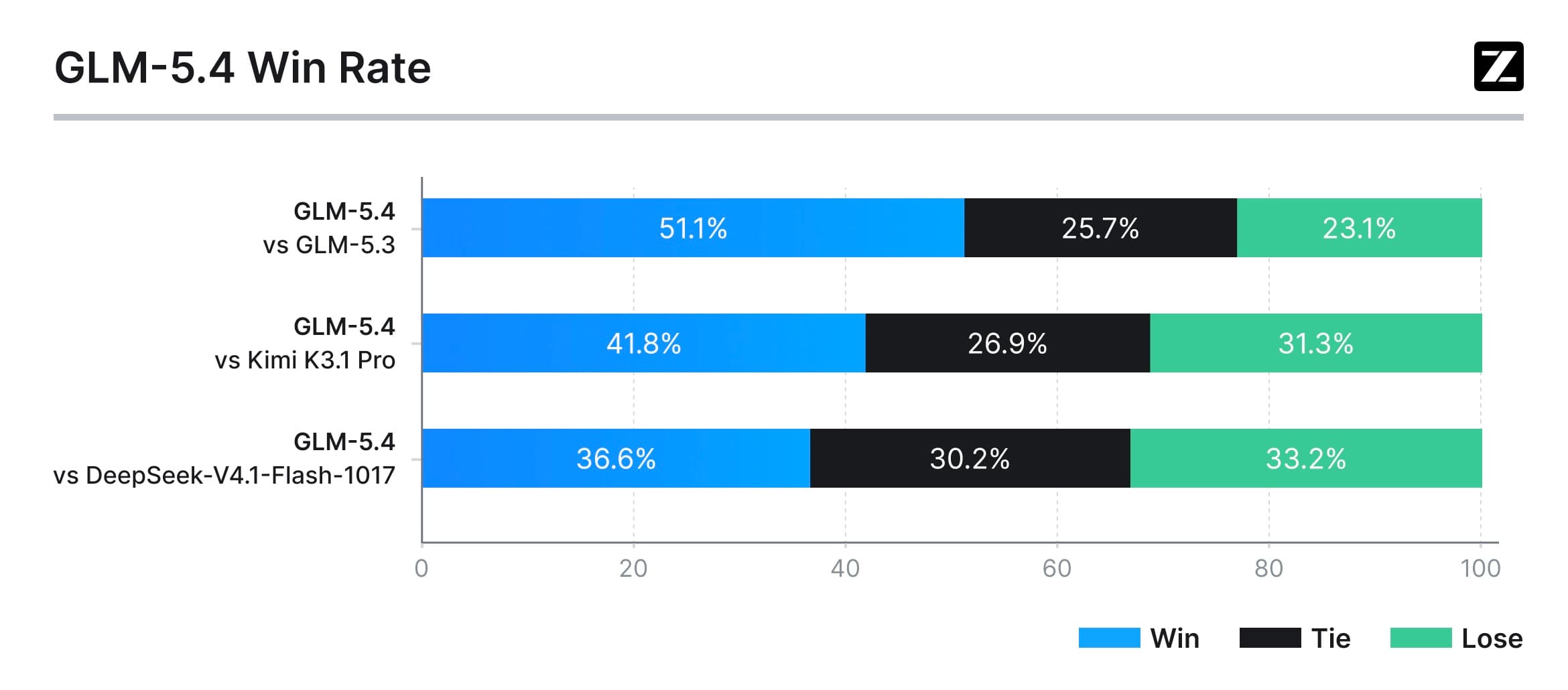
GLM-5.4 won 41.8% and lost 31.3% against Kimi in Zhipu's own coding comparison. Moonshot's 65.7% on Terminal-Bench 4.0 comes from a separate evaluation.
Track accepted work, time and quota or API usage together. A patch that passes after three retries should carry the cost of all three attempts.
GLM-5.4 vs Kimi K3.1 Pro at a glance
| What matters | GLM-5.4 | Kimi K3.1 Pro |
|---|---|---|
| Coding tool access | GLM Coding Plan and ZCode. Z.ai also lists its chat product. | Kimi Code with eligible membership. Moonshot also lists its chat and work products. |
| General API | Z.ai says access follows a security assessment. No public per-token rate confirmed in the checked docs. | Public Moonshot API, model ID kimi-k3.1-pro. |
| Published weights | Z.ai plans to release them after safety hardening. | Downloadable on Hugging Face under the Kimi K3.1 Pro license. |
| Advertised context | 1M. Check the configuration of your coding client. | 1,048,576 tokens on Moonshot's API. Kimi Code context depends on membership. |
| Images and other inputs | Z.ai lists text, image, video and file inputs, with text output. | The released weights describe text and image input. Check the hosted interface for file and video handling. |
| How you pay | Subscription quota through the coding route. Z.ai says eligible weekly plans get 1.5× the usable GLM-5.3 quota. | On the international API, $2/M uncached input, $0.20/M cache-hit input and $10/M output. Kimi Code uses membership quota. |
The access rows use Z.ai's model guide, its release note, the Kimi Code docs, Moonshot's API pricing and the released Kimi model card. For feature and version details, see the GLM-5.4 model resource page and the Kimi K3.1 Pro model resource page.
What the coding benchmarks tell you
In Zhipu's own evaluation of 200 real-world coding scenarios, GLM-5.4 recorded 41.8% wins, 26.9% ties and 31.3% losses against Kimi K3.1 Pro. That gives GLM the edge in this vendor test. The release does not publish the individual tasks, scoring procedure, or the tools and reasoning budgets for the two models. Use it to justify a trial, with your own tests deciding the switch. Zhipu's original chart and release
Z.ai's launch post explains the Loop Transformer by showing a controlled comparison at 30B parameters. It holds parameter count fixed and changes the architecture, with additional training compute. The full GLM-5.4 uses the looping approach at about 750B scale, reusing a block of 28 layers over two iterations. The 30B results say something about the change to the architecture. A buyer still needs a measurement on the full model and the workload they plan to run. Z.ai technical announcement
Moonshot's model card gives a clearer public starting point for Kimi's coding behavior on named tasks. It reports 65.7% on Terminal-Bench 4.0 and 75.5 on DeepSWE v1.1. The card says it used maximum reasoning effort unless specified otherwise. The GLM column is GLM-5.3. Using that column as a stand-in for GLM-5.4 would turn a dated model comparison into a claim about a newer release. Moonshot model card and evaluation conditions
There is a second mismatch to watch for. A coding plan can meter quota across a time window while an API charges by usage. If one run gets extra time, a higher thinking setting, or another chance after an error, the outputs still tell you something about the tools you bought. They tell you less about model performance under equal conditions. Write down which question you're trying to answer before picking a winner.
For software work, try a fixture with a reproducible failure. For example, a report export drops the final row when a filter is active. Give each model the same repository commit, failure description and file permissions. Run the existing test suite plus a regression test prepared independently. Check whether the patch preserves the unfiltered behavior and whether a reviewer accepts the changes. An answer that explains the bug and leaves the tests red belongs in the failure count.
The Kimi K3.1 Pro overview has more detail on its evaluations. The LongCat 2.5 vs GLM-5.3 comparison covers the earlier GLM release if that's the model you run today.
One GLM-5.4 user asked for an SVG to understand a river-generation problem in a Unity game. The user found the diagram useful for reviewing the proposed changes and said the implementation was still in progress. A separate Pac-Man exercise on Hacker News reported a promising Kimi result on that one task. Those reports suggest two things to check in your trial: whether the explanation helps a reviewer and whether the final artifact passes its tests. Unity workflow · Pac-Man exercise
API pricing and subscription quota measure different things
Moonshot's international rate card lists the standard Kimi K3.1 Pro API at $2 per million uncached input tokens and $10 per million output tokens. With 100,000 uncached input tokens and 10,000 billed output tokens, the inference charge is $0.30 before tax. With 800,000 uncached input tokens and 20,000 billed output tokens, the same formula gives $1.80. These are examples using assumed token counts. If you use context caching, record cache reads and cache writes separately according to the endpoint's usage fields. Tool charges can change the total. Moonshot model pricing · Caching guide
GLM Coding Plan answers a different budget question. Check the price and the quota for the account and billing period you actually use. Z.ai's 1.5× figure applies to eligible weekly quota plans relative to GLM-5.3. It gives no conversion to dollars per million API tokens. For an existing subscription, first record how much work you accept in a normal quota window and whether you regularly hit its limit. For a new purchase, divide the plan cost by the useful work completed in the same billing period. ZCode pricing and quota FAQ
For team pilots use cost per accepted task = total cost across all attempts / accepted tasks. Keep capacity errors, timeouts and abandoned jobs in the run log. If no work passes, report the total spend and zero accepted tasks. If you're comparing a subscription with a metered API, report both the cost and the amount of usable quota left. Our Kimi K3.1 Pro pricing guide covers cache billing in more detail. The cost per successful browser-agent task guide shows how to account for retries and review time.
Measure the time from submission to a usable result. Z.ai reports 70–80 output tokens per second at peak load and up to 200 off peak. Those are streaming rates. Your wait includes the time before output, tool calls and any retries. Z.ai streaming figures
For self-hosting, Moonshot reports 2.8 trillion total parameters and 104 billion active per token. The active count describes computation per token. Size your deployment using the published checkpoint and runtime requirements, then measure how many concurrent jobs your infrastructure can handle. Moonshot deployment notes
Check the client before trusting a 1M context label
A context limit tells you what the system can hold. For day-to-day work, check how that system handles a long session. ZCode documents automatic compaction near 966K for its GLM-5.4 setup and gives a specific glm-5.4[1m] configuration for Claude Code. Moonshot's API lists 1,048,576 tokens, while Kimi Code reserves up-to-1M context for eligible tiers. Use the docs for your actual client when deciding how much material to send. ZCode FAQ · Kimi Code model IDs
A simple document test works better than jumping straight to the limit. Give each setup the same manual and ask for six facts with section or page references, including two near the end and one that the manual never states. Add a paragraph that contradicts an earlier draft and check that the model uses the latest version. Score factual answers, citations and omissions separately. Increase the input size only when the shorter run is reliable enough to tell you something.
For a 3D or screenshot-driven task, hold the tools fixed too. Moonshot's card reports 72.8 on BenchCAD without tools and 92.7 with tools. Those two entries describe Kimi in distinct conditions. The Kimi K3.1 Pro browser-use guide makes a similar distinction between reading an image and interacting with a browser. If your pilot involves a CSV export, a screenshot diff or a render, save the artifact your team will inspect.
Use Tabbit Browser to check the inputs to your decision
Open the Z.ai model guide, ZCode FAQ, Kimi API rate card and Kimi model card in a Tabbit tab group. Keep one note with a row for each claim you're going to rely on. Record the exact model name, endpoint or client, billing unit, date and source link. For example, the evidence for the claim “1M context” should identify whether it describes an API, ZCode or a Kimi Code membership.
The Tabbit Browser guide shows how to keep related tabs together. The source-backed browser research workflow gives a way to check a summary against the original pages. Use the browser for source review and your coding client for the actual repository test. Model availability in Tabbit can vary by edition and account. This comparison draws on published documentation and does not measure either model inside Tabbit.
Which model should you try first?
| If your team needs… | Start here | Acceptance check |
|---|---|---|
| A backend API you can call now | Kimi K3.1 Pro | One representative request works with the chosen endpoint, region and rate limit. |
| A coding trial inside an existing GLM subscription | GLM-5.4 | The actual model and context show up in your client, and the patch passes your tests within the quota window. |
| A deployment with downloadable weights | Kimi K3.1 Pro | The license fits your use, and your infrastructure meets the latency and throughput target. |
| A model for very long documents | Pilot both through the intended clients | The evidence and citations are correct at the lengths you actually use. |
| A visual or 3D workflow | Pilot both with the same tool permissions | A teammate can open, edit and reproduce the exported result. |
The decision on November 24 comes down to how you need to run the model. Choose Kimi K3.1 Pro for a documented public API or a pilot with downloadable weights. Try GLM-5.4 in your current Coding Plan if the work stays in a coding agent. Before switching a team, give both setups the same repository snapshot, budget and acceptance tests. If you're also comparing hosted alternatives, see Qwen4 Max vs Kimi K3.1 Pro.
If you want to keep the source pages and pilot notes together, use Tabbit for that part of the evaluation.
 Tabbit Browser

FAQ
Which is better for coding, GLM-5.4 or Kimi K3.1 Pro?
Start with GLM-5.4 if you already use the GLM Coding Plan and can test it in your repository. Start with Kimi K3.1 Pro if the workflow requires a public API. The published evaluations do not establish a winner for every codebase.
Does GLM-5.4 have a public pay-as-you-go API?
As of November 24, 2026, Z.ai's developer guide puts the general Model API after a security assessment. The GLM Coding Plan has a separate coding-tool access route. Z.ai also lists ZCode and Z.ai Chat.
How much does the Kimi K3.1 Pro API cost?
Moonshot's international API lists $2 per million uncached input tokens, $0.20 per million cache-hit input tokens, and $10 per million output tokens. Cache writes, other services, and taxes can add charges. These rates apply to standard Kimi K3.1 Pro, not Highspeed or Kimi Code.
Can I self-host GLM-5.4 or Kimi K3.1 Pro?
Moonshot has published Kimi K3.1 Pro weights under its own license. Running them requires compatible infrastructure and a review of the license for the intended deployment. Z.ai has announced plans to release GLM-5.4 weights after safety hardening.
Do GLM-5.4 and Kimi K3.1 Pro both have a 1M context window?
Z.ai lists 1M for GLM-5.4. Moonshot lists 1,048,576 tokens for Kimi's API, and Kimi Code reserves up-to-1M access for eligible tiers. The effective context in a coding session also depends on the client and its compaction behavior.
Can either model generate 3D assets or work from screenshots?
Both can work from images through supported clients. Their 3D demos involve code, tools, or both. To compare the results, give each setup the same input and verify that the exported file renders and can be edited.