
Try GLM-5.4 first if you already have Z.ai's Coding Plan and you want a coding agent to work from screenshots. Keep GLM-5.3 for a production integration that uses Z.ai's general Model API, or for a deployment you need to host yourself. GLM-5.4 launched on November 23, 2026. As of November 24, Z.ai still describes general Model API access as pending a security assessment. GLM-5.4 documentation · GLM-5.3 model card
The number that changes the decision for existing subscribers is 1.5×. Z.ai says users on weekly-quota plans get 1.5 times the usable quota with GLM-5.4 compared with GLM-5.3. Its credit schedule shows why the same token mix can go further. The number measures usage allowance. A speed test or a count of finished tasks measures something else. Coding Plan documentation
Simon Willison ran a small SVG drawing comparison after switching to Coding Plan. He found the 5.4 pelicans visually similar to those from 5.3. That is an observation about one drawing prompt and one route to access. Hacker News comment by simonw
For browser research, there's a separate decision about how the agent gets its source material. The Tabbit Browser example below uses the public launch and pricing pages to check that distinction before you run a coding trial.
Key takeaways
GLM-5.4 accepts visual inputs. GLM-5.3 takes text, so an image needs to be described or processed by another tool first.
Both have a documented 1M context window and a 128K maximum output. Confirm how your client exposes the context option.
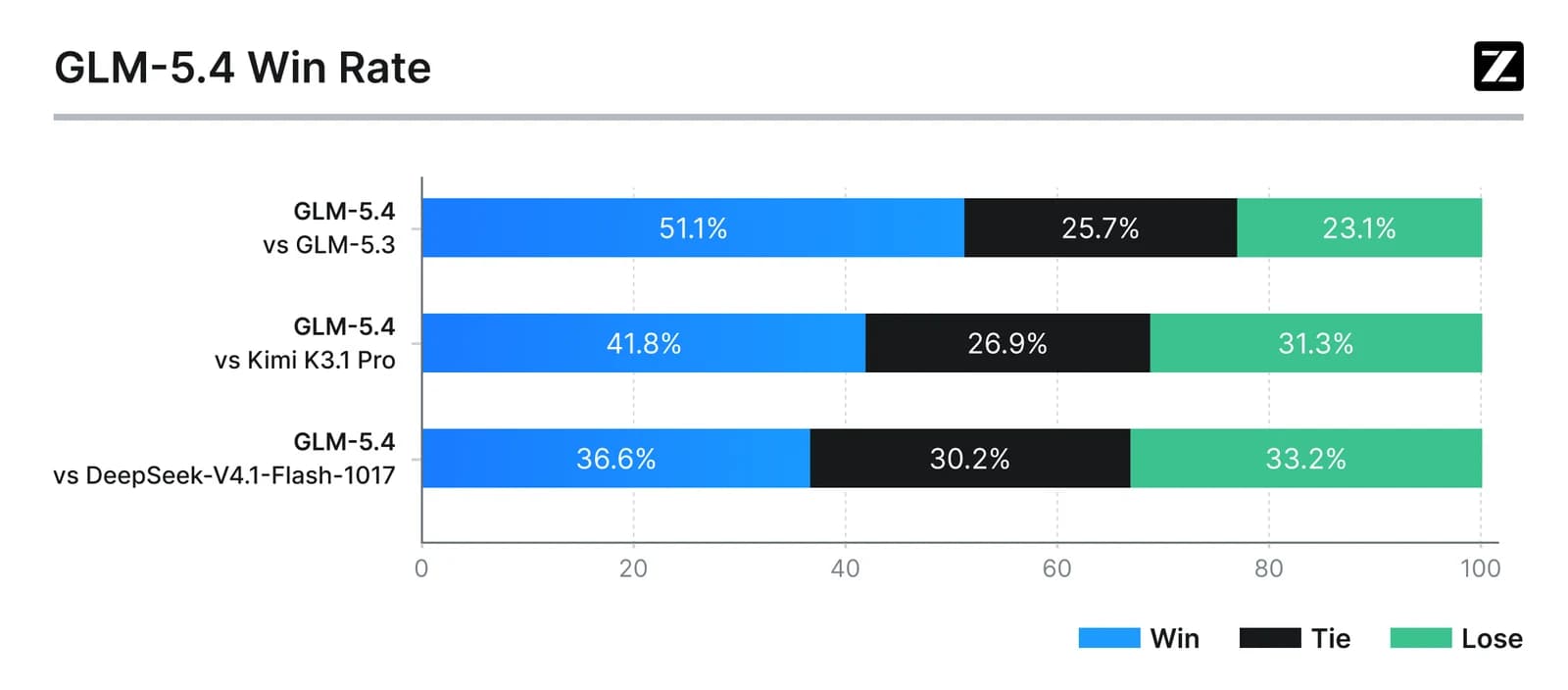
Z.ai reports that GLM-5.4 beat GLM-5.3 in 51.1% of its comparisons, tied in 25.7%, and lost in 23.1%. Run tasks from your own repository before changing your default.
Coding Plan credits and general API prices are different. Z.ai lists a dollar rate for GLM-5.3, while the GLM-5.4 general Model API is still pending.
GLM-5.3 has public weights with a published license. Check the current release status before planning a GLM-5.4 deployment.
GLM-5.4 vs GLM-5.3 at a glance
| What you need | GLM-5.4 | GLM-5.3 |
|---|---|---|
| Model input | Image, video, text, and file inputs per Z.ai. Client support varies. | Text |
| Model output | Text, up to 128K tokens | Text, up to 128K tokens |
| Context window | 1M tokens | 1M tokens |
| Architecture | Loop Transformer reuses 28 layers in two passes | Same base as GLM-5.2, with improvements from post-training |
| Z.ai Coding Plan | Available. Weekly-quota users get 1.5× the GLM-5.3 allowance. | Available |
| Z.ai general Model API | Pending security assessment | Available. $1.40 input, $0.26 cached input, $4.40 output per million tokens. |
| Published weights | Public release unconfirmed at the time of review | Available under the GLM-5.3 license |
Checked November 24, 2026. This comparison covers the two flagship models. GLM-5.3-Flash is a separate option with its own credit schedule and capabilities. GLM-5.4 guide · GLM-5.3 guide · Z.ai API prices · GLM-5.3 weights
What the Loop Transformer changes
GLM-5.3 uses the GLM-5.2 base model. Z.ai attributes its gains over that version to post-training. GLM-5.4 changes the computation itself. It runs a block of 28 layers twice with shared weights. The first pass produces a representation that the second pass can refine. Z.ai also describes reusing sparse-attention indices and part of the key-value cache across those passes, which limits the additional memory needed for long inputs. GLM-5.4 architecture notes
The distinction matters if you're evaluating a long engineering task. A model can spend more computation inside each step and still produce fewer output tokens. Z.ai's controlled comparison used a 30B test model, with the same parameter count on both sides. It helps explain the architecture. The flagship results need their own evaluation. For the prior generation's changes, see the GLM-5.2 overview and GLM-5.3 overview.
The launch comparison and its limits
Z.ai's chart reports 51.1% wins, 25.7% ties, and 23.1% losses for GLM-5.4 against GLM-5.3. A win rate is the share of comparisons judged in favor of the newer model. To decide what it predicts for your work, you'd need the tasks, judging protocol, tool setup, and effort budgets. The published chart lacks enough detail to reproduce that comparison. Z.ai's GLM-5.4 guide
Z.ai's GLM-5.3 release reports scores of 28.3 on Terminal-Bench 3.0 and 66.9 on DeepSWE v1.1. Those are named tests for 5.3. The 5.4 win-rate chart measures a different comparison, so there is no sensible way to subtract one figure from the other. The LongCat 2.5 vs GLM-5.3 comparison shows how even two scores bearing the same benchmark name can use different tool versions. GLM-5.3 benchmark notes
Z.ai reports up to 200 tokens per second off peak and 70–80 at peak on its infrastructure. The same guide says GLM-5.4 can spend a long time reasoning. When you test, track the time to the first useful answer and the time to a tested patch. A model can stream quickly and still spend longer on a task by taking more steps. GLM-5.4 inference notes
HN user tokai tried 5.4 on a hobby repository built with 5.2 and 5.3. They reported a modest improvement in understanding the codebase and clearer explanations. The report gives no test count or acceptance rate. Hacker News comment by tokai

HN user lnenad raised a concern about long reasoning even on simple tasks across several models. It is a reason to include a short task in a pilot, with the time measured to the final answer. Hacker News comment by lnenad

What visual input changes in a coding client
A good test is a small layout bug. Provide the same repository, a 390px screenshot with a clipped button, and the exact route to reproduce it. Ask the agent to identify the affected component, make the smallest CSS fix, and leave you a screenshot and the test result. Compare the render at 390px and desktop width. This makes it possible to spot a patch that hides the button or breaks the wider layout.
GLM-5.4 can take the screenshot as input if the client and route deliver it to the model. For a GLM-5.3 baseline, write down the same observations, including which element is clipped and at what width. A visual tool can also supply the description. Document that tool in your results, so you're comparing two complete workflows and can identify which step saved time. GLM-5.4 input types · GLM-5.3 input types
The two context windows are the same size on paper. In Claude Code, ZCode's documentation specifies glm-5.4[1m]. Other tools use glm-5.4 according to the same guide. Confirm the actual model after starting a fresh session. If you're testing long context, place an observable requirement early in the task and verify it in the result. A client may summarize prior turns, and a large input window alone does not measure how well the model uses all that input. ZCode setup instructions
Reading a screenshot also differs from opening a live page. A coding agent needs an appropriate tool and access to inspect live state or interact with the page. The GLM-5.3 browser-use guide and comparison of browser use and computer use explain that part of the workflow.
HN user desireco42 said 5.4 let them stay in one conversation for visual work and reported an unexpected switch to Chinese. Check that the result stays in your requested language when trying the image workflow. Hacker News comment by desireco42

How much further Coding Plan credits go
The personal-plan docs list uncached input, cached input, and output multipliers of 4.6 / 1.1 / 16 for GLM-5.4 and 6.9 / 1.7 / 24 for GLM-5.3. Multiply tokens in each category by the corresponding multiplier, add them, and divide by 10,000. For 100,000 uncached input tokens and 10,000 output tokens, that gives 62 credits for 5.4 and 93 credits for 5.3. This example holds token counts constant and excludes tool calls. Coding Plan credit schedule
Both the five-hour and weekly limits still matter. Check your account's quota, and record actual credits after each task. Include retries in the total. If the 5.4 run takes many more turns or calls more tools, the lower multipliers may yield less benefit than the fixed-token example suggests. Keep an eye on the short window if several people or sessions run heavy tasks at the same time.
For a GLM-5.3 production service, Z.ai publishes separate token rates in USD. The same 100,000 uncached input and 10,000 output would be $0.184 in model charges at $1.40 and $4.40 per million respectively. The API pricing page has no GLM-5.4 row as of the review date. That leaves the dollar cost of a comparable 5.4 API task open. Z.ai API pricing
If you deploy on your own infrastructure, GLM-5.3 provides a concrete starting point. Check the license and serving requirements, including the memory implications of your real context lengths. The public weights and license for 5.4 are still unconfirmed. Treat any third-party endpoint or model listing as a separate provider with its own access terms and specifications. GLM-5.3 model and license
Legacy V1 plans keep their existing benefits. Z.ai excludes them from the 1.5× comparison. ZCode FAQ
The launch post also links to ZCode and Z.ai Chat. Check the model shown in each product before comparing results with your coding client. ZCode · Z.ai Chat

Comparing release information in Tabbit Browser
If your first job is to verify what changed before picking a model, open the two Z.ai model guides, the Coding Plan guide, and the API pricing page. In Tabbit, use the page assistant to capture the relevant lines and save the links beside them. Start with each document on its own, then check the results against the rendered pages. Our Tabbit Browser guide shows the page assistant in use, and the web search and browser control comparison explains when opening the original page matters.
Read the current Z.ai page. List each GLM-5.4 statement about
model input, API access, or subscription usage. For each statement,
give the section heading and source URL. If this page leaves an item
unconfirmed, mark it as unconfirmed.
A useful result gives you a line to check on each source. For instance, the model page explains the 1.5× weekly allowance, while the Coding Plan page supplies the multipliers. The API pricing page supplies the dollar rates. Read the headings along with the numbers so the allowance never becomes a claim about an API discount.
Use the model selector to check which models your account exposes. This public-page workflow uses whichever model your account provides for the task. To measure patch quality, use a controlled repository and the two actual GLM model versions. If local execution is part of the decision, see what local and cloud browser agents each need to access the same page.
Which GLM model should you choose?
| Scenario | Start with | Before you make it the default |
|---|---|---|
| Reproduce a UI problem from a screenshot | GLM-5.4 on Coding Plan | Verify that your client passes the image and that the change works at both viewport widths. |
| Make multi-file changes within a weekly allowance | GLM-5.4 pilot alongside 5.3 | Compare accepted patches, real credits, and time to finish. |
| Maintain a stable text-only service on the general Z.ai API | GLM-5.3 | Revisit when Z.ai documents the 5.4 endpoint, price, and supported options. |
| Operate the model on your own infrastructure | GLM-5.3 | Read the specific license and verify memory and throughput at your target context length. |
| Process short, low-risk text jobs | Your existing model, with Flash as a separate trial | Check whether smaller changes still pass the same acceptance tests. See the GLM-5.3-Flash guide. |
For a fair trial, freeze one repository revision and pick two tasks the team has actually needed to do. Use a UI regression for the first and a text-only multi-file change for the second. Run clean sessions with the same client, tools, and test commands. Keep the effort and output limits as comparable as the clients permit, and log any differences. Decide what passes before reviewing the patches.
Count a task as accepted only when the relevant tests pass and the diff stays within scope. Then compare credits per accepted task, including the credits spent on failed attempts, and record the total time to acceptance. If GLM-5.4 completes the visual case and leaves the text-only workflow stable, start there. Keep GLM-5.3 where API access or published weights are essential.
For research that starts with public release notes, Tabbit can help collect the source lines and keep the links at hand before you set up that trial.
 Tabbit Browser

FAQ
Is GLM-5.4 better than GLM-5.3 for coding?
GLM-5.4 is the first one to try when the coding task depends on a screenshot or another visual input. Z.ai also reports more wins than losses in its own comparison. For a text-only repository, run the same tasks and acceptance tests before changing the default.
Can I use GLM-5.4 through the Z.ai API?
As of November 24, 2026, GLM-5.4 is available through the GLM Coding Plan. Z.ai says the general Model API will open after its security assessment. GLM-5.3 already has documented Model API access.
What does 50% more GLM-5.4 quota mean?
Z.ai describes 1.5 times the usable quota relative to GLM-5.3 for weekly-quota users. The Coding Plan's input and output multipliers for GLM-5.4 are two-thirds of GLM-5.3's. Your usable task count still depends on how many tokens and tool calls each task uses.
Does GLM-5.4 have a larger context window than GLM-5.3?
Z.ai lists a one-million-token context window and a 128K maximum output for both models. The launch instructions specify glm-5.4[1m] in Claude Code. Check the effective limit in your own client.
Which GLM version can I self-host?
Z.ai publishes GLM-5.3 weights and serving instructions on Hugging Face under the GLM-5.3 license. As of November 24, 2026, GLM-5.4 public weights and a release date were unconfirmed.
Does GLM-5.4 accept screenshots and video?
Z.ai lists image, video, text, and file inputs for GLM-5.4, with text output. Verify which attachments your coding client actually sends. GLM-5.3 has text-only model input, although an external tool can extract information from an image for it.