
A comment in r/browsers put the annoyance in one sentence: Edge's main page is "bloated" because Bing and Microsoft services get shoved in your face. Chrome people say the same thing about shopping chips and the AI control that now sits in the address bar. Nobody opened a browser to be sold another product on the blank tab.
"Browser bloat" is the catch-all for that irritation, plus the fans spinning, plus a window that will not sit still. The causes are not one bug. Later this guide uses Tabbit Browser as the desktop option if you want a working window instead of a start page that keeps pitching extras. It is not a 10MB toy browser. A heavy web app will still be heavy.
Key takeaways
Browser bloat is feature creep, extra UI, extensions, ads, and heavy pages stacked together. Treat them as separate causes.
A slow feeling can come from one tab or extension. Diagnose that before you wipe the profile or switch apps.
Clutter is often duplicated menus, promotional modules, and assistants you did not invoke. Those can be turned off or avoided without changing engines.
Page bloat (the site) and browser bloat (the app around the site) need different fixes. Blocking ads helps the first; cleaning the chrome helps the second.
Tabbit is useful when you still need a modern desktop browser, but the default one keeps putting shopping, news, or AI in the way of the page.
Browser bloat at a glance
| What you feel | Likely source | Check first | Will a new browser fix it alone? |
|---|---|---|---|
| The start page is full of news, rewards, or product tiles | Promotional browser chrome | New-tab settings, pinned side-panel icons | Yes, if you pick a quieter start page and do not re-enable the same modules |
| The toolbar looks busy even on a blank tab | Feature creep and duplicated entry points | Right-click the toolbar and side panel; disable unused Google or Microsoft extras | Often, unless you install the same icon set again |
| The machine gets hot with a handful of tabs | Process isolation, a heavy site, or an extension | Browser task manager, then one-variable tests | No. The same site can stay expensive on another Chromium browser |
| Pages stutter because of banners, trackers, or autoplay | Page bloat on the site | Ad and tracker blocking, or a temporary page cleanup | Only if the new browser blocks that weight by default |
| An AI or Copilot panel appears while you type in the address bar | Product bundling | Hide or policy-disable that control; decide whether you actually use it | Yes for that control. You may still want AI that you start on purpose |
| You cannot find the tab you need | Tab sprawl, not "the engine got fat" | Groups, vertical tabs, or a retrieval system | Only if the new layout makes titles readable and you still close junk |
Wikipedia's software bloat page splits this cleanly. Measurable bloat is extra RAM, disk, and CPU. Perceived bloat is an interface stuffed with features you do not want. A shopping sidebar can bother you more than a quiet process that uses 80 MB.
Joel Spolsky's old warning still fits. Different people use different slices of the same product. If you cut "everything I never click," you may delete the one tool someone else needs. Turn off the surface you do not use. Do not pretend a 2008 browser would still open today's sites.
Browser bloat is not the same as a fat web page
SpeedCurve's note on page bloat is about the document: images, third-party scripts, ads, and the work the renderer does after you hit Enter. That is why a news homepage can feel heavy in every browser.
Browser bloat is the application wrapped around that document. It includes:
menus and side panels that duplicate each other;
start-page modules that compete with the page you meant to open;
extensions that stay alive after you close the tab that needed them;
assistants, rewards, and shopping tools bolted onto the chrome.
Fight only the page weight and you still get a Copilot button. Switch browsers and leave the ads in place, and a 12 MB article still hitches. Fix the layer that is actually in the way.
Why the same browser starts to feel slow
A Reddit commenter who had left Chrome still remembered it as "an excessively heavy user of mem and cpu." That report is a feeling, not a benchmark, and it matches how Chrome is built. Tabs, extensions, GPU work, and network services run in separate processes so one crash is less likely to take the whole window. Isolation costs memory. Google documents the other half of the story in Chrome performance help: Memory Saver can deactivate idle tabs, then reload them when you return, and it will refuse to sleep a call, download, unfinished form, or pinned tab.
Skip the reinstall. If RAM is the actual complaint, use the Chrome memory walkthrough and the Memory Saver checklist. Those guides isolate a process. This article is for the leftover cases: the window looks busy, it keeps tapping you on the shoulder, or it still holds work you already finished.
A lot of "bloat" reports are more specific than they sound. One live web app (a doc, a dashboard, a meeting) can own most of the memory, and another Chromium browser will copy the same bill. Extensions that inject into every page are a different leak; removing two unused ones often beats a new theme. Dozens of leftover tabs keep renderers around, which is a tab system problem, not a mysterious engine disease.
A lightweight browser can still help once you know which of those you have. If the site is the heavy part, a faster browser will not invent a smaller JavaScript bundle.
Why the window feels cluttered and hard to ignore
Android Police argued in 2024 that Chrome's problem was less "too few features" than extra ways to do the same job. Bookmarks appear in the side panel and under the omnibox. Tab groups add clicks on top of windows you could already open. Google Lens and the media widget occupy space for jobs many people already finish on the page itself. Discover, at least on mobile, is designed to keep you in Chrome instead of letting you leave.
How-To Geek's 2025 defense of Chrome is useful because it agrees on the mess. The author stayed for sync and site compatibility, then listed the tax: RAM, Manifest V3 limits on blockers, and an interface "increasingly cluttered" with shopping insights, visual search, and AI. The recommended repair is local. Unpin side-panel icons. Turn off shopping lists and price tracking. Disable Ad topics, site-suggested ads, and ad measurement. Turn on Memory Saver.
That is a reasonable first pass if Chrome still fits the rest of your life. A YouTube tutorial from Carol Brightbill Technology exists for the same itch: Stay Organized and Decluttered with Google Chrome. The chapter list is search engine, shortcuts, cards, and extra icons. People are not imagining the noise on the new-tab page.
Edge is louder. Microsoft rewards, Bing, and Copilot sit closer to the default start page. Chrome often wins that comparison, which is why so many people never leave. Winning against Edge is not the same as looking clean.
AI made the next layer obvious. In January 2026, Android Police walked through Just the Browser, a policy script that turns off AI Mode in the address bar, Help Me Write, Tab Compare, sponsored links, and similar enterprise-flagged extras. The same piece is honest about the ceiling. It cannot remove Gemini from Google Search, Drive, or Gmail, because those live in the websites. It also cannot run on mobile. If your complaint is "the browser keeps selling me an assistant," a policy hammer works. If your complaint is "I want an assistant that does the reading and clicking, then gets out of the way," stripping Chrome is the wrong tool.
Clean the browser you already have
Do this in the current profile before you migrate anything important.
Unsubmitted forms, uploads, and calls are not clutter. Finish or export them first. Memory Saver and tab sleepers will not keep that state for you.
Then strip what you can see. Right-click the toolbar and unpin the side panel, Lens, media, and shopping entries you never open. On Edge, hide the feed and Copilot if you do not use them. In Chrome, turn off shopping features and the Ad privacy toggles How-To Geek lists. In Edge, turn off the promotional start-page tiles.
Count extensions next. Keep the ones you can name in one sentence. Disable the rest for a day and remove them if nothing breaks.
Leftover tabs still need a destination. Active work, later reading, and reference material should not share one favicon strip. Vertical tabs help you read titles; they do not invent a filing system. See whether vertical tabs help if the strip is the only problem.
Only then touch Memory Saver. Use it to reclaim idle pages, not to hide a pile you still need.
If that list restores a usable window, stay. Switching has a cost. On the day this article was researched, an X user wrote that they "tried moving from Chrome to Helium to reduce browser bloat," then hit a second wall: ChatGPT, Codex, and Claude integrations were still Chrome-only. Leaving a bloated default is easy to want and annoying to finish.
A practical option when the browser chrome is the clutter: Tabbit
Stay on Chrome or Edge when the remaining pain is one site, one extension, or a setting you have not flipped yet. Switch the working browser when the chrome itself keeps interrupting: a start page full of products, an assistant you did not ask to speak, tabs you cannot read, and no quiet place to run a long task.
Tabbit Browser is built as a desktop work surface. The new tab is a command box and a vertical list, not a magazine. AI sits behind Chat, Agent, and the Omnibox. You start it. It does not need to occupy the address bar as a permanent AI Mode button.

A practical first week looks like this.
Import a test profile, not your only profile. Tabbit can bring over history, bookmarks, extensions, and settings from Chrome, Edge, or Safari. Use a copy you can abandon. Confirm the sites you care about before you change the default browser.
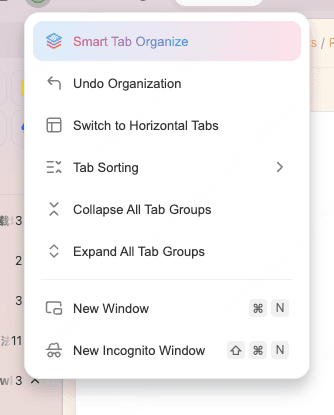
Vertical tabs show titles, which is the first thing a crowded strip needs. If the session is a mix of projects, open the tab-management menu and run Smart Tab Organize. Review the groups. Rename the ones that match real outcomes. Close duplicates. Move a recurring project into a workspace. You still decide what stays; the browser only drafts the piles. The AI tab organizer page covers the classification step in more detail.
Script Mode is for a one-off change you can describe, such as hiding a sticky promo, stripping a comment widget, or extracting links, without adding another extension. Inspect the result. It is a temporary page tool, not a replacement for a maintained blocker, and it should not run blind on a checkout or a bank site.
Tabbit's Agent Mode can read pages and click through a task in another group while you stay on the current one. That split is the opposite of a Copilot panel leaning on the page you are trying to finish. You still watch logins and payments.
After a group exists, reference it from the Omnibox with @ instead of pasting ten URLs into a chatbot. Ask for a source list or a conflict map. Do not ask it to invent the missing pages.
Trade-offs, in the same order as the benefits:
Tabbit has Chat and Agent chrome. If your definition of bloat is "any AI UI," Just the Browser or a minimal third-party app fits better.
It is Chromium underneath. A meeting tab can still be expensive. Organization does not delete JavaScript.
It is macOS and Windows. There is no mobile Tabbit in this product line.
Smart grouping mislabels odd tools. You still close, rename, and protect live state.
For the Chrome-specific migration list, use Tabbit vs Chrome and the Chrome alternative checklist. If the job is getting through research and repetitive web work, the productivity browser page is the closer match than a RAM-only comparison.
Which fix matches the bloat you actually have?
| Situation | Start here | Why | Cost to watch |
|---|---|---|---|
| New tab looks like a storefront | Hide feed, rewards, shopping, and extra icons in the current browser | Fast, reversible, no import | The vendor can put a tile back after an update |
| Address bar grew an AI or Copilot control you never click | Hide it, or use a policy tool such as Just the Browser | Removes that one interruption | Website-level Gemini or Copilot stays; you still live in that ecosystem |
| A few tabs make the fans spin | Task manager and the Chrome RAM guide | You might find one guilty page or extension | A new browser with the same page will not look heroic |
| Idle tabs never sleep, or reload at the wrong time | Memory Saver rules and exceptions | Official protection lists explain most "bugs" | Aggressive sleeping drops unsaved page state |
| Titles are unreadable, but you know what the windows are for | Vertical tabs and named groups | Layout problem, not an engine problem | You still need a close rule |
| The pile spans projects and you will not sort it by hand | Tabbit Smart Tab Organization on a test import | First draft of groups, then you edit | Misclassification and live forms |
| The page itself is banners and autoplay | Blocker, or Script Mode for a one-session cleanup | Hits page bloat directly | Breaks some sites; do not use on payment flows |
| You want the browser to finish a multi-step web task | Tabbit Agent Mode in a separate group | Keeps the extra work off the tab you are reading | Permissions and confirmation on sensitive actions |
Final verdict
Browser bloat is a pile of leftovers: features added for someone else, promotions on the start page, extensions that never leave, ads inside the document, and tabs that outlived the task. Name the layer. Clean the chrome you can see. Measure the process that is actually large. Give leftover pages a home, then close them.
Stay in Chrome or Edge if a short settings pass returns a boring, usable window. That is a good outcome. If the product keeps putting shopping, news, or an assistant on top of the page, install Tabbit Browser on the computer you already work on. Import a test profile, run Smart Tab Organization once on a messy session, and keep Agent jobs in their own group for a week. Keep the old browser until the sites, extensions, and logins you need have been checked. Then set Tabbit as default only if the quieter window still holds up.

FAQ
What is browser bloat?
Browser bloat is the feeling that the app got slower, busier, or harder to ignore as features, promotions, extensions, and background work piled up. It is a mix of real resource use and interface clutter. A feature you never asked for can feel like bloat even when it barely uses RAM.
Why does Chrome feel slower than it used to?
Chrome still isolates tabs and extensions in separate processes, which costs memory on purpose. Sites also ship more scripts than they did a decade ago, and extra UI such as side panels, shopping tools, and AI buttons competes for attention. Measure a heavy tab or extension before assuming the whole browser is broken.
How do I declutter Chrome without switching browsers?
Unpin toolbar and side-panel icons you do not use, turn off shopping and ad-topic settings, enable Memory Saver at a level that fits live work, and remove extensions you cannot explain. A new-tab cleanup of shortcuts and cards is often enough if the rest of Chrome still fits your Google login and sites.
Is browser bloat the same as a slow website?
No. Page bloat is extra weight inside a site, such as large images, ads, and JavaScript. Browser bloat is extra weight in the application around that site, such as duplicated menus, promotional modules, and always-on assistants. You can meet both on the same visit, and they need different fixes.
Will switching browsers always fix bloat?
Only when the clutter lives in the browser chrome or in extensions you will not copy over. The same heavy web app can still use a large process in another Chromium browser. A tiny specialty browser may feel light and then fail on sync, extensions, or a site you need.
Can Tabbit reduce browser clutter?
Tabbit can help when the problem is a crowded tab strip, a promotional start page, or page junk you want to hide for one session. Import a test profile, use vertical tabs and Smart Tab Organization, and keep Agent work in its own group. It will not make a heavy dashboard cheap, and it is desktop-only.