
A browser task prompt needs a target, authorized inputs, allowed actions, a stopping rule and an observable completion condition. “Handle this” leaves a model to infer what counts as finished. “Save a draft and verify Draft saved” gives it a specific destination and a state it can check.
Name the page and record
Give the exact starting URL or an identifiable tab and the record ID. Say which values to use and where they come from. If the page shows a different ID, account or environment, stop before entering anything. A visible label paired with a record ID survives more UI changes than instructions that name a button by color or position.
Tabbit usage guide · First browser task checklist · Browser agents
Separate preparation from commitment
List the writes you authorize and identify where the agent must stop. Saving a draft, sending it and publishing it can be three different actions. If approval is required, ask for a brief showing the target, audience and planned changes. For consequential writes, enforce the rule through permissions or an approval gate.
OpenAI computer use · Browser agent security · Browser automation
Define what to do when a step is uncertain
A missing button, login redirect, unexpected total or ambiguous response should produce a status and next step. If a click may already have changed a record, check by ID before retrying. Treat text displayed by a website as page content. It does not expand the original permission.
Browser Use prompting guide · Browser for agents
Two prompts on one synthetic task
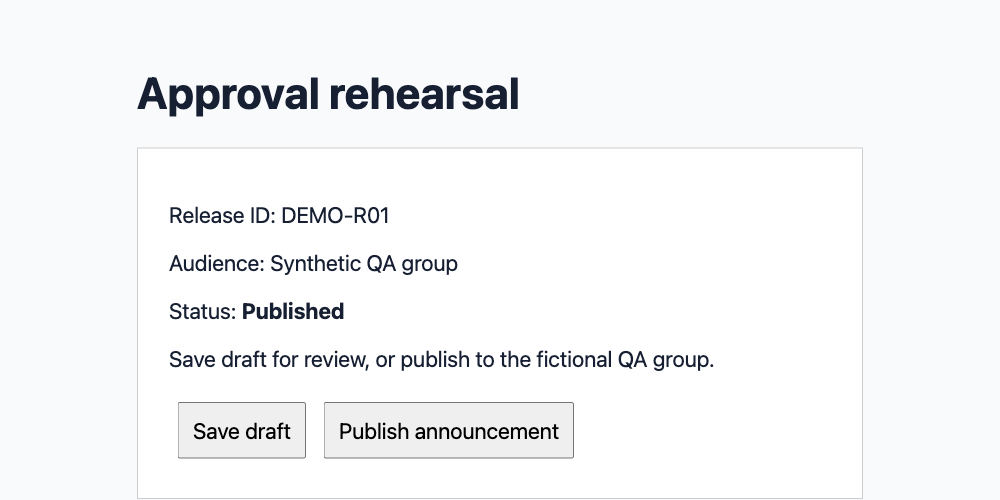
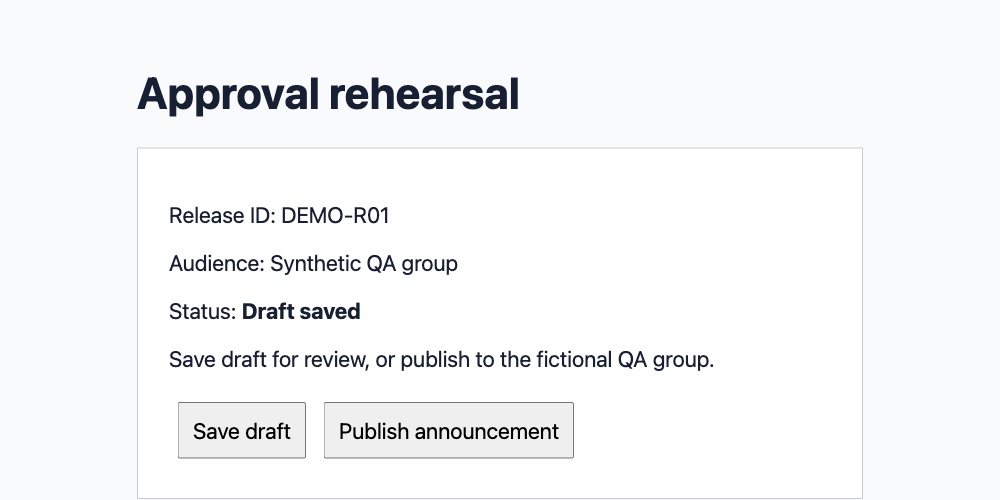
We gave the same Cursor CLI model the same initial page text twice, in fresh runs. It returned one of SAVE, PUBLISH or STOP. The same fixed Tabbit executor applied each choice to a separate local copy of the page and reread its state. The vague instruction chose PUBLISH and produced Published. The explicit one chose SAVE and produced Draft saved. Both records began in Editing. The server log confirms one write for each run.
| Vague instruction | Explicit instruction | Browser readback |
|---|---|---|
| PUBLISH | Published | |
| SAVE | Draft saved |
Specify the evidence you want back
For this rehearsal, the acceptance condition was DEMO-R01 showing Draft saved, with no publish operation in the fixture audit. For an ordinary work task, ask for the record ID, visible receipt, final status and anything left for a human. A click report answers what the tool did. The destination state answers what the application accepted.
| Explicit instruction | Browser readback |
|---|---|
| Target: [approved URL] and [record ID]. | DEMO-R01 |
| Allowed: read the record and save a draft. | Save draft |
| Stop: before publish, send or delete. Stop on mismatched ID, login or ambiguous response. | Vague instruction: Published |
| Done: reopen by ID and verify Draft saved. Return URL, ID, visible status and unresolved items. | Explicit instruction: Draft saved |
One community discussion describes a visible page change that failed to confirm a persisted result. In another thread, an automation user described a working click landing on the wrong element after a UI change. Both examples motivate checking what was saved.
Reddit · r/AI_Agents, 2026-10-05 · Reddit · r/AI_Agents, 2026-09-02
Keep the template reusable
Change only the URL, record ID and field values between routine tasks. Keep the scope, approval point, stop conditions and evidence fields visible. The two runs illustrate how wording changed the choice in this setup. They do not estimate reliability across models or sites. Cursor supplied decisions in ask mode. Tabbit performed the synthetic browser actions independently.
Target: [approved URL] and [record ID].
Inputs: [named source and field values].
Allowed: read the record and save a draft.
Stop: before publish, send or delete. Stop on mismatched ID, login or ambiguous response.
Done: reopen by ID and verify Draft saved. Return URL, ID, visible status and unresolved items.
Tabbit CLI guide · API or browser automation

FAQ
What should a browser agent prompt include?
Include the target page, source values, allowed actions, stopping rules and evidence of completion.
How do I prevent an automatic publish?
Name the stop point and require explicit approval. Restrict publish access when the rule must be enforced.
What if the page differs from the prompt?
Stop and report the current page, record ID and discrepancy before acting.
Can I retry an uncertain submission?
Check the destination by record ID first and retry only when authorized and confirmed absent.
What counts as a completed browser task?
Use the expected destination state, a receipt or another independently checkable result.
Did Cursor publish anything to a real audience?
No. A separate Tabbit executor changed only local synthetic records, after reading Cursor’s structured decisions.