
Choose Kimi K3 if you need a metered API or downloadable weights today. Try GLM-5.4 first if you already have the GLM Coding Plan and want to see how it handles your repository. Public evidence reviewed through November 24, 2026 leaves the coding-quality comparison open.
Access is the difference that can decide the purchase before you write a prompt. Z.ai opened GLM-5.4 to Coding Plan subscribers and says its general Model API will follow a security assessment. Moonshot already documents the original kimi-k3 API, publishes its weights, and lists an international rate of $3 per million uncached input tokens and $15 per million output tokens. GLM-5.4 model guide · Kimi API rate card · Kimi K3 weights
The comparison covers the original Kimi K3. If your team is considering Moonshot's newer flagship, read the Kimi K3.1 Pro overview and check that the model ID in the client matches the version you plan to buy. Later in this guide, a Tabbit Browser example shows how to keep those IDs and source links together while you compare.
Hacker News user tokai tried GLM-5.4 on a hobby project previously built with GLM-5.2 and 5.3. They reported a small improvement in understanding the codebase. That experience makes a good case for using your own repository as the baseline. Original Hacker News comment

Key takeaways
API integration: Kimi K3 has a documented general API and a public token rate. GLM-5.4 has a documented Coding Plan route.
Existing Z.ai subscription: GLM-5.4 is available across GLM Coding Plan tiers. Check both the five-hour and weekly usage limits.
Benchmark evidence: Z.ai's launch ablation used a 30B research model. Moonshot's K3 scores describe K3 under its published test setup. The two sets of results answer different questions.
Visual coding: Both vendors document image input and roughly one million tokens of context. Check whether your actual client passes the image and preserves the files you need.
Self-hosting: Moonshot has published K3 weights under its own license. Z.ai's GLM-5.4 announcement describes a future weights release after security hardening.
GLM-5.4 vs Kimi K3 at a glance
| Decision factor | GLM-5.4 | Original Kimi K3 |
|---|---|---|
| Developer access | GLM Coding Plan in supported tools. General Model API pending a security assessment. | Moonshot API under kimi-k3 and access through Kimi Code. |
| First-party billing | Subscription with usage limits. No GLM-5.4 row on Z.ai's public Model API rate card at the time of review. | $3 uncached input, $0.30 cache-hit input, $15 output per million tokens on Moonshot's international API. |
| Context | Z.ai documents 1M context and 128K maximum output. | Moonshot documents a 1,048,576-token context window for the K3 series. |
| Visual inputs | Z.ai lists image, video, text, and file input, with text output. Check the client for available attachment types. | Moonshot documents native vision, including image input. Check the chosen client for its attachment limits. |
| Weights | Z.ai describes a planned release after security hardening. | Downloadable from Moonshot's model repository under the Kimi K3 license. |
| Evidence for coding | Launch demos and a controlled 30B architecture ablation. | Vendor coding evaluations and demos for the released K3. |
Sources checked November 24, 2026. Z.ai launch post · Z.ai pricing · Moonshot API model guide · Moonshot technical post
For model-specific resources and the conditions behind the examples, see the GLM-5.4 model page and the Kimi K3 model page.
Coding benchmarks and repository work
What Z.ai actually tested
Z.ai says the GLM-5.4 flagship reuses 28 layers of the GLM-5 base across two passes. The release post supports the architectural idea with a controlled 30B experiment. In that experiment, the loop variant scored higher on MMLU-Pro and IFBench and produced shorter answers on the reported tests. The tested model was a 30B comparison model. Treat those results as evidence about the architecture and wait for a benchmark that explicitly names the released flagship before using a number to compare products. Z.ai launch post
Z.ai also shows demos that use code to produce games, video, and CAD artifacts. A demo can help you design a useful trial. For example, if your work involves maintaining browser UIs, ask each model to fix a documented layout issue in a small component. Require the same before and after screenshots, assert that keyboard navigation still works, and check that the patch stays within the files you specified. One polished demo gives you no estimate of how often a new task will pass. Z.ai launch post
Another reader, Systemerror7A69, still used GLM-5.3 for their personal work and wanted to know whether the upgrade would help with those tasks. That sets a useful bar for an existing subscriber. Run 5.3 on the same issues before switching. Original Hacker News comment

What Moonshot's K3 results tell you
Moonshot describes testing K3 on software tasks, including long-running tool use, and shows an example where the model iterates using visual feedback. Its launch comparison includes GLM-5.2. Look for the version in the table before carrying a relative claim forward to GLM-5.4. The two releases also differ in the amount of public evidence available. K3 has had months of evaluations and use since July, and GLM-5.4 was announced on November 23. That difference helps explain why you can get a better-documented K3 starting point today. For a concrete reference point, Moonshot reports a DeepSWE v1.1 score of 67.3 for Kimi K3 with mini-SWE-agent. This is a separate run from its Kimi Code evaluation and gives you one result tied to a specific setup. Moonshot technical post · Z.ai launch post
For a concrete example of why evidence travels poorly between tasks, the Qwen4-Max vs Kimi K3 comparison discusses a Plotly data-analysis evaluation in a specific application. It is relevant if your work resembles that evaluation. You still need repository tests to answer whether the model you select can deliver an acceptable patch.
In a July web-app experiment, senko reported that K3, Qwen 3.8 and Fable produced broadly similar results from one specification. The author later clarified that K3 ran in Pi. The three setups used different coding tools and this test did not include GLM-5.4. Original Hacker News comment · Correction on the K3 client

Test the two ways you would actually use them
Pick three tasks your team can grade from the work itself. A small bug with a failing test checks scope discipline. A change across several files checks whether the model follows existing conventions and updates their callers. A screenshot-based defect checks whether the client can pass the image and whether the change solves the visual issue in a real browser.
Run each task from the same commit and give both models the same issue text and reference inputs. Fix the time budget, file access, tool permissions, and acceptance tests. Record the model and client versions, the reasoning setting, the access route, and whether the agent compacted the conversation. If you have to use two different clients, report the result as a comparison of the two setups people would actually buy. Attribute a difference to the model only when the rest of the setup is comparable.
For each run, save the patch, test output, elapsed time, and the amount of reviewer intervention. Give each model more than one attempt if a single result would change your decision. Count timeouts and retries in the denominator. A useful cutoff is a result the reviewer can merge with the allotted time and without unrelated changes. The cost-per-success guide explains how to count the work behind an accepted result.
In a July K3 discussion, techjamie described watching Kimi spend many tokens reconsidering small details. That anecdote suggests a practical metric for your trial. Record time to an accepted result as well as time to the first response. Original Hacker News comment

Pricing an API request and a Coding Plan
On the international Kimi API, 100,000 uncached input tokens and 20,000 output tokens cost $0.60 at the listed rates. The input and output each contribute $0.30. That example counts only inference at those rates. Cache handling, taxes, extra tools, and later retries can change the bill. Use the API usage fields for actual cached tokens. Moonshot's automatic caching depends on repeated prefixes and its retention policy. Moonshot international API · Moonshot billing rules
A long input alone can look cheaper than the run really is. A repair task can resend the same instructions several times, generate long tool traces, and spend output tokens revising its first patch. That is why a request budget should include the output, the number of attempts, and any extra services. For a more detailed example with cache writes and product differences, see the Kimi K3 pricing guide.
Z.ai's GLM Coding Plan has both a five-hour limit and a weekly limit. Its documentation explains how model tokens and tool calls consume credits. Z.ai says users on weekly quota plans have 1.5× the GLM-5.3 quota for GLM-5.4. That is a comparison of plan allowances. To budget a workday, record how many tasks you finish before hitting either limit and how long you wait for capacity to return. A subscription can work well if your team's usage reliably fits the included capacity and supported client. GLM-5.4 model guide · GLM Coding Plan terms and usage
If you've priced earlier GLM versions, keep the model names on the invoice or rate card. Z.ai publishes token rates for GLM-5.3, and its public card did not list GLM-5.4 when checked. A team that requires a line item for each API request can budget the K3 pilot now. A team with prepaid GLM capacity can budget a bounded editor pilot and track the actual quota use. Compare the two on completed work once you have numbers from both setups. Z.ai API rate card
Context and image input in the client you use
A million-token window gives a coding agent room to carry more files and tool output. The practical question is whether it can locate and use the few pieces that control the answer. Set a test whose correct response requires referencing two distant files or documentation sections. Ask for the exact paths or source sections. Grade coverage and correctness, then repeat the task with a shorter handpicked input. This shows whether the extra material helps the model and whether the client compacts away something you needed.
For screenshots, verify the full round trip. Attach an image that exposes a visible defect and require the model to name what it sees before it starts editing. Run the same viewport after the patch and inspect the result. Z.ai documents image and video as inputs to GLM-5.4 and text as output. When a model generates code that renders a video or game, the client and the renderer are part of how you get the artifact. Moonshot also shows K3 using screenshots for iterative coding. Confirm the tools available in the route you are testing. The Kimi K3 browser-use guide walks through a separate, browser-based workflow. Z.ai input and output specs · Moonshot K3 examples
Checking the comparison in Tabbit Browser
Use Tabbit Browser when your first job is to check which facts can go into a model-selection note. Open the two model guides and each billing page. Reference the tabs in a chat and ask for one row per model, with the exact API ID, access route, billing unit, and source link. Open each cited page beside the answer. A model that puts a GLM subscription quota in a per-million-token column has made an error you can catch immediately.
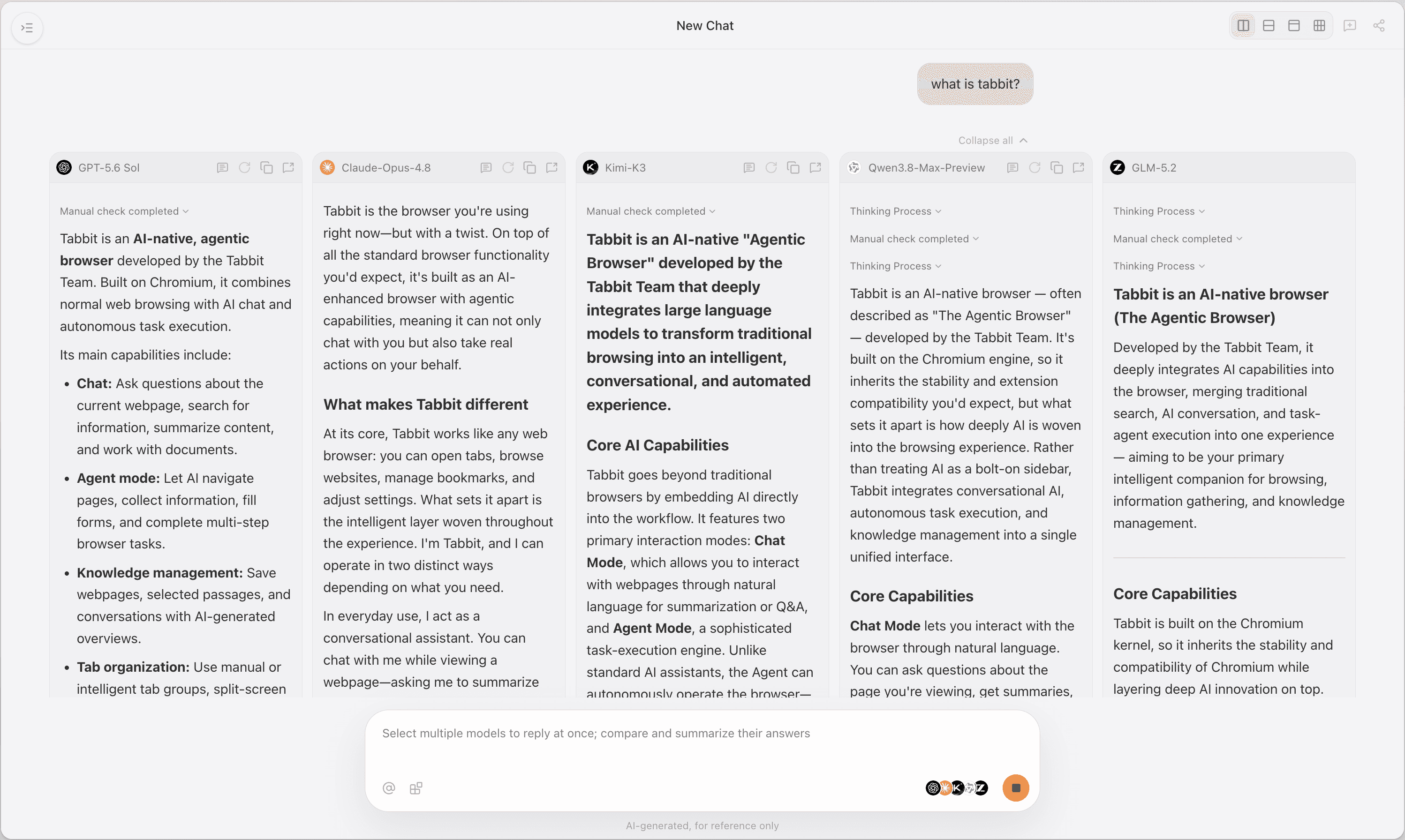
The Tabbit screenshot below shows the original Kimi K3 answering the same short prompt as four other models. The GLM column is GLM-5.2. For this comparison, check the exact labels in your account's current picker before recreating the workflow. The screenshot documents the comparison interface. There is no fresh paired GLM-5.4 and Kimi K3 run in this article.
Start with a request you can check quickly:
Using only the referenced official pages, make two rows:
GLM-5.4 and the original Kimi K3. For each row, report the access route,
the public billing unit, and a source URL. Leave an unlisted price blank.
Flag any page that refers to another model version.
A cited brief is a practical first pass for a decision meeting. Run the actual code changes in your editor or test environment, where you can check the diff and rerun tests. See browser research with sources for citation checks and Tabbit Browser best practices for working with page context.
Self-hosting and deployment
If deployment on your own infrastructure is a requirement, start with the weights you can inspect and obtain today. Moonshot's Kimi K3 repository includes model files and serving documentation, and lists the Kimi K3 license. Read that license for your use case. A 2.8-trillion-parameter model also needs a realistic estimate of device memory, parallelism, context, and concurrency. Weights availability answers one procurement question. Your serving test answers how much capacity you need.
Z.ai says it plans to release GLM-5.4 weights after security hardening. Check the official release and a model repository for the exact artifacts and license before assigning GLM-5.4 to a self-hosting project. A previous GLM checkpoint has its own terms and serving profile. Z.ai GLM-5.4 announcement
Which model should you choose?
| Your requirement | Start with | What settles the decision |
|---|---|---|
| A general API for a new integration this week | Kimi K3 | Budget a small run and verify its API model ID, outputs, and real bill. |
| An editor workflow on an existing GLM subscription | GLM-5.4 | Test real tickets in your supported client and track time and quota per accepted patch. |
| An on-premises deployment | Kimi K3 | Check the license and see whether hardware and serving capacity fit the deployment. |
| A screenshot-driven UI task | Test both available routes | Send the same image, check the attachment reaches the model, and validate the same viewport. |
| A migration based on coding quality alone | Keep your current setup while testing | Compare accepted patches on repeated tasks before switching the team. |
In short, Kimi K3 is the deployable choice for a public API or published weights. GLM-5.4 is the first experiment for teams already working within Z.ai's Coding Plan. For a raw coding-quality verdict, wait for matching evidence or collect it on your own tasks. If your immediate job is gathering those sources, try the source-checking workflow in Tabbit with a model available in your picker.

FAQ
Which is better for coding, GLM-5.4 or Kimi K3?
Try GLM-5.4 if you already use the GLM Coding Plan and want to evaluate it in your editor. Start with Kimi K3 for an API-based coding workflow. As of November 24, 2026, the evidence reviewed here does not establish a coding-quality winner under identical conditions.
Does GLM-5.4 have a public API and per-token price?
Z.ai documents GLM-5.4 access through the GLM Coding Plan. As of November 24, 2026, its general Model API was pending a security assessment and Z.ai's public per-token rate card did not list GLM-5.4.
What does the original Kimi K3 cost on Moonshot's international API?
Moonshot lists $3 per million uncached input tokens, $0.30 per million cache-hit input tokens, and $15 per million output tokens. Check the cache-write terms and any extra tool charges for your request.
Can GLM-5.4 and Kimi K3 read screenshots?
Both vendors document image input for these models. Confirm that your chosen editor or API route can send the image and that the file size and input limits fit the task.
Which model can I self-host?
Moonshot publishes the original Kimi K3 weights under the Kimi K3 license. As of November 24, 2026, Z.ai had described plans to release GLM-5.4 weights after security hardening. Check the license and serving requirements before deploying Kimi K3 yourself.
Is Kimi K3 the same model as Kimi K3.1 Pro?
They are separate releases. The original K3 uses the API ID kimi-k3, and K3.1 Pro uses kimi-k3.1-pro. Select the exact ID before comparing prices or running a test.