
Kimi K3 is priced like a $3 model only if you stop reading at the input column. The official API table lists $3.00 per million uncached input tokens, $0.30 per million cached input tokens, and $15.00 per million output tokens. Cache writes are separate: $3.00 per million tokens for a five-minute TTL and $6.00 for a one-hour TTL. The number that changes the budget is therefore 5×: one million output tokens cost five times one million uncached input tokens.
This is a pricing guide, not another capability review. The Kimi K3 model page and Kimi K3 review collection cover coding, research, safety, and other evidence. Here the question is narrower: which Kimi K3 access path matches your workload, and what should you count before you call it affordable? Tabbit can be a practical place to compare supported models, but access and product terms depend on the current account and edition.
Key takeaways
API K3 is $3/M input, $0.30/M cached input, and $15/M output on the official USD rate card checked on September 20, 2026.
Cache hits are cheap; cache writes are not free. The API attempts caching automatically. The pricing page lists five-minute and one-hour cache-write billing tiers, while troubleshooting says callers do not need to send a cache ID, TTL, or extra parameter.
Membership is not API credit. The official consumer page currently shows Andante, Moderato, Allegretto, and Allegro monthly prices in CNY, with annual billing described as more favorable and savings up to ¥1,680 rather than a stable per-plan annual quote.
K3’s 1,048,576-token context is part of the decision. K2.6 is cheaper in the same official comparison table, but its listed context window is 262,144 tokens.
Budget by workload shape. Short prompts with long answers are output-heavy; repeated long contexts benefit from caching; background agents may care more about allowances or retries than a headline token rate.
Kimi K3 pricing at a glance
Official API rate card
| Kimi model | Cached input / 1M | Cache write, 5 min / 1M | Cache write, 1 hour / 1M | Input / 1M | Output / 1M | Context |
|---|---|---|---|---|---|---|
| K3 | $0.30 | $3.00 | $6.00 | $3.00 | $15.00 | 1,048,576 tokens |
| K2.7 Code | $0.19 | — | — | $0.95 | $4.00 | 262,144 tokens |
| K2.6 | $0.16 | — | — | $0.95 | $4.00 | 262,144 tokens |
Source: Kimi’s official model pricing documentation, rendered and checked September 20, 2026. A dash means the comparison table does not expose a K3-style cache-write column for that row; it is not a claim that every provider or route handles caching identically.
Official consumer plans are a separate table
| Plan | Monthly display | What the page emphasizes |
|---|---|---|
| Andante | ¥49 | Entry consumer access and product allowances |
| Moderato | ¥99 | Higher product allowances and features |
| Allegretto | ¥199 | Larger allowances for heavier use |
| Allegro | ¥699 | Highest displayed consumer tier |
Source: Kimi’s official membership pricing page, checked September 20, 2026. The page describes annual billing as more favorable and says savings can reach ¥1,680; it does not provide a stable per-plan annual amount in this snapshot. Purchase eligibility is determined by what the live page displays. These are consumer plan displays, not a conversion of API token rates.
The one number that decides the budget: $15 per million output tokens
The $3 input price is easy to repeat in a launch post. The $15 output price is what changes many real tasks. A prompt can be small and still produce a large bill if K3 returns a long answer, spends many reasoning steps, or runs a multi-turn agent loop. The official table does not give a universal “cost per task,” so the safe unit is still tokens consumed per attempt.
For one API call, use this model:
request cost = (uncached input × $3
              + cached input × $0.30
              + cache-write input × write rate
              + output tokens × $15) / 1,000,000
              + separately metered tools and taxes
The rates in the formula are dollars per million tokens. “Output tokens” is the provider’s billable output count; do not replace it with the visible character count. If an SDK exposes usage metadata, save the input, cached input, cache-write, and output fields for each request. If it does not, label your estimate as an estimate.
What the official billing page is actually saying
Kimi’s pricing documentation lists two K3 cache-write billing tiers: five minutes and one hour, with the five-minute tier as the default when no TTL is specified. Its official troubleshooting guidance says the API attempts caching automatically; callers do not need to provide a cache ID, TTL, or extra parameter. A request prefix written into the cache is billed at the relevant write rate. A later request that hits the cache is billed at the cached-input price, and the hit refreshes the cache lifetime without an additional write charge for that hit.
That creates a simple but often missed sequence:
First request writes a repeated prefix and pays the write rate.
Subsequent hits pay $0.30/M for the cached input.
Every request still pays its uncached input and output lines.
A new prefix, an expired entry, or a changed prefix can return you to the write path.
For a 500,000-token context, a cold uncached read is $1.50 before output. A cache hit for the same context is $0.15 before output. A one-hour cache write for that 500,000-token prefix is another $3.00. The difference between cold, warm, and newly written context is much larger than a casual “K3 costs three dollars” summary suggests.
The Kimi API pricing help page also separates token billing from feature billing. Web Search, files, taxes, and provider-specific features need their own line items. Do not hide them inside a token multiplier without documenting the assumption.
Three worked budgets
These examples use the official USD API table. They are arithmetic illustrations, not a promise about a production request.
Local calculation
Estimate Kimi K3 API token cost
Uses the official USD rates checked 2026-09-20. Values stay in this browser.
The API attempts caching automatically. This estimate separates cache-write billing from cache hits and excludes retries, tools, taxes, and provider markups. Verify current rates
The calculator runs entirely in this browser. It separates automatic cache hits from cache-write billing and does not send your inputs anywhere. It excludes retries, tools, taxes, and provider markups; check the live official rate card before committing a budget.
A short prompt with a short answer
Assume 10,000 uncached input tokens and 2,000 output tokens:
(10,000 × $3 + 2,000 × $15) / 1,000,000 = $0.06Input and output each contribute $0.03 in this example. For a one-off workload, optimizing a cache that is rarely reused will not matter as much as measuring output and retries.
A long first read
Assume 500,000 uncached input tokens and 20,000 output tokens:
(500,000 × $3 + 20,000 × $15) / 1,000,000 = $1.80Add a five-minute cache write if that context is stored: another $1.50. Add a one-hour write instead: $3.00. The first call is not comparable with a later cache hit, so keep cold-start and warm-loop budgets separate.
A repeated long context
Assume the same 500,000-token context is cached and the response is 20,000 output tokens:
(500,000 × $0.30 + 20,000 × $15) / 1,000,000 = $0.45The warm request is much cheaper on the input side, but output still dominates this example. If the agent repeats a large answer or tool trace, reducing output volume can matter more than shaving another fraction from cached input.
The family ladder: cheaper does not mean interchangeable
Kimi’s official comparison lists K2.6 at $0.16/M cached input, $0.95/M input, and $4/M output, with a 262,144-token context. K3 is listed at $0.30/M cached input, $3/M input, and $15/M output, with a 1,048,576-token context. K2.7 Code has the same displayed token rates as K2.6 in that table.
The right comparison is not “which row is cheapest?” It is “which row lets this workload finish with acceptable retries, context, and output?” If a repository or research corpus fits inside 262k tokens and your task does not need K3’s capability, K2.6 or K2.7 Code deserves a cost test. If truncation or repeated retrieval would create more calls, K3’s larger context can change the total cost even though its token rate is higher.
For a coding workflow, start with Kimi’s API prompt guide and keep request acceptance criteria explicit. For a multi-step loop, the agent setup guide is a better starting point than blindly increasing the model budget. The coding workflow resource can help separate planning, implementation, and validation so a retry has a reason.
Subscription, API, or a browser workflow?
The official membership page currently presents Andante, Moderato, Allegretto, and Allegro as consumer plans. It also shows a separate API tab with K3 listed at ¥2/M cached input, ¥20/M input, and ¥100/M output. The official developer page lists the USD API table described above. This article keeps those pages separate because the displayed currencies, account surfaces, and terms differ.
Community feedback shows why that distinction matters. One Reddit post describes usage limits as the main frustration even though the author wanted to use the model. A commenter says a $200 plan supported multi-hour agentic loops; another says the same plan could be exhausted in half a day. These are not contradictory price tables. They are reminders that “value” depends on allowance, task length, concurrency, and personal usage pattern.
The original pages are the Reddit post, the multi-hour loop comment, the quota-limit comment, the hours-without-issues comment, and Web3 Wesley’s YouTube video. These links preserve the source context; none proves a universal quota.
Collected on September 20, 2026, these records describe personal Kimi K3 release-era usage: Reddit comments discuss a $200 plan and multi-hour loops, while the video description discusses three months on Moonshot’s $19 plan alongside Claude and Codex. No record independently verifies a quota, current version behavior, or general ROI.
The Kimi K3 community review collection keeps those experiences beside source conditions rather than converting them into a score. The real-world coding review and single-task SVG case are similarly useful for deciding what to test, not for inventing a universal cost-per-task number.
What people actually complain about
The five community records in this research split into two themes.
The allowance can feel like the price
On Reddit, u/thegodkingreal calls the usage cap “a ridiculous usage cap.” u/Moppmopp says a $200 plan can be consumed in half a day. Those are personal reports, not verified quotas, but they identify a real purchasing question: how many usable loops does the plan support for your work?
The same plan can feel ample for another workload
u/Timely_Impression_92 reports being happy with a $200 plan for multi-hour agentic loops. u/the_stamp_collector says they run Kimi for hours each day without issues. The YouTube creator Web3 Wesley frames the choice as whether Kimi Code can replace a $100 Claude subscription, while describing three months on a $19/month plan alongside other tools. None of these statements proves a general winner. Together they show why plan comparisons must name the workload and the reference price.
A practical option: compare the model in Tabbit
When the current account exposes Kimi K3, Tabbit’s Kimi K3 model page gives you a browser-level place to move from price theory to a small, repeatable task. You can first inspect the prompt collection, then compare a short answer, a long-document question, or a staged coding request. The existing multi-model view can place Kimi K3 next to other supported models, which is useful when the decision is “one task, several model options,” not “one rate card in isolation.”
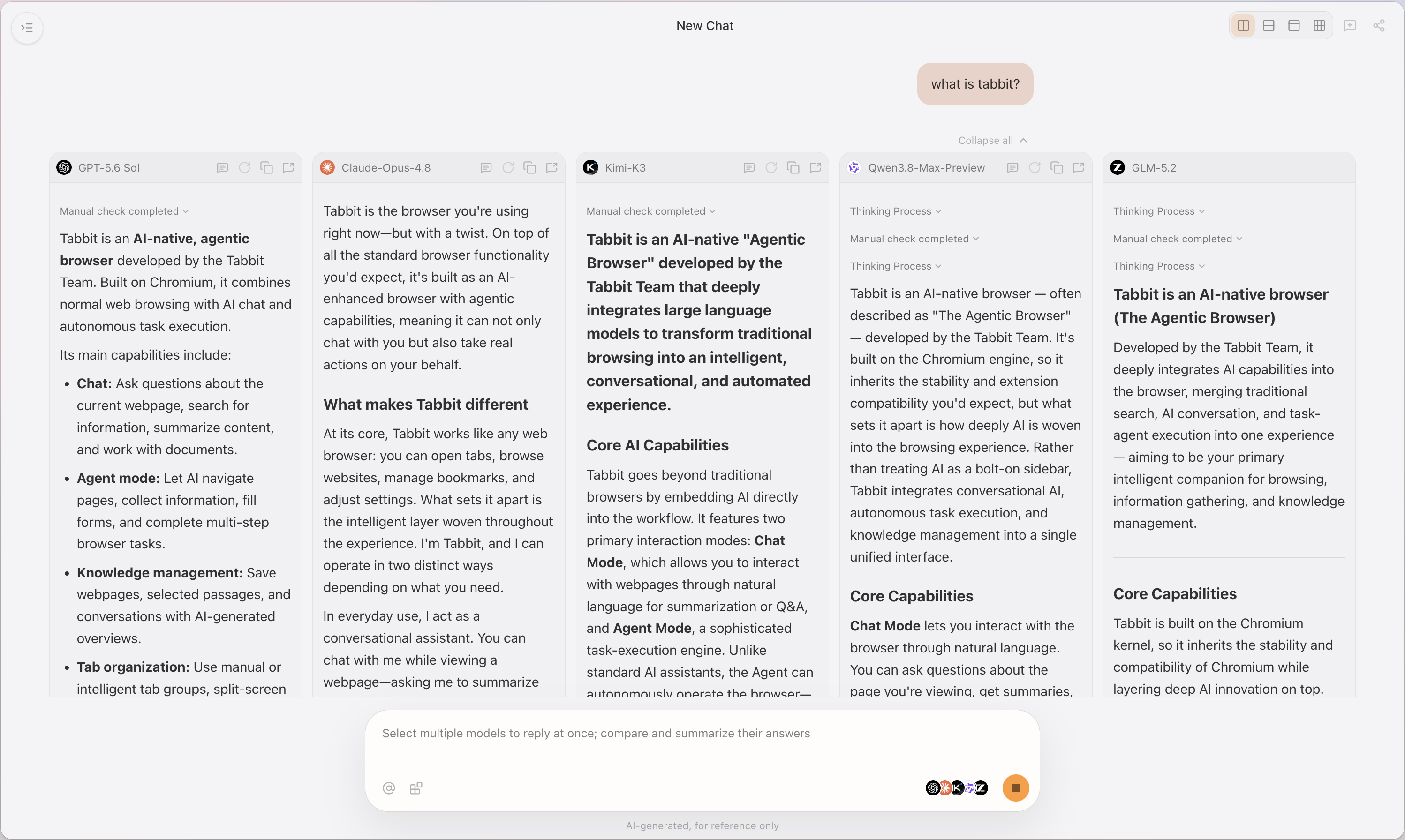
 Tabbit Browser
The trade-off is important: this workflow does not turn a consumer plan into API credit, does not expose a hidden quota, and does not prove Kimi K3 is available to every account. Treat the browser comparison as a way to define your task and acceptance criteria before committing to a provider budget. For a broader context comparison, see the GPT-5.6 Sol 1M-context article; it is a separate model and pricing context, not a direct K3 quote.
Kimi K3 pricing decision table
| Your workload | Cost driver | Best starting path | Watch out for |
|---|---|---|---|
| Small prompts, concise answers | Output tokens and retries | API with a strict output budget | $15/M output can dominate the $3/M input headline |
| Repeated 100k–500k prefix | Cache write, TTL, then cache hits | API with cache-hit/write logging | A cold write is not the same as a warm hit |
| Long context above 262k | Context size and call count | Compare K3 against truncation/retrieval cost | K3’s higher rate may still reduce total calls |
| Background agent loops | Output, retries, allowance, concurrency | Test a representative loop before buying | A plan that works for one user may exhaust for another |
| One-off consumer research | Membership features and limits | Compare current membership tiers | Membership is not API billing |
| Multi-model browser work | Access, task fit, and setup time | Try supported models in Tabbit | Model availability follows the current account and edition |
Final verdict
Choose Kimi K3 API when the 1M context and model capability justify a $15/M output line, and when you can measure cache hits, output volume, retries, and tool charges. Choose a lower-priced Kimi row when the task fits its smaller context and your acceptance tests show no costly quality regression. Choose a consumer membership when you need the product’s bundled Agent and research experience, but compare allowances rather than pretending the subscription is a token wallet.
The first budget to build is not “monthly tokens × $3.” It is three scenarios: one cold request, one warm cached request, and one failed or retried agent loop. Run those scenarios with the same prompt and acceptance criteria in the access path you actually plan to use. Then recheck the official API rate card and membership page before paying.

FAQ
What is the official Kimi K3 API price?
The official API table lists Kimi K3 at $3.00 per million uncached input tokens, $0.30 per million cached input tokens, and $15.00 per million output tokens. Cache writes are listed separately at $3.00 per million tokens for a five-minute TTL and $6.00 for a one-hour TTL.
How much cheaper is cached Kimi K3 input?
A cached input token is listed at $0.30 per million, compared with $3.00 for an uncached input token. That is a 10x rate difference for the input line, but you still need to account for the first cache write and the output tokens.
Does Kimi K3 charge for cache writes?
Yes. The official K3 table lists separate five-minute and one-hour cache-write prices. Kimi's troubleshooting guidance says the API attempts caching automatically, so callers do not need to provide a cache ID, TTL, or extra parameter. A cache hit is billed at the cached-input price and refreshes the cache lifetime without another cache-write charge for that hit.
Is a Kimi membership the same as Kimi K3 API access?
No. Membership plans provide consumer features and allowances, while API access is metered by token usage. The current personal page displays Andante at ¥49/month, Moderato at ¥99/month, Allegretto at ¥199/month, and Allegro at ¥699/month; annual billing is described as more favorable, with savings up to ¥1,680, but the exact annual amount should be checked live.
Which Kimi model is cheaper for repeated long-context work?
The official comparison table lists K2.6 below K3 on cached input, uncached input, and output rates, but it also has a smaller context window. The right choice depends on whether the workload needs K3’s capability and 1,048,576-token context or can fit K2.6’s 262,144-token window.
Can Kimi K3 pricing change?
Yes. The pricing pages are the live source of truth, and taxes, region, eligibility, quotas, and tool charges can change independently. Recheck the official API and membership pages immediately before setting a budget or purchasing a plan.