
Gemini 4 Neon is worth trying at High if you regularly ship changes across several files or need decisions backed by charts and documents. Keep Gemini 4 Hydrogen for short, routine work. Keep Carbon on jobs where you have already measured a higher acceptance rate. Google released Neon on November 18, 2026 and positions it between those models for demanding work you do often. Google's launch announcement
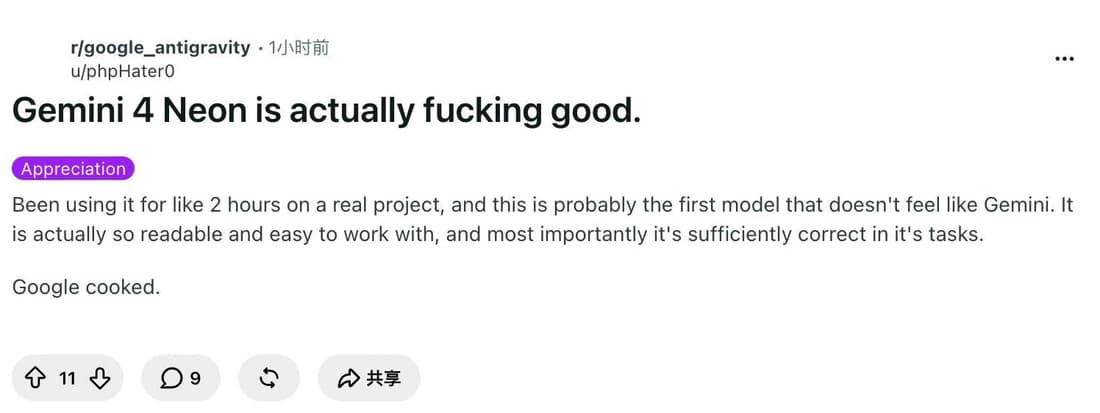
On Zapier's AutomationBench 1.0.6, Extra High passed 13 more tasks out of 657 than High. The estimated cost per attempt went from $0.88 to $1.69. That difference is the best reason to start at High and make Extra High earn its place. An early Antigravity user also describes readability and correctness on a real project. Their short report leaves out the repo and scoring criteria, which is why the decision still comes down to your own acceptance tests. Zapier's run report · Original user report
The examples below show how to judge the trade-off on code, automation and document work. The Tabbit Browser example shows how to collect the source pages for a repeatable comparison.
Key takeaways
Start Neon at High for multi-file fixes and evidence-heavy work. Try Medium when a cheap validation step can catch misses.
Zapier recorded 357 passes at High and 370 at Extra High on the same 657 tasks. Set the default from the cost of additional accepted results.
The paid Standard API rate is $3 per million input tokens and $15 per million output tokens, including thinking. Implicit cached input costs $0.15 per million.
Carbon's introductory Standard rates run through November 30. Neon has lower published input and output rates from December 1.
Google's API accepts PDF, audio, video, images and text. Keep the documents and source evidence with each evaluation so you can check what the model used.
What Gemini 4 Neon is and where to try it
Neon is a text-output model adapted from Gemini 4 Carbon. The API model ID is gemini-4-neon. Its 1,048,576-token context is shared across input and output. Ordinary synchronous calls have a 65,536-token output limit. Long decode raises the output ceiling within the shared budget. Google documents four thinking levels, Low through Extra High, with High as the default. The account experience varies across AI Studio, the Gemini app and Antigravity. Neon model card · API specifications · Antigravity release notes
If you have an existing Carbon or Argon workload, carry its current model settings and acceptance criteria into the trial. The Carbon review and Argon review cover the other two configurations in more detail. Starting fresh with simpler work? The Hydrogen review gives you a cheaper baseline to test first.
What the task runs show
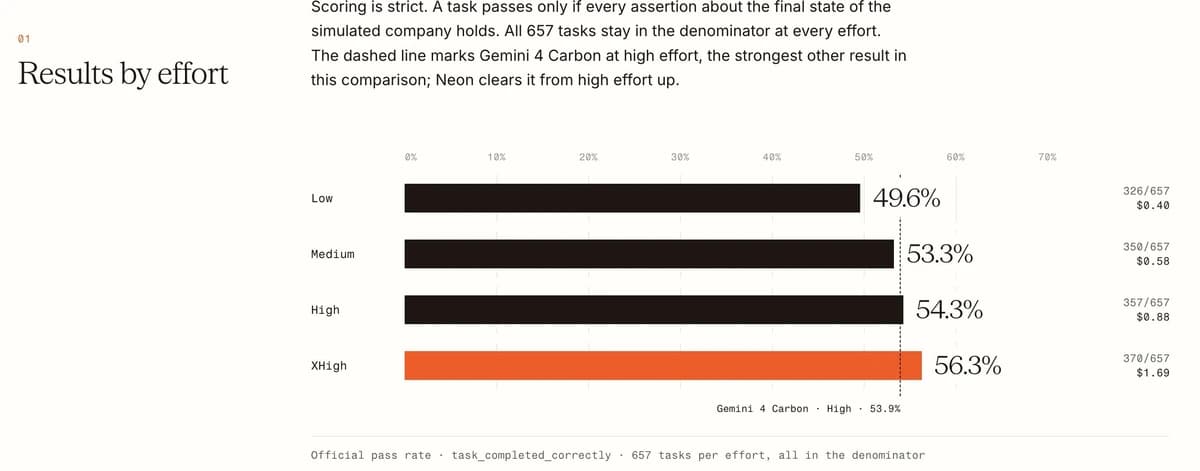
Zapier scored the final state of a simulated company across 657 tasks per effort level on November 17–18. A run passed only when every end-state assertion held. High got 357 passes, up seven from Medium. Extra High added another 13, while raising the estimated spend per attempt by $0.81. The cost estimates use list prices and a cache assumption from the pre-release run. The pass counts and costs describe Zapier's environment. AutomationBench methods and results
| Neon thinking level | All checks passed | Pass rate | Estimated USD per attempt |
|---|---|---|---|
| Low | 326 / 657 | 49.6% | $0.40 |
| Medium | 350 / 657 | 53.3% | $0.58 |
| High | 357 / 657 | 54.3% | $0.88 |
| Extra High | 370 / 657 | 56.3% | $1.69 |
For a batch with human review, compare total spend divided by accepted results, with the same acceptance rules for each model. Divide Zapier's rounded prices by the exact pass fractions and you get roughly $1.62 per pass at High and $3.00 at Extra High. In a job where a failed attempt sends a person back through a long reconciliation, the added passes might be worth that increase. In a job with a cheap retry and a reliable checker, the economics can go the other way. The cost-per-success guide shows how to include rework.
On a real pilot, keep the instructions and data fixed. For a code change, run the same tests and include a check for unrelated file changes. For a report, check the figures, dates and source links line by line. Record end-to-end time and the bill for every attempt, including failed runs. A long answer that leaves out one required field is still a failure under a strict rubric.
What the published benchmarks add
| Evaluation | Neon | Claude Opus 5.5 | GPT-6.2 Sol | What it measures |
|---|---|---|---|---|
| Artificial Analysis Intelligence Index v5.0.1 | 61 | 59 | 57 | Aggregate of nine evaluations |
| Vals Index v2.2 | 70.9% | 70.1% | 66.1% | Mix of practical tasks |
| CursorBench 4.1 | 65.4% | 58.1% | Unreported | Coding work in a specific environment |
| Terminal-Bench 4.1 | 65.2% | 65.8% | 61.5% | Adjusted terminal-task accuracy |
| FrontierCode 2.0 | 46.2% | 47.3% | 43.8% | Repository tasks in the published setup |
These are the values in Google DeepMind's model card. The rows use different tasks, tool environments and thinking settings. The Intelligence Index score of 61 is for Neon at Extra High. Google's FrontierCode result of 46.2% uses the default High. Opus 5.5 edges out Neon in the last two rows, and DeepMind lists no Sol result for CursorBench in the table. Treat the results as reasons to run a trial under your own constraints, with the settings attached to every number. DeepMind evaluation methodology
Where Neon earns a trial
Changes that cross file boundaries
If a request touches a public interface, its callers and the tests, start with one change for which you already know the expected behavior. Artificial Analysis scored Neon at 58.6 on its Coding Agent Index with Antigravity CLI and Extra High, published as a rounded 59 in its release analysis. The result is for the model and that agent setup together. Keep the runner, tools and tests fixed if you want to compare the model itself. See the Opus 5.5 review if that is your current baseline. Artificial Analysis launch analysis
A Hacker News reader also reports using Neon to find mistakes in an Astra 6.2 answer. They give no task or scoring details. A comparison on issues you can reproduce is the next step. Original comment

Documents that include dense charts
Native support for PDFs and images makes a practical difference when a figure, chart label or footnote changes the answer. In Artificial Analysis's GDP.pdf evaluation, Neon High scored 33.4%, versus 28.0% for Neon Extra High and 28.4% for Carbon High. That is a good test case for trying both thinking levels on the same packet of documents. Require the model to include page numbers and units for each figure. For a browser-based starting point, see research with verifiable sources. Artificial Analysis document results
Workflows with a clear finish line
Neon High reached 54.3% on AutomationBench, near its own Extra High result. That makes High a sensible baseline for jobs with a clear validation step, such as reconciling rows against a reference sheet. Check the final artifact or state and keep a record of misses. Every partial failure that requires a manual fix belongs in the time and cost totals. Zapier's AutomationBench report
Where costs and limits show up
Fast output can still leave you waiting
Artificial Analysis measured around 110 output tokens per second for Neon Extra High and about 21.5 minutes per Intelligence Index task. The first figure measures streaming throughput. The second reflects a demanding task mix with much more work to do. For interactive work, record time to the first useful response and time to an accepted result separately. For scheduled work, measure how long the entire run holds the queue. Artificial Analysis model measurements
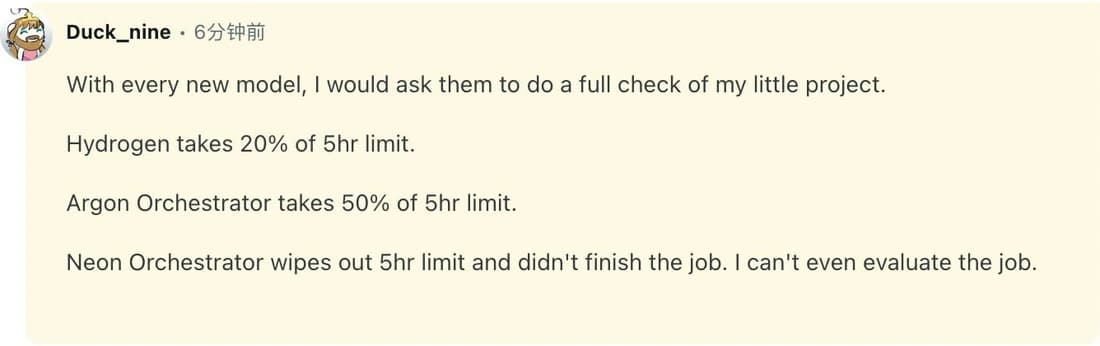
Quotas affect the experience in Antigravity too. Duck_nine reports that Neon Orchestrator exhausted their five-hour allowance during a project review and left the job unfinished. The report is specific to their run. Check the quota display on your plan with a representative job. Original comment
Carbon's price comparison changes on December 1
Artificial Analysis estimated $6.44 per task for Neon Extra High and $7.76 for Carbon High using Carbon's standard, non-discounted price. Google's Standard API rate card lists Carbon at $2 in and $10 out per million tokens through November 30, then $4 in and $20 out from December 1. Neon is $3 in, $15 out and $0.15 for cached input. Use the rate effective on your invoice date. For example, 100,000 uncached input tokens and 20,000 output tokens cost $0.60 on Neon before tools, versus $0.40 on discounted Carbon and $0.80 at Carbon's December rates, assuming identical usage. Real runs can spend different numbers of tokens. The Carbon pricing breakdown covers the rest of its rate card. Google Gemini Developer API pricing · Artificial Analysis cost calculation
A large context window still needs checks
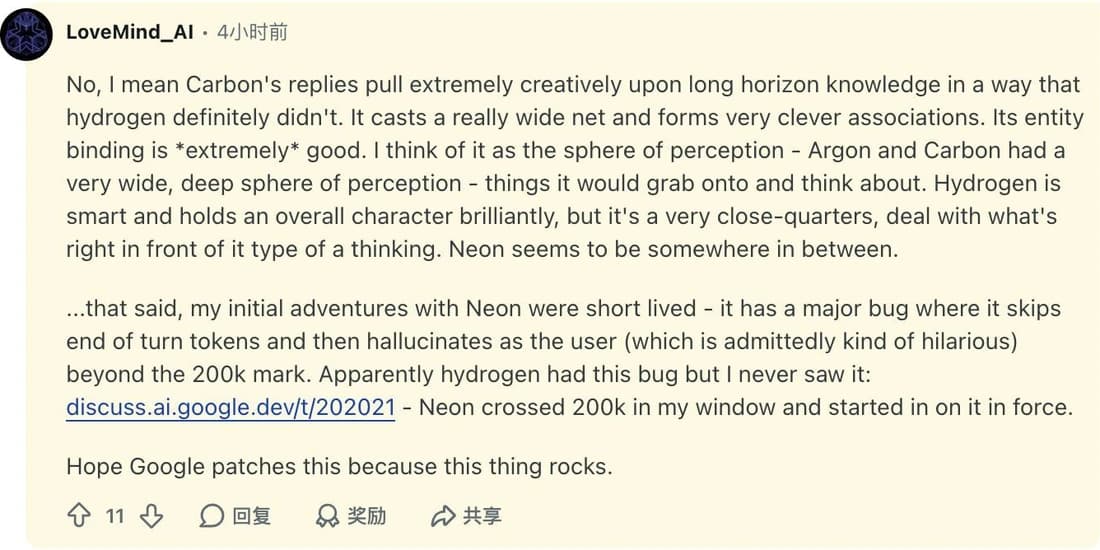
Google's model card lists hallucinations as a known limitation. In a launch discussion on Reddit, LoveMind_AI describes a long session in which Neon began generating as if it were the user after crossing about 200,000 tokens. That report is one session. Check your actual format, input lengths and document layout. Include at least one task that requires evidence buried deep in the packet. Google DeepMind's known limitations · Original discussion
Use Tabbit to collect a fixed set of sources
A model comparison gets harder to reproduce when one run sees three web pages and the next sees a newer version of the docs. Open the Neon API specs, the Google rate card and the Zapier results in Tabbit Browser. Use the Tabbit CLI with your connected agent to collect the exact source values and URLs. Save the result as a fixed input packet using the method in organizing multi-model research.
In a read-only Tabbit Browser session, the three public pages provided all four reference values. The Zapier page also showed the matching $0.88 and $1.69 estimates. Zapier source
For this example, verify four values against their pages before running any model: the unified 1,048,576-token budget, the $15 output rate, and Zapier's 357 and 370 passes at High and Extra High. Then use the same packet in each model run. Ask for the same four values with their URLs and a short recommendation that accounts for Carbon's pricing change. Tabbit handles the browser and source collection in this setup. Run Neon through a Google product or a configured endpoint that identifies the model, and record which one you used.
Verdict by workload
| Workload | Starting choice | When to change it |
|---|---|---|
| Small edits and routine summaries | Hydrogen | Move to Neon when missed constraints or rework start costing more than the savings. |
| Repeated multi-file fixes with tests | Neon High | Try Extra High for the failures your tests catch at High. Keep the increase if it pays for itself. |
| Chart-heavy review with citations | Neon High | Try Medium for simpler packets. Keep the setting that preserves figures, units and source links. |
| Difficult jobs that already pass on Carbon | Keep Carbon as your baseline | Switch after Neon matches acceptance on those jobs at the current rates. |
| Infrequent personal use | Use your existing plan first | Try Neon when a recurring task has a clear success criterion and your account exposes it. |
Start with three recent tasks that have checkable answers. Run Neon High on them alongside your current model and compare passed work, human review time and total cost. If the inputs live across browser tabs, Tabbit can help collect the evidence packet for that trial.
 Tabbit Browser

FAQ
Is Gemini 4 Neon worth upgrading for?
Try Neon if you regularly need multi-file code changes or detailed analysis across charts and documents. Start at High and compare the number of usable results and the time they take with your current model before changing plans or defaults.
Is Gemini 4 Neon free?
The Gemini Developer API lists Neon on its paid tier. Google announced Gemini app and Antigravity access for eligible Google AI Pro and Ultra subscribers. Account access and usage limits depend on the product.
How much does the Gemini 4 Neon API cost?
Google's Standard Gemini Developer API rate is $3 per million input tokens, $0.15 per million cached input tokens and $15 per million output tokens. The output rate includes thinking tokens. Tools and other service tiers have their own billing rules.
Is Gemini 4 Neon cheaper than Gemini 4 Carbon?
For Standard API tokens, Neon costs more than Carbon's introductory $2 input and $10 output rates through November 30, 2026. From December 1, Carbon's published $4 and $20 rates make Neon cheaper per input and output token. Total cost also depends on thinking, caching and retries.
What thinking level should I use with Gemini 4 Neon?
Use High as the baseline for demanding jobs. Try Medium for high-volume tasks with repeatable checks. Reserve Extra High for cases where additional passes or less review work justify the measured cost.
What is Gemini 4 Neon's context window?
The API has a unified 1,048,576-token budget for input and output. Synchronous output is capped at 65,536 tokens by default. Google's separate long-decode mode can generate up to the shared limit, subject to the remaining budget.