Editorial Review (2026)Dendrite SystemsBETA ReleasemacOS & WindowsCredit-Based Pricing

Strawberry Browser Review: The Self-Driving Browser, Tested for Real Work

Strawberry is a Chromium-and-Electron browser from Dendrite Systems built around AI Companions — agents that research prospects, update spreadsheets, and replay recorded workflows while you watch. We spent hands-on time with its BETA release to test how well the self-driving promise holds up, and where a free alternative like Tabbit fits.

7.6

Editorial Verdict

Promising agentic concept / early-beta polish gap

A genuinely useful companion browser — slowed by Electron weight and credit anxiety

Strawberry deserves credit for making browser agents visible, pausable, and approval-gated. Companions handle research, lead sourcing, and recurring routines inside your logged-in tabs, and the no-code workflow recording is clever. But heavier tasks lag, complex instructions still wobble in this BETA, and the credit meter ($10 per 1,000 credits after 500 free) quietly taxes the heaviest users. For teams that want the same approval-based automation without the meter or the framework tax, Tabbit is the stronger daily driver.

Agent visibility & human controlWatch, pause, replay
Raw browsing performanceElectron lag & resource use
Workflow reliability (BETA)Complex runs can wobble
Cost transparency500 free credits, then $10/1k

Jump to section

Product Identity

What Is Strawberry Browser, and Who Makes It?

Strawberry positions itself as “the self-driving browser”: a standalone desktop browser where AI Companions click, fill forms, extract data, and manage tabs for you. It is developed by Dendrite Systems, runs on Electron + Chromium, and currently ships as a BETA for macOS and Windows.

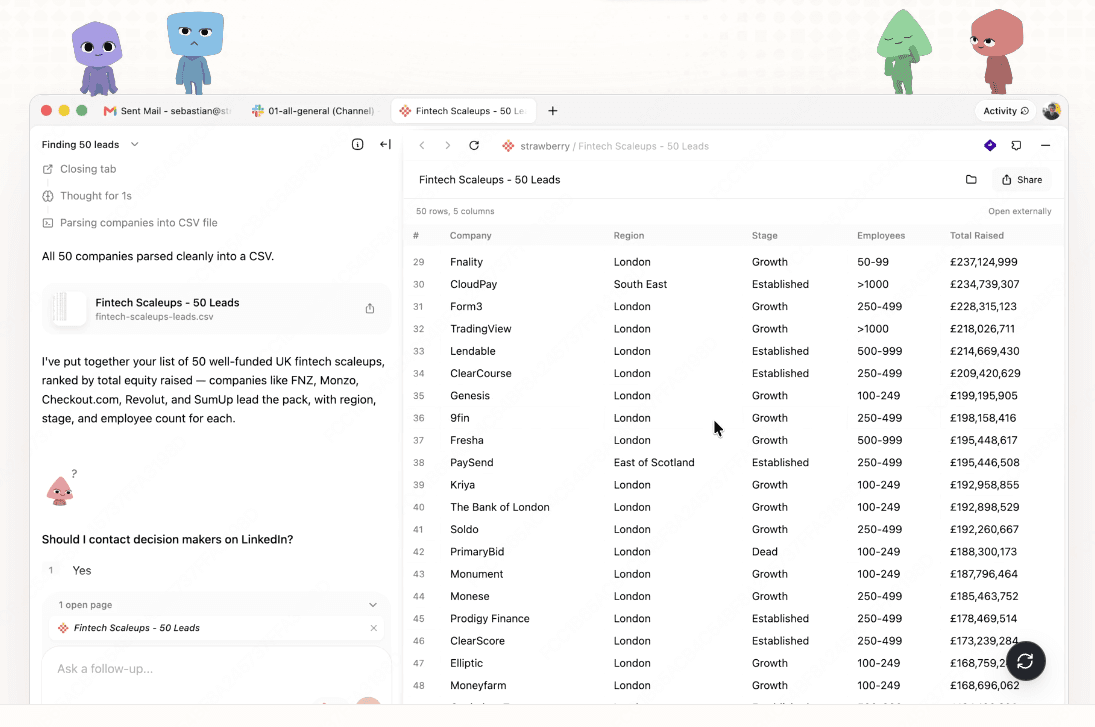
Strawberry browser interface with an AI Companion sourcing 50 UK fintech leads and parsing them into a CSV file
A Strawberry Companion sourcing 50 UK fintech scale-up leads and exporting them to CSV — the browser’s core “self-driving” workflow.

Dendrite Systems, from Sweden

Strawberry is built by Dendrite Systems, a Swedish team that has run three Product Hunt launches, most recently positioning the browser as the place “where teams and agents work together.”

Electron + Chromium foundation

Under the hood, Strawberry is an Electron app rendering with Chromium. That enables deep desktop integration, but reviewers consistently report more lag and memory use than native Chromium browsers like Chrome, Edge, or Tabbit.

BETA, macOS & Windows only

There is no official Linux or mobile build — a gap users actively search for. Per the company FAQ, passwords, chats, and history stay local on your device.

Hands-On Findings

Where Strawberry’s Companions Shine — and How Tabbit Handles the Same Jobs

We ran Strawberry’s headline workflows side by side with Tabbit’s Agent Mode. Three patterns stood out.

Research & Tab Automation

Cross-Site Research in Logged-In Tabs

Give a Companion a plain-English brief — “source 50 leads and add them to our CRM” — and it reads playbooks, searches LinkedIn and Crunchbase, scores companies against your ICP, and writes rows into Google Sheets. Impressive while the run stays simple; heavier sweeps get slow.
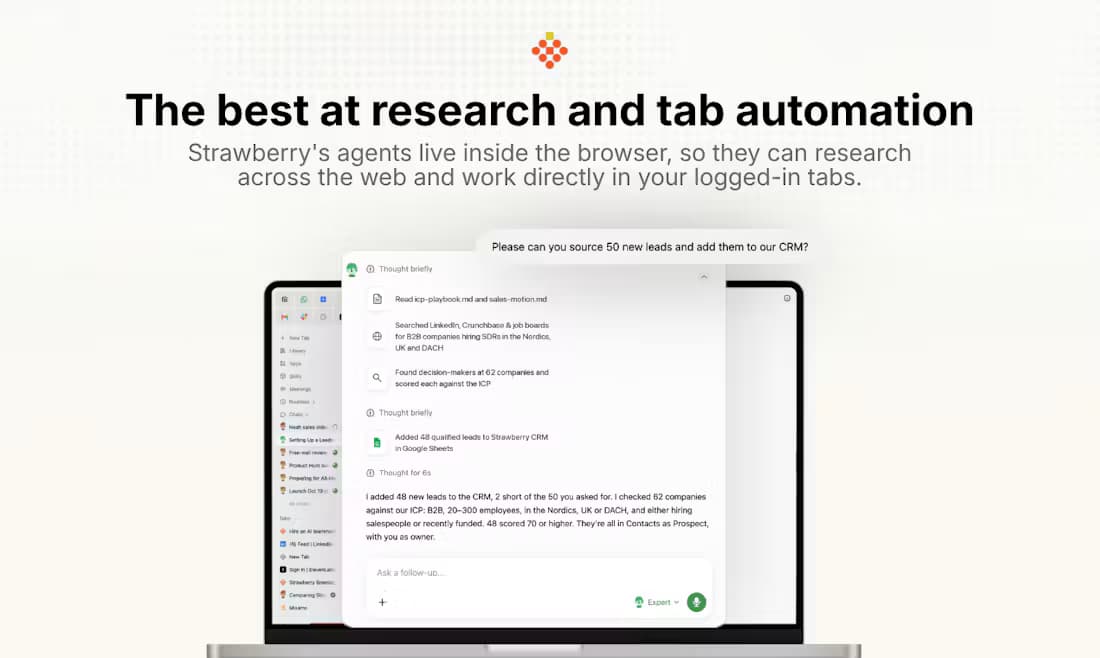
Strawberry marketing screenshot showing an agent researching leads across LinkedIn and Crunchbase and logging them to a spreadsheet
Recurring Routines

Putting Repeat Work on Autopilot

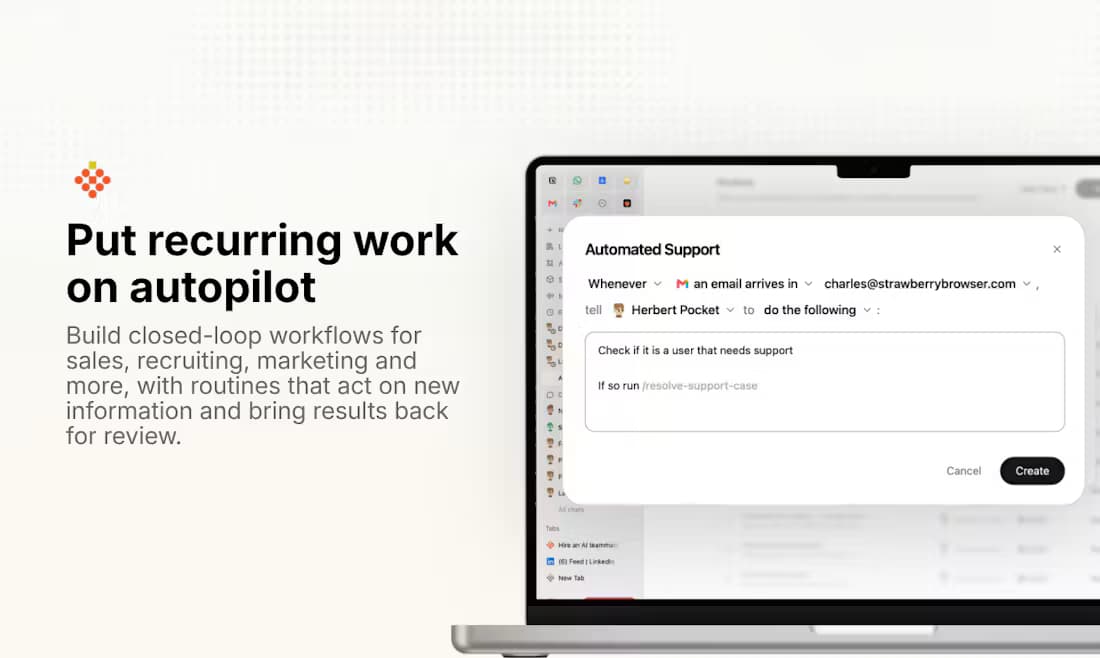
Strawberry’s routines trigger on events — “whenever a support email arrives, run the resolution playbook” — and bring results back for review. It is the closest thing to an always-on digital coworker we have tested, provided you budget credits for every activation.

Strawberry marketing screenshot of the Automated Support routine builder that reacts to incoming emails
Approval-Based Control

Human-in-the-Loop, Done Two Ways

Strawberry pauses before sensitive actions like sending email. Tabbit implements the same safety idea with a live, step-by-step execution plan — Load Skill, Update Plan, Click, Snapshot — plus free Agent Mode during public beta, so approvals never come with a meter attached.

Tabbit Agent Mode automating a Google Sheets task with a live step-by-step execution plan in the side panel

Evaluation Matrix

Strawberry Browser In-Depth Review Rubric

Our scoring methodology tests the dimensions power users care about when an AI browser becomes their primary workspace.

Feature / DimensionTesting MethodologyStrawberry PerformanceTabbit Advantage
Agent transparencyWatching, pausing, and replaying agent runs; inspecting what the AI is about to doExcellent: visible companion steps, pause and replay praised across user reviewsLive execution plan with per-step snapshots and explicit approval cards
Browsing performancePage load, scroll smoothness, and memory footprint during long sessionsElectron overhead: noticeable lag and higher resource use versus native browsersNative Chromium engine tuned for speed with lower memory overhead
Workflow reliabilityMulti-step runs on complex sites with forms, filters, and dynamic DOMsSolid for simple briefs; complex instructions can miss outcomes in this BETADeterministic Skills library plus agent improvisation, tested on real workflows
Model choiceWhich AI models power the agent and the assistant chatTied to Strawberry’s own model routing; no user-facing model pickerRoute freely across Claude, GPT, Gemini, DeepSeek, Kimi, Qwen and more
Cost modelReal monthly cost for daily research, CRM updates, and outreach drafts500 free credits, then $10 per 1,000; heavy teams land on $85–$250 plansPublic beta: Agent Mode, deep research, and multi-model chat free
Platform coveragemacOS, Windows, Linux, and mobile availabilitymacOS and Windows desktop only; no Linux or mobile buildsNative Windows and macOS builds with full web compatibility

Pros & Cons

The Definitive Strawberry Browser Scorecard

✓What Strawberry Gets Right

  • •Visible, collaborative agent flow: watch, guide, pause, and replay what the AI does
  • •Approval gates before sensitive actions like sending email or submitting forms
  • •No-code workflow recording: demonstrate a process once and the Companion repeats it
  • •Role-based companions for sales, recruiting, marketing, and operations
  • •Local-first data stance: passwords, chats, and history stay on your device

✗Where Strawberry Falls Short

  • •Electron framework brings lag and heavier resource use than native Chromium browsers
  • •BETA stability: complex instructions and long workflows can miss expected outcomes
  • •Credit pricing adds up fast: 500 free credits a month, then $10 per 1,000
  • •No Linux or mobile builds despite active user demand
  • •Single-vendor model routing with no user-facing choice of AI models
Bottom line: Bottom line: Strawberry is one of the most thoughtful agentic browsers we have tested, and its approval-based companions set a high bar. But Electron weight, BETA rough edges, and credit-meter pricing keep it from being the default browser for most teams today.

Pricing Reality Check

What Strawberry Actually Costs Month to Month

Browsing itself is free — credits are consumed only when Companions act. The meter is the catch: a single research-and-CRM update run can burn hundreds of credits, and top-ups cost $10 per 1,000.

PlanPriceMonthly CreditsBest For
Free$0500Trying companions on light tasks
Intern$20/mo6,000Solo users automating daily chores
Part-time$85/mo25,000Delegating 15–20 hours of work weekly
Full-time$250/mo75,000Automating 40+ hours of complex workflows
Team$35–$350/seat10,000–100,000Shared pools with admin controls
Tabbit: Tabbit, by contrast, keeps Agent Mode, deep research, and multi-model chat free throughout public beta — no credit meter, no per-action anxiety.

All Strawberry prices from strawberrybrowser.com/pricing (October 2026); $10 per extra 1,000 credits on every plan.

Target Audience

Who Should Use Strawberry — and Who Should Pick Tabbit

Automation Purists

Teams Married to Recurring Routines

If your work is dominated by event-triggered loops — inbox triage, CRM hygiene, candidate sourcing — Strawberry’s routines and shared companions are genuinely well designed. Budget for the Part-time tier or above.

Great fit if credits fit the budget

Performance-First Users

People Who Browse All Day

If the browser is your primary workspace, Electron lag compounds. Tabbit gives you the same approval-based agent automation on a fast native Chromium base that stays responsive with dozens of tabs open.

Tabbit wins on daily-driver speed

Model Switchers

Users Who Refuse One AI Vendor

Strawberry routes through its own stack with no picker. Tabbit lets you send the same task to Claude, GPT, Gemini, DeepSeek, or Kimi and compare answers side by side — free during beta.

Tabbit wins on model freedom

The Alternative

Get the Same Approval-Based Automation Without the Meter

Tabbit is an AI-native browser built on a fast Chromium core for both Windows and macOS. Its Agent Mode plans every action before it runs, shows a live step-by-step execution log, and asks for approval before anything sensitive — the same safety philosophy as Strawberry, without credit counting.

Add multi-model routing, one-click migration from Chrome, and a Skills library of reusable browser automations, and Tabbit becomes the natural next stop for anyone outgrowing Strawberry’s BETA.

  • ✓Free Agent Mode with human-in-the-loop approvals during public beta
  • ✓Multi-model routing: Claude, GPT, Gemini, DeepSeek, Kimi, Qwen, and more
  • ✓Native Chromium performance — no Electron lag, full Chrome Web Store support
  • ✓One-click import of bookmarks, history, and extensions
  • ✓Reusable Skills library covering research, forms, sheets, and outreach
Tabbit new tab page running the same question across five AI models — GPT, Claude, Kimi, Qwen, and GLM — side by side

Frequently Asked Questions

Strawberry Browser Review FAQ

Strawberry has a free plan with 500 credits per month, and normal browsing never consumes credits. Credits are only spent when Companions chat, browse, or automate — extra credits cost $10 per 1,000 on every plan, and paid tiers run from $20 to $250 per month.

Ready for Agent Automation That Doesn’t Count Credits?

Download Tabbit and put approval-based AI agents to work on your real browser tasks — free while we’re in public beta, on macOS and Windows.

Free during public beta · macOS & Windows · No credit card required

© 2026 Tabbit Browser. The AI-native browser that understands your context.

