
When Doubao Work needs to retrieve information from a live webpage, you can look at Tabbit's @Tabbit browser-calling workflow. The official case page shows Doubao Work asking Tabbit to open Eastmoney, check seven trading days of data for four securities, and then produce a chart, details, and a summary. This is a specific demonstration of reading public data; it does not mean that compatibility has been verified for every version of Doubao, website, or financial workflow. The case was recorded on September 3, 2026, and the page data is a snapshot from that time, not current market data.
The official demo covers stock-price pages
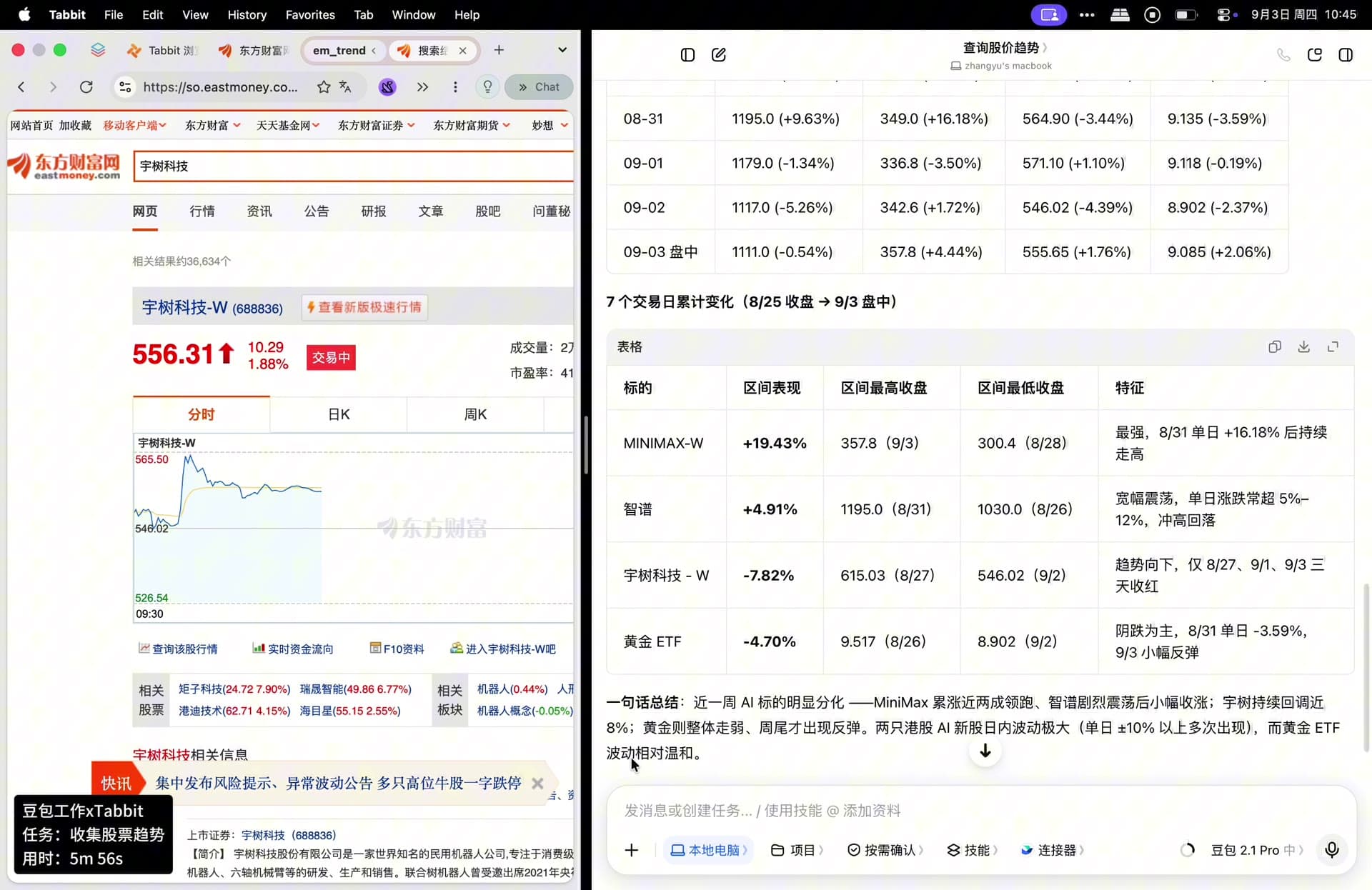
The official case page, recorded on September 3, 2026, gives a clearer picture of the scope: Doubao Work receives an instruction and delegates browser actions through @Tabbit; Tabbit opens Eastmoney in a real browser. The case includes securities related to MiniMax, Zhipu, Unitree, and gold, covering Hong Kong stocks, A-shares, and a gold ETF. It displays data for seven trading days and outputs a chart and table after normalizing values against the first day's closing price.
The screen recording also preserves a recovery from failure: the first data request returned zero results, so the Agent switched to the site's search interface and continued. The page describes this as a record of one demonstration, not a reliability metric. If you use it as a reference, check the specific securities and codes mapped by the Agent. In particular, a generic term such as “gold” does not identify a unique security. Currency and trading hours for different markets also matter.
The recording demonstrates two checks worth retaining. First, the Agent maps colloquial targets such as “gold” and “Unitree” to specific codes and states those mappings in its report. Second, because the four prices are at very different scales, it normalizes them to 100 based on the August 25 closing price before comparing their relative movements. A normalized chart helps compare changes over a period, but it cannot replace a price table or indicate future performance.
The time basis matters too: the starting point is the August 25 close, while the endpoint is an intraday reading on September 3, not seven full closing prices. The report's final row identifies the intraday data. If you reuse a similar workflow, include the retrieval date, time zone, trading day, and whether the reading is intraday or at close. Do not write only “the last seven days.”
This is different from asking Doubao Chat a financial question. A chat answer may come from the model's existing knowledge or a web search; a browser task opens a particular page and reads the data displayed there at that time. Either result can become outdated, and figures on a page may be delayed. Numbers can be checked only when both the source and retrieval time are clear.
Official Tabbit CLI announcement · Doubao stock-tracking case page · Tabbit CLI quick start
Start by verifying one item of public data with a read-only task
If you want to verify this approach, start with one public page and one security instead of reproducing a multi-market report right away. First confirm that the site permits access. Do not log in to someone else's account, handle private account information, or trigger an order or other financial action. Ask Doubao Work to plan which fields to check, then use the @Tabbit call shown in the case to operate the browser and read what is actually visible on the page.
You could phrase the task like this:
@Tabbit 打开我提供的公开行情页面,只读取指定证券当前可见的价格。记录页面 URL、读取时间与时区、证券代码、交易市场、显示价格、币种、单位和页面标注的数据更新时间。不要补齐页面没有显示的字段,不要做买卖建议或下单。若页面未显示数据或映射不明确就停止,列出需要我人工复核的项目。This separates the roles of the client and the browser: Doubao Work receives the goal and organizes the fields, @Tabbit hands browser operations to Tabbit, and the webpage provides the data visible at that time. This wording follows the calling method on the Doubao case page; /tabbit in the quick-start article is an example of connecting a different client, and should not be used to rewrite the Doubao case. If the call is unavailable, the target page blocks access, or the data has not loaded fully, the task should stop as “incomplete.” Do not fill gaps with search snippets or prices from memory.
Add time and units to quotes
“Price is 120” is not enough information. Readers also need to know which security and market it refers to, what currency it uses, whether the quote is per share or per unit, and the time indicated by the data page. Quotes on different exchanges may be from different trading sessions. A page may also show an intraday price, closing price, percentage change, and delayed quote at the same time. Recording these fields separately reduces the risk of confusing units or misreading dates.
| Field | Example to record | How to check |
|---|---|---|
| Page source | Official exchange or data provider URL | Open the original page; do not rely only on a search snippet |
| Retrieval time | 2026-11-09 14:30, Asia/Singapore | Keep it separate from the page update time |
| Security and market | Security code and listing market | Check that the name and code match |
| Quote and currency | Record the number, currency, and unit exactly as shown | Do not combine Hong Kong dollars, US dollars, and renminbi in one column |
| Data timestamp | Delay or update time shown on the page | If none is given, write “not specified on page” |
These are recommended fields to check; they are not a list of columns already shown in the demonstration recording. Adjust them to the page in question, but keep the fields needed to determine time and units. If the page labels a figure “delayed by 15 minutes,” retain that note. If the page does not say the data is real-time, do not call it real-time.
How to verify results in a Tabbit CLI workflow
Start with the quick-start guide and confirm that Tabbit on your machine and the target Agent are connected as documented. Then provide a clear public URL, restrict the task to read-only access, and specify the output fields and stop conditions. Once the webpage content is in a table, spot-check the original page manually: the code, market, currency, and page time should correspond one-to-one. If the page redirects to a login screen, mark it “authorization required” and let the account owner decide whether to continue in their own browser environment. Do not try to bypass access controls.
| Page state | What to do | Does this count as complete? |
|---|---|---|
| Data and time fields are all visible | Record the values and URL, then spot-check manually | Yes, for read-only organization |
| Value is visible, but currency or time is missing | Mark the missing field unknown and check another trusted source | Not ready to compare |
| Login, CAPTCHA, or permission prompt | Stop and report the state | Incomplete |
| Page load error or conflicting content | Keep the error details and retry manually or use another source | Incomplete |
This table is an acceptance method for organizing public data, not a reproduction of the official demo's steps. Whether Tabbit CLI can access a particular page depends on the current version, page structure, browser session, and site restrictions. For important data, rely on the data provider.
Which tasks are worth considering for this approach
Tabbit CLI is worth exploring if Doubao Work breaks down a task and you need it to read a public page actually opened in a browser. If you only need an explanation of a concept, a regular Q&A may be more direct. If the target site offers an official API, first assess its terms and data definitions. For account holdings, personal information, paid pages, or trading actions, check permissions and risks first. Do not extend the demo's “checking stock prices” scope into a claim that it can make investment decisions.
The easiest completion signal for a reader to check is that every data row leads back to its source page and can be explained in terms of market, unit, and time. If the source or update time cannot be found, mark the information for review instead of having the Agent supply a plausible-looking answer. To learn how Tabbit executes web tasks, read the introduction to agentic browsers; for a specific Doubao example, open the stock-tracking page.
Keep different markets separate in quote tables
If you need to compare multiple public sources, fix the comparison criteria first. The same company may have different security codes, trading hours, and currencies in different markets; units for funds or depositary receipts may also differ. Do not let the Agent merge data based only on company name. At a minimum, keep the source URL, security code, market, quote currency, unit, and data timestamp given by the page in every row. If a page shows “price” without a unit, record the original wording and mark it for review; do not infer the unit yourself.
Consider splitting the information into three columns: what the page displays, the standardized fields organized by the Agent, and the manual review status. The original value helps reconstruct what was on the page; standardized fields make comparison easier; and the review status keeps unverified data out of the final report. For example, if a page says “delayed quote,” the organized result should retain the delay label. If two sources show different numbers, first check whether they refer to different times or markets. Then decide whether a third source is needed instead of simply picking the more appealing number.
Recovery steps when a browser task fails
If a page is blank or shows a login prompt, first ask the Agent to return the final URL, page title, and error status. Confirm that the link points to the intended site, then check whether the browser is using the right session. The account owner should handle login, authentication, and account selection; after that, restart the read-only check. If the data still does not appear, report the missing fields rather than filling them with search results or prices from another date. If the page explicitly restricts automated access, stop and choose a source the site permits.
Before running the task, you can also break it into small, reversible steps: open the source, read one row, check it manually, and then decide whether to expand to more securities. Do not ask the first run to track several markets, make an investment judgment, and set up a scheduled task all at once. Smaller steps make it easier to tell whether a problem came from page access, field recognition, or data definitions. This recovery process is a recommended acceptance method, not a retelling of the Doubao Work demo.

FAQ
Are there examples of Doubao Work using Tabbit for web tasks?
Yes. The official stock-tracking case page shows Doubao Work calling the Tabbit browser through @Tabbit to read an Eastmoney page. It demonstrates this specific workflow; it does not establish compatibility across all versions and websites.
Can stock prices read from a webpage be used directly for trading?
Do not treat an Agent summary as investment advice or a basis for trading. Verify the quote source, time, market, currency, and unit, then check the data with the provider.
How can I tell whether a webpage reading is reliable?
Ask for the page URL, data timestamp, market, and currency, then open the source page and check them yourself. Mark missing fields as unknown; do not have the model fill them in.