
The short answer is yes, Rill Browser is technically free to download, but its AI features come with an important catch: you must bring your own paid AI account.
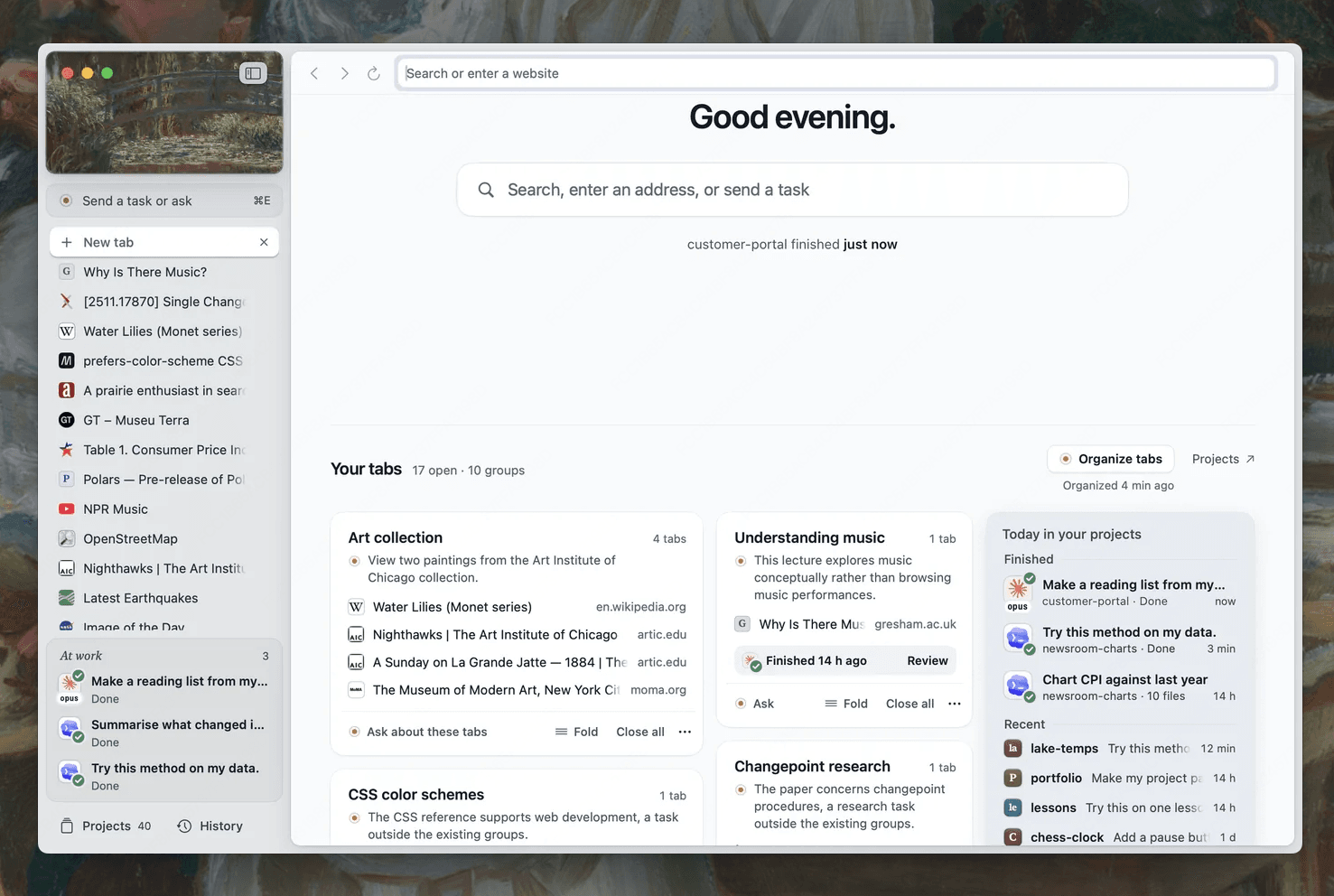
Developed by Manifold AI, Rill Browser is offered as a free early beta (version 0.1.5) for Apple silicon Macs. There is no software purchase price, no recurring Rill subscription tier, and no Rill license key. However, if you plan to use Rill for its signature AI features—invoking agents with ⌘E to handle tasks, summarize pages, or research complex topics—the browser relies entirely on your existing Claude Code (2.1.261+) or Codex CLI (0.144.4+) installation.
As one developer on Reddit pointed out: “The browser itself is a free download, but don't expect free AI. It hooks right into your Claude Code CLI, so you are burning your own tokens for every prompt.”
If you are looking for an all-in-one AI-native browser with generous free allowances that runs out of the box on both Mac and Windows, Tabbit Browser provides a much simpler alternative.
Key takeaways
The browser download is 100% free: Rill Browser charges zero dollars for downloading its macOS app, browsing standard web pages, and organizing tabs.
AI execution is not free: Rill does not bundle its own hosted LLM quota. Every agent action consumes tokens from your own Claude or OpenAI subscriptions.
Strict Mac hardware prerequisite: Rill only runs on Apple silicon Macs (M1/M2/M3/M4) running macOS 14 or later. Windows, Linux, and Intel Mac users cannot use it.
Complex terminal setup: To unlock any AI capabilities in Rill, you must install and authenticate developer CLI tools in your terminal first.
Tabbit provides free, zero-setup AI: Tabbit Browser is free on macOS and Windows, includes built-in models, and provides a weekly free AI allowance without requiring external API keys or terminal configurations.
Cost breakdown: Rill Browser vs Tabbit Browser
To see the real financial and technical requirements of both tools, review our detailed Rill Browser review alongside this direct cost comparison:
| Cost dimension | Rill Browser | Tabbit Browser |
|---|---|---|
| Software license | Free beta download | Free download |
| Bundled AI quota | None (0 free tokens included) | Generous weekly free AI allowance |
| AI token billing | Billed to your Anthropic / OpenAI account | Included out of the box; optional Pro plan for power users |
| Terminal CLI required | Yes (Claude Code or Codex CLI mandatory for AI) | No (Models pre-integrated in the UI) |
| Supported operating systems | Apple silicon Mac only (macOS 14+) | macOS 12+ (Intel & Apple Silicon) and Windows 10+ |
| Hidden usage limit | Stops working when your personal CLI token quota exhausts | Smooth rollover and free standard model access |
Understanding Rill's pricing model: The "BYO-Agent" approach
Why does Rill advertise itself as free while still requiring a paid service? Rill takes a Bring-Your-Own-Account (BYO) approach. Rather than managing server infrastructure, hosting language models, or charging a $20/month browser subscription, Rill acts as an interface layer between your browser tabs and your Mac’s command line.
When you press ⌘E on a web page, Rill passes the page context and prompt directly to your local CLI. This design offers distinct advantages for developers who already pay for Anthropic or OpenAI API plans and want to link web browsing to local Git repositories.
However, for anyone seeking an everyday AI browser, this setup presents three major hurdles:
1. Unexpected API costs and rate limits
Because Rill sends complete page contents, DOM trees, and tab context to your CLI agent, token consumption accumulates rapidly. A multi-step web scraping or research task can easily consume hundreds of thousands of context tokens. If your monthly API balance runs low or hits an hourly rate limit, Rill’s AI assistant abruptly stops working.
2. No support for Windows or Intel hardware
Many users looking for Rill Browser for Windows discover that the browser does not exist outside modern macOS. If you work on a Windows PC or an older Intel MacBook, Rill is completely inaccessible. In contrast, users needing an agentic browser for Windows can run Tabbit seamlessly.
3. High friction for non-technical users
Setting up Node.js packages, configuring environment variables, authenticating API tokens, and troubleshooting terminal permissions are intimidating barriers if you simply want to summarize articles, compare prices, or plan itineraries. When weighing Rill Browser alternatives, usability is just as critical as raw cost.
Daily workflow fit: Which browser suits your tasks?
Depending on how you work and where your projects live, each tool addresses fundamentally different needs:
| Use case | Rill Browser fit | Tabbit Browser fit |
|---|---|---|
| Piping web research into local Git code | Strong: Built specifically to pass pages to local code projects | Good: Supports file context and coding workflows |
| Everyday web research across multiple tabs | Limited: High token costs; limited multi-tab analysis | Strong: Native Deep Research with integrated source citations |
| Windows desktop productivity | Unsupported: Mac Apple Silicon only | Native: Full feature parity on Windows 10 & 11 |
| Automated web tasks and forms | Experimental: Requires CLI agent terminal permissions | Built-in: Agent Mode handles browser automation safely |
| Zero-friction onboarding | Low: Requires terminal CLI installation & API keys | Instant: Download, launch, and start exploring immediately |
For a head-to-head architectural analysis, check out our in-depth comparison of Rill Browser vs Tabbit Browser as well as Rill Browser vs Chrome.
Why Tabbit Browser is the smarter free alternative
If you love the idea of an agentic browser that handles heavy research and routine web chores, but do not want to manage API keys or pay per token, Tabbit Browser is built for you.
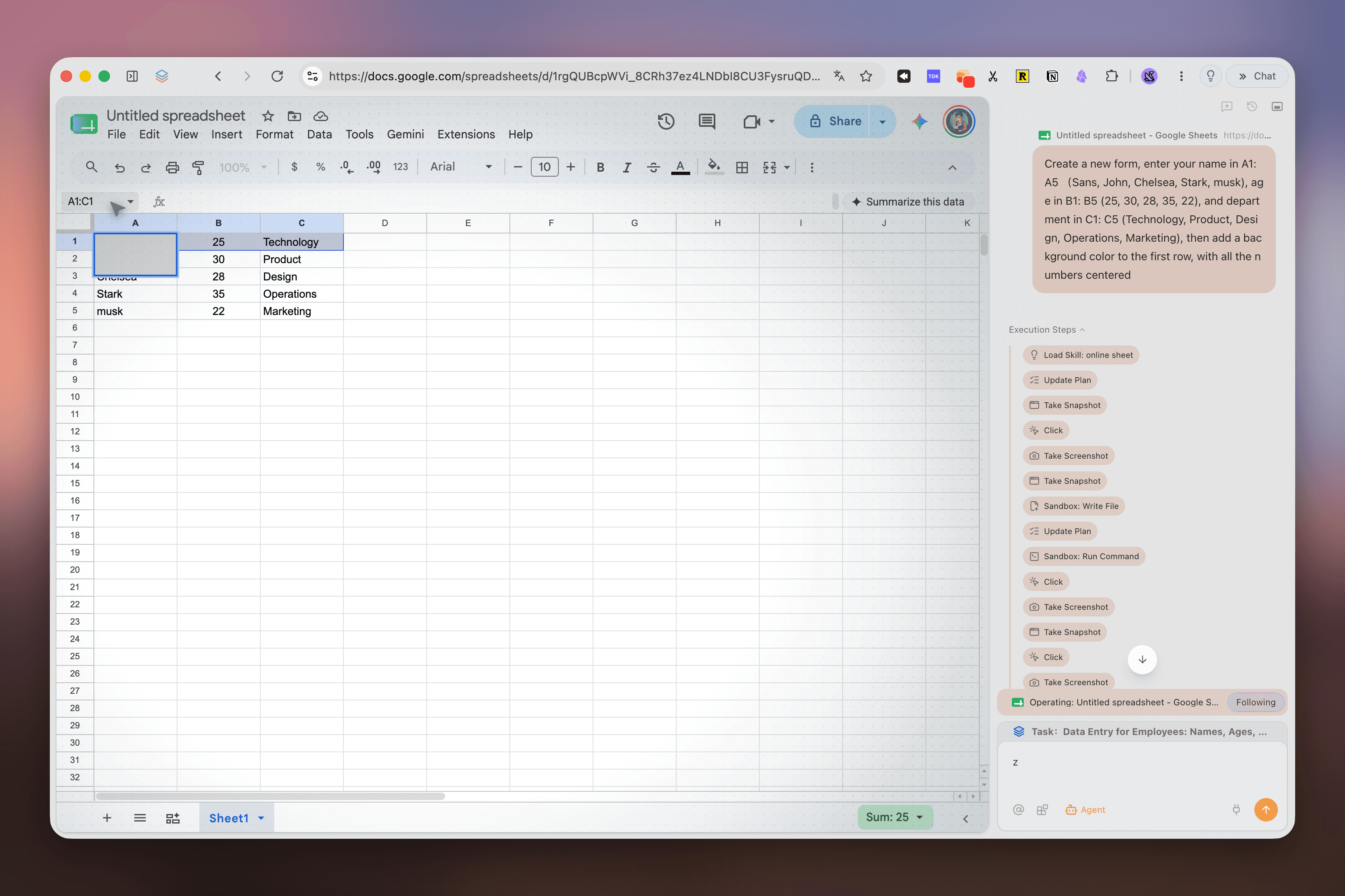
Tabbit delivers a complete AI-native workspace with zero configuration:
Free download across all major desktops: Tabbit runs natively on Windows 10/11 and macOS (both Intel and Apple Silicon), offering a calm, distraction-free interface with vertical tabs and organized spaces.
Built-in state-of-the-art models: Access leading models without juggling API keys or paying separate subscription fees for everyday browsing tasks.
Generous weekly free allowance: Enjoy free conversational chat, page summaries, multi-tab comparisons, and Deep Research every week.
Autonomous Agent Mode: When you need more than a quick summary, Tabbit’s built-in Agent can navigate pages, extract data from tables, fill out forms, and execute complex multi-step workflows while keeping you in complete control.
Final verdict: Should you install Rill?
If you are a software engineer who already spends hours inside Claude Code CLI on an M-series Mac and wants a quick shortcut to pass web pages into local repositories, Rill Browser is an interesting, free open beta to try.
However, if you want a polished, truly accessible AI browser that does not drain your personal API wallet or lock you into Apple hardware, Tabbit Browser is the clear winner. Download Tabbit today for macOS or Windows and experience the future of AI-powered web exploration without the hidden fees.

FAQ
Is Rill Browser free to download and use?
Yes, Rill Browser is currently available as a free early beta for macOS with no separate software purchase, subscription fee, or Rill license key required.
Are AI features in Rill Browser completely free?
No. While Rill does not charge a platform fee, its AI agent capabilities require a connected Claude Code or Codex CLI account, which consumes your own Anthropic or OpenAI API tokens or subscription allowance.
Can you use Rill Browser on Windows for free?
No. Rill Browser does not currently support Windows; it is only available for Apple silicon Macs running macOS 14 or later.
Does Tabbit Browser offer a free tier?
Yes. Tabbit Browser is completely free to download on both macOS and Windows, offering built-in AI chat, Deep Research, and Agent workflows with a generous weekly free allowance.
Do I need to configure a terminal CLI or API keys to use Tabbit?
No. Unlike Rill, Tabbit provides pre-configured AI models directly inside the browser interface, so you do not need terminal tools, CLI logins, or external API keys to get started.
Which browser should I choose if I want free AI browsing?
If you already pay for Claude Code or Codex CLI and work exclusively on an Apple silicon Mac passing web context to local repositories, Rill is a free wrapper. If you want free, ready-to-use AI research and browser automation across Mac and Windows, Tabbit is the superior choice.