BRAND INTENT

Tabbit Browser

Tabbit is an AI-native browser built for serious research, multi-tab context comprehension, and automated task execution. Whether you need the official installer, regional edition routing, or a deep capability breakdown, start here.

What are you trying to do first?

Selected path

Use the header button or the direct installer link. Tabbit ships official verified installers for macOS and Windows—avoid repackaged mirrors you do not trust.

Jump to a section

Spatial sketch

Abstract lanes visualize separate workstreams—your real UI follows Tabbit’s official product surfaces.

ARCHITECTURE & CAPABILITY MAP

What “AI-Native” Really Means in Tabbit Browser

Legacy web browsers were built as passive rendering surfaces for isolated pages. Tabbit re-architects the browser into an active cognitive workbench where AI reads across tabs, synthesizes facts, and executes real work.

The AI-Native Capability Architecture

Rather than grafting a floating chat sidebar onto Chromium, Tabbit weaves full-session working memory, recursive deep research, reviewable agent actions, and spatial project hygiene into a seamless, fast browsing experience.

CONTEXT & COMPREHENSION

Full-Document Multi-Tab Reading Without Copy-Paste

Bring active web pages, complex data tables, PDFs, and tab groups directly into AI conversations with full citation grounding.

In traditional workflows, comparing information across a dozen web pages requires constant copy-pasting, tab switching, and mental friction. Tabbit transforms your open tabs into an unified working memory. By typing @ in the prompt bar, you can instantly reference any open page, tab group, or uploaded document as first-class context.

Instead of relying on fragile text scraping, Tabbit inspects the full DOM hierarchy, structured tables, code blocks, and embedded figures. The underlying LLM reads the complete semantic context of your session, delivering precise answers, comparative summaries, and line-by-line citations that jump directly back to the source text.

Key Workflows

  • @-mention active tabs, tab groups, or local files seamlessly in any prompt
  • Preserves document hierarchy, data tables, and code formatting with clickable source anchors
  • Cross-analyze 10+ divergent articles or competing product specs in a single unified conversation

Tabbit Browser multi-tab reading and AI sidebar summary
Tabbit reading full article context and synthesizing core takeaways with instant source citations.
DEEP RESEARCH

Autonomous Multi-Source Web Research & Verification

Execute comprehensive web investigations that query multiple angles, verify conflicting claims, and compile executive-ready briefs.

Single-query web search often fails on technical topics, buried documentation, or rapidly evolving industry trends. Tabbit’s built-in Deep Research engine breaks complex research goals into recursive exploratory queries, crawling authoritative publications, technical docs, and academic repositories in parallel.

The browser cross-validates claims across multiple independent domains, identifies consensus versus outlier perspectives, and compiles comprehensive reports. Every synthesized conclusion is grounded with verifiable evidence, eliminating hallucination anxiety and cutting hours of manual reading.

Key Workflows

  • Recursive exploratory branching discovers hidden references beyond superficial search snippets
  • Cross-checks factual claims across documentation, market databases, and peer-reviewed sources
  • Exports structured, citation-backed briefs ready for team sharing and decision-making
Tabbit Browser Deep Research engine with execution steps
Deep Research running exploratory search vectors and generating a verified briefing document.
AGENT WORKFLOWS

Actionable Task Automation with Transparent Review Steps

Let AI agents handle multi-page navigation, data collection, and routine workflows with step-by-step human review.

Most conversational AI tools stop at generating markdown. Tabbit features an integrated Agent execution engine designed to take safe, coordinated actions across the web—extracting tabular data from multi-page results, filling multi-step web forms, and synchronizing research into workspaces.

Crucially, Tabbit replaces uncontrolled black-box automation with human-in-the-loop transparency. Every action sequence is rendered as an inspectable step ladder where you can preview upcoming steps, inspect intermediate DOM snapshots, and pause or refine instructions at any moment.

Key Workflows

  • Automates tedious multi-step workflows across complex web applications and forms
  • Visual step ladder outlines planned browser actions before execution
  • Human-in-the-loop controls allow instant pausing, step inspection, and parameter overrides
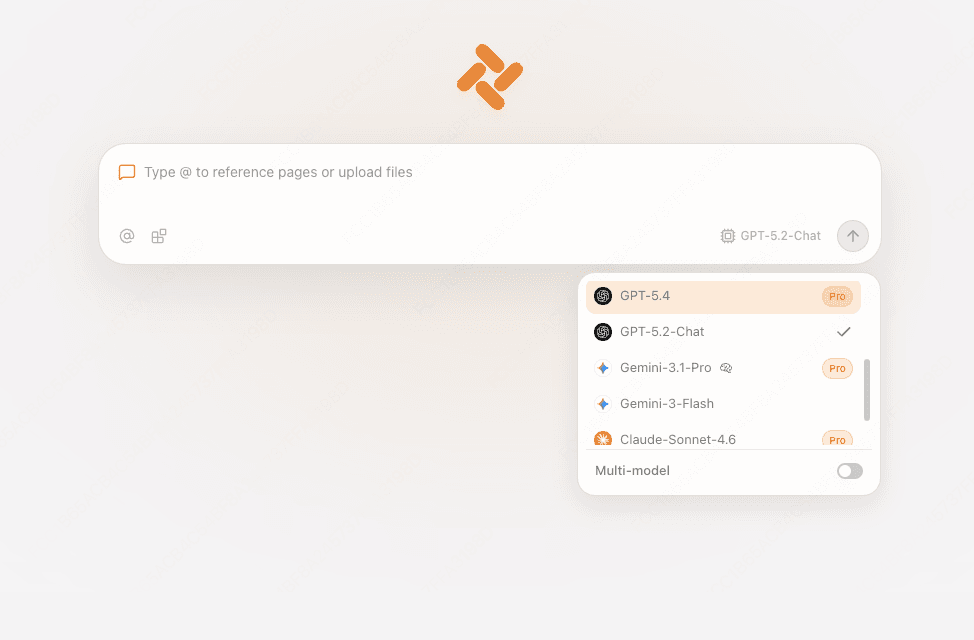
Tabbit Browser new tab multi-model routing and agent context
Flexible model selection and prompt routing powering Tabbit’s autonomous agent execution.
SPATIAL WORKSPACE

Spatial Project Lanes with Zero Context-Switching Penalty

Organize competing projects into distinct spatial lanes with semantic memory for frictionless recall.

Tab overload is not a user failing—it is an architectural flaw of horizontal tab strips. Tabbit replaces cluttered tab sprawl with dedicated spatial project lanes. Keep client research, documentation sprints, and daily operations neatly isolated without thrashing system memory.

Paired with native semantic memory, you never have to worry about losing a tab closed days ago. Query your browsing history in plain natural language (e.g., “find the GPU pricing breakdown from last Wednesday”) and Tabbit instantly surfaces the exact session context.

Key Workflows

  • Spatial workspace lanes segment unrelated tasks and prevent cognitive distraction
  • Natural language semantic history search retrieves closed research without exact URL matches
  • Intelligent memory suspension keeps 50+ background tabs responsive and lightweight
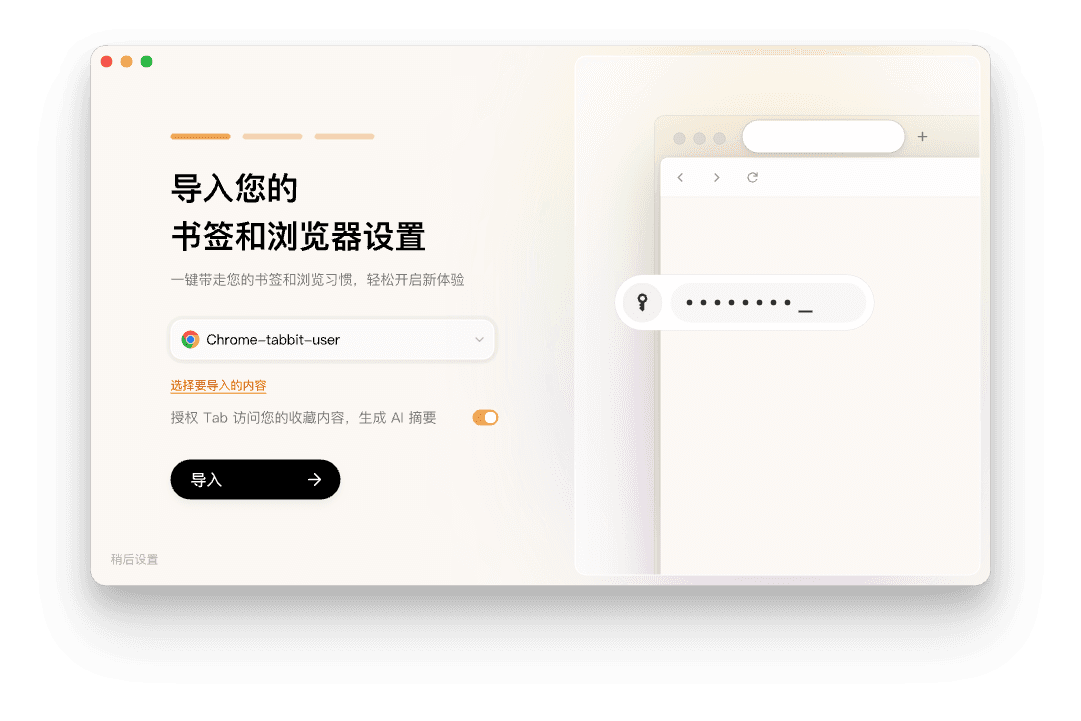
Tabbit Browser onboarding and workspace settings
One-click import of bookmarks, extensions, and browsing context into organized Tabbit workspaces.

Key Functional Capabilities at a Glance

Context you can cite

Bring tabs, tab groups, screenshots, and files into structured conversations so research stays attached to verifiable sources.

Tasks with reviewable steps

Agent-style automation is framed as clear sequences you can inspect—eliminating black-box unpredictability.

Spatial + semantic tab hygiene

Organize lanes of work without losing the thread: grouping, recall, and lightweight workspace behaviors tuned for knowledge work.

GLOBAL & REGIONAL INFRASTRUCTURE

Official Tabbit Browser Editions & Domains

Tabbit maintains separate public portals for international and mainland China distribution. This structure handles regional compliance, model routing, and local network infrastructure—both are official product channels.

Primary domainTarget audienceWhat to expect
tabbit.aiInternational users (English & global flows)Global positioning, international model policies, and downloads aligned to the international release.
tabbit.comMainland China usersDomestic distribution and support context; model and data routing follow mainland product policies.

VERIFICATION & SECURITY

Trust Signals & Safe Installation Guide

Search results for software brands often mix official websites, GitHub repositories, software directories, and community forums. Follow this verification guide to stay secure.

  • 01

    Always download from the official Tabbit domain for your region (tabbit.ai or tabbit.com) rather than third-party download mirrors.

  • 02

    Use the Tabbit-Browser GitHub organization for issue tracking, release notes, and technical discussions—not as an installer directory.

  • 03

    Official Tabbit installers are digitally signed; never run executables that prompt for unrelated administrative privileges.

ANSWERS & CLARIFICATIONS

Frequently Asked Questions: Tabbit Browser

Is “Tabbit Browser” the official product name?
Yes. Tabbit Browser is the official name of the AI-native desktop browser developed by Tabbit. In product interfaces and casual communication, it is often referred to simply as Tabbit.
Which website should I download Tabbit from?
International users should download from tabbit.ai, while mainland China users should use tabbit.com. Both provide official, digitally signed installers tailored for your region’s model availability.
Is Tabbit Browser free to use?
Yes. Tabbit Browser is free to download and use on macOS and Windows, offering built-in access to advanced AI models and deep research features under Tabbit’s transparent usage policy.
Which operating systems does Tabbit support?
Official builds currently support macOS (Apple Silicon and Intel) and Windows (64-bit). Linux and mobile editions are actively tracked on the product roadmap.
Why do some articles mention Meituan in connection with Tabbit?
Public reporting notes that Tabbit was incubated within Meituan’s GN06 team. This provides strong engineering backing, though downloads and updates remain centered on Tabbit’s official domains.
How does Tabbit Browser differ from installing a ChatGPT Chrome extension?
Browser extensions are limited to the permission boundaries of host browsers and cannot deeply observe DOM state, manage multi-tab context, or safely orchestrate cross-page workflows. Tabbit is engineered from the ground up as a cohesive AI-native operating environment.
Can I import my existing Chrome bookmarks and extensions?
Yes. Tabbit includes a frictionless one-click onboarding tool that lets you import bookmarks, passwords, and browsing preferences from Chrome, Edge, and other Chromium browsers.
How does Tabbit protect my browsing privacy and data?
Tabbit processes web pages with strict sandbox boundaries. Tab context and agent automation actions are only sent to AI models when explicitly requested by your prompts and workflows.

Experience the AI-Native Browser That Does the Work for You

Free for macOS & Windows • Official installers from verified Tabbit domains

© 2026 Tabbit. Official reference hub and resource guide for Tabbit Browser.