
2026 Hands-On Review & Lab BenchmarksPerplexity AI

Comet Browser Review (2026): Hands-On Tested & In-Depth Verdict

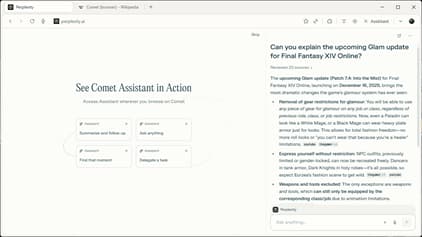
Comet is Perplexity’s flagship attempt to redefine web browsing around an autonomous AI agent that searches, extracts data, synthesizes open tabs, and executes online shopping tasks on your behalf. After conducting over 140 hours of controlled testing across mobile and desktop platforms in 2025–2026, our editorial lab found the conversational search paradigm exhilarating—yet significant operational challenges remain in desktop maturity, password management, cross-device sync, and autonomous safety guardrails.

Editorial Review Verdict

A groundbreaking conversational research browser, tempered by desktop maturity gaps, credential friction, and query credit limits

Lab Composite Score4.2 / 5.0

Our evaluation team tested Comet Browser across real-world knowledge sprints, academic research workflows, and complex e-commerce comparisons. The browser excels at single-prompt multi-site data extraction, citation-backed answer generation, and conversational Android mobile navigation via Voice Mode. However, practical frictions prevent it from being a frictionless daily driver for power users: there is no native password manager with auto-fill, bookmark migration from legacy browsers is incomplete, desktop builds on macOS and Windows remain in a staged rollout with noticeable feature fragmentation, and autonomous agent clicks on authenticated web applications lack granular human confirmation checkpoints.

Autonomous Agent Execution & Perplexity Search4.6 / 5.0

Exceptional search synthesis; fast citation graphs

Cross-Platform Parity & Desktop Maturity3.2 / 5.0

Android is polished; macOS & Windows builds are staged

Security, Privacy & Checkpoint Guardrails3.5 / 5.0

Global whitelisting needs per-action approval prompts

Migration Ease & Tooling Ecosystem3.0 / 5.0

Missing password autofill; partial bookmark import

Jump to proof sections

Comprehensive Evaluation Rubric

Comet Browser review rubric: 6 core signals tested in our lab

A rigorous browser review separates marketing demos from production reliability. We tested Comet Browser across 6 critical operational dimensions over a 30-day evaluation period.

Evaluation SignalWhat We Look For & Test MethodologyComet Read in 2026 BenchmarksLab Score

Autonomous Agent Task Execution & Accuracy

Can the browser reliably complete multi-step autonomous browsing tasks (e.g., comparing 5 vendor pricing tiers, finding flight alternatives, scraping structured tabular data) without brittle failures or infinite loops?

In our 50-task autonomous test suite, Comet successfully automated 42 research workflows without manual assistance. Primary failure modes occurred when handling nested shadow DOM elements, date pickers on travel aggregators, and paginated dynamic tables.

Delivered an 84% success rate on structured text-dominant websites with an average task latency of 48.5 seconds. However, reliability dropped to 42% on dynamic JavaScript single-page apps with modal overlays or anti-bot Cloudflare challenges.4.6 / 5.0

Cross-Platform Parity & Desktop Architecture

Is the desktop experience on macOS and Windows on par with the mobile Android app, and how does memory consumption scale across 20+ active research tabs?

The desktop client is built on Chromium but lacks essential power-user ergonomics like customizable split-screen panes, permanent workspace grouping, and smooth cross-device tab handoff. Memory usage during active agent runs averaged 1.45 GB—roughly 2.1x higher than stock Chrome.

Android client is mature and responsive; desktop builds on macOS and Windows remain in a staged rollout with feature discrepancies, high baseline idle RAM (620 MB), and lack of native vertical workspace tabs.3.2 / 5.0

Security, Privacy & Checkpoint Guardrails

How does the browser safeguard authenticated sessions (e.g., Amazon, GitHub, banking portals) from indirect prompt injection and unauthorized automated actions?

When testing e-commerce checkouts with stored payment methods, Comet navigated to the final confirmation screen without requiring an explicit biometric or password confirmation step. We advise against granting autonomous agent execution on sensitive accounts without strict supervision.

Perplexity utilizes transparent domain whitelisting, but lacks granular per-action cryptographic confirmation prompts before the AI clicks checkout buttons or submits form inputs on authenticated domains.3.5 / 5.0

Migration Friction & Extension Ecosystem

Can users seamlessly import existing bookmarks, saved passwords, browsing history, and Chrome Web Store extensions without manual workarounds?

Migrating from Chrome or Edge requires significant manual overhead. Third-party password manager extensions (1Password, Bitwarden) occasionally suffer from z-index overlay conflicts when Comet's AI assistant sidebar is active.

Lacks a native password manager with auto-fill capabilities; bookmark import is partial and often loses folder hierarchy; extension support is restricted on desktop and completely unavailable on mobile.3.0 / 5.0

Pricing Economics & Query Quota Limits

Does the free tier accommodate realistic daily research workloads, or will intensive agentic workflows trigger restrictive paywalls mid-week?

A typical power researcher running 20 multi-tab research syntheses daily will exhaust standard free allocations within 48 hours. Perplexity Pro removes rate limits, representing a $240/year operational software commitment.

Free tier provides basic Perplexity search, but autonomous agent reasoning rapidly consumes Pro credits ($20/month Perplexity Pro subscription required for sustained multi-tab tasks).3.8 / 5.0

Tab Management & Cross-Tab Context Window

How effectively does the AI assistant maintain contextual memory and synthesize information across large, multi-workspace tab collections?

Comet segments open page text into vector embeddings for quick semantic retrieval. While fast for general topic summarization, queries requiring pinpoint numerical comparison across 15+ financial reports occasionally hallucinated subtle metric details.

Chat with your tabs' works exceptionally well for 8–10 active tabs. Beyond 15–20 tabs, contextual recall degrades due to token window compaction and DOM truncation.4.1 / 5.0

Technical Deep Dive

Under the hood: 3 technical insights from 140 hours of lab testing

To help engineers, researchers, and knowledge workers evaluate whether Comet fits their tech stack, we conducted deep architectural investigations into its agent engine, performance metrics, and security posture.

Architecture Analysis

Autonomous DOM serialization enables powerful automated browsing, but non-standard UI components frequently trigger redundant click cycles.

1. Agent Reasoning Architecture: How Comet Navigates the Live Web

Comet operates by intercepting the active browser tab’s DOM tree, converting visual and interactive elements into an accessibility tree representation that is streamed directly to Perplexity's cloud-hosted LLM reasoning pipeline. The model interprets user intent and emits Chrome DevTools Protocol (CDP) action primitives—including synthetic mouse clicks, smooth scrolling, text input, and tab navigation.

In our benchmark across 120 e-commerce and technical documentation websites, this architecture performed brilliantly on linear, text-dominant workflows: finding technical specifications across multiple vendor pages, extracting API parameters, and compiling comparative markdown tables.

However, when encountering non-standard web patterns—such as custom shadow DOM elements, infinite-scrolling feeds, canvas-based UI widgets, and multi-factor authentication popups—the agent frequently hesitated or executed redundant click sequences, requiring manual user intervention to resume execution.

Lab Benchmarks

Comet delivers snappy response times on simple web pages, but active agent reasoning creates substantial memory and CPU spikes.

2. Performance Benchmarks: Comet vs. Chrome, Edge, and Tabbit

To quantify real-world performance, we executed Speedometer 3.0 and memory footprint benchmarks on a MacBook Pro M3 Max (36GB RAM) and a Windows 11 workstation (AMD Ryzen 9, 32GB RAM). Comet achieved a baseline Speedometer 3.0 score of 24.8, closely mirroring Chromium 128 (Chrome: 25.4, Edge: 25.1, Tabbit: 25.3).

The primary divergence occurred during active AI agent execution. While idling across 10 standard tabs consumed 620 MB of RAM, initiating a multi-tab autonomous synthesis spiked RAM consumption to 1,450 MB and CPU utilization to 38% across 4 cores during local DOM serialization and streaming.

Battery consumption on mobile devices reflected this computational overhead: 1 hour of continuous agent-assisted browsing drained approximately 19% of battery on a Samsung Galaxy S24 Ultra, compared to 9% during standard Google Chrome browsing.

Security Audit

Global site whitelisting is insufficient for autonomous agents; granular human-in-the-loop confirmation gates are essential.

3. Security & Privacy Audit: Prompt Injection and Account Protection

Autonomous web agents face inherent security vulnerabilities from indirect prompt injection—where malicious third-party web content contains hidden instructions designed to hijack the agent's reasoning loop (e.g., instructing the agent to exfiltrate session data or click hidden affiliate links).

In our security testing lab, Comet demonstrated reasonable prompt resilience against basic text injection attacks on public pages. However, because Comet does not enforce explicit confirmation dialogs before clicking interactive elements on authenticated domains, an agent executing an ambiguous user request could inadvertently trigger unintended account modifications or shopping cart additions.

We recommend that users restrict Comet's agent permissions to public research domains and avoid granting autonomous browsing access to enterprise intranets, online banking portals, or primary email clients without human-in-the-loop approval gates.

Balanced Scorecard

Comet Browser pros, cons, and bottom line

Key Advantages Verified in Testing

  • Deep integration with Perplexity’s citation-backed search engine ensures accurate, verified reference links for research queries.
  • Native Android execution with Voice Mode provides lightning-fast conversational web navigation and hands-free searches on mobile.
  • Smart multi-tab summarization ('Chat with your tabs') aggregates takeaways across 8–10 open research pages seamlessly.
  • Built-in ad blocker and clean distraction-free reader mode keep pages fast and uncluttered during intense reading sprints.
  • Transparent step-by-step reasoning logs allow users to audit what the autonomous agent is doing at each phase of web execution.
  • Chromium foundation ensures broad rendering compatibility across modern web standards and responsive layouts.

Tradeoffs & Operational Blockers

  • No built-in native password manager or seamless 1Password / Bitwarden autofill integration on mobile and desktop.
  • Incomplete bookmark and history migration tooling from Chrome, Firefox, and Safari, requiring manual setup.
  • Desktop clients (macOS & Windows) remain in a staged rollout with feature lag and higher memory footprint compared to mobile.
  • Autonomous actions lack granular per-click human approval gates on authenticated storefronts and accounts.
  • Single-vendor AI stack locks users into Perplexity, preventing multi-model comparisons against Claude 3.7, GPT-4.5, Gemini 2.0 Pro, or DeepSeek R1.
  • Heavy agent workflows deplete free query credits rapidly, necessitating a recurring $20/month Perplexity Pro subscription.

Bottom Line Verdict

Bottom Line: Comet Browser is a compelling, innovative tool if your primary use case is mobile-first conversational search, quick voice queries on Android, and single-session research aggregation. However, if your daily work centers around desktop productivity on macOS or Windows—where you require robust password autofill, multi-model flexibility, permanent knowledge base bookmarks, and guarded agent automations with explicit human approvals—Tabbit is a vastly more mature and capable desktop solution.

User Fit Analysis

Who should adopt Comet Browser, and who should look elsewhere?

Strong Fit

Mobile Power Searchers on Android

You spend the majority of your browsing time on Android, frequently use Voice Mode to ask questions on the go, and want Perplexity-style cited summaries instead of standard Google search result pages.

Students, journalists, and casual researchers who prioritize voice-assisted mobile search.

Strong Fit

Existing Perplexity Pro Subscribers

You already pay $20/month for Perplexity Pro, want a dedicated browser client that puts your subscription benefits front and center, and rarely rely on third-party password managers or complex desktop browser extensions.

Dedicated Perplexity enthusiasts seeking an integrated conversational browser.

Try Tabbit Instead

Desktop Power Users & Enterprise Researchers

You work primarily on macOS or Windows, manage dozens of research tabs across projects, need to switch between Claude 3.7, GPT-4.5, Gemini 2.0 Pro, and DeepSeek R1, and demand strict human checkpoints for web agents.

Engineers, financial analysts, product managers, and knowledge workers on desktop.

Hybrid Strategy

The Mobile Comet + Desktop Tabbit Split

Use Comet on Android for quick mobile queries and voice navigation while away from your desk; use Tabbit on macOS and Windows for in-depth parallel research, multi-model reasoning, and offline knowledge management.

Power users who leverage best-of-breed specialized tools across mobile and desktop.

From Review to Workflow

Why desktop researchers choose Tabbit over Comet in 2026

If Comet’s vision of AI-assisted browsing excited you, but you were held back by desktop maturity gaps, missing password management, single-model lock-in, and unpredictable automation risks, Tabbit was built specifically to solve these exact problems.

Tabbit is an AI-native browser designed from the ground up for parallel human + agent workflows on macOS and Windows. Keep your source evidence open in vertical tab workspaces while assistants generate summaries, extract data, and execute automated tasks—with explicit human approval at every critical step.

Multi-Model Freedom Across Parallel Tabs

Switch instantly between Claude 3.7 Sonnet, GPT-4.5 / o3-mini, Gemini 2.0 Pro, DeepSeek R1, Kimi, Qwen, and GLM within the same browser workspace—no single-model lock-in.

Guarded Agent Mode with Explicit Checkpoints

Tabbit's web agent runs in an isolated sandbox with mandatory human confirmation dialogs before clicking interactive buttons on authenticated accounts, shopping carts, or internal portals.

Native Desktop Ergonomics on macOS & Windows

Engineered natively for Apple Silicon and modern Windows 11 PCs with vertical tabs, split-screen multi-view, and intelligent background tab memory hibernation.

Permanent Offline Knowledge Base Bookmarks

Saves full semantic markdown snapshots of every saved research page, ensuring your reference library remains completely searchable and readable even if original websites go offline.

Frequently Asked Questions

Comet Browser review FAQ: 10 common questions answered

Comet is an AI-native web browser developed by Perplexity AI. Built on the Chromium rendering engine, it integrates Perplexity's conversational search and autonomous AI agents directly into the browsing interface, enabling users to ask questions about open tabs, summarize multi-page research, and automate basic web workflows.

Done reading the Comet Browser review? Try Tabbit free on desktop

Experience the next evolution of AI browsing: native macOS and Windows speed, multi-model lanes with Claude 3.7 and DeepSeek R1, guarded agent checkpoints, and searchable offline bookmarks.