No. Tabbit is a standalone AI-native browser for macOS and Windows. Instead of installing an extension on Chrome, you get a browser where AI is built in — sidebar AI, agent mode and deep research included.
English
2026 · AI for Chrome, without the extension stack
Chrome AI Extension
You are looking for a Chrome AI extension — a way to summarize pages, chat with AI, and automate busywork. Tabbit puts all of that inside the browser itself: sidebar AI, agent execution, and deep research, with no extension stack to install.

- Built inSidebar AI, agent mode and research are native — nothing to install
- Real contextUse @ to pull in any tab, group, screenshot or local file
- Agent executionMulti-step tasks run in a parallel tab group while you keep browsing
- FreeNo paywall, no invite code — macOS & Windows
What you find first
What “Chrome AI extension” actually returns
Search results for Chrome AI extensions fall into four buckets. Each solves a slice of the problem — and none removes the need to install and manage extensions.
Web Store collections
Chrome Web Store · AI-powered extensions
A long list of extensions with ratings, but quality varies and you still assemble the stack yourself.
“Best AI Chrome extension” listicles
DigitalOcean, Thunderbit, KDnuggets…
Useful overviews, yet every list ends with “install several tools and combine them yourself”.
Vendor AI in Chrome
Google · Gemini in Chrome
Google’s built-in assistant is powerful but locked to the Gemini model and Google ecosystem.
Agentic automation tools
BrowserAgent, Bardeen, HARPA…
They automate more than chat, but each one is another permission layer, another quota, another tab.
The four types
AI Chrome extensions, grouped by what they actually do
Nearly every Chrome AI extension fits one of four categories. Once you see the pattern, the decision gets simpler.
01
Chat copilots
Merlin, Sider, Monica, ChatGPT for Google
✓Summarize the current page, rewrite text, quick Q&A in a sidebar.
✕See only one page, hit daily quota limits, and mostly chat instead of acting.
02
Agentic automators
BrowserAgent, HARPA, Bardeen
✓Automate repetitive flows like form filling and data extraction.
✕Each adds its own permission and learning curve; cross-tab context is still fragmented.
03
Reading & writing tools
Glasp, Compose AI, Grammarly
✓Highlight, annotate, and polish text inside a single tab.
✕Narrow feature sets that overlap when you install more than one.
04
Model utilities
Perplexity, Gemini in Chrome, model switchers
✓Bring a specific model or search experience to the browser.
✕Tie you to one vendor and one model — the opposite of model choice.
The hidden cost
Why a stack of AI extensions is worse than one browser
Lists never mention what happens after you install three or four AI extensions. The real cost is structural.
Context stays fragmented
Most extensions only see the page you are on. Real research spans dozens of tabs — every time you switch tools, the context breaks.
Quotas and subscriptions pile up
Each free extension has its own daily cap. Paying for three tools costs more than a browser that includes the AI.
Permissions and performance add up
Every extension wants site access, clipboard and tab data. Each one also consumes memory and can slow every page load.
One model per tool
Merlin runs one provider, Gemini runs Google. You end up locked into whichever model each extension chose for you.
Tabbit instead


The AI you wanted in Chrome, built into Tabbit
Tabbit is an AI-native browser for macOS and Windows. The capabilities people install Chrome AI extensions for are already inside — with real page context and the ability to act, not just chat.
Sidebar AI that reads with you
Open any page and ask questions, summarize, or rewrite — the AI sidebar answers with the page you are viewing as context, just like the chat copilots you were going to install.
Agent execution across pages
Tell the agent what to do in natural language. It fills forms, collects data and chains steps across sites — the automation extension makers promise, but browser-wide.
Deep research across the web
Ask a question and Tabbit searches, reads and filters dozens of sources, then delivers a structured report — the research workflow a single-tab extension cannot do.
Side by side

Chrome AI extension, Gemini in Chrome, or Tabbit?
The three paths people actually take when they search for a Chrome AI extension.
| Capability | Tabbit | AI extension stack | Gemini in Chrome |
|---|---|---|---|
| Installation | One native browser | Multiple Web Store installs | Chrome + Google account |
| Cross-tab context | @ any tab or tab group | Mostly the current page | Limited to Google flow |
| Multi-step execution | Agent in a parallel tab group | Varies by extension | Auto-browse in preview |
| Model choice | GPT, Claude, Gemini and more | Often one model per tool | Gemini only |
| Cost | Free flagship AI access | Freemium + stacked subscriptions | Google subscription tiers |
| Privacy surface | One browser, one policy | Many vendors read your pages | Google collects the context |
Switch in minutes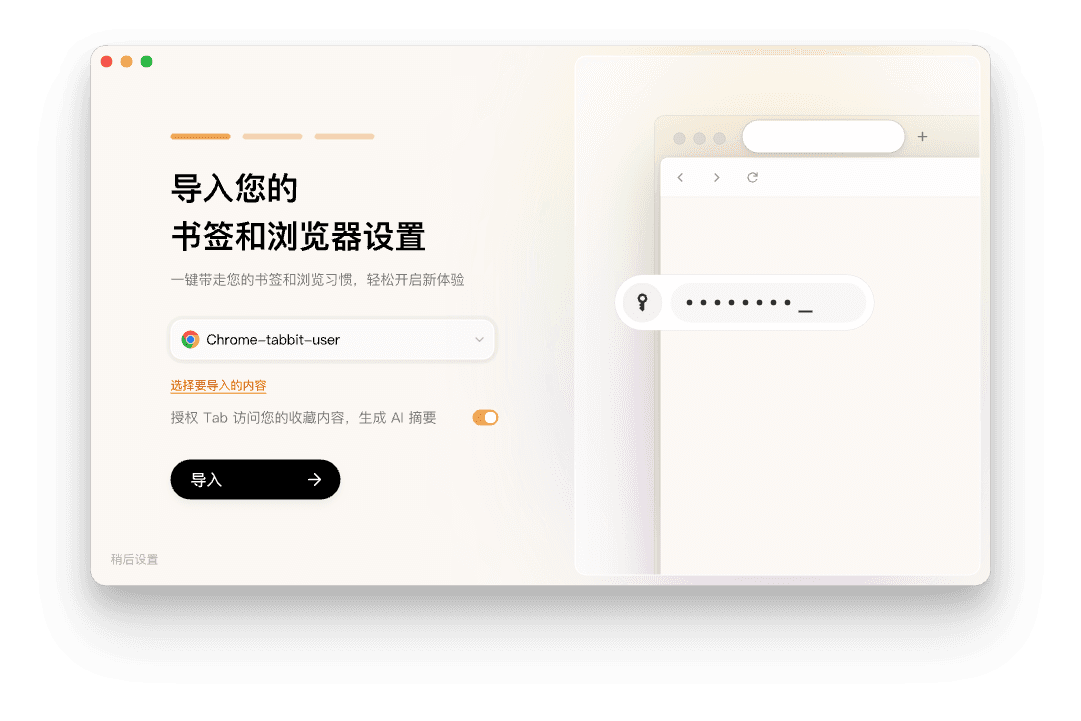
Keep Chrome’s data, drop the extension stack
You do not have to abandon Chrome to get a better AI browser. Import everything, then run your first AI task.
01
Download Tabbit
Free for Windows and Mac. No invite code, no store approval wait.
02
Import from Chrome
Bookmarks, history, passwords and the extensions you still need come over in one click.
03
Run your first AI task
Ask the sidebar to summarize a page, or hand the agent a multi-step task in natural language.
FAQ
Chrome AI extension questions

Skip the extension stack
Download Tabbit for Mac and Windows, import your Chrome data in one click, and get AI that is genuinely part of the browser.