AI BROWSER COMPARISON · OCT 2026

Strawberry Browser vs Tabbit Browser

Strawberry sends AI Companions into the websites and tools you are already logged into, on a credits-based plan. Tabbit is a free AI-native browser with multi-model chat, an Agent mode and Skills on Mac and Windows.

Running sales, recruiting or ops workflows inside your logged-in accounts, with a team sharing budget? Strawberry is built for that. Want a free browser where you can ask, compare models and delegate web tasks without counting credits? Start with Tabbit.
Tabbit browser showing a blog article with a structured AI summary in the side panel
In Tabbit, the page you read is context the AI can use right away.

Six differences that decide the choice

Both are agentic browsers that act on the web for you. They differ in audience, pricing model and how much setup each expects.

Decision pointStrawberry BrowserTabbit Browser
Built forSales, recruiting, ops and research teams; work inside logged-in tools like CRMs and inboxes.Everyday browsing, research and web tasks; students, creators and office workers.
Desktop platformsmacOS and Windows per the official FAQ; Linux and mobile not confirmed.macOS 12+ (Apple silicon or Intel) and Windows 10+.
How AI worksCompanions follow you across tabs, learn workflows as Skills, and ask approval for important actions.Omnibox with @ references to pages, files and screenshots; Agent runs tasks in a separate tab group.
Automation triggersRoutines fire on schedules, new emails, calendar events, Slack mentions or form submissions.Natural-language tasks plus script Skills generated from a one-line request.
Cost todayFree plan with 500 credits/month; paid plans from $20/month (6,000 credits); plain browsing costs no credits.Browser is free with no invite code; AI has a weekly free allowance and an optional Pro plan.
Known limitsUsers report slow heavy tasks and fast-burning free credits in public reviews.Public beta: agent accuracy and pricing policy are still evolving.

Strawberry facts checked on its official site on 12 October 2026; limits come from public user reviews, not our tests. No same-task benchmark was run.

Choose by the work you actually do

01 / STRAWBERRY

Strawberry fits shared business workflows

If your team lives in a CRM, inbox or ATS, Strawberry Companions can work inside those logged-in sessions, pause for approval, and replay Skills your teammates share. Team plans bill per seat with a shared credit pool.
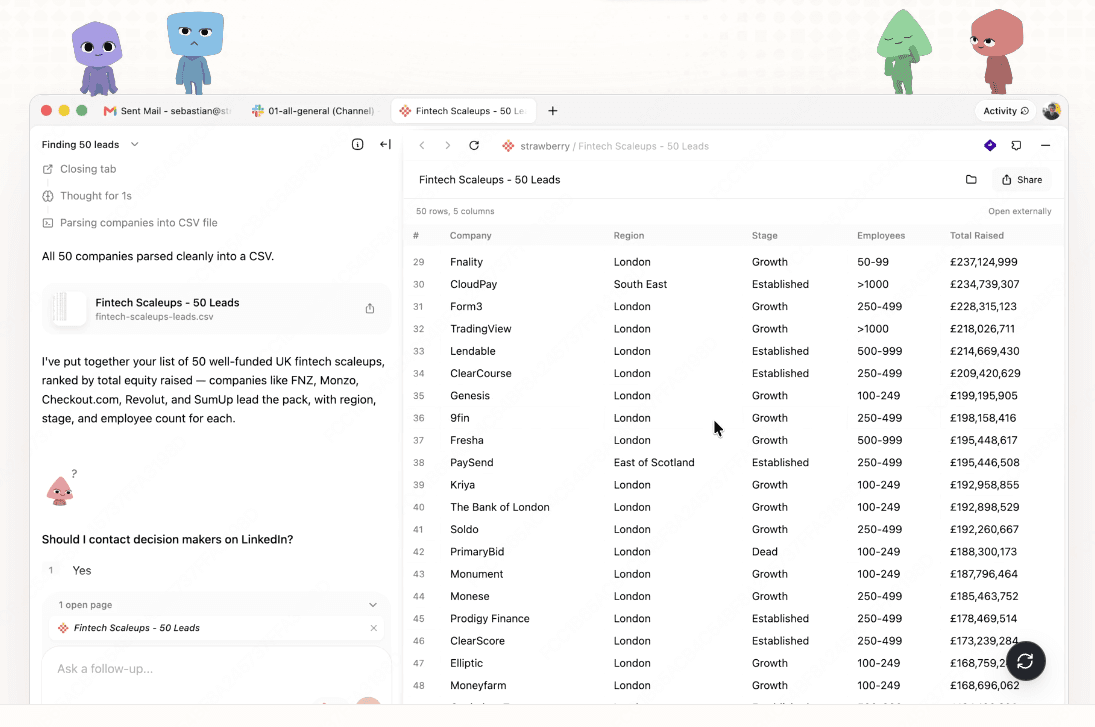

Strawberry Companion collecting 50 UK fintech leads, with steps on the left and a CSV table of companies on the right
Strawberry Companion turning a lead-sourcing request into a 50-row table.
02 / TABBIT

Tabbit fits free, everyday AI browsing

Ask about any page, compare several models on one question, or hand a multi-step web task to the Agent — without installing CLIs or counting credits. Windows and Intel Mac support makes it easy to roll out across devices.

Tabbit chat where five AI models answer the same question side by side for comparison
Tabbit compares answers from multiple built-in models in one chat.

What the automation looks like

Screenshots below show each product’s own interface; they are not head-to-head test results.

01 / STRAWBERRY

Agents that research across tabs

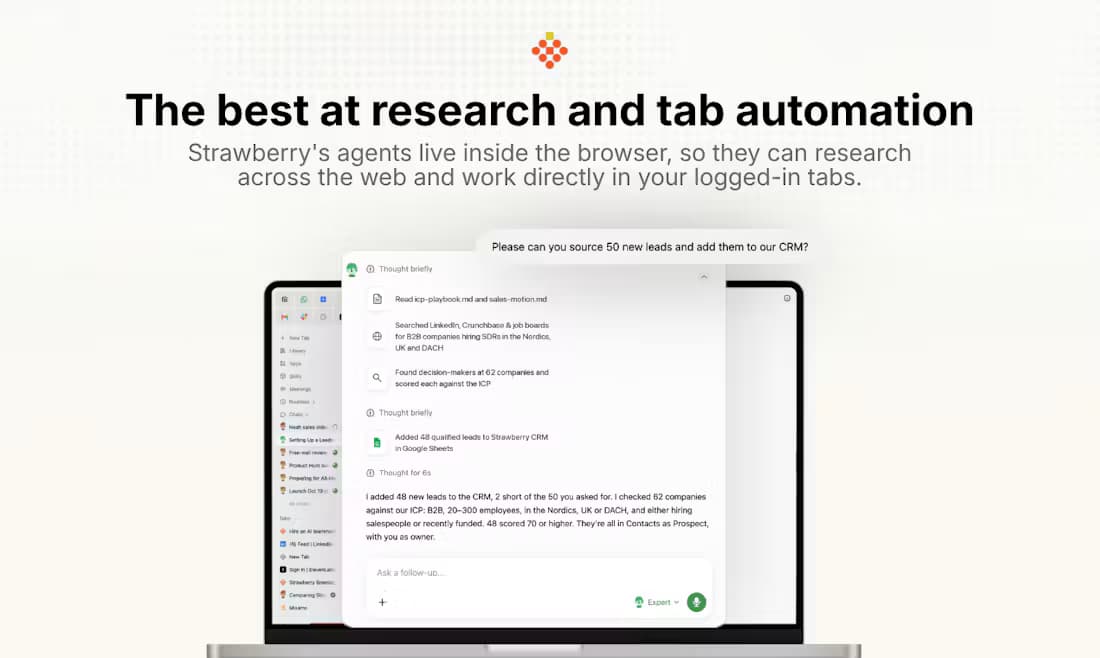
Strawberry’s official showcase has an agent sourcing leads from LinkedIn and job boards, then writing them into a CRM — a pattern aimed at sales and recruiting pipelines.

Strawberry official image of an agent researching leads across tabs and reporting what it added to the CRM
Strawberry’s own demo: research across tabs, results into the CRM.
02 / STRAWBERRY

Routines on recurring triggers

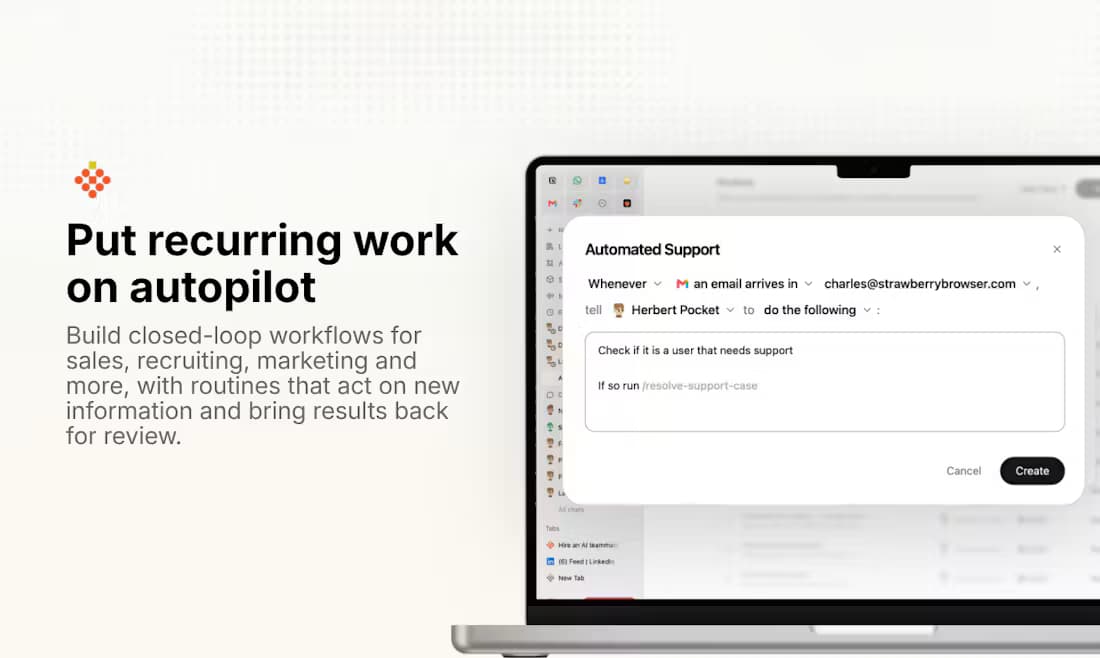
Routines turn a repeated browser process into a closed loop: a new email can trigger a support-check workflow, run it, and bring the result back for review.

Strawberry Routines editor building a closed-loop support workflow that fires when a new email arrives
Strawberry Routines: trigger, act in the browser, return for review.
03 / TABBIT

Research with visible steps

Tabbit’s Deep Research collects sources and shows execution steps while it works, so you can inspect where each claim comes from before trusting the report.

Tabbit Deep Research panel next to search results, listing sources and execution steps; interface text is in Chinese
Tabbit shows sources and steps during a research task.

Questions before you decide

What is the Strawberry browser?

Strawberry is an agentic browser from a Stockholm team. Its AI Companions work inside the websites you are logged into, learn repeatable workflows as Skills, and ask for approval on important actions.

Is Strawberry browser free?

There is a free plan with 500 credits per month and normal browsing costs no credits. Chatting with Companions and running tasks consume credits; paid plans start at $20/month for 6,000 credits. Check the official pricing page for current numbers.

Is Strawberry browser good?

Public reviews praise its research output, but also report slow heavy tasks, uneven stability on simple tasks and free credits running out fast. It is worth trying on your own workflow; no independent benchmark confirms the vendor’s historical claims.

How much does Strawberry cost for regular use?

Beyond the free tier: Intern $20 (6,000 credits), Part-time $85 (25,000) and Full-time $250 (75,000) per month, with team plans billed per seat; top-ups are $10 per 1,000 credits. Costs depend on how many tasks you run.

Strawberry or Tabbit — which should I pick?

Pick Strawberry if your team wants shared Companions inside logged-in business tools and accepts credits-based pricing. Pick Tabbit if you want a free AI browser with multi-model chat, an Agent for web tasks and support for Mac (including Intel) and Windows.

Try the free browser first

If credits and per-seat plans feel heavy for the browsing and research you do every day, open Tabbit on Mac or Windows and judge it on your own tasks.

Sources and scope

Product facts checked on 12 October 2026. Screenshots show Strawberry and Tabbit interfaces; no same-task benchmark was run between the two.

© 2026 Tabbit Browser. The AI-native browser that understands your context.