Reasoning is missing
The provider may not expose its reasoning field, or the preset may use a field name that this route ignores. If thinking text appears in the answer, inspect the response schema before raising temperature.
PRESET FIELD GUIDE · MIMO-V2.5-PRO
A preset is a saved request, not a model upgrade. MiMo-V2.5-Pro can expose different thinking fields, model IDs, limits, and output behavior through different providers. Start with the exact source, then change one layer at a time in SillyTavern.
Tabbit does not currently list MiMo-V2.5-Pro as a native model. This page does not promise a Tabbit endpoint or reproduce an unlicensed community file.

SYMPTOM FIRST
A preset can look fine in the editor and still send the wrong request. Use the symptom as a clue, not as proof that the model is bad.
The provider may not expose its reasoning field, or the preset may use a field name that this route ignores. If thinking text appears in the answer, inspect the response schema before raising temperature.
Community user Competitive_Plan8807 reported unstable reasoning, gibberish, and very long output while using DeepInfra through Requesty. Quantization, route, post-processing, and context are separate suspects.
Repeated sensory details or a character speaking for the user can come from the card, example messages, stop strings, sampler, or model behavior. Keep a short control prompt.
A 404 does not mean the preset is wrong. The provider may require a namespace, expose another alias, or not offer Pro at all.
SOURCE CHECK
The official model and the community prompt are different things. Keep their provenance visible in your notes.
Xiaomi calls the open model `MiMo-V2.5-Pro`. Its Hugging Face card is `XiaomiMiMo/MiMo-V2.5-Pro`; the API tag on Xiaomi’s page is `mimo-v2.5-pro`.
The Hugging Face card recommends `temperature=1.0` and `top_p=0.95` for local deployment. That is a starting reference, not a universal SillyTavern preset.
Evening-Truth’s Rentry index links “Xiaomi-MiMo-V2.5 Base and Dark”, marked Updated and authored on that page by Evening-Truth. Open the source to review its terms; do not copy its prompt here.
A provider can rename the model or expose a smaller context. Record the provider, exact ID, endpoint, quantization, and date beside the preset.
IMPORT A COPY
Keep the original untouched. Import a copy, label the provider and model ID, and test it with a tiny card before you edit a long-running chat.
Write the preset name, author, source URL, date, provider, model ID, and license or usage note. If any field is unknown, leave it unknown.
Use the preset import control in SillyTavern, then confirm the API type is Chat Completions. For a custom route, copy the base URL and key rules from the provider.
Duplicate the imported preset as `mimo-control`. Use a short character card, one opening message, a fixed context limit, and a small output cap.
Confirm the response, stop behavior, token accounting, and whether reasoning is separated. Only then compare the imported copy against your control.
Do not download a random JSON from a search result. Preset files can contain prompts, post-processing rules, provider assumptions, or content you did not intend to run.
THINKING + SAMPLERS
MiMo’s model card and a provider route do not expose the same controls. Use this order for a meaningful test.
Use the provider’s exact model ID. Confirm whether it exposes reasoning, the maximum context, tool calls, and custom sampling fields. A UI control that disappears is not a failed sampler experiment.
Run one branch with the provider’s documented thinking or reasoning setting and one without it. Record time to first token, output length, and whether the final answer contains reasoning text.
For local deployment, begin at `temperature=1.0` and `top_p=0.95` as the official card suggests. Keep other penalties and stop strings unchanged until you have a control.
State role, scene, output boundary, and who controls the user character. Do not paste a community prompt into the system field without reading it and checking its author.
ONE VARIABLE AT A TIME
Keep the same card and opening message. Log the exact request shape when the provider makes that possible.
| Symptom | Check | Next action |
|---|---|---|
| Reasoning absent or leaked | Provider reasoning schema, preset field, response parser. | Use the provider’s documented field or disable it for the control. Do not infer hidden thinking from a blank panel. |
| 404 / model not found | Provider model list, namespace, route date. | Copy the current provider ID. Keep `mimo-v2.5-pro` only when the route accepts that tag. |
| Gibberish or loops | Quantization, chat template, stop strings, duplicate card text. | Return to control, remove duplicate formatting, and change one sampler value. |
| Very long answer | Max tokens, verbosity instruction, thinking output, context size. | Set a clear output cap and separate reasoning from final text when supported. |
| Rules ignored | Post-processing mode, system message order, example messages. | Try the route’s expected role format, then test with a two-turn card. |
TABBIT WORKSPACE
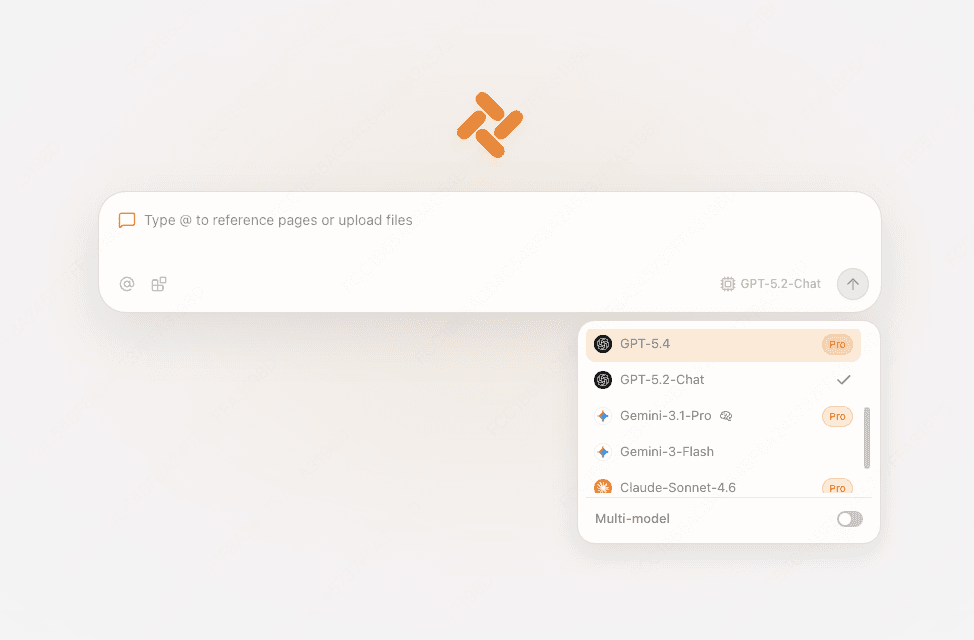
Tabbit is useful for the research around a preset: model cards, provider docs, release notes, screenshots, and your test log. The current visible model list does not include MiMo-V2.5-Pro, so use a model the picker actually shows.
Keep Xiaomi, Hugging Face, the provider docs, and the SillyTavern guide in separate tabs. Use a local note for the exact ID and date.
In Tabbit, type `@` to reference an open page, screenshot, or file. Ask for a provenance checklist or a comparison of two provider docs.
Use multi-model chat to compare explanations. It is a research aid, not a MiMo runner, and the screenshots below do not prove MiMo availability.


FAQ
The model is MiMo-V2.5-Pro. Xiaomi’s API tag is `mimo-v2.5-pro`; a provider may add a namespace or use another route ID.
Evening-Truth’s Rentry index lists “Xiaomi-MiMo-V2.5 Base and Dark” and attributes the page to Evening-Truth. The page is a source to inspect, not a file that this guide republishes.
Use them as the official local-deployment baseline from the Hugging Face card. A provider may clamp, ignore, or replace these fields, so verify the request and response.
The route may not separate reasoning, the preset may use the wrong field, or the frontend parser may not match the provider schema. Run a no-thinking control and inspect the provider docs.
Tabbit does not currently list MiMo-V2.5-Pro as a native model. Use Tabbit for source pages and a listed model, while keeping SillyTavern for preset execution.
No. It names the verified source and author so you can review the original. It does not mirror an unlicensed preset or invent a download link.
Verify `mimo-v2.5-pro`, import a copy, run a short control, and log thinking and sampler behavior before you start a long chat. Use Tabbit to keep the evidence in reach.
Available for macOS and Windows. Model lists and provider behavior can change.