01 / Marble
Keep the path you followed
Marble opens linked pages beside their source and connects them into trails. Fold a trail, keep notes nearby and return to the board later. It fits exploratory research where the route matters.
 Tabbit
Research browser comparison · October 2026
Marble keeps live webpages on an infinite canvas, with lines showing how you reached them. Tabbit brings webpages into AI conversations and tasks. Choose by what you need to do with your sources.
CompareChoose Marble to keep a visual research trail on your Mac. Choose Tabbit to ask about sources, compare answers and delegate browser tasks on Mac or Windows.
Explore Tabbit
01 / Marble
Marble opens linked pages beside their source and connects them into trails. Fold a trail, keep notes nearby and return to the board later. It fits exploratory research where the route matters.
02 / Tabbit
In Tabbit, reference pages, screenshots or files in a conversation. Ask for a comparison, inspect the sources and use Agent tasks for web operations. It fits research that needs a written result or a next step.
This comparison covers Marble at marble.surf, the early canvas browser. Search results also contain an unrelated Firefox-based project with the same name.
A canvas organizes your sources. AI can interpret them and act on the web. Neither approach removes the need to check the original evidence.
| Decision point | Marble Browser | Tabbit Browser |
|---|---|---|
| Research layout | Live page cards, linked trails, separate Spaces and folded stacks. | Tabs and tab groups, plus referenced pages and files in AI conversations. |
| Notes and analysis | Markdown notes, sticky notes and quotes with source links beside the page. | Page Q&A, summaries, model comparison and research tasks. |
| Web actions | The current homepage emphasizes manual browsing and canvas organization; no AI Agent is documented there. | Agent tasks can navigate websites and work with web forms or tables. Review the result. |
| Desktop access | Apple silicon M1 or newer, macOS 14+. Windows is a waitlist. | Mac and Windows downloads. Check the regional website for current system requirements. |
| Cost | The current board and features are free. A Research edition is planned, with no published price on the homepage. | Free browser with an AI allowance and optional paid plans. Models and limits depend on region and plan. |
| Data handling | The board stays on your Mac, with no account or sync. Read the privacy policy for usage analytics. | AI requests use model or cloud services. Check regional privacy terms and sync settings before adding sensitive context. |
Official materials checked on 21 October 2026. This is a feature comparison, not an installation test, speed benchmark or accuracy ranking.
See how Tabbit handles model comparison, research and web tasks. The screenshots show examples; available models depend on your region and plan.
Ask the same question across models and compare their reasoning. For a research brief, check which statements match your sources before keeping an answer. Model availability follows your region and plan.

Use a research task to gather information around a question, then review the sources and output. The sidebar shows execution steps. Marble instead helps you retain the route through pages you explore yourself.

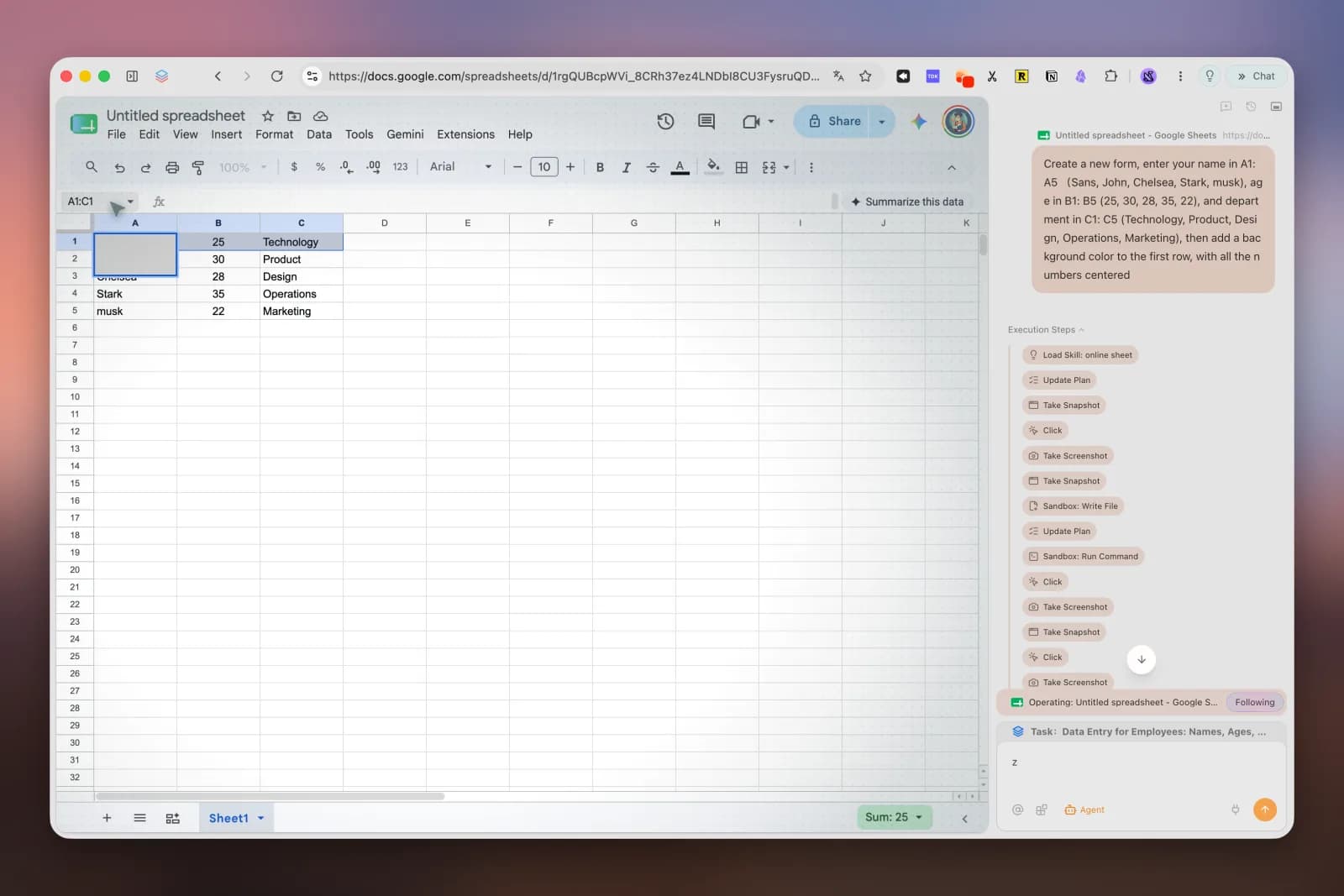
When reading leads to structured work, ask Agent to operate a web table or form. Inspect the destination and values before relying on the result. The spreadsheet example shows the task steps beside the working page.
Choose Tabbit for AI conversations and web tasks. This page does not establish an equivalent infinite canvas in Tabbit. If spatial layout is your main requirement, try Marble on a compatible Mac.
The Marble homepage currently offers a Windows waitlist. Its available download requires an M1 or newer Mac with macOS 14+. Tabbit offers Windows and Mac downloads.
Marble says its current board and features are free, with a Research edition planned. Tabbit has a free browser, an AI allowance and optional paid plans. Check current regional terms for limits.
Use one small project. In Marble, follow links, add a source quote and reopen the board. In Tabbit, reference the same sources, request a comparison and verify it against the originals. Compare what you can retrieve and check, rather than the number of features.
Try Tabbit with a few public sources. Start with a summary, then check a comparison or a small web task.
Published by Tabbit. Product images show Tabbit; some interface text is in English or Chinese. Features and plans may change.