VOICE
Good prose can still sound generic
A polished reply may lose the character’s diction, boundaries or emotional temperature. Check required voice markers, not just whether the paragraph reads well.
ROLEPLAY FIELD GUIDE / KIMI K3
Kimi K3 can write vivid dialogue, but roleplay quality is more than prose. Community reports mention overthinking, repetition, slow turns, summaries instead of scenes, and instructions drifting after a long chat. This guide gives you a small test and a layer-by-layer fix path.
Official facts and community experience are labeled separately. No jailbreaks, safety bypasses, or universal preset claims.

THE RP QUESTION
The Kimi K3 API Quickstart confirms a 1M-token context window and always-on thinking. Reddit discussions praise dialogue and novel-like prose while reporting instruction drift, heavy reasoning and variable provider behavior. Neither fact alone predicts your character’s next turn.
VOICE
A polished reply may lose the character’s diction, boundaries or emotional temperature. Check required voice markers, not just whether the paragraph reads well.
MEMORY
A large window gives the conversation room, but cards, summaries, recent turns and provider handling still compete for attention. Test a fact after several turns.
RHYTHM
K3 always thinks. Higher effort can add depth, latency or a long preamble; lower effort may make a scene brisker. Compare the same seed instead of guessing.
A 10-MINUTE BASELINE
Use one character card, one scene seed and a fresh chat. Run the three probes below, then repeat only the probe that fails. A score is a decision aid, not a benchmark.
Score each probe 0-2: 0 = failed, 1 = mixed, 2 = reliable. Change one variable only when the same probe fails twice.
Keep the transcript, provider, model alias, response length and reasoning effort beside the score. This makes a roleplay comparison reproducible.
Ask for 160-220 words. Name five positive voice markers and one forbidden habit in the card. Do not restate them in the user turn.
↳ Count markers present, forbidden habits absent, and unwanted meta-commentary.
After 8-12 turns, ask for two established facts and one unresolved thread without pasting the card again.
↳ Record each fact as correct, invented, or missing; note whether the answer becomes a summary.
Alternate a quiet beat, a user action and an open ending. Let the character advance the scene but never decide the user’s action.
↳ Mark pacing, initiative, repetition and whether the reply leaves a playable opening.
SYMPTOM → LAYER → NEXT TEST
A roleplay card cannot repair a 429, and a lower reasoning setting cannot restore a fact that was never in the history. Use the symptom map to isolate the cause.
Thinking / prompt / history
Start clean, shorten the instruction block, set an explicit scene-length target, then compare `reasoning_effort=low` if your provider exposes it.
Card / recent context
Move three voice anchors near the active instruction, remove contradictory examples, and test the same recall probe at turn 10.
Agency contract
Add one clear boundary: describe only the character and environment, then end with a playable opening. Test without changing samplers.
Reasoning / budget / provider
Compare low and max on the same seed; record first-token wait and output length. Treat X speed reports as anecdotes, not an SLA.
Provider compatibility
Disable Partial Mode, run the baseline, and verify the provider supports K3 Partial Mode before adding a prefix.
Platform policy / prompt
Do not attempt to bypass safeguards. Reframe the scene within the platform’s rules and score tone separately from compliance.
K3’s official controls include `reasoning_effort=low|high|max`; several generation fields are fixed. Follow the active provider’s contract instead of copying a generic sampler preset.
A BROWSER-CONTEXT ROUTE
When your roleplay is grounded in a wiki, research page or writing brief, Tabbit lets you keep the source visible while you ask Kimi-K3 questions. It is a context workflow, not a replacement for SillyTavern cards, lorebooks or extensions.
Keep the character sheet, lore page or scene outline in a tab. The browser remains your reference surface.
✓ The source stays visible while you chat.
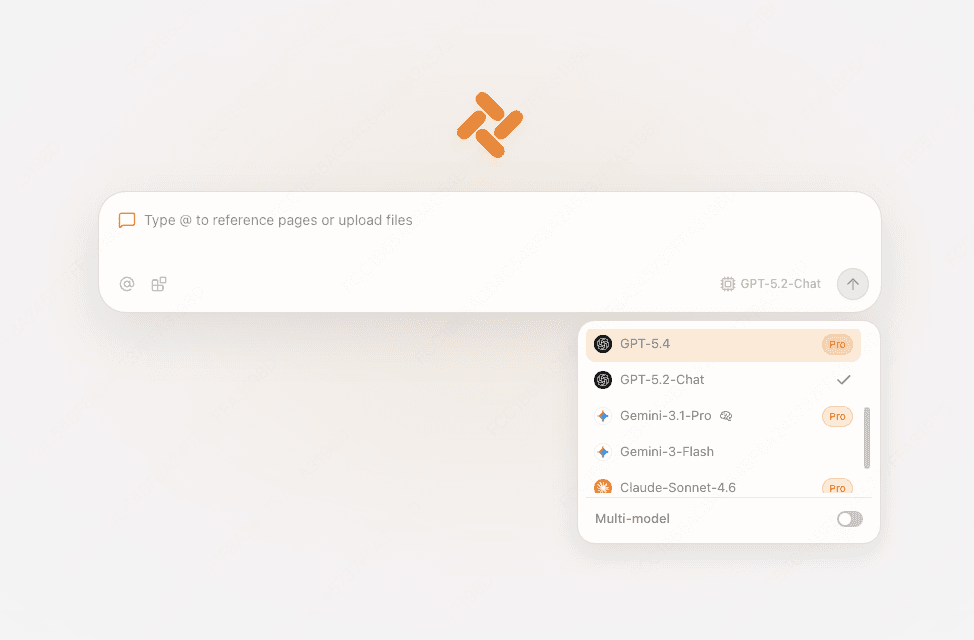
Use the current model picker in a new tab or Chat. The live roster, edition and plan are the source of truth for access.
✓ The selected model matches the test you recorded.

Use Chat for a focused answer or multi-model view to compare voice and pacing. Keep your card and transcript as the evaluation record.
✓ You can explain which model and context produced the result.

CHOOSE THE RIGHT SURFACE
Keep the tool boundary clear so a missing feature does not look like a model failure.
| SillyTavern | Tabbit | |
|---|---|---|
| Character cards and lorebooks | Purpose-built controls and extensions | A visible page or file as context |
| Provider and preset control | Endpoint, sampler, template and history controls | Live model picker and browser chat |
| Consistency testing | Best for a repeatable card-based RP harness | Best for comparing answers beside sources |
| Multi-model contrast | Depends on your setup and extensions | Multi-model chat view for quick comparison |
KIMI K3 ROLEPLAY FAQ
It is worth testing if you value dialogue and long-form prose, but there is no universal verdict. Community reports include strong writing as well as overthinking, drift, latency and repetition. Use the three-probe baseline on your own card.
No. It provides capacity, not perfect retrieval. The card, recent turns, summaries, provider serialization and output budget still shape what K3 attends to.
K3 always has thinking enabled. The official API exposes `reasoning_effort` with low, high and max. Compare settings on one seed and measure pace rather than assuming max is best.
Start a clean chat, shorten and de-duplicate the instruction block, add an explicit scene-length target, and test a lower effort if available. Change one layer at a time.
Not to establish a baseline. Partial Mode can continue a supplied assistant prefix, but provider compatibility varies. Add it only after a clean run and document the change.
Tabbit is a browser-context chat workflow and does not claim to import SillyTavern cards, lorebooks or extensions. Keep those in SillyTavern; use Tabbit when the page or file is the context you need.
Use one card, three probes and one change at a time. When the context lives on a webpage or file, open Tabbit and try Kimi-K3 beside it.
Available for macOS and Windows. Model access and quotas vary by edition and plan.