Endpoint and alias
The official quickstart uses https://api.moonshot.ai/v1 and the Chat Completions model alias kimi-k3.
KIMI K3 API + SILLYTAVERN
SillyTavern can reach Kimi K3 through an OpenAI-compatible connection, but the model still has Kimi-specific rules. Start with the exact endpoint and alias, then check the request body, reasoning block, provider, and status code in that order.
Official docs use https://api.moonshot.ai/v1 and model kimi-k3. K3 always thinks; set reasoning_effort instead of copying a K2.x thinking block.

WHAT THE SOURCES ACTUALLY SAY
The official Kimi docs are precise about K3. Community search results add useful failure clues, but reports about slow replies, overthinking, quotas, or safety-shaped output are not uptime or behavior guarantees.
The official quickstart uses https://api.moonshot.ai/v1 and the Chat Completions model alias kimi-k3.
K3 always has thinking enabled. Streaming can expose reasoning_content separately from final content, and multi-turn clients may need to preserve the full assistant message.
A compatible frontend does not make every provider equivalent. Check the provider model list, alias, limits, supported fields, and whether it preserves the returned reasoning block.
THE API CONTRACT
Use this small contract to separate an authentication problem from a model-parameter problem. Keep the key in an environment variable and begin with Chat Completions.
Minimal request shape
curl https://api.moonshot.ai/v1/chat/completions \
+  -H "Authorization: Bearer $MOONSHOT_API_KEY" \
+  -H "Content-Type: application/json" \
+  -d '{"model":"kimi-k3","reasoning_effort":"high","messages":[{"role":"user","content":"Hello"}]}'
The body shows the official field names. Do not add temperature or other fixed K3 fields just because an OpenAI client accepts them.
Set the OpenAI client base URL to https://api.moonshot.ai/v1. A provider proxy may use a different URL, so copy its documented base URL.
Create a Kimi API key in the Kimi API Platform and send it as Authorization: Bearer. Store it in MOONSHOT_API_KEY or the provider variable. Never paste a live key into a public preset.
Use kimi-k3 for the official K3 API route. A display label such as Kimi K3 is not always the request slug. Confirm the alias in a third-party provider model list.
When a response includes reasoning_content, keep the complete assistant message for the next turn. Removing fields from preserved thinking can make the next call look empty or invalid.
MODEL-SPECIFIC FIELDS
The common mismatch is treating all Kimi models like one API. K3 and K2.x expose different reasoning controls and reject some familiar fields.
Use top-level reasoning_effort with low, high, or max. The official default is max. Thinking remains enabled.
The thinking object belongs to K2.x examples. Do not paste thinking: { type: enabled } into a K3 request unless your provider documents a translation layer.
K3 supports tool_choice auto, none, and required. Partial mode uses an assistant message with partial=true. Keep these features separate from a SillyTavern text template.
For K3, omit temperature, top_p, n, presence_penalty, and frequency_penalty. The official reference lists them as fixed. If a provider adds controls, follow that provider documentation.
PROVIDER CHECK
Use the official row when you call Moonshot directly. For a gateway or shared endpoint, treat each value as provider-specific until its docs confirm it.
| Moonshot official API | Gateway or third-party provider | |
|---|---|---|
| Base URL | https://api.moonshot.ai/v1 | Use the provider URL exactly |
| Model field | kimi-k3 | Confirm its listed slug or alias |
| Reasoning control | reasoning_effort: low | high | max | Check whether it passes or remaps the field |
| Limits and access | Kimi account tier and current limits | Provider billing, quota, RPM, TPM, and concurrency |
| History | Preserve the complete assistant message | Check whether reasoning_content is retained |
ERROR BENCH
These checks map the most useful next action. They do not claim that every provider uses identical error text.
The key is missing, malformed, expired, or sent to the wrong host.
Inspect Authorization, the environment variable, selected provider, and account access. Rotate the key if it was exposed.
The URL path or model alias is not available at this provider.
Check that the base URL ends at /v1, the path is /chat/completions, and the model list contains kimi-k3 or its documented alias.
The request hit a rate, concurrency, quota, or account limit.
Read the provider limit page, reduce parallel turns, shorten context, and retry with backoff. A community quota report is not a universal limit.
The body contains an unsupported field, mismatched thinking format, or incomplete preserved assistant turn.
Remove K2.x thinking and fixed K3 parameters, validate messages, and return the assistant message including reasoning_content when required.
A LOWER-SETUP ROUTE
If the job is to ask Kimi about a character sheet, wiki, or writing brief, Tabbit gives you a browser chat route. It is not a SillyTavern replacement and does not expose ST cards or lorebooks.
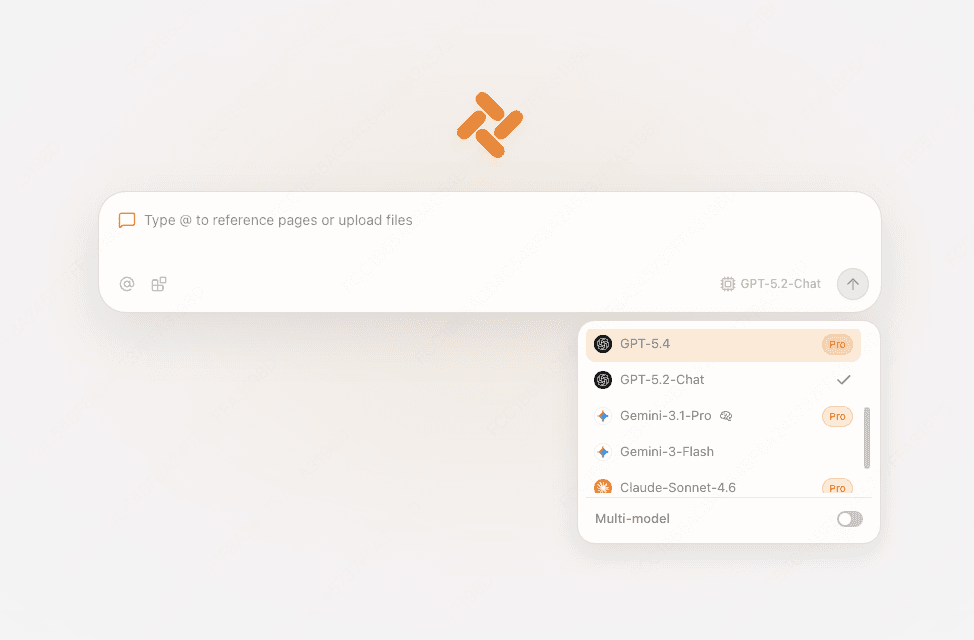
Keep the character sheet, lore page, or draft in a tab. Tabbit can reference the visible page, a screenshot, or a local file.

Select Kimi-K3 from the current Chat or new-tab model picker. The screenshots are interface examples, so check the live roster and access rules after installing.

Use the sidebar for a focused question or compare several model replies in one view. You skip endpoint wiring for this browser workflow while keeping SillyTavern for character features.
KEEP THE BOUNDARY CLEAR
Use the tool that matches the next task. A browser chat shortcut should not be mistaken for a character-card engine.
| SillyTavern | Tabbit | |
|---|---|---|
| API endpoint and key | You configure the provider, key, alias, and template | Select an available built-in model |
| Character cards and lorebooks | Core SillyTavern workflow | Use an open page or file as context |
| Reasoning diagnostics | Inspect the provider response and extensions | Ask beside the page without managing API fields |
| Extensions and group chat | SillyTavern ecosystem | Different product surface |
K3 API FAQ
The official quickstart uses https://api.moonshot.ai/v1 with /chat/completions. A gateway may publish a different base URL.
For the official Moonshot API, use kimi-k3. For a third-party provider, use the exact slug shown in its current model list.
K3 uses top-level reasoning_effort with low, high, or max and always has thinking enabled. The thinking object is a K2.x control.
K3 always reasons. Check effort, stream handling, and whether the next request preserves the complete assistant message and reasoning_content. Community speed reports are not a service guarantee.
Remove fixed K3 fields such as temperature and K2.x thinking configuration. Then validate the model alias, messages, and provider schema.
Tabbit currently shows Kimi-K3 in its model picker, so you can try the browser route without creating your own endpoint first. Access and quotas can change; confirm in the live app.
When you need cards, lorebooks, or extensions, configure SillyTavern carefully. When you need to ask Kimi about a page, open Tabbit and choose the model from the live picker.
Available for macOS and Windows. Model access depends on the current edition and plan.