DuckDuckGo vs Brave · a third axis

DuckDuckGo or Brave — which is safer, and who works in the tab?

Official Brave pages score Shields against a thinner DuckDuckGo browser. Reddit argues about sync and AI. Neither comparison asks whether the model can see the page you already opened. Tabbit is the Chromium browser that answers that.

DuckDuckGo

Simple defaults. Stronger as a search brand than as a full desktop browser.

Brave

Chromium plus Shields, Leo, and extensions. The usual winner on tracker math.

Tabbit

Same Chromium habits, plus Chat and Agent on the live tab.

macOS and Windows. Chat and Agent Mode in public beta.

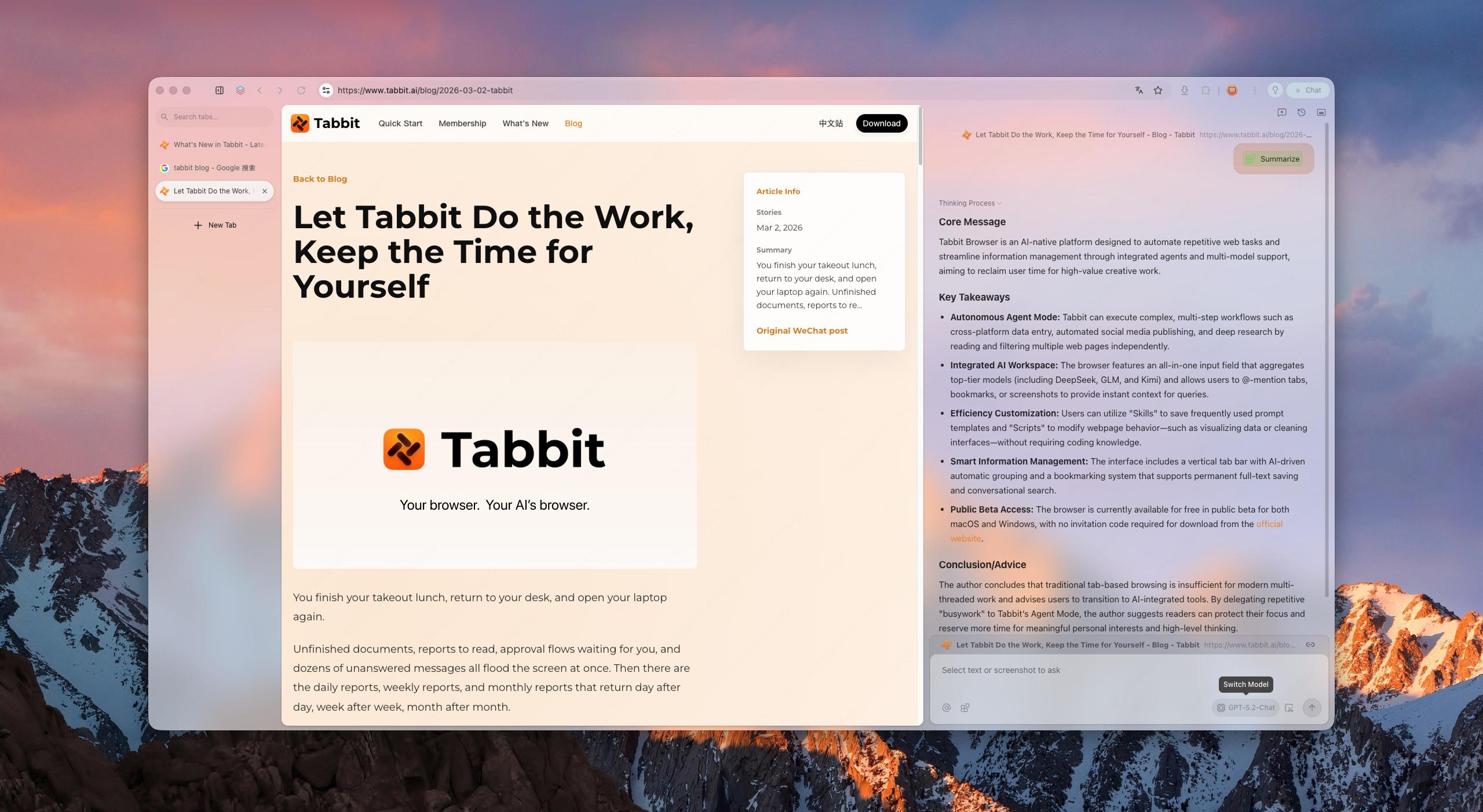
Tabbit Browser showing a Tabbit blog article on the left and a Summarize sidebar with core message, key takeaways, and a model picker.
The article stays on screen while the model writes notes from that page — not from a pasted dump.

Three products, three jobs

DuckDuckGo sells search privacy. Brave sells Shields. Tabbit sells work on the page.

SERP articles mix the DuckDuckGo search engine with the DuckDuckGo browser. Keep them apart before you pick a daily driver.

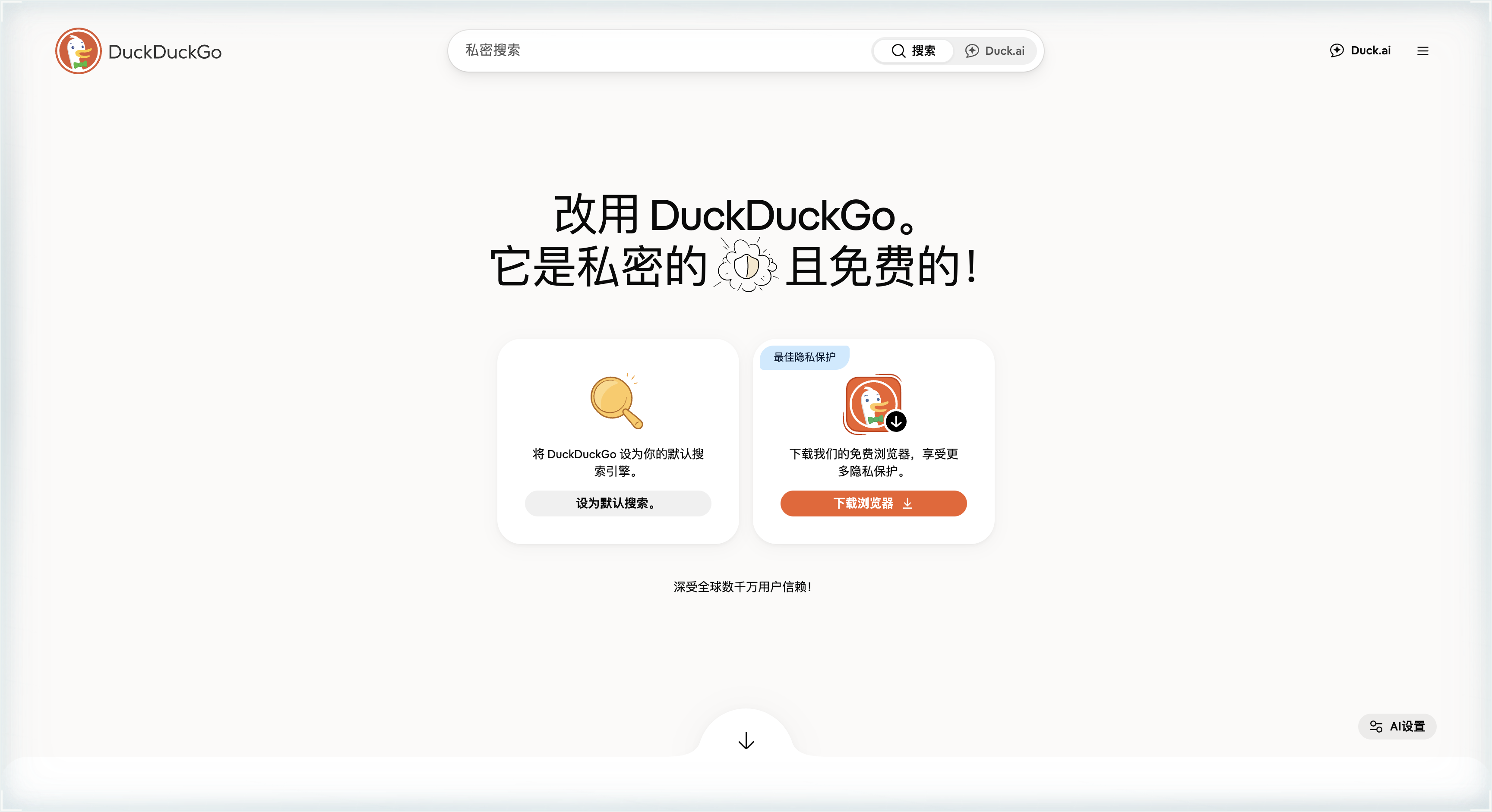
DuckDuckGo Chinese homepage with a private-search bar, Duck.ai, a card to set default search, and an orange button to download the DuckDuckGo browser.

DuckDuckGo homepage

The site still asks you to set a private search engine or download a lighter browser. That split is the product: search first, browser second.

Screenshot of duckduckgo.com in Chinese: search brand on the left, browser download on the right.
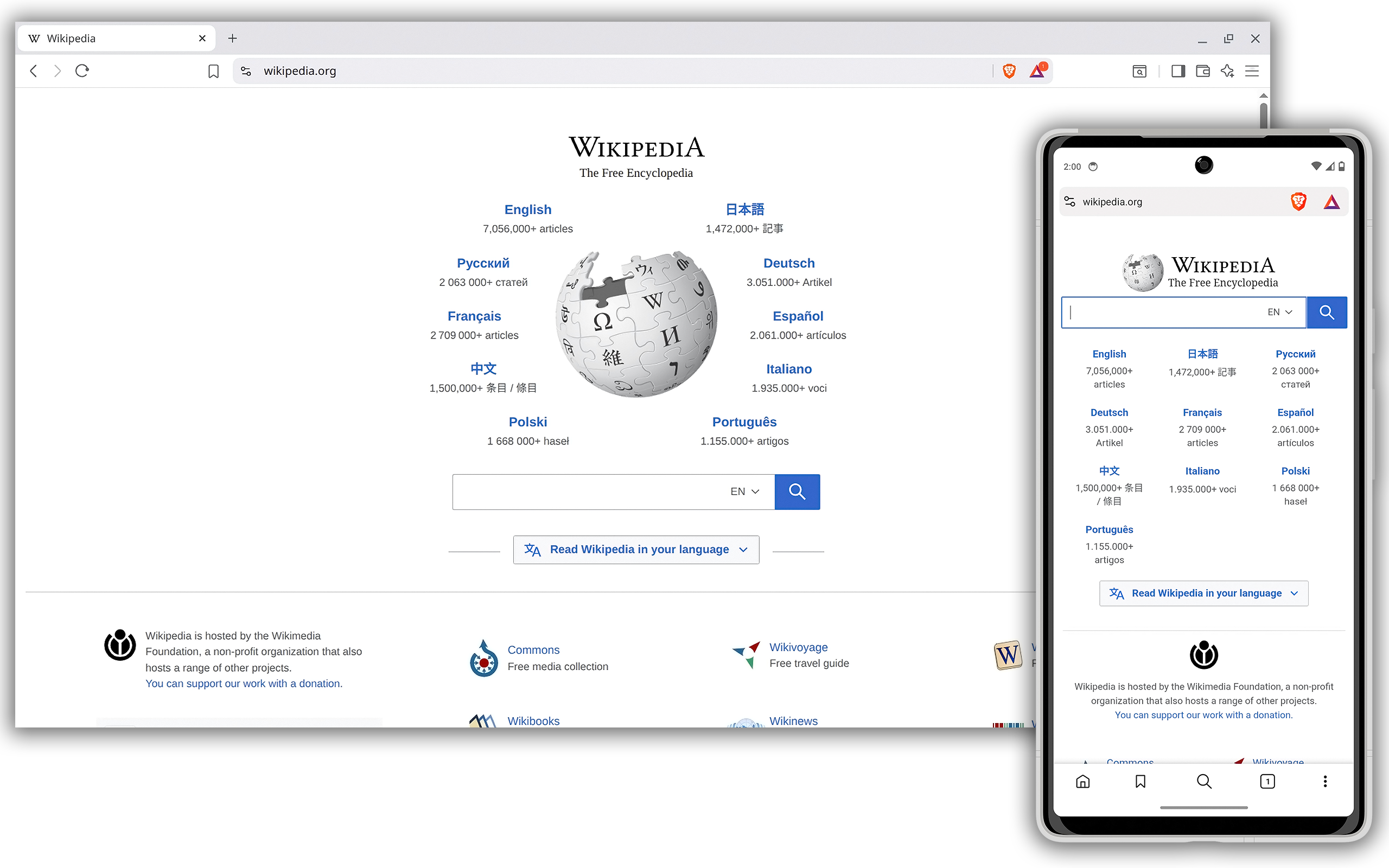
Brave Browser desktop window and Android phone both showing the Wikipedia homepage, with the orange Shields lion in the toolbar.

Brave on Wikipedia

A full Chromium window with Shields in the toolbar — desktop and Android in one frame. This is the “power privacy browser” people mean in Reddit threads.

Brave as a daily Chromium browser, not a search landing page.

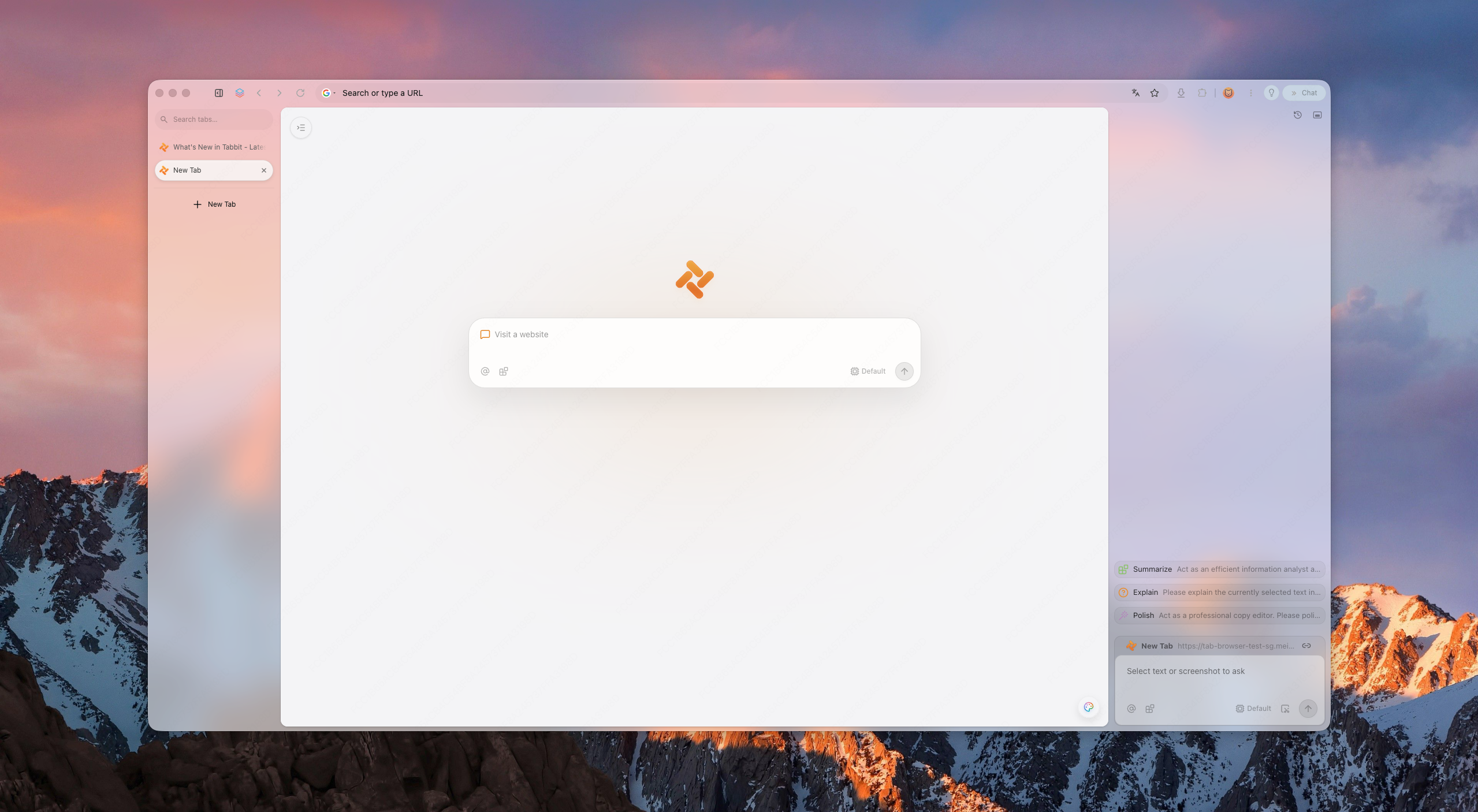
Tabbit Browser new-tab window on a desktop wallpaper, with the orange Tabbit mark in the center and chat controls at the lower right.

Tabbit on the article

The same Chromium muscle, but the sidebar is already summarizing the tab. That is the job Duck.ai and Leo usually do in a separate chat.

A full Chromium window first — Chat and Agent sit in that chrome, not in a separate privacy chat site.

At a glance

Where DuckDuckGo, Brave, and Tabbit actually differ

Brave’s own compare page claims a sweep on ads, trackers, fingerprinting, and GPC. Independent write-ups (Incogni, Sigma) still pick Brave for power users and DuckDuckGo for less setup. Tabbit does not try to beat Shields on paper.

AxisDuckDuckGoBraveTabbit
Default blockingBlocks some ads and trackers; historically allowed Microsoft trackers — still cited in 2026 recapsShields on by default; fingerprinting and GPC are the headlineChromium daily driver — not a Shields replacement; pair with search you trust
SearchDuckDuckGo Search is the brandBrave Search, or set DuckDuckGo if you preferUse either engine; the browser is for the tab, not the index
ExtensionsLimited Chrome-extension story on the DDG browserChrome Web Store habitsChromium extensions, plus Chat and Agent in the chrome
On-page AIDuck.ai is a chat destinationLeo in the sidebar of BraveChat reads the open tab; swap GPT, Claude, Gemini, and others
Doing the clickYou still clickYou still click, plus Leo draftsAgent Mode can fill sheets and follow steps on the real site
SyncReddit: bookmarks often do not sync the way Brave doesSync across devices is a frequent reason people stayInstall on Mac and Windows; treat it as the work browser

Privacy, without slogans

Is Brave safer than DuckDuckGo? Safer at what?

People Also Ask leads with “Is Brave safer than DuckDuckGo?” Brave’s compare page answers “yes” on tracker lists. Incogni splits security (hard to hack) from privacy (who is allowed to look). Brave also carries the Rewards / crypto debate; DuckDuckGo carries the Microsoft-tracker episode. Tabbit is honest here: if your only job is maximum default blocking, Brave is the SERP consensus. If the job is finishing the page in front of you, blocking lists are not the whole product.

Leo vs Duck.ai vs the tab

Private chat that cannot see the spreadsheet is still a copy-paste tax

Sigma’s 2026 recap treats Brave Leo and Duck.ai as the AI round. Both are chats with a privacy story. Neither is an agent walking the cells of the Google Sheet you already have open. Tabbit Chat sits on that sheet; when talk is not enough, Agent Mode takes the clicks.

After the privacy pick

When the winner still cannot fill the form

DuckDuckGo vs Brave ends at “who blocks more.” Payroll sheets, CMS drafts, and research tabs still need a cursor. Tabbit Agent Mode runs those steps in the same window as the site.

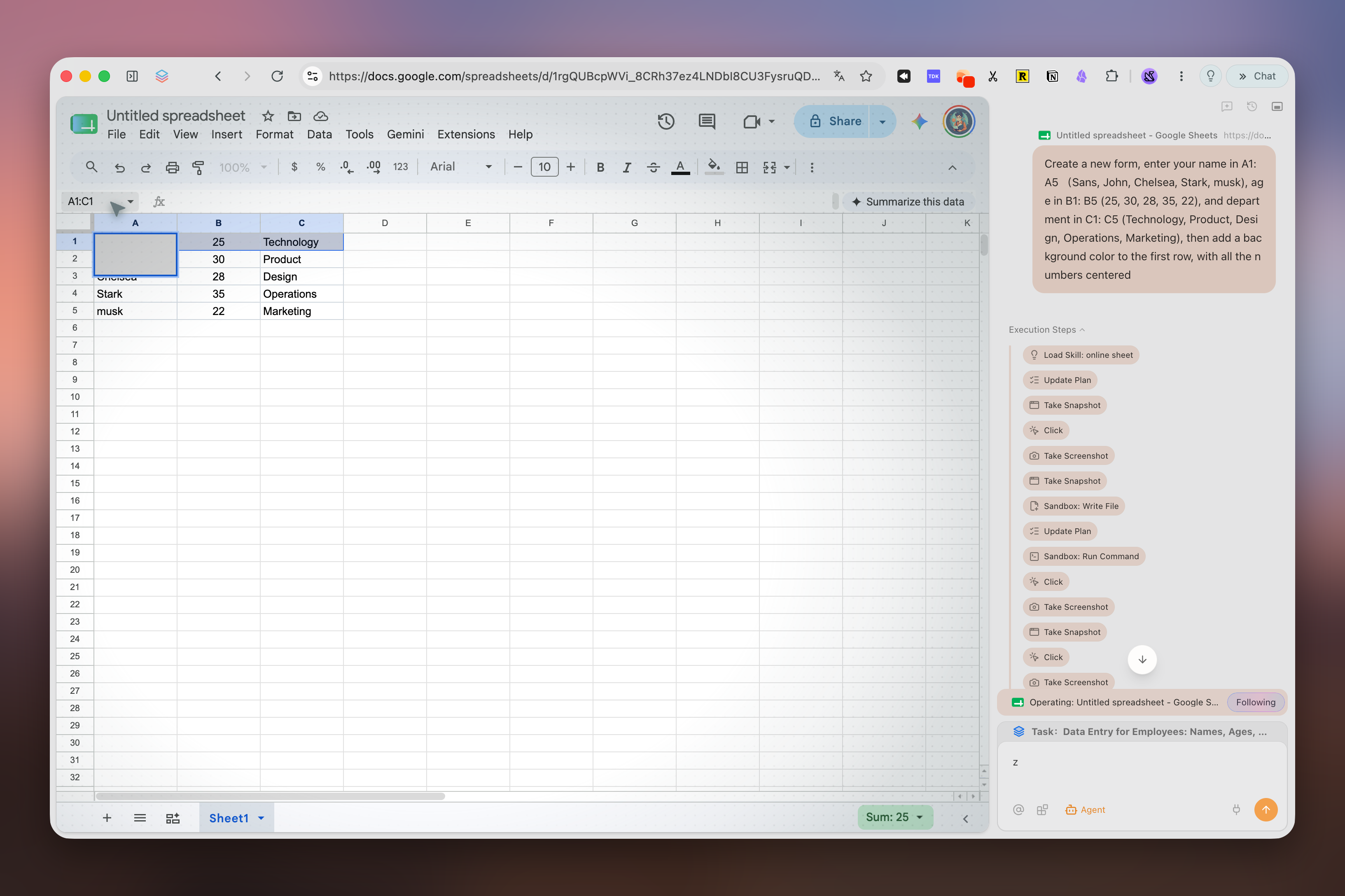
Tabbit Agent Mode filling a Google Sheet: names and departments in the grid, execution steps and the original prompt in the right sidebar.
The sheet is the source of truth. The agent does not rent a second computer to type into it.

Not one house model

Leo is Brave’s model. Duck.ai is DuckDuckGo’s. Tabbit lets several answer at once.

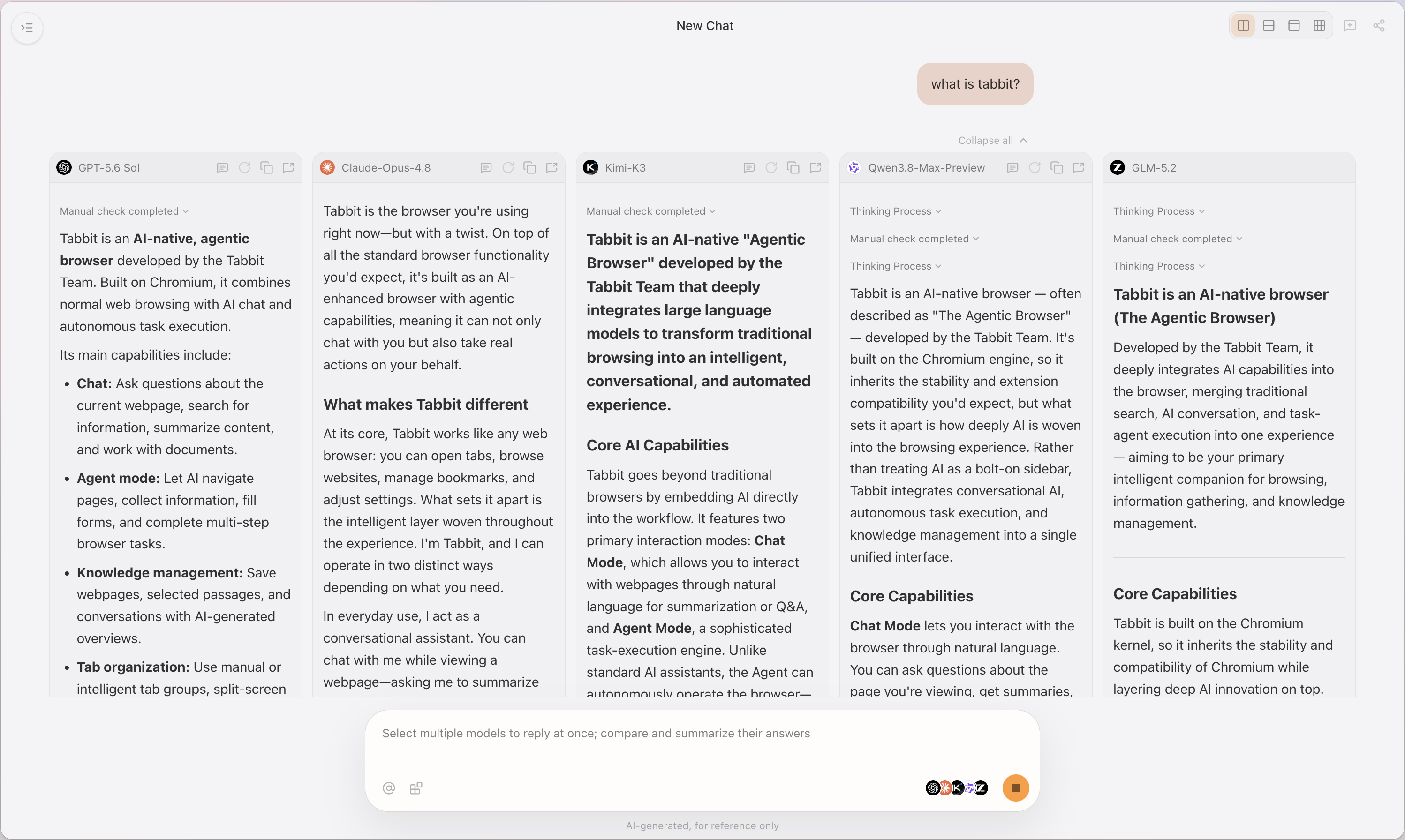
A privacy browser that locks you to one assistant recreates the Chrome+ChatGPT split inside a new skin. Tabbit can put GPT, Claude, Kimi, Qwen, and GLM on the same question so you keep the answer, not the vendor.

Tabbit New Chat view with five columns — GPT, Claude, Kimi, Qwen, and GLM — answering “what is tabbit?” side by side.
Compare models in one pass instead of trusting a single Leo or Duck.ai reply.

Who should choose what

A clean split, then a work browser

Incogni and Sigma already tell you who should pick Brave or DuckDuckGo. Keep those verdicts. Add the case they skip.

Choose DuckDuckGo when

You want the search engine, a light mobile browser, and as little chrome as possible. You are fine installing another desktop browser for extensions.

Choose Brave when

You want Chromium plus aggressive default Shields, Leo, and Tor windows, and you accept Rewards UI and a denser settings surface.

Choose Tabbit when

You already know the privacy tradeoffs, and the bottleneck is summarizing the tab, comparing models, or letting an agent click the live site. Keep DuckDuckGo or Brave Search if you like them.

FAQ

Questions the SERP already asks

Is Brave safer than DuckDuckGo?

On default ad and tracker blocking, Brave’s own tables and most 2026 recaps say yes. “Safer” is the wrong word if you meant “will this finish the task on my current tab.” That is a different product.

Is DuckDuckGo a browser or a search engine?

Both. The famous product is private search. The DuckDuckGo browser exists on mobile and desktop but is repeatedly described as thinner on extensions than Brave.

Can I use DuckDuckGo Search inside Brave or Tabbit?

Yes. Brave’s FAQ says you can set DuckDuckGo Search. Tabbit is a Chromium browser: pick the engine in settings. Search brand and browser brand do not have to be the same company.

What is the Brave controversy people mention?

Searchers still ask about Rewards, crypto, and past defaults. DuckDuckGo has its own history with Microsoft trackers. Neither controversy is a reason to ignore Shields math — or to ignore that neither product is an agentic work browser.

Is Tabbit a privacy browser like Brave?

No. Tabbit is an AI-native Chromium browser for Chat and Agent on the live tab. If you need Brave-level Shields as the headline feature, stay on Brave and use Tabbit only when the work requires it — or run a privacy engine of your choice inside Tabbit.

Tabbit

Keep the privacy engine you trust. Change the window that does the work.

Install Tabbit, open the messy tab, and let Chat or Agent stay beside it.

Free public beta for macOS and Windows.

Aside vs Brave·Browsers with an AI sidebar·What an agentic browser is

© 2026 Tabbit Browser. The AI-native browser that understands your context.