Release facts
Hugging Face names the checkpoint DeepSeek-V4-Flash-0731, with 284B total parameters and 13B active. It supersedes the preview and documents low, high, and max reasoning effort.
DeepSeek V4 Flash 0731 / SillyTavern
The official release is named DeepSeek-V4-Flash-0731. It supersedes the preview and ships without a Jinja chat template, so provider encoding matters. SillyTavern users report a split RP experience: some see dry or filtered replies, while others use it successfully for memory and JSON tasks.
The model name, route, price, and behavior can vary by provider. Verify the returned model before tuning a preset.

Evidence ledger
Separate release facts from provider behavior and individual RP reports before you spend hours rewriting a character card.
Hugging Face names the checkpoint DeepSeek-V4-Flash-0731, with 284B total parameters and 13B active. It supersedes the preview and documents low, high, and max reasoning effort.
The official card says there is no Jinja chat template. Its encoding folder shows how to turn OpenAI-compatible messages into the model input. A generic chat template can make results look broken.
Reddit reports include drier prose, refusals, role confusion, and weaker instruction following. Other users report good memory extraction and JSON. This is anecdotal, not a benchmark.
SillyTavern / four checks
A 0731 issue can sit in routing, encoding, a preset, or the model response. Change one layer at a time.
Use the provider’s current model list. Do not infer a stable alias from an old forum title or an OpenRouter display label.
Send one short test and inspect the response metadata. Record the exact `model` value, context limit, and whether reasoning text is separated.
Test one character, a short scene, and a direct format instruction. If this fails, a large lorebook or preset is not the first suspect.
Then compare the preset, system prompt, completion mode, temperature, and post-processing separately. A community workaround is not an official fix.
Do not treat a preset as a way to remove provider safety behavior. For mature content, follow the provider and community rules.
A browser-context alternative
If your task is reading a wiki, release note, or character document while asking questions, Tabbit keeps the source page visible. It is a different workflow from SillyTavern’s card and lorebook stack.
Keep a character sheet, model note, or scene outline in a browser tab.
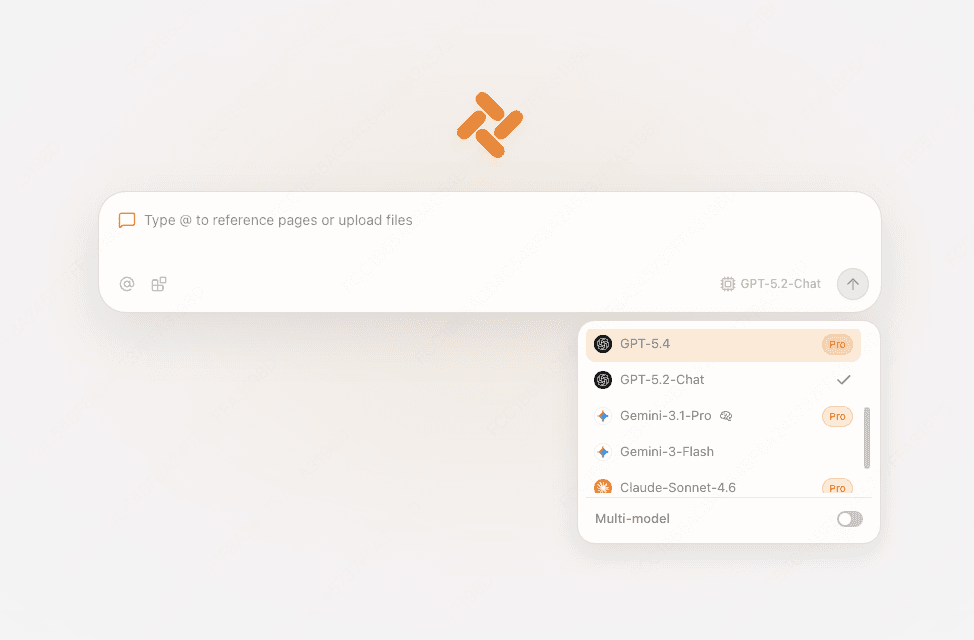
Open the model picker in the new tab or side chat. Names and availability follow your current Tabbit edition.
Type `@` to bring a tab, screenshot, or local file into the conversation instead of pasting the same context repeatedly.
Choose the right surface
Keep SillyTavern for deep RP configuration. Choose Tabbit when the source page itself is part of the task.
| SillyTavern | Tabbit | |
|---|---|---|
| Character cards and lorebooks | Built in | Keep a reference tab instead |
| Provider and model IDs | You configure the connection | Pick an available built-in model |
| Web or file context | Paste or use extensions | Reference a tab, screenshot, or file with @ |
| Preset control | Full preset and post-processing stack | Browser chat controls and Skills |



FAQ
The official Hugging Face repository uses DeepSeek-V4-Flash-0731 and says it supersedes the preview. Provider dashboards may show a different slug or dated route, so verify the provider’s current entry.
Use the exact ID documented by your provider, then inspect the returned `model` field. This page does not invent a universal alias because provider catalogs can differ.
Community reports describe that behavior, but they are mixed. Check routing and encoding first, then test a small card and isolate the preset, system prompt, and sampling settings.
No. SillyTavern remains the better fit for character cards, lorebooks, extensions, and fine RP control. Tabbit is useful when a web page or file should stay beside the chat.
Record the provider, returned model, and small-card result. If your next step is reading a reference while chatting, open it in Tabbit and use the model currently offered there.
Model names and availability can change. Check the in-product picker before starting.